Updating to .NET 8, updating to IHostBuilder, and running Playwright Tests within NUnit headless or headed on any OS
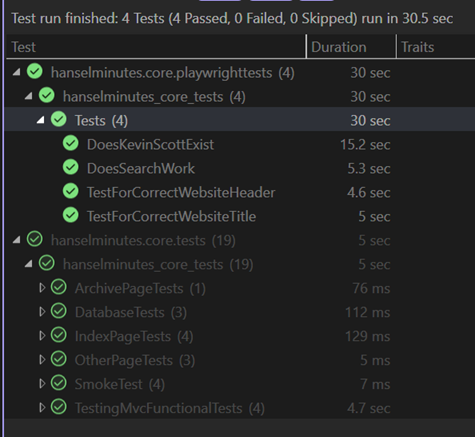 I've been doing not just Unit Testing for my sites but full on Integration Testing and Browser Automation Testing as early as 2007 with Selenium. Lately, however, I've been using the faster and generally more compatible Playwright. It has one API and can test on Windows, Linux, Mac, locally, in a container (headless), in my CI/CD pipeline, on Azure DevOps, or in GitHub Actions.
For me, it's that last moment of truth to make sure that the site runs completely from end to end.
I can write those Playwright tests in something like TypeScript, and I could launch them with node, but I like running end unit tests and using that test runner and test harness as my jumping off point for my .NET applications. I'm used to right clicking and "run unit tests" or even better, right click and "debug unit tests" in Visual Studio or VS Code. This gets me the benefit of all of the assertions of a full unit testing framework, and all the benefits of using something like Playwright to automate my browser.
In 2018 I was using WebApplicationFactory and some tricky hacks to basically spin up ASP.NET within .NET (at the time) Core 2.1 within the unit tests and then launching Selenium. This was kind of janky and would require to manually start a separate process and manage its life cycle. However, I kept on with this hack for a number of years basically trying to get the Kestrel Web Server to spin up inside of my unit tests.
I've recently upgraded my main site and podcast site to .NET 8. Keep in mind that I've been moving my websites forward from early early versions of .NET to the most recent versions. The blog is happily running on Linux in a container on .NET 8, but its original code started in 2002 on .NET 1.1.
Now that I'm on .NET 8, I scandalously discovered (as my unit tests stopped working) that the rest of the world had moved from IWebHostBuilder to IHostBuilder five version of .NET ago. Gulp. Say what you will, but the backward compatibility is impressive.
As such my code for Program.cs changed from this
public static void Main(string[] args)
{
    CreateWebHostBuilder(args).Build().Run();
}

public static IWebHostBuilder CreateWebHostBuilder(string[] args) =>
    WebHost.CreateDefaultBuilder(args)
        .UseStartup<Startup>();
to this:
public static void Main(string[] args)
{
  CreateHostBuilder(args).Build().Run();
}

public static IHostBuilder CreateHostBuilder(string[] args) =>
  Host.CreateDefaultBuilder(args).
      ConfigureWebHostDefaults(WebHostBuilder => WebHostBuilder.UseStartup<Startup>());
Not a major change on the outside but tidies things up on the inside and sets me up with a more flexible generic host for my web app.
My unit tests stopped working because my Kestral Web Server hack was no longer firing up my server.
Here is an example of my goal from a Playwright perspective within a .NET NUnit test.
[Test]
public async Task DoesSearchWork()
{
    await Page.GotoAsync(Url);

    await Page.Locator("#topbar").GetByRole(AriaRole.Link, new() { Name = "episodes" }).ClickAsync();

    await Page.GetByPlaceholder("search and filter").ClickAsync();

    await Page.GetByPlaceholder("search and filter").TypeAsync("wife");

    const string visibleCards = ".showCard:visible";

    var waiting = await Page.WaitForSelectorAsync(visibleCards, new PageWaitForSelectorOptions() { Timeout = 500 });

    await Expect(Page.Locator(visibleCards).First).ToBeVisibleAsync();

    await Expect(Page.Locator(visibleCards)).ToHaveCountAsync(5);
}
I love this. Nice and clean. Certainly here we are assuming that we have a URL in that first line, which will be localhost something, and then we assume that our web application has started up on its own.
Here is the setup code that starts my new "web application test builder factory," yeah, the name is stupid but it's descriptive. Note the OneTimeSetUp and the OneTimeTearDown. This starts my web app within the context of my TestHost. Note the :0 makes the app find a port which I then, sadly, have to dig out and put into the Url private for use within my Unit Tests. Note that the <Startup> is in fact my Startup class within Startup.cs which hosts my app's pipeline and Configure and ConfigureServices get setup here so routing all works.
private string Url;
private WebApplication? _app = null;

[OneTimeSetUp]
public void Setup()
{
    var builder = WebApplicationTestBuilderFactory.CreateBuilder<Startup>();

    var startup = new Startup(builder.Environment);
    builder.WebHost.ConfigureKestrel(o => o.Listen(IPAddress.Loopback, 0));
    startup.ConfigureServices(builder.Services);
    _app = builder.Build();

    // listen on any local port (hence the 0)
    startup.Configure(_app, _app.Configuration);
    _app.Start();

    //you are kidding me
    Url = _app.Services.GetRequiredService<IServer>().Features.GetRequiredFeature<IServerAddressesFeature>().Addresses.Last();
}

[OneTimeTearDown]
public async Task TearDown()
{
    await _app.DisposeAsync();
}
So what horrors are buried in WebApplicationTestBuilderFactory? The first bit is bad and we should fix it for .NET 9. The rest is actually every nice, with a hat tip to David Fowler for his help and guidance! This is the magic and the ick in one small helper class.
public class WebApplicationTestBuilderFactory
{
    public static WebApplicationBuilder CreateBuilder<T>() where T : class
    {
        //This ungodly code requires an unused reference to the MvcTesting package that hooks up
        //  MSBuild to create the manifest file that is read here.
        var testLocation = Path.Combine(AppContext.BaseDirectory, "MvcTestingAppManifest.json");
        var json = JsonObject.Parse(File.ReadAllText(testLocation));
        var asmFullName = typeof(T).Assembly.FullName ?? throw new InvalidOperationException("Assembly Full Name is null");
        var contentRootPath = json?[asmFullName]?.GetValue<string>();

        //spin up a real live web application inside TestHost.exe
        var builder = WebApplication.CreateBuilder(
            new WebApplicationOptions()
            {
                ContentRootPath = contentRootPath,
                ApplicationName = asmFullName
            });
        return builder;
    }
}
The first 4 lines are nasty. Because the test runs in the context of a different directory and my website needs to run within the context of its own content root path, I have to force the content root path to be correct and the only way to do that is by getting the apps base directory from a file generated within MSBuild from the (aging) MvcTesting package. The package is not used, but by referencing it it gets into the build and makes that file that I then use to pull out the directory.
If we can get rid of that "hack" and pull the directory from context elsewhere, then this helper function turns into a single line and .NET 9 gets WAY WAY more testable!
Now I can run my Unit Tests AND Playwright Browser Integration Tests across all OS's, headed or headless, in docker or on the metal. The site is updated to .NET 8 and all is right with my code. Well, it runs at least. ;)
About Scott
Scott Hanselman is a former professor, former Chief Architect in finance, now speaker, consultant, father, diabetic, and Microsoft employee. He is a failed stand-up comic, a cornrower, and a book author.


About Newsletter