Maxivista Undocumented Registry Tweaks
 By now, you know I love Maxivista (Buy it here). I use it on a TabletPC, turning my Tablet into a 3rd monitor, using only software drivers and the network.
Here's some (as of yet) undocumented registry hacks from a Maxivista Insider:
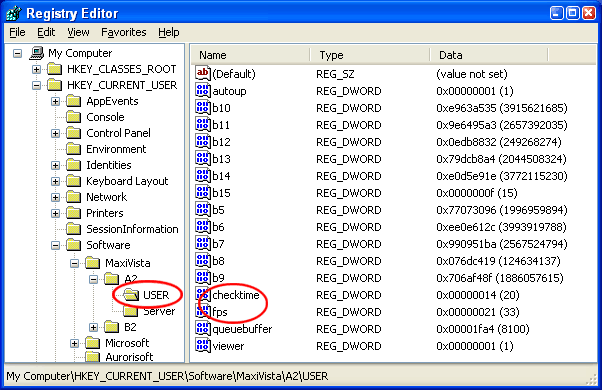
MaxiVista adds two registry entries of note, specifically "fps" and "checktime" to the following registry key:
My Computer\HKEY_CURRENT_USER\Software\MaxiVista\A2\(YourUserName)
Checktime
Checktime determines the time interval when new picture updates are being sent. Smaller values, increase the responsiveness of the viewer screen for the cost of higher CPU load and presumably more network traffic. If the mouse cursor is laggy then users should play around with this setting. Ordinarily I don't notice the difference between my machine's attached monitors, but if you do, try this switch to speed up the refresh a bit.
Recommended value range: 5..20ms (default: 20ms)
fps
Determines the maximum frame rate per second. Decreasing this value reduces the network load. May be useful for slow wireless network connections. Sometimes I use Maxivista over wireless and lowering to 20 fps definitely takes the load off an 11Mbs network, while still keeping the monitor totally usable.
Recommended value range: 20..33 fps (default: 33fps)
About Scott
Scott Hanselman is a former professor, former Chief Architect in finance, now speaker, consultant, father, diabetic, and Microsoft employee. He is a failed stand-up comic, a cornrower, and a book author.


About Newsletter

 CypherBit
Synergy is a software KVM.
Maxivista literally is a "software video card," in that you can tell Windows you have another monitor, then use an extra machine or laptop as a second monitor.

For example, I have a compaq nx7010 laptop with with larger resolution than my two 1600x1200 LCDs yet the screen is almost 20% smaller. And Synergy doesn't support different DPIs thus cursor entrance to screen is not that one would like :-)

Simon

Comments are closed.