First time here? Check out the site's "greatest hits" or read a post from the archives. Feel free to leave a comment or ask a question, and consider subscribing to the latest posts via RSS or e-mail. Thanks for visiting!
« Hacking Video Game Consoles | Main | New integrated real-time glucose meter a... »

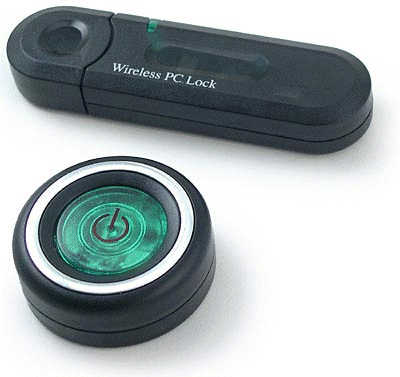
WirelesspclockThe USB Wireless Security Lock/KeyFob is a very slick piece of hardware with crap software. Bryan's USBWiSec Software made it usable and added plugin capabilities.

Recently a number of users have reported that their USB Key isn't working with our software. Seems that a new vendor has stepped in with the same hardware and a different product/vendor id.

It used to be Vid_04b4&Pid_7417, but now Vid_13b7&Pid_7417 has appeared. We'll get this updated and built soon, and probably include a configuration option, but until then, you can update UsbStickReceiver.cs line 141 to the new ID.

Perhaps this is the push the project needs for the next major release. BTW, there's a nice video with a live demo midway through on Channel 9.


Tuesday, April 18, 2006 10:23:17 PM (Pacific Standard Time, UTC-08:00)
I just got this a couple days ago and installed the app, replaced the dll so it will recognize my usb device, and now when I plug in the key fob it will recognize that the transmitter is within range but after about 3 seconds it says it is not availible. After that I cannot get it to recognize the transmitter unless I replug in the device. Has anyone else experienced this problem?

Thanks!
Stephen
Stephen
Tuesday, April 18, 2006 11:07:50 PM (Pacific Standard Time, UTC-08:00)
Try upping the "presense window" to 10 or 15.
Scott Hanselman
Wednesday, April 19, 2006 4:44:10 AM (Pacific Standard Time, UTC-08:00)
:) - I got this for xmas, and changed the line. I tried joining the sourceforge project but never got an answer - I would have added it then so they both worked.
Wednesday, April 19, 2006 5:21:41 AM (Pacific Standard Time, UTC-08:00)
Thanks for the suggestion Scott but all that did was show the fob as present a little longer before going 'NotPresent'. I even bumped it all the way up to 30 and still no go. Any other ideas?

Thanks
Stephen
Wednesday, April 19, 2006 5:23:08 AM (Pacific Standard Time, UTC-08:00)
One other thing I should add, even though it says it's NotPresent, the lights flash in sync with one another.
Stephen
Thursday, April 20, 2006 9:08:03 AM (Pacific Standard Time, UTC-08:00)
http://www.hanselman.com/blog/IsOpenSourceACrapIdea.aspx
DeanG
Friday, April 21, 2006 4:14:50 AM (Pacific Standard Time, UTC-08:00)
just got one of these from www.blahdvd (£9.99) and msinfo32 is showing the device ID as VID_03F0&PID_0024
Monday, May 08, 2006 5:54:55 AM (Pacific Standard Time, UTC-08:00)
I got two of them from TigerDirect, and both only show up for a second or two before going NotPresent.
John R Plant
Comments are closed.

Contact

Sponsors

Hosting By

On this page...

Tags

Calendar

<November 2008>
SunMonTueWedThuFriSat
2627282930311
2345678
9101112131415
16171819202122
23242526272829
30123456

Archives

Google Ads