Logitech Harmony 880 Remote Control Review
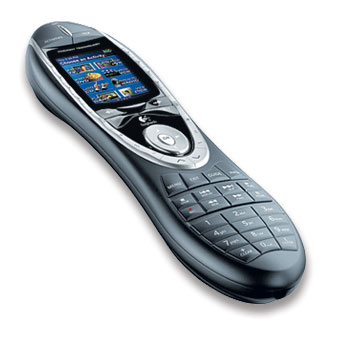 Mo and I just got back from a cruise to Jamaica. We took a week off work and just relaxed. This was our first cruise, and I think we've decided we aren't cruise people. We don't drink alcohol, we don't smoke, and this was pretty much Vegas on water. Also, considering that I'm diabetic, the offer of free food (read: gorging yourself) isn't that attractive to me either.
Anyway, we we got back and we still have a few days until we have to go back to work. My idea of vacation often involved getting our media center all together and organized. It relaxes me.
Logitech recently bought Harmony Remotes, and is introducing a new color stateful remote, the 880. The Logitech Harmony 880 isn't supposed to be released to the general retail channel until mid-June, but it is available via some kind of exclusive deal with BestBuy for the next few weeks. I picked up the last (only?) one at the local Beaverton BestBuy a few days ago.
I was previously using an All For One Kameleon 9660. It's a great remote, offers good flexibility between hard buttons and programmable macros. However, I have a pretty complex system and the biggest trouble I have when programming macros is the issue of state. It's tricky for a remote - at least a standard "classical" kind of remote - to keep track of which component is on, which is off, and what inputs they are currently set to. The Kameleon does offer an obscure programming model called JP1 that you can exploit, but I wanted a simpler system. I need the wife and neices and nephews need to be able to use the system without my help.
So, long story short, the Harmony series of remotes doesn't think about things in terms of Macros (series of commands strung together). Rather, it is stateful by default. It knows intrinsically what inputs are available on your components and dynamically creates the string of commands required to get your system into a specific states.
Here's the current system I've got:
- TV - Sharp TV (LC-37G4U)
- Stereo Receiver - Sony Stereo Receiver (STR-DE925)
- ReplayTV - ReplayTV PVR (RTV-4500)
- Comcast Cable - Comcast Digital Set Top Box (Motorola DVR HDTV)
- DVD VCR Combo - Sony DVD VCR (SLV-D350P)
- XBox - Microsoft Game Console (With DVD) (XBox)
The Harmony remote requires a USB cable and a login to harmonyremote.com. The client software does require a CD to install and sets up a mimetype/extension association. You go through a wizard and settings online. When you click "Update your Remote" the harmonyremote.com server queues your request and creates a "package" as a single file representing all the settings for your specific remote. This includes everything from the names you've associated with your devices and activities, as well as any graphics you may have associated with favorite channels. This file extension opens the client software which takes care of flashing the remote control.
Good things:
- You can associated graphics or "media" with your favorite channels. There's a pile of graphics on remotecentral.com that can be downloaded and used directly with the Harmony. I've setup 8 favorite channels using graphics from a Philips Pronto. It's slick to press a button next to a full color graphic of the NBC peacock to get to channel 708.
- The color graphic screen is very cool. I really prefer it over black and white or LCDs. It makes sense which the price of color screens to start including them into remotes. It's a shame color screens are so expensive.
- The statefulness of the remote works, but only if your components respond consistently to the commands. If you get out of sync, you have to click "Help" on the remote. That starts up a Help Wizard that asks you questions like "Is the TV on?" These questions are all meant to get the remote control back into sync with reality. This makes sense as the remote can't "ask" the system what's happened. It's a shame that with all the technology our there that we have no two-way IR communication. There's a lot of potential our there for improvement.
- Rechargeable batteries and a cradle. This may seem like a bad thing, but it gives your remote a place to live and isn't any more inconvenient that putting your cordless phone back into the cradle at night.
- Hard Buttons. Other reviews say that this new Harmony isn't as easy to use "blind." I disagree. There are enough raised bumps on specific buttons that you can always find your way if you can visualize the remote.
- Tilt sensor. The screen turns off automatically after a time and will automatically turn on when you lift or tilt the remote.
- Other cool stuff. There's a few interesting and cool features like, a built in clock that syncs automatically, a configurable 'screen saver' when the remote is docked, everything can be renamed and presented as your like in the order you like.
- The Harmony Database is pretty complete. Interestingly for all my components, except the BRAND NEW Sharp LCD, it nailed it. The database is the most complete I've ever seen online and includes many commands that your current stock remote doesn't include. I'll say that again for clarity as it's a very powerful concept. Some folks don't realize that their components can support a large number of IR commands that are NOT included in the remote controls that come with the component themselves. Many of these commands are what are called discrete commands. A discrete command is like "off" or "on" as opposed to what usually comes with remotes like "toggle power." For inputs you'll get commands like "Input CD" rather than "Next Input." Important Note: If your components support discrete commands you'll find state management a hundred times easier. (see below under Bad Things).
- My Comcast HD DVR has a remote that includes a "Jump Back 5 Seconds" command that is bound to the stock remote's REW button and the FW button starts a Fast Forward, rather than a "Jump Forward 30 Seconds." It's likely that Comcast made this choice because Jump Forward allows you to jump over commercials, while at least Fast Forward forces you to see something in a faster speed. However, the Harmony Database included a number of new commands including the one for Jump Forward 30 Seconds. This allowed me to bind the << and >> buttons to Jump Back and Jump Forward. This almost makes my Comcast DVR usable again, and since Mo and I switch back and forth between the Comcast DVR and our Replay TVs, we want all the buttons to work the same. This was an unexpected but awesome benefit.
- This remote is completely set up around the concept of Activities rather than control of specific components. For example, I created Activities like "Watch TV" and "Play a DVD." The Watch TV activity will make sure that all components are off except the TV, Receiver and Comcast DVR. It'll set the Receiver to input TV and the TV to input HD. All of this was previously managed with complex macros on my other remotes. When you're in this activity, the volume commands will be sent to the Reciever, things like screen format are sent to the TV, and Play and Stop are sent to the Comcast DVR.
Bad things:
- The software you can download online at Logitech's site is still version 3.3. The CD that comes with the 880 is 4.3. Of course, when you buy a piece of hardware these days you usually don't even look at the CD, instead you go online to download the latest drivers. However, in my case, the folks online haven't updated the download and the 3.3 version doesn't work with the 880. Additionally there is a link our there on the forums for an as-yet-unrelease 4.4 version. I'm running that one without trouble. Either way, it's tacky, unprofessional and cheesy that the "correct" version isn't online. Logitech should get organized on these kind of public-facing issues.
- The web-based wizard is very slick, very well laid out and is great for any 80% case. However, when the advanced user (me) wants to do something more specific, you'll be hunting. There seems to be a number of inconsistancies online. You'll also want to add the harmonyremote.com website to your list of IE "safe sites" otherwise Windows XP SP2 will constantly bug you when downloading files automatically.
- Unfortunately every single component works fantastically EXCEPT my brand-new Sharp LC-37G4U TV. I'm currently having a hell of a time with the Input commands. The Sharp has a funky input system where you press Input to bring up the Input menu, then Input again to move to the next input, then Enter to select it. However, the TV will automatically select an input after 500ms if you don't press Enter. That means that if the remote is a little slow to press Input then the TV will automatically switch inputs. This happens about every 2 or 3 times I switch to another Activity. When this out-of-sync situation occurs, I have to re-sync using the Help wizard which is a huge hassle. Interesting, the Harmony Database includes over 11 discrete input commands for this TV, but it only actually has 5 inputs. Also, none of the discrete commands work for the TV. I think there's a problem with their database, now I just have to convince them of it. I'm currently in the middle of a long thread with Harmony Support to work this issue out. They seem very amenable and I'm sure we'll figure it out.
All in all, I think this is the best remote you can buy for <$250. Note also that you can often search Froogle and print out offers for cheap Harmony 880s for as low as $160 and get Best Buy to lower their prices. The wife has always given it a thumbs up, even with the problems around inputs. I suspect when I get the input thing worked out this will be the ONLY remote I've ever owned that will allow the wife to switch from TV to DVD to VCR and back without my help.
About Scott
Scott Hanselman is a former professor, former Chief Architect in finance, now speaker, consultant, father, diabetic, and Microsoft employee. He is a failed stand-up comic, a cornrower, and a book author.


About Newsletter


Comments are closed.
The objscure-ness and complexity of JP1 should not have any effect on the user experience of your wife, nieces or nephews. Only you need to know how to program it. You do the hard stuff once, and the others can use it just like a normal remote.
Ok, I'm nitpicking, but I love my <$20 (but more functional than most >$100 remotes) JP1 One For All remote.