Visual Studio 2017 can automatically recommend NuGet packages for unknown types
There's a great feature in Visual Studio 2015.3 and Visual Studio 2017 that is turned off by default. It does use about ~10 megs of memory but it makes me so happy that I turn it on.
It's under C# | Advanced in Tools Options. Or you can just type "Advanced" in the Quick Launch Bar (via Ctrl+Q if you like) to jump there.
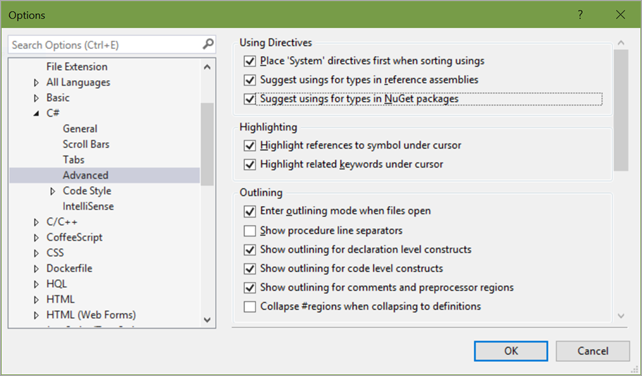
I turn on "Suggest usings for types in NuGet packages" and "Suggest usings for types in reference assemblies."
For example, if I am typing some code and start referencing a Type that isn't in my project but could be...you know how sometimes you just need a using statement to bring in a namespace? In this Web App, I already have Json.NET so it recommends a using statement to bring it into scope.
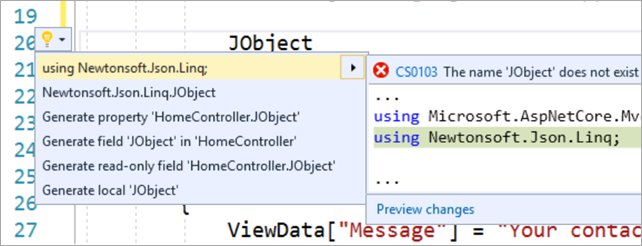
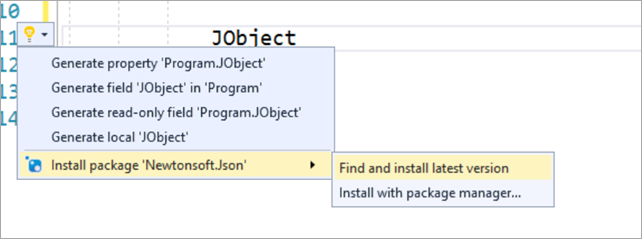
But in this Console App, I have no packages beyond the defaults. When I start using a type like JObject from a popular NuGet, Visual Studio can offer to install Json.NET for me!
Or another example:
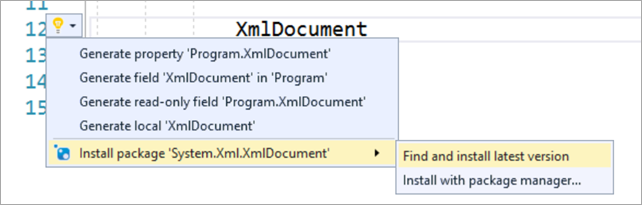
And then I can immediately continue typing with intellisense. If I know what I'm doing, I can bring in something like this without ever using the mouse or leaving the line.
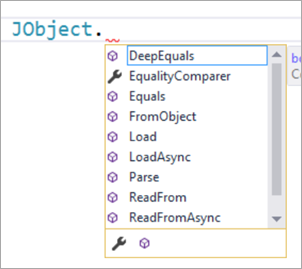
Good stuff!
Sponsor: Check out JetBrains Rider: a new cross-platform .NET IDE. Edit, refactor, test, build and debug ASP.NET, .NET Framework, .NET Core, or Unity applications. Learn more and get access to early builds!
About Scott
Scott Hanselman is a former professor, former Chief Architect in finance, now speaker, consultant, father, diabetic, and Microsoft employee. He is a failed stand-up comic, a cornrower, and a book author.


About Newsletter

 Daniel Crabtree


Thanks for the tip. Initially I was disappointed that the same functionality wasn't avaiable in VS2017! I would be nice to have this info in the release notes.

Comments are closed.