Adding a Netgear N600 Wireless Dual Band Gigabit Router WNDR3700 to an existing FIOS Wireless AP for improved wireless coverage
A few months ago I added a second wireless access point (AP) to my existing network in order to get better wireless coverage. We have a house that's kind of spread out and we were getting really spotty 802.11g around the house. Laptops we getting one or two bars, or worse yet, they were constantly negotiating network speeds and never getting a decent one. The iOS devices (iPhone, iPad, etc) would barely get any signal in certain rooms. It was certainly irritating.
So, I added a second identical AP with the same SSID upstairs so we could move between floors without trouble. However, this AP (some crappy standard one that came with the FIOS service) was/is really inconsistent. While the network architecture is solid, as is the idea behind my "add a second AP" post, the implementation using these 5 year old crappy routers was flaky at best.
Techie Background: I have FIOS optical internet service, and have for the last 3 years. It's upgraded from 15Mbs to 35Mbs recently. The house is Gigabit Ethernet (all CAT6, see the related links below). All the wired devices are running through a Netgear GS724T-300 24-port Gigabit Smart Switch and all of the wireless devices are at least 2.4Ghz 802.11g, and some are 802.11n, with one being 2.4Ghz or 5Ghz.
Since I have a home office, meaning I literally work at home 90% of the time for my living, having flaky wireless is a problem. I decided to start researching a better solution. I decided to add a new wireless router. I figured that it was insane for one house to have to APs and that surely if a cell phone could work over miles that a freaking wireless network router could cover a single house. I found the solution in the Netgear N600 Gigabit.
Here's the idea:
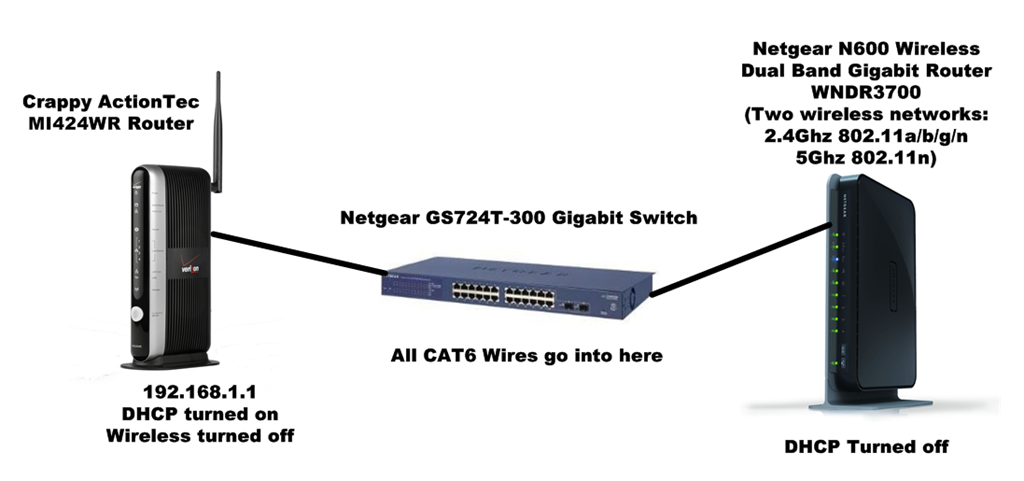
However, there are some important notes when adding a new wireless router to an existing system that is already performing these functions
- Passing out IP addresses via HDCP
- Acting as a wireless access point with lots of existing clients
- Has existing static IP leases setup, existing quality of service (QoS) settings
Stated differently, my existing router is nicely and intricately configured for my house. It works fine and I like it fine, except it has crappy wireless. I want to add a new wireless router without disturbing what already works. If it ain't broke, don't fix it.
I picked up a Netgear N600 Wireless Gigabit Router. Note that there are two versions of this, one with a large bright LED on the outside and one without. The one without has 4 Gigabit LAN ports, and that's the better router.
Let me tell you that this router is awesome. I figured I'd be moving from a 3-5 year old crappy router to some better router, sure, but not a totally awesome Swiss Army Knife. Networking has come a long way since 2005 or whenever my stock router was made.
This Netgear is awesome because of these features:
- Two separate bands for wireless, each with 300Mbs of independent bandwidth. There's 2.4GHz and 5.0GHz frequencies. Nice for copying VMs over wireless. I made a "HANSELMAN" and "HANSELMAN-N" network.
- Four Gigabit Ethernet points. Not needed for me, but it's nice to have four more Gigabit ports.
- Eight internal antennas - Seriously, this thing has insane range. I had already added an external antenna to my FIOS router and still had bad range. This little Netgear covers 3500+ square feet and more. I'm thrilled with the range. I don't need two routers anymore. Adding this router totally achieved my goal.
There were a few gotchas. I still need my ISP's router because it's the bridge to the ISP and the Optical Network Terminal (ONT) they installed on the house. It's also totally configured as I like.
Here's the steps I took:
- Logged into the FIOS ActionTec at http://192.168.1.1 and disabled the wireless interface. I confirmed that the "HANSELMAN" network was no longer showing up.
- Plugged the Netgear directly into my laptop and visited it's default IP of http://10.0.0.1. I disabled the new router's DHCP (this is crucial).
- Important Trick: I temporarily plugged the new Netgear's yellow "external network" directly into the FIOs ActionTec so the Netgear could update its firmware the first time and get the initial setup wizard would stop nagging me. The router expects to be hooked up in this way at least initially, so you need to satisfy its setup.
- After the Netgear is configured, now unplug the yellow external LAN wire and instead plug into one of the standard four ethernet ports into either your switch (that's what I did, gigabit to gigabit) or directly into your ISP's router. We want the new router to get an IP address from our existing router and route traffic and DHCP requests to the ISP's router. To be clear: Setting up your new router in this way will leave the yellow upstream external network port empty, despite what the documentation says.
- On the new router, setup the 2.4GHz wireless network with your SSID, and the 5GHz wireless network with something like YOURSSID-N. Here's what I did:
_3.png "View Available Networks Dialog")
Now I've got 192.x.x.x addresses being handed out on two wireless networks. My Wireless-N network is getting 300Mbs throughput on my Lenovo, as its Intel Wireless LAN does 5Ghz 802.11n. Also, my iOS devices are using 2.4Ghz 802.11n and are suddenly a LOT snappier on large downloads and email.
_3.png "Wireless Network Connection Status")
I'm absolutely thrilled with the a Netgear N600 Wireless Gigabit Router. It's the top of the line for the house, definitely a "prosumer" router and a really nice upgrade to any existing system if you know a little about setting up your network. Totally recommended.
Related Links
- Configuring two wireless routers with one SSID (network name) at home for free roaming
- Wiring the house for a Home Network
- Wiring the house for a Home Network - Part 2 - Design Q&A
- Wiring the house for a Home Network - Part 3 - ISP Hookup
- Wiring the house for a Home Network - Part 4 - Thank You Cat 6 Gigabit Ethernet
- Wiring the house for a Home Network - Part 5 - Gigabit Throughput and Vista
- New Job, New House, New Baby, and Designing a Totally New Home Office
- How To: Use Google Earth or Virtual Earth to Visualize a New House Lot - Part 1
- How To: Use Google Earth and SketchItUp to Visualize a New House Lot - Part 2
About Scott
Scott Hanselman is a former professor, former Chief Architect in finance, now speaker, consultant, father, diabetic, and Microsoft employee. He is a failed stand-up comic, a cornrower, and a book author.


About Newsletter

 Rohit Sharma
In addition it's smaller "brother" the WNDR3500L comes with hardware that is compatible to third party linux based firmwares. I heavily recommend the "tomato" based firmware which is rock solid even under high load. Unfortunately it's not Dual-Band though. That's why you get it for less than half the price of the WNDR3700.


I had no idea this trick worked. So, just to be clear: by *not* plugging in to the N600's WAN port, you're effectively using it as a Wireless Access Point instead of a Wireless Router, correct? Meaning, everything -- the N600, the ActionTec, and the wireless clients -- are all on the same network?
Also a question -- where did you position it in your house? Is it more-or-less centered, or is it on one side? 3500+ sq ft of coverage from one device is impressive.

I guess PC equipment I thought was awesome and great in 2005 isn't so awesome now. I recently upgraded to a Linksys Dual Band Gigabit router. It has been working very well. I was lucky enough to get FiOS back when the ran a CAT5e drop from the ONT to the router so I am not forced to bridge through an actiontec.
BOb


@BretFerrier - WPA2. Haven't had any drops yet, but it's only been a week. You have the latest firmware?
@Portman - Yep, that's it. It's centrally located, attached to a high part of a wall under the stairs' closet. So it's central horizontally and vertically.


What's nice about the upgrade to N though is that even older g devices get some range increase because the router can still use it's multiple antennas and more advanced signal processing to receive a better signal.


From the setup above what kind of security are you running. Meaning can Verzion Tech's see your internal Network the way you have it setup? I was thinking maybe you had a firewall in between the Verzion box & your switch.

So far so good with the WNDR3700 which, by-the-way, is the same exact hardware as the WNDR37AV (if anyone is wondering); the router with the light on the side is the WNDR3400 and doesn't have gigabit ports.

Now if you already have Cat 6+ everywhere, then never mind. But for me, this is a GREAT solution for connecting my office and my living room (50+ feet, many walls, and one floor apart) at 150+ MB/s without having to rewire my home. And I get full-bar WiFi everywhere.
Of course, it's still G, but it is rock solid, full 54 MB/s G. And yes, I tried many other solutions to do this wirelessly (including WDS'ing two WNDR3400's) with VERY poor results before spending $60 for this truly great solution. At least until I absolutely need to upgrade my wireless speeds (I mean, I can already stream compressed HD wirelessly anywhere in the house with this), I'm very happy. By then, I'm hope there'll be much better solutions. :)

I found it unreliable....not sure why, but some devices would get confused and stop connecting. That led me to these new one-router solution.
Good to know about the MoCA standard. Thanks!
Mine's been really solid, but I do know that I had to replace the wireless NIC in my wife's old laptop in order to get that stability. So doubtless there are differences in wireless NICs that make big difference in stability. Probably between revisions of these routers, too (I have two revision D's). And honestly, if I had Cat6 running everywhere, I'd be using a single router solution, as well. Especially if I could put the router in a central location. This setup does have the disadvantage of holding on to a weak signal longer than it should with some devices (i.e., when "roaming" from office to living room). But, on the whole it works great for me. Still might do the whole Cat6 thing one of these days, though. EVERY TV and game console and video streamer I own now is "connected." I imagine it'd be a decent investment over time.
Also, are you making use of some of the other features on the router? Guest Wireless Networks or the Streaming Video checkbox for increased performance. If so, what has been your opinion on these features?


Patrick, you can set the IP address of the N600 whatever you want when you initially set it up. I set mine at 192.168.1.5 (My DHCP from the Actiontek starts at 192.168.1.20 and up) so .2 - .19 are are manually configured by me (Printers, NAS drive's, other routers being used as AP's).
The N600 is great but I found out that you can't utilize the "Guest" wireless accounts if you don't use it as the primary NAT.
If you have CAT6 running to the ONT and you don't really care about using the FIOS media manager, you can forgo the ActionTec altogether and get rid of it. I don't know if this would mess up the Muti-room DVR but you could try having two local Lans, one hosted on the actiontec for all the cable boxes to access DVR and the other for your computers hosted on the N600 plugged into the ONT.

Really? HDCP can do that??

Brian K: What Static IP did you assign the WNDR3400 to? That'll be what you'll log into. Alternatively, you can log into the ActionTec and look at your list of network objects on the first page...your other Router is one of those IPs.
Bob: Sadly I have COAX running from the ONT. I'm not even sure where it's coming from.
Patrick: Try disconnecting it completely, plugging a cable into it from a disconnected laptop and hitting 10.0.0.1.
Your readers might also want to be aware that Cisco/Linksys have recently released a new router which might be the new king when it comes to Wireless range and speed, at least according to this SmallNetBuilder article.
Scott, thanks for making me aware that there are alternatives to my old WRT-54GL with much better range.

I was in much the same situation, have just moved from a small house into a large house, 4000 sq ft, but all on one level, approx 100 x 40ft.
House contained a few double-brick internal support walls, which made wireless a challenge.
Already had a netgear n600 adsl2+/gigabit modem/router, great little unit that it is, but just couldn't provide full coverage at the new house.
Wife was quite upset with poor wireless coverage, and is not IT savvy, so I had to come up with an auto-solution that would allow her to connect from anywhere in the house without needing to manually switch networks or anything, googled and found your article, light-bulb went off in my head as I thought "Hey, this Scott dude has been through exactly the same problem".
So, next morning, I got a 2nd netgear n600 (had to get another modem/router as they didn't have any router-only in stock).
Found that it pretty much all worked to your design (after a bit of head-scratching), had to set the 2nd modem/router to "AP mode", and also had to upgrade the 2nd modem to same firmware level as 1st for them to play nice togther, and finally had to disable MAC-address access restriction on both, that took a fair bit of serendipitous experimentation that kept me up until 2am last night to find the final roadblock to the wireless laptops being able to access the internet via the 2nd modem/router. (both using WPA2 anyhow, so secure enough without MAC address restriction).
I ended up running the first modem/router on 2Ghz only (to support a 2Ghz-only device in the home office where it's located), and the 2nd on 5Ghz only, to minimise interference as I like to run each in full 300Mbps dual-channel mode, (and with all the neighbours having wireless routers it's hard for me to find 2 sets of relatively clear dual 2Ghz channels)
Now all wireless devices happily switch seamlessly between the 2 routers without any interruption or notification depending on where you are in the house.
Thanks again!
Regards,
Maurice.
Comments are closed.