Analyze your Web Server Data and be empowered with LogParser and Log Parser Lizard GUI
 I've been using LogParser whenever I need to really dig into Web Server Logs since before 2005. It's an amazing tool. I love it. Jeff Atwood loves it, and you should to. It may not being something you use every day but when you need it, it's there and it's awesome. It's kind of like a really focused sed or awk. A low-level tool with a high-powered focus.
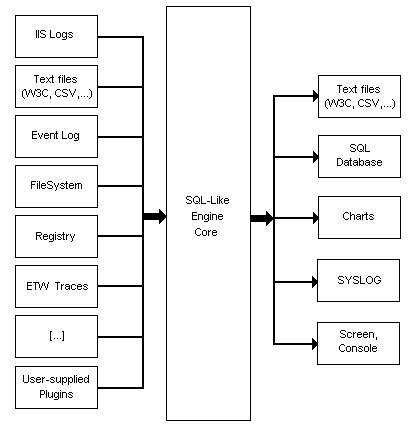
Log Parser hasn't changed that I know of since 2005. I've been working with some folks to try to get it to escape the big house, but we'll see how far we get. Until then, it works fabulously and unchanged after all these years. It's great because while my primary use of LogParser is with IIS Log files, it'll query anything you can plug into it like the File System, Event Logs, the Registry or just a CSV file. The diagram from their docs is at right.
I did a blog post 6 years ago before FeedBurner where I analyzed traffic to my RSS feed from Newsgator. NewsGator was an RSS reader that would include statistics and information in its User-Agent HTTP Header. I was reminded of this post when I was talking to the NuGet team about how they are releasing new versions of NuGet every month or so but it's not clear how many people are upgrading. It'd also be interesting to find out what other ways folks are hitting the NuGet feed and what they are using to do it. I volunteered, so David Ebbo sent me a day's log file to "figure out."
Log Parser is wonderful because it effectively lets you run SQL queries against text files. Here's a few choice examples from Atwood's post a few years back:
Top 10 Slowest Items
SELECT TOP 10 cs-uri-stem AS Url, MIN(time-taken) as [Min],
AVG(time-taken) AS [Avg], max(time-taken) AS [Max],
count(time-taken) AS Hits
FROM ex*.log
WHERE time-taken < 120000
GROUP BY Url
ORDER BY [Avg] DESC
HTTP Errors Per Hour
SELECT date, QUANTIZE(time, 3600) AS Hour,
sc-status AS Status, COUNT(*) AS Errors
FROM ex*.log
WHERE (sc-status >= 400)
GROUP BY date, hour, sc-status
HAVING (Errors > 25)
ORDER BY Errors DESC
Given queries like these, I figured that LogParser would be perfect for me to explore the NuGet web service logs. (Of course, I realize that the service itself could be instrumented, but this is more flexible, and I plan to make these queries run on a schedule and show up on http://stats.nuget.org.)
There are a number of ways to access a NuGet packaging server. You can use the Add Package Dialog, the Command Line, the PowerShell Console within Visual Studio, or the NuGet Package Explorer. There's also some testing data and some "no user agent" stuff in there also. I filtered that out by just charting "NuGet" clients.
I started doing the initial work from the command line, but it was slow going. I was having trouble visualizing what I wanted and what was being returned. Here is one of my first command lines. It was pretty hairy and hard to build this at the command line.
C:\u_ex110831>LogParser.exe -i:IISW3C "SELECT DISTINCT cs(User-Agent) AS Client,
   count(1) AS NumberOfHits
   FROM u_ex110831.log
   WHERE Client
   LIKE 'NuGet%'
   GROUP BY Client
   ORDER by count(1) DESC"

Client                                                                                      NumberOfHits
------------------------------------------------------------------------------------------- ------------
NuGet+Add+Package+Dialog/1.4.20701.9038+(Microsoft+Windows+NT+6.1.7601+Service+Pack+1)      38840
NuGet+Command+Line/1.5.20830.9001+(Microsoft+Windows+NT+6.1.7601+Service+Pack+1)            15591
NuGet+Add+Package+Dialog/1.4.20701.9038+(Microsoft+Windows+NT+6.1.7600.0)                   13360
NuGet+Command+Line/1.4.20615.182+(Microsoft+Windows+NT+6.1.7600.0)                          8562
NuGet+Add+Package+Dialog/1.4.20607.9007+(Microsoft+Windows+NT+6.1.7601+Service+Pack+1)      5531
NuGet+Package+Manager+Console/1.4.20701.9038+(Microsoft+Windows+NT+6.1.7601+Service+Pack+1) 5497
NuGet+Command+Line/1.4.20615.182+(Microsoft+Windows+NT+6.1.7601+Service+Pack+1)             3699
NuGet+Package+Manager+Console/1.4.20701.9038+(Microsoft+Windows+NT+6.1.7600.0)              3654
NuGet+Add+Package+Dialog/1.4.20701.9038+(Microsoft+Windows+NT+5.1.2600+Service+Pack+3)      3558
NuGet+Command+Line/1.4.20615.182+(Microsoft+Windows+NT+5.2.3790+Service+Pack+2)             2539
Press a key...
There were 40 unique User Agents in this file and they include the client and its version as well as the operating system. I wanted first to chop it up to find out what Types of NuGet clients were being used. I have broken the lines up to make it clearer in this snippet.
C:\u_ex110831>LogParser.exe
    -i:IISW3C "SELECT DISTINCT SUBSTR(cs(User-Agent),0, index_of(cs(User-Agent),'/')) AS Client,
    count(1) AS NumberOfHits FROM u_ex110831.log
    WHERE Client LIKE 'NuGet%'
    GROUP BY Client
    ORDER by count(1) DESC"

Client                        NumberOfHits
----------------------------- ------------
NuGet+Add+Package+Dialog      74761
NuGet+Command+Line            32284
NuGet+Package+Manager+Console 12637
NuGet+Package+Explorer        943
NuGet+Visual+Studio+Extension 49

Statistics:
-----------
Elements processed: 208235
Elements output:    5
Execution time:     0.79 seconds
Pretty amazing, though. A sub-second query over almost a quarter million line long log file with useful results and no database. Reminds me of working on Unix 20 years ago.
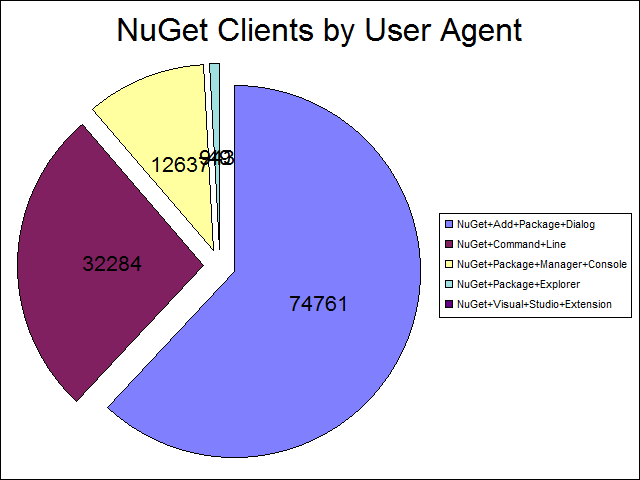
After some experimenting and installing the Office Web Components 2003 (discontinued) and was outputting a chart with this MONSTER command line:
C:\u_ex110831>LogParser.exe -i:IISW3C -o:CHART -chartType:PieExploded
        -categories:Off -values:On -view:on
         -chartTitle:"NuGet Clients by User Agent"
    "SELECT DISTINCT SUBSTR(cs(User-Agent),0,index_of(cs(User-Agent),'/')) AS Client,
        count(1) AS NumberOfHits
    INTO foo.png
    FROM u_ex110831.log
    WHERE Client
    LIKE 'NuGet%'
    GROUP BY Client
    ORDER by count(1) DESC"
Which yields me this profoundly 2003-looking chart, but still allows me to cheer a tiny victory inside. I will be able to get this (or a prettier one) to run as on a schedule (AT or Chron job) and serve it to the interwebs. I t'll probably be better to output a CSV or XML file, then process that with the web server and create a proper interactive chart. Regardless, tiny cheer.
Still, I'm thinking I'm too old for this crap. Where's my GUI? What's a brother got to do to drag a DataGrid around here? A little Binging with DuckDuckGo (yes, I'm trying DDG this month) and I find - wait for it - LogParser Lizard GUI.
LogParser Lizard GUI
What's this? Oh YES. It's intellisense and tooltips, baby!
_2.png "Log Parser Lizard GUI Main Screen")
I can't say how much faster this tool made me once I had figured out LogParser. It's funny how you have to suffer at the command line before you can really appreciate a good GUI. At this point I called Jon Galloway for some pair-SQLing and we pounded out a few more queries.
NuGet by Version
I filtered out NuGet Package Explorer because it has its own version scheme. However, I'm not sure about this query, as I wanted to get the Major.Minor versions. I noticed that by coincidence the third value z (of x.y.z) always started with .2 so I cheated with the SUB() below because I couldn't figure out how to just filter out the x.y values. Any thoughts are appreciated.
SELECT DISTINCT SUBSTR( cs(User-Agent),
                   ADD(index_of(cs(User-Agent),'/'),1),
                   SUB(index_of(cs(User-Agent),'.2'),STRLEN(cs(User-Agent))))
          AS Client, count(1) AS NumberOfHits
    FROM u_ex110831.log
    WHERE cs(User-Agent) NOT LIKE '%Explorer%' AND cs(User-Agent) LIKE '%NuGet%'
    GROUP BY Client
    ORDER by count(1) DESC
Client  Hits
------ -----
1.4    98097
1.5    18985
1.3     2524
1.6       69
So then I did the whole version:
SELECT SUBSTR( cs(User-Agent),
                   ADD(index_of(cs(User-Agent),'/'),1),
                   SUB(index_of(cs(User-Agent),'+('),STRLEN(cs(User-Agent))))
          AS Client, count(1) AS NumberOfHits
    FROM u_ex110831.log
    WHERE cs(User-Agent) NOT LIKE '%Explorer%' AND cs(User-Agent) LIKE '%NuGet%'
    GROUP BY Client, cs(User-Agent)
    ORDER by count(1) DESC

Client           Hits
---------------  ------
1.4.20701.9038   38840
1.5.20830.9001   15591
1.4.20701.9038   13360
1.4.20615.182     8562
1.4.20607.9007    5531
1.4.20701.9037    5497
1.4.20615.182     3699
1.4.20701.9038    3654
I was extremely impressed with how quickly (about an hour) was able to get really substantive, interesting and targeted data out of these log files. The next step will be to get all the logs and run the command line tool create month over month line charts. The goal will be to figure out how many folks are successfully upgrading their NuGet installations as well as how they are using it. Are they using the right-click menu or are they using the console?
If you've got an application that makes HTTP calls to a service that you own, whether your application is a phone or a custom client, while you can certainly instrument your code on the server side to collect stats, there's a LOT of information in your IIS logs. You can use LogParser Lizard GUI to develop your queries and then schedule runs of the command line tool to generate reports that will really help you improve your product. This technique isn't as sophisticated as custom 3rd party analytics package but you can certainly get a surprising amount of information in a short amount of time with LogParser.
Related Links
- Charting with LogParser
- Parsing my IIS Log Files with LogParser 2.2 to learn more about Blogs stats from NewsGator and NewsGatorOnline
- Parsing CSVs and Poor Man's Web Log Analysis with PowerShell
- FREE Download - Log Parser Lizard
- Download LogParser 2.2
- Atwood on LogParser
- Download: Office Web Components 2003
- Forensic Log Parsing with Microsoft's LogParser
- Book: The LogParser Book (awesome)
About Scott
Scott Hanselman is a former professor, former Chief Architect in finance, now speaker, consultant, father, diabetic, and Microsoft employee. He is a failed stand-up comic, a cornrower, and a book author.


About Newsletter

 Joshua DeLong

A few years ago I setup LogParserPlus.com and started hosting in one place some of the queries I'd written, as well as standard ones. The examples page needs some work, but ... people seem to find it helpful.
It's interesting that Microsoft hasn't released another iteration of it, but really there's only minor issues, like having u_ex*.log files automatically handled, with the application. Third-parties have really embraced the tool, possible because of how well planned (or at least implemented) the tool was.


It's funny how you have to suffer at the command line before you can really appreciate a good GUI.
To wit, I re-assert:
If you (or the customer) aren't willing to do it on paper (or "the hard way") then you (they) still won't be willing to do it if I automate it.
Congratulations on doing it the hard way, a nice GUI is your reward!

For adhoc queries, I use two separate files:
- A .bat file that is relatively static and contains all of LogParser commandline switches. In addition, there are commands to copy the query to the output file so that I know what was used to generate the output and some commands to sort the output into different folders depending on the switches I pass in to indicate which of our many IIS sites I am querying.
- A .sql file that contains the LogParser SQL. I format it like I would any other SQL with each statement on separate lines, comments, etc. It even takes in parameters from the calling .bat file to direct the output.
To run an adhoc query, I just call the .bat file and pass in a parameter to indicate which .sql file to pick up (and which folder to put the output in), and a parameter to describe the query. It looks like:
IIS.bat www "HitsByUser"
And outputs into the following file/location:
www\www_yyyymmdd_hhmmss_HitsByUser.txt
This approach allows me to have a nice trail of timestamped and organized files so that I can see how I got to a specific result. Much better than doing everything on the command line or having to remember to direct the output to a new file every time.
For scheduled reporting, I have wrapped up my queries with PowerShell commands and fire them from Task Scheduler. The date manipulation with the .bat file is obviously very limited and is a complete pain to try to do queries for yesterday, etc. With PowerShell, I have lots more flexibility in dealing with dates, parameters, etc. and I even have it so that writing the query is formatted nicely. And you can even add some additional power to LogParser to work with zip files.
I recently had to process six months of zipped logged files (one for each day). I didn't have the space or time to unzip them all (300GB+) and then run LP so I spent a few minutes with PowerShell, 7Zip and LP and automated the whole thing to pull out only the records I needed. Kicked off the query and came back a couple of hours later with the 24 million rows I needed extracted to new log files. I was then able to write targeted queries on those files.
I love the power and speed of LogParser. I regularly query 300 million rows of data in a matter of minutes. In addition to all of the native file formats it supports, you can define custom formats and query your custom logs or any TSV, CSV, etc. data.
My only requests for LogParser would be native support for zip files and multi-threading but overall I have been impressed at how awesome it is and how well everything works.


Comments are closed.