Announcing the Web Standards Update - HTML5 Support for the Visual Studio 2010 Editor
 Folks have been asking "When will VS2010 support HTML5?" I've been saying, jokingly, that the answer is "yesterday" as there's nothing keeping you from creating HTML5 in Visual Studio or ASP.NET today. However, there's no intellisense and there's lots of squiggly lines that make people uncomfortable. Combine all that with the fact that HTML5 is a moving target, and it's unclear. We've said before that the next version of Visual Studio will have better support HTML5, but what about today?
Today, a rogue faction some folks on the Web Platform and Tools team, spearheaded by Mads Kristensen are all pleased to announce the Visual Studio Web Standards Update. This adds better support for HTML5, CSS3 and new JavaScript features to ALL versions of Visual Studio.
Note that this isn't an official Microsoft product release, rather improved support from passionate people done in their spare time.
Download the first Visual Studio Web Standards Update
HTML5 moves fast, and this update will aim to keep up with it. It adds support to Visual Studio and the editor for HTML5, CSS3 and new JavaScript features. The goal is perhaps an update every quarter or so as new features or elements emerge. We want ASP.NET web developers to always be able to use the latest standards, as well as being able to choose from existing standards. Remember that you can use HTML5 today along with JavaScript libraries like Modernizr that allow you to create pages that work across nearly all browsers, including old crappy ones.
The Visual Studio Web Standards Update provides you with intellisense and validation for:
HTML 5 features
Browser APIs
- Geo-Location - Location aware websites are a clear, growing trend and now you've got full intellisense and validation within Visual Studio. For a nice sample, view source on the IE9 test drive demo.
- Local Storage – IE has been supporting local storage from IE8, so now Visual Studio will provide you with full-fidelity intellisense to create sites which can save state within the browser. For sample of this, do a view source on HTML5 Demo Site
CSS3
Additionally, if you are trying to make websites which work on a variety of platforms and browsers you will love the fact that Web Standards Update not only supports IE specific prefixes like –ms; but also other vendor prefixes like –webkit and –moz.
HTML5 in Visual Studio
When you start up Visual Studio 2010, you can select what version of HTML you want on a file-by-file basis, or set the defaults.
Side Note: See how IE6 is in there on its own? That's been there since before forever. Hopefully it'll be gone soon. Ignore it.
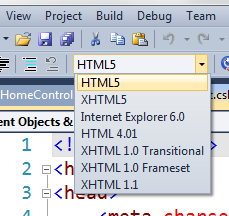
You can also set it as the default in Tools | Options | Text Editor | HTML | Validation. Note the options for errors.
_2.png "Options (87)")
All the new HTML5 semantic tags are there, like section, svg, video, etc. This is just the first release, and while it's REALLY comprehensive, I'm sure it has some bugs. But, it'll be updated regularly, so make sure you report anything you find and look for it to be fixed in the next release.
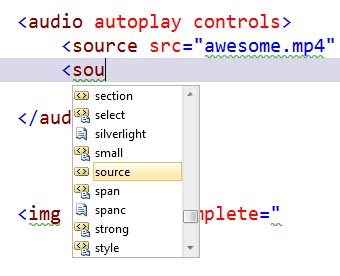
There's even support for important (but under-utilized and under-respected) attributes like the WAI-ARIA (Web Accessibility Initiative - Accessible Rich Internet Applications)
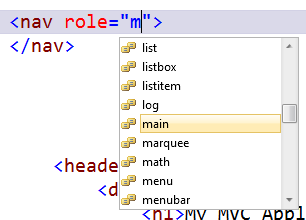
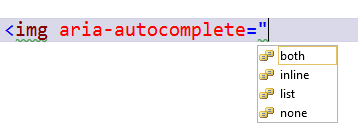
Also the aria-* attributes appear not only as intellisense enabled attributes, but also their enumerated values:
Tags are fun, sure, but how about microdata? Bing, Google and Yahoo are all supporting Microdata and more specifically the schema.org vocabularies. This update will therefore add intellisense to the most popular vocabularies including schema.org and data-vocabulary.org.
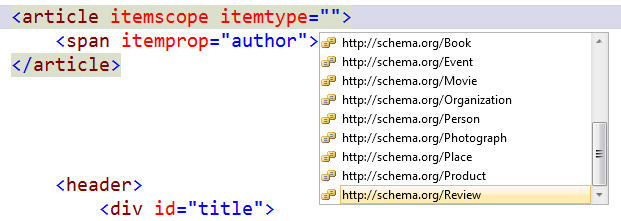
Seriously, tell me that's NOT the hotness. Awesome for SEO.
CSS3 in Visual Studio
That's just the HTML5 stuff. There's also CSS3 support. Yes, that's 1 better than CSS2.
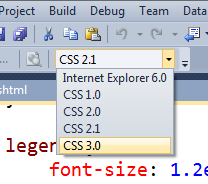
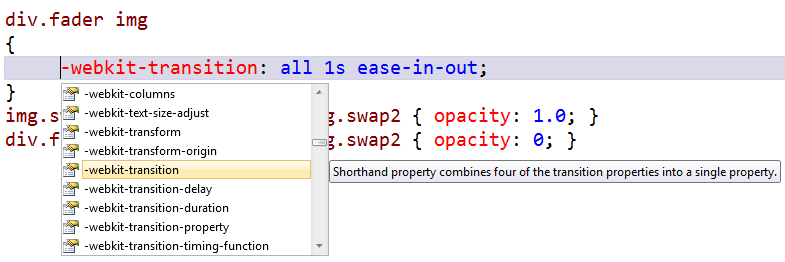
It includes all the cool new CSS3 stuff like column-full and of course border-radius as well as animations and transforms. There's also lots of details on vendor-specific prefixes like -webkit, -moz and -ms.
Note the informational tooltip in the dropdown here as we pick a -webkit-transform shorthand property.
JavaScript and HTML5 in Visual Studio
There's a huge number of additions to JavaScript intellisense in this update. Things like geolocation via navigator.geolocation and DOM storage via window.localStorage.

Here's a slightly less trivial snippet of HTML5 and JavaScript using some new local storage features and showing the intellisense.
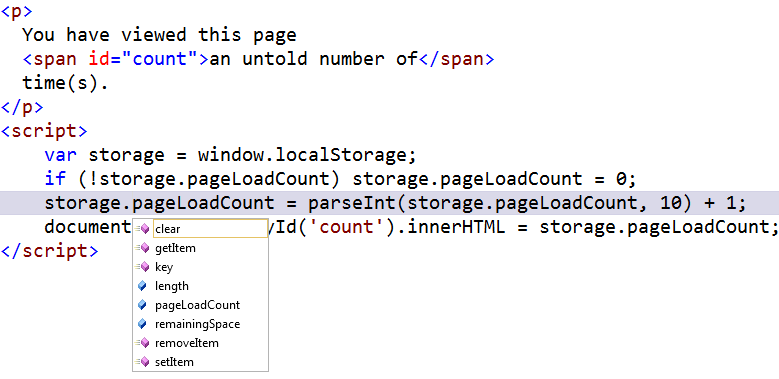
Say what you like about intellisense as a concept or crutch, but I like to think of it as a just-in-time object browser that helps me explore new technologies as well as discover nooks and crannies that I might not see.
We don't know what all will come in the next version of Visual Studio, or the next version of HTML5, but for those of you who are interested, we hope this "living update" of Web Standards support for Visual Studio will help you out!
Enjoy, Dear Reader.
P.S. This is an update for ASP.NET and HTML5 editing people who want to use HTML5, new JavaScript features and CSS3. I didn't mention Silverlight because it has nothing to do with Silverlight. I said once "just because your favorite technology isn't mentioned in a keynote doesn't mean it's dead." Assume that the same rule applies to a Blog Post.
P.P.S. No, that logo to the right isn't official anything and yes, it's fun.
Related Links
About Scott
Scott Hanselman is a former professor, former Chief Architect in finance, now speaker, consultant, father, diabetic, and Microsoft employee. He is a failed stand-up comic, a cornrower, and a book author.


About Newsletter

Now if we could just get IE9 to support more HTML5 features... Chrome is kicking it's arse around the block and back.
http://diveintohtml5.org/

http://weblogs.asp.net/dwahlin/archive/2011/06/05/getting-started-using-html5-boilerplate.aspx


I love to use the MSHTML editing capabilities in my Windows Forms applications, just looking for something more modern.
Would love to pay money for something like that!


If the faction is no longer 'rogue', please reconsider.

Oh actually I didn't install anything like that :(
Is it because my Visual Studio is not the english version?


Does it also add the Opera -o- prefix too? (When I spoke at Microsoft devdays 2 weeks ago on HTML5, the Microsoft evangelists were very on the ball about using all the prefixes. See http://www.brucelawson.co.uk/2010/cross-browser-future-proof-css-3/ for more).
Disclosure: I work for Opera.

There's also CSS3 support. Yes, that's 1 better than CSS2.
Yes, but only 0.9 better than 2.1

It does not show up there for me, is it installed and working?

No!
You mean No, not Yet! Surely?
Maybe, Microsoft wants to keep it's development software updates secret. You are only permitted to know about such releases if you are subscribed to certain blogs.
...and whilst we (or or at least I am) talking about the Web Platform Installer, I would like to take up Mohammad Mahdi Ramezanpour's point about which version of Visual Studio 2010 is currently installed.
On my system when I load VS2010 and click: Help -> About Microsoft Visual Studio
The following Information is displayed:
Microsoft Visual Studio 2010
Version 10.0.40219.1 SP1Rel
When I load Web Platform Installer 3.0 it still offers to install Visual Studio 2010 SP1 (Released 10-Mar-2011) .... Why?
The only other items it offers to install today (16-Jun-2011) are:
Orchard CMS (Released 14-Jun-2011)
Wordpress (Released 26-May-2011)
This is with the All option selected.


You'd think it would know not to!

Best,
Ken


(You never know, these days.)


Ben - Yes, we also uninstall Silverlight, Google Chrome, then format your D: drive just to be sure. ;)
Michael - Hm, do I? And a +1? I do have a Facebook Page.
Vincent - Nah, Scott didn't know about this thing, it was as surprise. Maybe if I take his place they'll give me a bag of money?
Ken - Yes, I prefer the Reset to the Boilerplate for basic stuff.
Craig - Are you still seeing this?
Bruce - We'll get Opera in the next update!
Ignat - Yes, anywhere there is an HTML editor.
Luddite - We can't add it to WebPI until it's official. Soon.
Mo - It appears we have a detection issue. We are working on that NOW.
Ergomane - We are signing it now...working on it.
It's easy to have two scripts providing the same polyfill, which is just wasting JS processing time. I've made that mistake in the past...


I thought they meant to be competing technologies.
Why start with Silverlight at all if you'll have open HTML5?
Why so much support for HTML5 from MS if Silverlight is MS creation and should be promoted first?


It seems to me that Modernizr and not VS WSU is used for backwards compatibility. I don’t even know if you can use VS WSU and Modernizr together, if you should use them together, if you’re supposed to, etc. As someone who’s been waiting for the HTML5 tools to come out,
I haven’t been following any HTML5 development and I assume I’m not alone. So a little direction here would be welcome.

Seen some posts about having html5-boilerplate as a default template available...made one awhile back that stripped out some of the extra stuff and uses normalize css in place of a css reset. Template is located under the download packages when clicking the download button for the source on GitHub.
https://github.com/justinlabenne/HTML5-ASP.NET-Web-Site


here at Prometheus Development we did a nice work , a new framework (over Standard MVC 3.00) named MVCPlus which is named by people MMVC also.
inform this and if you like , email me ,
MVC Plus is welcomed by people for the way it work and it work as ORM and fieldmapping and it have many many new ideas are came into a commercial product now , less code, more high quality product, we like to see a day microsoft support this new movement (which started from JAVA) .
actually, MVC PLUS is much more advanced than standard MVC.
www.codeproject.com/KB/library/MVCPlus.aspx
more screenshots will surprise you ! it was originally designed to say against Silverlight by our team but finally, it used in many commercial project and it is growing so fast.
please email me if you like to know more about it.
Regards
Ryan Samiee
MCs and Senior Software Architect

www.codeproject.com/KB/library/MVCPlus.aspx
this is a new library and component model in web with new concepts and manything were never described such as :
JavaScript SandBox Model
MetaModel
in other hand, it is against JQUERY with a different way of handling of codes, of course it is 100% DB Centric system so, it is have very few codes. when you read that you will undersand what we did exactly.
and it is only 100% db centric system with no refresh,,, and .... many more....
:) it is not opensource yet but if you email me , i will send you a copy of source...
I just installed this and I find it impressive that the rogue faction on the Web Platform and Tools team, spearheaded by Mads Kristensen, would choose to list YOU, SCOTT HANSELMAN, not Microsoft, or the Web Platform and Tools team or even Mads Kristensen, as the publisher of this update.
You clearly have a lot of swing...


SamD - Did you select CSS3 from the toolbar dropdown?


Yesterday on twitter you asked for suggestions for things to cover in a talk about Microsoft and open source. How about: why isn't open source the default model for free (as in beer) software releases?
I though I read somewhere VS2010 would use the doctype, but it still doesn't seem to be the case.
Get on it Scott!
BOb

Wow, wonder how that happened... http://www.hanselman.com/blog/AnnouncingTheWebStandardsUpdateHTML5SupportForTheVisualStudio2010Editor.aspx


Any progress on that SP1 detection issue? The HTML5 msi won't install for me either. Even tried reapplying SP1.


Thank you,
Jerry E. Ely

1. XMLHttpRequest
2. JSON.parse, JSON.stringify
3. some ECMAScript 5 support where practical?
Maybe intellisense shouldn't matter that much, but it gives me that extra bit of confidence that my code is correct when I'm writing it. Most likely I'm going to keep using Visual Studio whether the javascript intellisense gets updated or not, but it sure would help make me a more productive ASP.NET developer. Thanks.


Any ideas? I'm running VS2010 Pro SP1 (MSDN license) on WinXP SP3


I know i have another option like going with webkit.
Thoughts?
thanks

The fix for the same is as follows: (Thanks to Wouter vanEck)
Get the ORCA tool from Microsoft (http://msdn.microsoft.com/en-us/library/aa370557(v=VS.85).aspx) this is a MSI editor.
Once you have it, start it and Open the downloaded "Web Standards Update.msi" package.
In the Tables, select the "CustomAction" entry,
Once selected, in the right pane, select the "VSDCA_VsdLaunchConditions" line, right-click and select "Drop Row".
Then Save the package and run it.
To Fix the CSS editing issue after the Web Standards Update is installed: (Thanks to Wasaeed)
Also copy all the folders and files under the C:\Program Files (x86)\Microsoft Visual Studio 10.0\Common7\Packages folder to the similar folder under the drive where Visual Studio is installed.


System.ArgumentOutOfRangeException: Specified argument was out of the range of valid values. Parameter name: index at Microsoft.VisualStudio.Text.Implementation.SimpleStringRebuilder.get_Item(Int32 index) at Microsoft.VisualStudio.Text.Implementation.TextSnapshot.get_Item(Int32 position) at MadsKristensen.WebEssentials.ColorSmartTagger.GetRealSnapshot(String classification, SnapshotSpan currentSpan, ITextBuffer buffer) at IntraTextAdornmentSample.ColorTagger.<GetTags>d__0.MoveNext() at Microsoft.VisualStudio.Text.Tagging.Implementation.TagAggregator`1.<GetTagsForBuffer>d__16.MoveNext()
I hope this helps track down this problem, I appreciate the extension!
Joe

Comments are closed.
Seriously though, nice job to the team that did this.