Bug and Fix: ASP.NET fails to detect IE10 causing _doPostBack is undefined JavaScript error or maintain FF5 scrollbar position
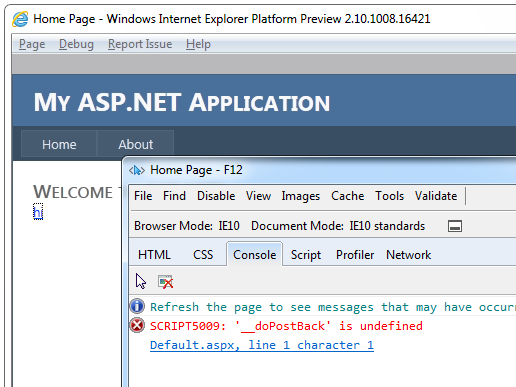
Browser version numbers continue to march on. IE9 is here, IE10 is coming, Firefox 5 and 6 are here with 7 and 8 in the wings, Opera's on 11, and Chrome is on, I dunno, somewhere between 14 and 50. Regardless, we'll all be on version 99 before The Singularity.
There is a bug in the browser definition files that shipped with .NET 2.0 and .NET 4, namely that they contain definitions for a certain range of browser versions. But the versions for some browsers (like IE 10) aren't within those ranges any more. Therefore, ASP.NET sees them as unknown browsers and defaults to a down-level definition, which has certain inconveniences, like that it does not support features like JavaScript.
If you want to see this for yourself, create a new, blank Web site (e.g. in Visual Studio 2010), add a control that requires JavaScript for postback (good example: <asp:LinkButton>), and then run the site using IE9 (where it works) and IE10 (where it won't). View the page source and compare the HTML and JavaScript sent to each browser.
A similar bug affects Firefox versions 5 and above, where support for using JavaScript to reposition the scrollbar in the browser is not detected. This basically breaks the MaintainScrollbackPositionOnPostBack property for Web Forms pages.
These "misdetection" bugs affect Web Forms pages in both ASP.NET 2 and ASP.NET 4. If you are using ASP.NET Web Pages, or if you're using ASP.NET MVC or ASP.NET Web Pages and are not using the Browser object to detect JavaScript support, you will not be affected.
Fixes
There are two ways to fix this: one is a machine-wide fix, the other is a way to fix individual sites.
Machine-wide fixes
We're releasing a hotfix that will fix these, which you'll be able to get to via some KB articles. These KBs with fixes are live and are the best way to update your system. The fixes solve the browser-detection issue forever for all sites on a machine. These will be rolled up into future versions of the framework and will eventually also be on Windows Update.
- .NET 4 - http://support.microsoft.com/kb/2600088
- .NET 2.0
- http://support.microsoft.com/kb/2600100 for Win7 SP1/Windows Server 2008 R2 SP1, Windows Vista/Server 2008, Windows XP/Server 2003
- http://support.microsoft.com/kb/2608565 for Win7/Windows Server 2008 R2 RTM
What the fixes do is update the ie.browser and firefox.browser files in \Windows\Microsoft.NET\Framework\<version>\Config\Browsers with new and future-proofed versions of these browser definitions. Nothing else is affected.
Site-only fixes
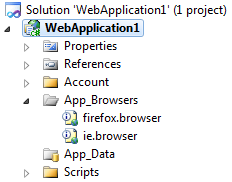 If you don't have access to the whole machine and/or just want to update a single project, use NuGet to install the App_BrowsersUpdate package. Your site structure in Solution Explorer will then look like the image at right. Note that NuGet uses .NET 4, so for systems that have only .NET 2, you'll need to get the ZIP file and put the new browser files in App_Browsers manually.
- .NET 4 Browser Update NuGet Package - http://nuget.org/List/Packages/App_BrowsersUpdate
- install-package App_BrowsersUpdate
- .NET 2.0 Browser Update NuGet Package - http://nuget.org/List/Packages/App_BrowsersUpdate.net20
- install-package App_BrowsersUpdate.net20
- Note that NuGet is VS2010 specific so if you don't have nuget.exe and .NET 4, you can also copy the .NET 2 updated browser files into ~\App_Browsers manually from this zip file.
Updating the whole machine is the preferred way to fix this.
Summary
- ASP.NET might not recognize the most current versions of some browsers, and will consequently treat them as down-level browsers. (Basically: no JavaScript.)
- The fix is to get updated browser-definition files.
- You can install a machine-wide fix or just fix individual projects.
- Hotfixes are availble with download links.
- .NET 4 - http://support.microsoft.com/kb/2600088
- .NET 2.0 - http://support.microsoft.com/kb/2600100
- The files will also be part of the next batch of .NET 4 fixes, which are anticipated to ship around January 2012 via Windows Update.
- The next version of the .NET framework will include all the updated files.
- Hotfixes are availble with download links.
If you're interested in more detail than you need, I’ve uploaded the updated versions of firefox.browser and ie.browser files that are expected to ship with the next version of ASP.NET. The files and source is up at my BitBucket repo if you are interested in the details.
About Scott
Scott Hanselman is a former professor, former Chief Architect in finance, now speaker, consultant, father, diabetic, and Microsoft employee. He is a failed stand-up comic, a cornrower, and a book author.


About Newsletter


does this bug affect SharePoint as well? Just tried opening a SP 2010 site with FF6 and all worked fine, at least I couldn't notice any difference...

Thank you for the post! We ran into the scroll position problem in Firefox several months ago and figured it was related to browser detection.
Is there a way to completely "disable" browser detection such that ASP.NET treats every request as coming from a state of the art browser with full support for everything?

Bill - This fix is that. If you look at the browser files they just say "FireFoxPlus" meaning all versions forever. That said, I'll double check.

https://connect.microsoft.com/VisualStudio/feedback/details/682952/java-can-no-longer-send-cookies-for-login


davh: I'm looking into that. Have you tried Greg's uplevel trick? You can also make a browser file or as you said, change the <forms cookieless="UseCookies"/>


Any help for this?


Also, no mention of ASP.NET 3.0 or 3.5 - are they safe from this, or does "2", mean "2, 3, and 3.5"?

If your Firefox 6 keeps reloading your MicrosoftAjax.js-enabled page when the URL contains a #, check out This post on StackOverflow

I added the files manually in the App_Browsers folder and re-compiled and generally all seems to be well, but I have started seeing errors like this one in my log:
System.ArgumentException: Version string portion was too short or too long. at System.Version.TryParseVersion(String version, VersionResult& result) at System.Version.Parse(String input) at System.Web.Configuration.HttpCapabilitiesBase.get_MSDomVersion() at System.Web.UI.WebControls.TreeView.EnsureRenderSettings() at System.Web.UI.WebControls.TreeView.OnPreRender(EventArgs e) at System.Web.UI.Control.PreRenderRecursiveInternal() at System.Web.UI.Control.PreRenderRecursiveInternal() at System.Web.UI.Control.PreRenderRecursiveInternal() at System.Web.UI.Control.PreRenderRecursiveInternal() at System.Web.UI.Control.PreRenderRecursiveInternal() at System.Web.UI.Control.PreRenderRecursiveInternal() at System.Web.UI.Control.PreRenderRecursiveInternal() at System.Web.UI.Page.ProcessRequestMain(Boolean includeStagesBeforeAsyncPoint, Boolean includeStagesAfterAsyncPoint)
I added some extra logic to capture the user agent in the log to figure out what browser is causing the error and the result is:
Mozilla/4.0 (compatible; MSIE 5.5; Windows NT 5.0)
not that I'm very concerned with supporting IE 5.5 at this point but my question is do you think I did something incorrectly?
I'm also using CSSAdapters and some other .browser files, is it possibly a conflict?
Since I still also support .NET 3.5 I have 2 .csproj files and the 3.5 version includes the alternate version of the ie.browser file while the .NET 4 version includes the .NET 4 version of the file. Could it be a problem having both versions physically in the App_Browsers folder even though only the correct one is referenced in the .csproj file?
Thanks for any tips or suggestions.


Thanks for the information Scott. I was wondering if you can confirm whether the update will fix the same issue for a .Net 2.0/Windows 2003 application?
Thanks, PPD
Mozilla/5.0 (compatible; MSIE 10.0; Windows NT 6.2; ARM; Trident/6.0; Touch)
I notice the 6.2 instead of 6.1, could that be part of the issue here?

Sys.WebForms.PageRequestManagerServerErrorException: An unknown error occurred while processing the request on the server. The status code returned from the server was: 500
BUT, there is no request that made it to the server in the logs, and no 500 response going back at all. Some other places in our app have an imagebutton inside an updatepanel and they also do not work but they do not display an error message either.
I also tried including the ie.browser field in our app's App_Browsers directory but that did not make any change.
It is important to note that I am seeing different results when I hit the same app running on a Windows 7 web server versus the WinServer 2008 R2 web server. The Win7 server is now working just perfectly, but we can't seem to get the new ie.browser file fix to take effect on the WinServer 2008R2 box. We have ensured that the update has been installed and rebooted. We can see that the ie.browser file has been updated in the CONFIG directory in the .NET Framework directory. Maybe we should try to patch with the version meant for the RTM build?
Anyone else having the issue still?
I'm also seeing it occur on win2008 but not on win 7 hosted instances. Win2008 is fully patched and the issue is NOT fixed yet.
Thanks,
Ed
I have two WinServer 2008 R2 Standard SP1 X64 servers, and one of them exhibits the problem while the other does not. Believe it or not, I installed the patch on the server that exhibits the problem and I have not installed it on the server that does not exhibit the problem. Let's call the server that works properly and does not have the patch, Server A, and the bad one we will call Server B.
I inspected the HTML source of my page and then made IE10 request the WebResource.axd and ScriptResource.axd URL's that are in the HTML source. I did this for both Server A and Server B, using each's HTML source of course. I found that WebResource.axd is serving the same javascript from both servers. But ScriptResource.axd is serving a different file. Server A seems to be serving a file that is nicely formatted for development while Server B seems to be serving a minified field. They are hard to compare because of this - my VisualDiff can't do it and neither can I manually.. But I can see right off the bat that the files are different because the first few lines differ in terms of the comments that are there in the files. Server A's file starts out like this:
//-----------------------------------------------------------------------
// Copyright (C) Microsoft Corporation. All rights reserved.
//-----------------------------------------------------------------------
// MicrosoftAjaxWebForms.js
// Microsoft AJAX ASP.NET WebForms Framework.
Type.registerNamespace('Sys.WebForms');
and then Server B's file looks like this:
//----------------------------------------------------------
// Copyright (C) Microsoft Corporation. All rights reserved.
//----------------------------------------------------------
// MicrosoftAjaxWebForms.js
Type.registerNamespace("Sys.WebForms");Sys.WebFor
and then it continues on one line due to the minified formatting. But notice that Server B is missing a comment line before the Type.registerNamespace, etc.
I think the next thing I need to do is find the source (no pun intended) of these files so that I can determine what object or layer of code is serving the wrong file.

It's not even returning webresources.axd at all when the browser is IE 10 on win 8.
Server Error in '/' Application.
--------------------------------------------------------------------------------
Input string was not in a correct format.
Description: An unhandled exception occurred during the execution of the current web request. Please review the stack trace for more information about the error and where it originated in the code.
Exception Details: System.FormatException: Input string was not in a correct format.
Source Error:
An unhandled exception was generated during the execution of the current web request. Information regarding the origin and location of the exception can be identified using the exception stack trace below.
Stack Trace:
[FormatException: Input string was not in a correct format.]
System.Number.StringToNumber(String str, NumberStyles options, NumberBuffer& number, NumberFormatInfo info, Boolean parseDecimal) +7471479
System.Number.ParseInt32(String s, NumberStyles style, NumberFormatInfo info) +119
System.Version..ctor(String version) +259
System.Web.Configuration.HttpCapabilitiesBase.get_MSDomVersion() +52
System.Web.UI.WebControls.Menu.EnsureRenderSettings() +135
System.Web.UI.WebControls.Menu.OnPreRender(EventArgs e, Boolean registerScript) +22
System.Web.UI.WebControls.Menu.OnPreRender(EventArgs e) +25
System.Web.UI.Control.PreRenderRecursiveInternal() +80
System.Web.UI.Control.PreRenderRecursiveInternal() +171
System.Web.UI.Control.PreRenderRecursiveInternal() +171
System.Web.UI.Control.PreRenderRecursiveInternal() +171
System.Web.UI.Page.ProcessRequestMain(Boolean includeStagesBeforeAsyncPoint, Boolean includeStagesAfterAsyncPoint) +842
On IE6-9 working without problems but IE10 don't work


to the head?
Sorry, but that didn't seem to affect anything. This might be a different issue than what this article addresses, because I am not getting any script errors. However, when I do a redirect, it goes to a blank screen with this as the source:
<BODY><ASP_SMARTNAV_RDIR url="/Example.aspx"></ASP_SMARTNAV_RDIR></BODY>
the new browser definition file will NOT be used until the site recompiles, just uploading it isn't enough. the best way to guarantee that the site recompiles is to change a value in the web.config file (i've been using the debug setting) and re-uploading it to the site in question.
it took me a bit of stress to figure this out...
this is on our shared hosting environment (they refused to apply the hotfix) so the experience maybe different for others.
hope this helps someone out ;)

I have a lot of .NET1.1 application on win2003.
Do you have by a chance hot fix for those?

I already installed the hotfix, but my site still didn't display correctly in Ipod! Can you help?
Can I change the default browser file to support javascript?

"The resource you are looking for has been removed, had its name changed, or is temporarily unavailable."
I went through the process twice just to make sure.
Thanks loads for the typing exercise!!
NOW WHAT?

The __doPostBack() function is not being defined and it's not rendering the ddl w/ an autopostback attribute in the rendered <select> even though it's in the <asp:DropDownList>.
Is there any solution to this?


Any help I will be thank full to you

Is there any way to do this... I tried
<meta http-equiv="x-ua-compatible" content="IE=EmulateIE8" />
but with no success - it just changes Document mode

I use VS 2008, and when I added an "App_Browsers" folder it was created with a small blue/green spot in the folder icon (the same as the Web References folder). I can't find what this means, but double clicking on the folder doesn't open it. I added the ie.browser file from the zip by opening the folder in Windows Explorer.
Is this sufficient and do I have to copy this folder to the web site?
(please note also that the firefox.browser file is not in the zip)
Comments are closed.
I don't understand the adapters too, when you use ASP.net menu control, it renders different HTML in IE and chrome!