CSI: My Computer - What is netsession_win.exe from Akamai and how did it get on my system?
I know my system backwards and forwards and I do not like noticing stuff running in the background that I don't recognize. Recently I was checking out the Task Manager (right click on the clock, and select Task Manager or press Ctrl-Alt-Del and click Task Manager) and noticed TWO copies of "netsession_win.exe" running with a peak memory working set of about 25 megs. Ok, what's this? It's the Akamai Net Session Interface. Ick.
_23e03aa7-8647-46d9-b0d3-9622c4ebcef3.png "netsession_win.exe in my Windows Task Manager")
You can always right click on suspicious processes and click Open File Location. This little tip is often enough to jog your memory and go, "Oh, THAT."
_7a026eae-a5f7-4258-95ca-164e5f589b51.png "Open File Location in Task Manager's Context Menu")
Hm, that dropped me into C:\Users\scottha\AppData\Local\Akamai. I know who Akamai is. They are a download accelerator used by lots of companies. Kind of the first large Content Distribution Network or CDN.
Am I sure it's them and not someone evil trying to fake me out? Right click on netsession_win.exe, then Properties.
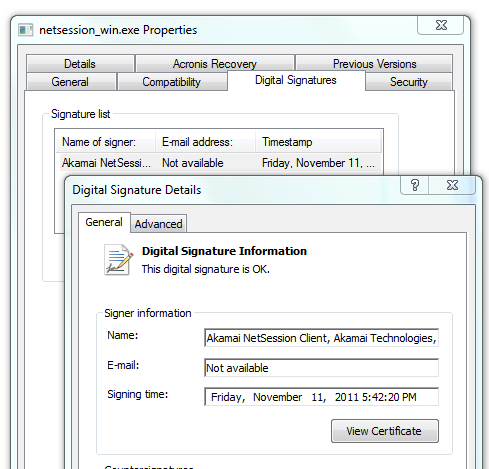
Well, they have a legitimate digital signature, interestingly they signed this on the 11th of November. Looks like this was recently installed automatically by something, perhaps Flash or Adobe Acrobat.
I wonder if someone needs to tell Akamai that their freshly installed service that just (kinda, a little) snuck on my system has a digital certificate that expires in 5 weeks. Are they or one of the companies that uses them going to update this client and cert soon?
_bca0d2fb-3949-409d-83bb-837177095f3f.png "Akamai's digital certiticate expires before Christmas")
Running services.msc from Start | Run tells me that this runs as an Automatic Service. At least it's a Delayed Start so it doesn't slow down my boot.
_ef8bc134-4d63-4674-9e8b-20ec6d6446e6.png "Services (158)")
The only thing I installed on my machine on the 11th was an automatic update to Adobe Flash. That's my #1 suspect right now as it's the only thing that I ran as Administrator that day.
For now, I'll keep it on my machine because it:
- Is from a reputable (so far) company
- Is known to be used by folks like Netflix, etc to speed up downloads
- Has an uninstall available in Installed Programs
- Feels legit
- Has a control panel icon and a Read Me with lots of info about what it does (except who installed them)
- Has a customer bill of rights online with details with test demo pages about their API.
I will say this, though. Whatever program installed it should have told me first before chaining it in. At least with Evil Toolbars I can see them. Not cool Akamai. Who installed you?
You're on notice.
UPDATE: Looks like this is using my own computers bandwidth to upload to other Akamai users. They're using our computers and network to make other people's uploads faster. That sounds like I'm running a Torrent and no one asked if it was OK. I'm continuing to dig into this, like disk space usage, etc.
About Scott
Scott Hanselman is a former professor, former Chief Architect in finance, now speaker, consultant, father, diabetic, and Microsoft employee. He is a failed stand-up comic, a cornrower, and a book author.


About Newsletter


You know you can press Ctrl-Shift-Esc and start Task Manager directly right?
Best Regards
Tom


This, at least, gives some sort of context of processes at a glance. Handy when companies have obscurely named executables, e.g. ATI & MOM.exe (?)

http://www.akamai.com/html/misc/akamai_client/csd_faq.html
You can run "C:\Program Files (x86)\Common Files\Akamai\AdminTool.exe" to get an idea of which application installed it (in my case it's Lenovo).

[...] a digital certificate that expires in 5 weeks. Are they or one of the companies that uses them going to update this client and cert soon?
No need to update the client, as the screenshot shows that a timestamp service was used when signing the bits. NitsPicked++;

In my case this service was used by an Autodesk application.
Would be nice if this Autodesk application (or any other related application) would also be shown on the "Applications" tab within the control panel.


Not cool AkamaiPerhaps it is time that we, as a community, start talking about installers and what should be considered "acceptable" behavior in general, or more specifically, when installing 3rd party services.
After all, it was not Ford who paid for the new bay window.


No flash here, no adobe, and no akamai...
(Adobe is on top of my blacklist. I'd rather install a sasser worm than that).
It surprises me a lot though, that this installed without your knowledge. The UAC should pop up when something invades your machine like that? It must be something you manually approved?
I really don't know why you would keep it. Remove it, see if anything complains. A quick search almost immediatly shows people describing its invasive behavior, unstability. Appearantly, it sends data to Akamai servers all the time.
Some users even suspect it might use YOUR pc, to ease their server traffic! lol
Check your client.ini file.
-->eulaAccepted":true ? Really true?!
--> http://124.40.51.155:80/logs/YOUR UNIQUE TRACKING ID.
And remove it!
Unless you wanna analyze the traffic it generates and report back to us?! That could be (a lot of) fun. And would either clear up the bad rumours, or confirm how evil it is. A lot of mixed views on this...


The Adobe crap doesn't actually auto-update on my computer -- even the ActiveX Flash plugin. I don't recall doing anything special (this time) to arrive at this state of bliss.
In the absence of any decent patch and package management on Windows, the best way I've found to actually keep a Windows box patched up and current is Secunia's PSI utility. Is there anything better?


I just checked my box, and did not find this process running; its not installed at all.
I recently received a flash update and can safely say that its not the culprit.


http://kb2.adobe.com/cps/526/cpsid_52698.html

If there is a timestamp associated with the digital signature, the signature will remain valid, even if the certificate expires. So that's not really a problem :)


that MAYBE ...
I detected it 2 years ago, when different ISPs and
universities in Austria, resolved
www.bing.com with different end IPv4 adresses.
(each one with open port 22,80 -> ssh don't look
like MS, it looks like the ...)


I dislike the torrent model, especially when a client is installed surreptitiously. Sure my machine has spare cycles and memory, but those are my cycles and memory to waste as I see fit.

No way to safely turn this off. And who authorized Akamai to use my machine and my bandwidth to serve? Clearly a violation.

http://www.akamai.com/html/misc/akamai_client/netsession_interface_faq.html


I currently do not have a packet sniffer installed, on my laptop, but I would to loved to see what they are attempting to upload.
I back tracked by looking at the creation date of the Akamai folders. I then did a global search of the C drive - of all files created on that date. They coincided with the install of "Autodesk TrueView" which I needed to view an autocad file.
This is getting uninstalled. I do not need spurious stuff running or uploading stuff, for a program I used one time.
I hope this helps others.
Gary


Suposedly it is safe (personally I don't know). Kind of deceptive to install (maybe there is a mention in the terms to download?)
In Windows control panel there is an option to launch its control settings. This is the way to see what program/company is using it.
uninstall through control panel PROGRAMS AND FEATURES (or add remove programs).
What is frustrating is (with Adobe) after the trial software is installed/downloaded this download management software STAYS INSTALLED. it would be better if Adobe (and others) have found a better solution for download accelleration. I mean 8MB of wasted system resources (ram) that could be better used by other background programs since I am not always downloading trial adobe software, etc.
Totally agree about this being underhand and I wonder how long before a hacked version is out there that allows the silent install of all manner of crap.
So are we to assume that the network infrastructure of these companies is so rubbish that they want to distribute the effort of downloading their files to their 'customers'?
Also, without a clear notification that you are now part of their P2P distribution network, this could possibly be considered illegal access to a computer in the UK.
Bitdefender Antivirus Plus 2013 now uses this to download, for me a Microsoft update.
Cheers


Facts are; Akamai sneaks up on you, installs itself unannounced on your PC, AND installs itself in a hidden folder!
These 3 facts alone are damnable to me. And that's not even speaking of them using up your bandwidth.
Don't let them fool you. It's only logical to assume that Akamai has people working for them who will answer questions on this topic by actually promoting Akamai and even linking you to their website.
I really hate companies or people that force you into something and impose on you unannounced. They are playing us, secretly use us for their own enrichment. Some would call that behavior thuggish or even criminal, others simply call it business. It's bad behavior. And the only answer they can give you is, but it's good and safe and very helpful. Yeah right, if it was even remotely like that they wouldn't have to sneak up on people.
Right, I'm getting rid of it as I write this. Bye bye Akamai. Thanks for making me waist an hour of my free time.

They try to install drivers as a package using a download manager.
Em
netsession_win.exe
Akamai.
I have experienced this myself. In my case Akamai appears when I downloaded updates from Autodesk. This is the download manager that they use.

**** Akamai NetSession Interface ****
--------
Overview
--------
This file describes the Akamai NetSession Interface.
The Akamai NetSession Interface is a download manager application. It was
installed on your computer when you downloaded content that uses the service
to provide secure, high integrity downloads of large files.
The NetSession Interface supports downloading from a central source and between
peers. When peer-downloading is enabled, your computer can serve as an upload
source for other computers -- without adverse impacts to your computing.
Peer-to-peer downloading can provide faster, more effective downloads.
The NetSession Interface contains no adware or spyware, is safe and secure,
uses minimal resources, and provides you the ability to manage and control its
actions, including the ability to uninstall it if you do not want it on your
computer.
------------
How It Works
------------
The NetSession Interface does not have a noticeable desktop presence during
downloads, since its work is integrated into the sites or applications that use
the service.
However, there are two interfaces you can use to manage downloads and the
interface itself: admintool and a Control Panel extension.
--------------------------------------------------------------
Windows Control Panel / Mac OS X System Preferences Extension
--------------------------------------------------------------
The Control Panel / System Preferences extension provides you an easy way to
manage NetSession functions, such as starting or stopping the service. The
extension also provides you with a Troubleshooting test you can run to tell you
whether your NetSession Interface is installed correctly and can download
properly.
When installed, the extensions are available:
On the Windows Control Panel:
Akamai NetSession Interface Control Panel.
On the Mac, on the System Preferences pane:
under Other --> Akamai
Note that with Windows Vista 64-bit, additional steps may be required to view
the NetSession Control Panel in the Windows Control Panel directory.
Open the Control Panel, select Additional Options and enable the option
to View 32- bit control panel items.
------------------------------------------------
admintool and the NetSession Installation Folder
------------------------------------------------
admintool is a command-line utility used to get information about the current
NetSession download activities, to stop or start download sessions, clear the
download cache of all downloads, and uninstall the NetSession Interface.
To see all the commands available to you with admintool:
1) Go to the command line of your computer. You can do this as follows:
On Windows, select Command Prompt from the Start menu, OR...
Run on the Start menu, type "cmd" into the Open text box, then click OK.
On Mac OS X, in the Application -> Utilities folder, double-left click
Terminal.
2) Go to the Akamai NetSession Interface installation folder.
The installation folder location depends on your configuration. Normally, it
is found in the following locations, where you would replace
<user name> with your user name:
On Windows XP:
C:\Documents and Settings\<user name>\Local Settings\Application Data\Akamai
On Windows Vista and Windows 7:
C:\Users\<user name>\AppData\Local\Akamai
On Macintosh OS X:
/Users/<user name>/Applications/Akamai
3) Type the command
admintool help
4) Press the Enter (Return) key
All admintool commands are run in the same way as admintool help in steps 3)
and 4).
------------
Uninstalling
------------
Before you uninstall, please note: If you uninstall the service, you will
delete files downloaded to the cache folders under the installation folders. If
you don't want to delete those files, copy or move them to a different folder.
If you do not have a serious need to uninstall the service, it may be better
not to, since other downloads may require NetSession later. NetSession may be
installed again when you download software or media that uses this service.
Also, the Akamai NetSession Interface is a shared network library that may be
used by multiple applications. It will uninstall correctly only when other
applications using the interface are uninstalled. Other applications may not
perform correctly if they look for but do not find the NetSession Interface.
For that reason, you should not simply delete the NetSession files.
Uninstalling on Windows
-----------------------
The simplest and preferred method is to use the Add or Remove Programs
application.
1) In the Windows Control Panel, run Add or Remove Programs.
2) Select Akamai NetSession Interface
3) Click Change/Remove, then click Yes to confirm your choice.
Windows Alternate Method
------------------------
Alternatively, you may open Windows Explorer, go to the installation folder,
then double-click uninstall.exe.
Uninstalling on Mac OS X
------------------------
The simplest and preferred method is to use the Finder to go to the NetSession installation
folder described above, then double-click the uninstaller app. Confirm your decision.
Mac OS X Alternative Methods
----------------------------
There are two alternative uninstall methods.
The first alternative method also works in Windows, but the methods listed in the Windows section are simpler and
are preferred for that system.
1) As described in the "admintool" section above, go to the command line, and
then go to the NetSession installation folder.
2) Type the command:
admintool uninstall -force
3) Press the Enter (Return) key to complete the command.
The Launch Unload Mac OS X Alternative
---------------------------------------
This alternative method may be used, for example, if you deleted admintool
without running the admintool uninstall steps described just above. This
uninstall involves required steps of manually stopping the client, then
removing the installation directory, the automatic startup script, and the
preferences panel.
1) As described in the "admintool" section above, go to the command line.
2) Type the following lines, and after typing each line, press the Enter
(Return) key to complete the command:
launchctl unload ~/Library/LaunchAgents/com.akamai.single-user-client.plist
rm -rf ~/Applications/Akamai
rm -rf ~/Library/LaunchAgents/com.akamai.single-user-client.plist
rm -rf ~/Library/PreferencePanes/AkamaiNetSession.prefPane
3) If the NetSession client isn't stopped when you have gone through these
steps, restart your computer to complete the operation.
-----------------------------
Further Support & Information
-----------------------------
The Control Panel / System Preferences extension provides an easy way to
manage many NetSession functions, and it provides help in Troubleshooting
and links to more information. It is described above in the section,
"Windows Control Panel / Mac OS X System Preferences Extension."
For a FAQ, a user "Bill of Rights" and privacy policy, as well as technical
overview and design principles, visit our Web site at:
http://www.akamai.com/client
Thank you for using Akamai NetSession Interface.
Akamai Technologies, Inc. http://www.akamai.com
****
----------------------------------------
License Information and Acknowledgements
----------------------------------------
Copyright (c) 2008-2012 Akamai Technologies, Inc. All Rights Reserved.
The package of software that includes the Akamai software described above
also includes software from the following projects.
Google Breakpad
---------------
Copyright (c) 2006, Google Inc.
All rights reserved.
Redistribution and use in source and binary forms, with or without
modification, are permitted provided that the following conditions are
met:
* Redistributions of source code must retain the above copyright
notice, this list of conditions and the following disclaimer.
* Redistributions in binary form must reproduce the above
copyright notice, this list of conditions and the following disclaimer
in the documentation and/or other materials provided with the
distribution.
* Neither the name of Google Inc. nor the names of its
contributors may be used to endorse or promote products derived from
this software without specific prior written permission.
THIS SOFTWARE IS PROVIDED BY THE COPYRIGHT HOLDERS AND CONTRIBUTORS
"AS IS" AND ANY EXPRESS OR IMPLIED WARRANTIES, INCLUDING, BUT NOT
LIMITED TO, THE IMPLIED WARRANTIES OF MERCHANTABILITY AND FITNESS FOR
A PARTICULAR PURPOSE ARE DISCLAIMED. IN NO EVENT SHALL THE COPYRIGHT
OWNER OR CONTRIBUTORS BE LIABLE FOR ANY DIRECT, INDIRECT, INCIDENTAL,
SPECIAL, EXEMPLARY, OR CONSEQUENTIAL DAMAGES (INCLUDING, BUT NOT
LIMITED TO, PROCUREMENT OF SUBSTITUTE GOODS OR SERVICES; LOSS OF USE,
DATA, OR PROFITS; OR BUSINESS INTERRUPTION) HOWEVER CAUSED AND ON ANY
THEORY OF LIABILITY, WHETHER IN CONTRACT, STRICT LIABILITY, OR TORT
(INCLUDING NEGLIGENCE OR OTHERWISE) ARISING IN ANY WAY OUT OF THE USE
OF THIS SOFTWARE, EVEN IF ADVISED OF THE POSSIBILITY OF SUCH DAMAGE.
OpenSSL Toolkit
---------------
This product includes software developed by the OpenSSL Project
for use in the OpenSSL Toolkit (http://www.openssl.org/).
/* ====================================================================
* Copyright (c) 1998-2011 The OpenSSL Project. All rights reserved.
*
* Redistribution and use in source and binary forms, with or without
* modification, are permitted provided that the following conditions
* are met:
*
* 1. Redistributions of source code must retain the above copyright
* notice, this list of conditions and the following disclaimer.
*
* 2. Redistributions in binary form must reproduce the above copyright
* notice, this list of conditions and the following disclaimer in
* the documentation and/or other materials provided with the
* distribution.
*
* 3. All advertising materials mentioning features or use of this
* software must display the following acknowledgment:
* "This product includes software developed by the OpenSSL Project
* for use in the OpenSSL Toolkit. (http://www.openssl.org/)"
*
* 4. The names "OpenSSL Toolkit" and "OpenSSL Project" must not be used to
* endorse or promote products derived from this software without
* prior written permission. For written permission, please contact
* openssl-core@openssl.org.
*
* 5. Products derived from this software may not be called "OpenSSL"
* nor may "OpenSSL" appear in their names without prior written
* permission of the OpenSSL Project.
*
* 6. Redistributions of any form whatsoever must retain the following
* acknowledgment:
* "This product includes software developed by the OpenSSL Project
* for use in the OpenSSL Toolkit (http://www.openssl.org/)"
*
* THIS SOFTWARE IS PROVIDED BY THE OpenSSL PROJECT ``AS IS'' AND ANY
* EXPRESSED OR IMPLIED WARRANTIES, INCLUDING, BUT NOT LIMITED TO, THE
* IMPLIED WARRANTIES OF MERCHANTABILITY AND FITNESS FOR A PARTICULAR
* PURPOSE ARE DISCLAIMED. IN NO EVENT SHALL THE OpenSSL PROJECT OR
* ITS CONTRIBUTORS BE LIABLE FOR ANY DIRECT, INDIRECT, INCIDENTAL,
* SPECIAL, EXEMPLARY, OR CONSEQUENTIAL DAMAGES (INCLUDING, BUT
* NOT LIMITED TO, PROCUREMENT OF SUBSTITUTE GOODS OR SERVICES;
* LOSS OF USE, DATA, OR PROFITS; OR BUSINESS INTERRUPTION)
* HOWEVER CAUSED AND ON ANY THEORY OF LIABILITY, WHETHER IN CONTRACT,
* STRICT LIABILITY, OR TORT (INCLUDING NEGLIGENCE OR OTHERWISE)
* ARISING IN ANY WAY OUT OF THE USE OF THIS SOFTWARE, EVEN IF ADVISED
* OF THE POSSIBILITY OF SUCH DAMAGE.
* ====================================================================
*
* This product includes cryptographic software written by Eric Young
* (eay@cryptsoft.com). This product includes software written by Tim
* Hudson (tjh@cryptsoft.com).
*
*/
Original SSLeay License
-----------------------
/* Copyright (C) 1995-1998 Eric Young (eay@cryptsoft.com)
* All rights reserved.
*
* This package is an SSL implementation written
* by Eric Young (eay@cryptsoft.com).
* The implementation was written so as to conform with Netscapes SSL.
*
* This library is free for commercial and non-commercial use as long as
* the following conditions are aheared to. The following conditions
* apply to all code found in this distribution, be it the RC4, RSA,
* lhash, DES, etc., code; not just the SSL code. The SSL documentation
* included with this distribution is covered by the same copyright terms
* except that the holder is Tim Hudson (tjh@cryptsoft.com).
*
* Copyright remains Eric Young's, and as such any Copyright notices in
* the code are not to be removed.
* If this package is used in a product, Eric Young should be given attribution
* as the author of the parts of the library used.
* This can be in the form of a textual message at program startup or
* in documentation (online or textual) provided with the package.
*
* Redistribution and use in source and binary forms, with or without
* modification, are permitted provided that the following conditions
* are met:
* 1. Redistributions of source code must retain the copyright
* notice, this list of conditions and the following disclaimer.
* 2. Redistributions in binary form must reproduce the above copyright
* notice, this list of conditions and the following disclaimer in the
* documentation and/or other materials provided with the distribution.
* 3. All advertising materials mentioning features or use of this software
* must display the following acknowledgement:
* "This product includes cryptographic software written by
* Eric Young (eay@cryptsoft.com)"
* The word 'cryptographic' can be left out if the rouines from the library
* being used are not cryptographic related :-).
* 4. If you include any Windows specific code (or a derivative thereof) from
* the apps directory (application code) you must include an acknowledgement:
* "This product includes software written by Tim Hudson (tjh@cryptsoft.com)"
*
* THIS SOFTWARE IS PROVIDED BY ERIC YOUNG ``AS IS'' AND
* ANY EXPRESS OR IMPLIED WARRANTIES, INCLUDING, BUT NOT LIMITED TO, THE
* IMPLIED WARRANTIES OF MERCHANTABILITY AND FITNESS FOR A PARTICULAR PURPOSE
* ARE DISCLAIMED. IN NO EVENT SHALL THE AUTHOR OR CONTRIBUTORS BE LIABLE
* FOR ANY DIRECT, INDIRECT, INCIDENTAL, SPECIAL, EXEMPLARY, OR CONSEQUENTIAL
* DAMAGES (INCLUDING, BUT NOT LIMITED TO, PROCUREMENT OF SUBSTITUTE GOODS
* OR SERVICES; LOSS OF USE, DATA, OR PROFITS; OR BUSINESS INTERRUPTION)
* HOWEVER CAUSED AND ON ANY THEORY OF LIABILITY, WHETHER IN CONTRACT, STRICT
* LIABILITY, OR TORT (INCLUDING NEGLIGENCE OR OTHERWISE) ARISING IN ANY WAY
* OUT OF THE USE OF THIS SOFTWARE, EVEN IF ADVISED OF THE POSSIBILITY OF
* SUCH DAMAGE.
*
* The licence and distribution terms for any publically available version or
* derivative of this code cannot be changed. i.e. this code cannot simply be
* copied and put under another distribution licence
* [including the GNU Public Licence.]
*/
zlib
----
Copyright (C) 1995-2010 Jean-loup Gailly and Mark Adler
This software is provided 'as-is', without any express or implied
warranty. In no event will the authors be held liable for any damages
arising from the use of this software.
Permission is granted to anyone to use this software for any purpose,
including commercial applications, and to alter it and redistribute it
freely, subject to the following restrictions:
1. The origin of this software must not be misrepresented; you must not
claim that you wrote the original software. If you use this software
in a product, an acknowledgment in the product documentation would be
appreciated but is not required.
2. Altered source versions must be plainly marked as such, and must not be
misrepresented as being the original software.
3. This notice may not be removed or altered from any source distribution.
Jean-loup Gailly
Mark Adler
Boost
-----
Boost Software License - Version 1.0 - August 17th, 2003
Permission is hereby granted, free of charge, to any person or organization
obtaining a copy of the software and accompanying documentation covered by
this license (the "Software") to use, reproduce, display, distribute,
execute, and transmit the Software, and to prepare derivative works of the
Software, and to permit third-parties to whom the Software is furnished to
do so, all subject to the following:
The copyright notices in the Software and this entire statement, including
the above license grant, this restriction and the following disclaimer,
must be included in all copies of the Software, in whole or in part, and
all derivative works of the Software, unless such copies or derivative
works are solely in the form of machine-executable object code generated by
a source language processor.
THE SOFTWARE IS PROVIDED "AS IS", WITHOUT WARRANTY OF ANY KIND, EXPRESS OR
IMPLIED, INCLUDING BUT NOT LIMITED TO THE WARRANTIES OF MERCHANTABILITY,
FITNESS FOR A PARTICULAR PURPOSE, TITLE AND NON-INFRINGEMENT. IN NO EVENT
SHALL THE COPYRIGHT HOLDERS OR ANYONE DISTRIBUTING THE SOFTWARE BE LIABLE
FOR ANY DAMAGES OR OTHER LIABILITY, WHETHER IN CONTRACT, TORT OR OTHERWISE,
ARISING FROM, OUT OF OR IN CONNECTION WITH THE SOFTWARE OR THE USE OR OTHER
DEALINGS IN THE SOFTWARE.
TinyXML
-------
www.sourceforge.net/projects/tinyxml
Original code (2.0 and earlier )copyright (c) 2000-2006 Lee Thomason (www.grinninglizard.com)
This software is provided 'as-is', without any express or implied
warranty. In no event will the authors be held liable for any
damages arising from the use of this software.
Permission is granted to anyone to use this software for any
purpose, including commercial applications, and to alter it and
redistribute it freely, subject to the following restrictions:
1. The origin of this software must not be misrepresented; you must
not claim that you wrote the original software. If you use this
software in a product, an acknowledgment in the product documentation
would be appreciated but is not required.
2. Altered source versions must be plainly marked as such, and
must not be misrepresented as being the original software.
3. This notice may not be removed or altered from any source
distribution.
INRIA LDPC FEC Implementation
-----------------------------
http://planete-bcast.inrialpes.fr/article.php3?id_article=16
LDPC FEC Licence
This codec is:
Copyright (c) 2002-2006 INRIA - All rights reserved.
Copyright (c) 1995-2003 by Radford M. Neal
The code coming from Radford M. Neal is distributed under the following licence:
Permission is granted for anyone to copy, use, modify, or distribute these
programs and accompanying documents for any purpose, provided this copyright
notice is retained and prominently displayed, along with a note saying that
the original programs are available from Radford Neal's web page, and note is
made of any changes made to these programs. These programs and documents are
distributed without any warranty, express or implied. As the programs were
written for research purposes only, they have not been tested to the degree
that would be advisable in any important application. All use of these programs
is entirely at the user's own risk.
The code coming from INRIA is distributed under the GNU/LGPL licence, with the
following additional requirement:
This copyright notice must be retained and prominently displayed, along with a
note saying that the original programs are available from Vincent Roca's web page,
and note is made of any changes made to these programs.

**** Akamai NetSession Interface ****
--------
Overview
--------
This file describes the Akamai NetSession Interface.
The Akamai NetSession Interface is a download manager application. It was
installed on your computer when you downloaded content that uses the service
to provide secure, high integrity downloads of large files.
The NetSession Interface supports downloading from a central source and between
peers. When peer-downloading is enabled, your computer can serve as an upload
source for other computers -- without adverse impacts to your computing.
Peer-to-peer downloading can provide faster, more effective downloads.
The NetSession Interface contains no adware or spyware, is safe and secure,
uses minimal resources, and provides you the ability to manage and control its
actions, including the ability to uninstall it if you do not want it on your
computer.
------------
How It Works
------------
The NetSession Interface does not have a noticeable desktop presence during
downloads, since its work is integrated into the sites or applications that use
the service.
However, there are two interfaces you can use to manage downloads and the
interface itself: admintool and a Control Panel extension.
--------------------------------------------------------------
Windows Control Panel / Mac OS X System Preferences Extension
--------------------------------------------------------------
The Control Panel / System Preferences extension provides you an easy way to
manage NetSession functions, such as starting or stopping the service. The
extension also provides you with a Troubleshooting test you can run to tell you
whether your NetSession Interface is installed correctly and can download
properly.
When installed, the extensions are available:
On the Windows Control Panel:
Akamai NetSession Interface Control Panel.
On the Mac, on the System Preferences pane:
under Other --> Akamai
Note that with Windows Vista 64-bit, additional steps may be required to view
the NetSession Control Panel in the Windows Control Panel directory.
Open the Control Panel, select Additional Options and enable the option
to View 32- bit control panel items.
------------------------------------------------
admintool and the NetSession Installation Folder
------------------------------------------------
admintool is a command-line utility used to get information about the current
NetSession download activities, to stop or start download sessions, clear the
download cache of all downloads, and uninstall the NetSession Interface.
To see all the commands available to you with admintool:
1) Go to the command line of your computer. You can do this as follows:
On Windows, select Command Prompt from the Start menu, OR...
Run on the Start menu, type "cmd" into the Open text box, then click OK.
On Mac OS X, in the Application -> Utilities folder, double-left click
Terminal.
2) Go to the Akamai NetSession Interface installation folder.
The installation folder location depends on your configuration. Normally, it
is found in the following locations, where you would replace
<user name> with your user name:
On Windows XP:
C:\Documents and Settings\<user name>\Local Settings\Application Data\Akamai
On Windows Vista and Windows 7:
C:\Users\<user name>\AppData\Local\Akamai
On Macintosh OS X:
/Users/<user name>/Applications/Akamai
3) Type the command
admintool help
4) Press the Enter (Return) key
All admintool commands are run in the same way as admintool help in steps 3)
and 4).
------------
Uninstalling
------------
Before you uninstall, please note: If you uninstall the service, you will
delete files downloaded to the cache folders under the installation folders. If
you don't want to delete those files, copy or move them to a different folder.
If you do not have a serious need to uninstall the service, it may be better
not to, since other downloads may require NetSession later. NetSession may be
installed again when you download software or media that uses this service.
Also, the Akamai NetSession Interface is a shared network library that may be
used by multiple applications. It will uninstall correctly only when other
applications using the interface are uninstalled. Other applications may not
perform correctly if they look for but do not find the NetSession Interface.
For that reason, you should not simply delete the NetSession files.
Uninstalling on Windows
-----------------------
The simplest and preferred method is to use the Add or Remove Programs
application.
1) In the Windows Control Panel, run Add or Remove Programs.
2) Select Akamai NetSession Interface
3) Click Change/Remove, then click Yes to confirm your choice.
Windows Alternate Method
------------------------
Alternatively, you may open Windows Explorer, go to the installation folder,
then double-click uninstall.exe.
Uninstalling on Mac OS X
------------------------
The simplest and preferred method is to use the Finder to go to the NetSession installation
folder described above, then double-click the uninstaller app. Confirm your decision.
Mac OS X Alternative Methods
----------------------------
There are two alternative uninstall methods.
The first alternative method also works in Windows, but the methods listed in the Windows section are simpler and
are preferred for that system.
1) As described in the "admintool" section above, go to the command line, and
then go to the NetSession installation folder.
2) Type the command:
admintool uninstall -force
3) Press the Enter (Return) key to complete the command.
The Launch Unload Mac OS X Alternative
---------------------------------------
This alternative method may be used, for example, if you deleted admintool
without running the admintool uninstall steps described just above. This
uninstall involves required steps of manually stopping the client, then
removing the installation directory, the automatic startup script, and the
preferences panel.
1) As described in the "admintool" section above, go to the command line.
2) Type the following lines, and after typing each line, press the Enter
(Return) key to complete the command:
launchctl unload ~/Library/LaunchAgents/com.akamai.single-user-client.plist
rm -rf ~/Applications/Akamai
rm -rf ~/Library/LaunchAgents/com.akamai.single-user-client.plist
rm -rf ~/Library/PreferencePanes/AkamaiNetSession.prefPane
3) If the NetSession client isn't stopped when you have gone through these
steps, restart your computer to complete the operation.
-----------------------------
Further Support & Information
-----------------------------
The Control Panel / System Preferences extension provides an easy way to
manage many NetSession functions, and it provides help in Troubleshooting
and links to more information. It is described above in the section,
"Windows Control Panel / Mac OS X System Preferences Extension."
For a FAQ, a user "Bill of Rights" and privacy policy, as well as technical
overview and design principles, visit our Web site at:
http://www.akamai.com/client
Thank you for using Akamai NetSession Interface.
Akamai Technologies, Inc. http://www.akamai.com
****
----------------------------------------
License Information and Acknowledgements
----------------------------------------
Copyright (c) 2008-2012 Akamai Technologies, Inc. All Rights Reserved.
The package of software that includes the Akamai software described above
also includes software from the following projects.
Google Breakpad
---------------
Copyright (c) 2006, Google Inc.
All rights reserved.
Redistribution and use in source and binary forms, with or without
modification, are permitted provided that the following conditions are
met:
* Redistributions of source code must retain the above copyright
notice, this list of conditions and the following disclaimer.
* Redistributions in binary form must reproduce the above
copyright notice, this list of conditions and the following disclaimer
in the documentation and/or other materials provided with the
distribution.
* Neither the name of Google Inc. nor the names of its
contributors may be used to endorse or promote products derived from
this software without specific prior written permission.
THIS SOFTWARE IS PROVIDED BY THE COPYRIGHT HOLDERS AND CONTRIBUTORS
"AS IS" AND ANY EXPRESS OR IMPLIED WARRANTIES, INCLUDING, BUT NOT
LIMITED TO, THE IMPLIED WARRANTIES OF MERCHANTABILITY AND FITNESS FOR
A PARTICULAR PURPOSE ARE DISCLAIMED. IN NO EVENT SHALL THE COPYRIGHT
OWNER OR CONTRIBUTORS BE LIABLE FOR ANY DIRECT, INDIRECT, INCIDENTAL,
SPECIAL, EXEMPLARY, OR CONSEQUENTIAL DAMAGES (INCLUDING, BUT NOT
LIMITED TO, PROCUREMENT OF SUBSTITUTE GOODS OR SERVICES; LOSS OF USE,
DATA, OR PROFITS; OR BUSINESS INTERRUPTION) HOWEVER CAUSED AND ON ANY
THEORY OF LIABILITY, WHETHER IN CONTRACT, STRICT LIABILITY, OR TORT
(INCLUDING NEGLIGENCE OR OTHERWISE) ARISING IN ANY WAY OUT OF THE USE
OF THIS SOFTWARE, EVEN IF ADVISED OF THE POSSIBILITY OF SUCH DAMAGE.
OpenSSL Toolkit
---------------
This product includes software developed by the OpenSSL Project
for use in the OpenSSL Toolkit (http://www.openssl.org/).
/* ====================================================================
* Copyright (c) 1998-2011 The OpenSSL Project. All rights reserved.
*
* Redistribution and use in source and binary forms, with or without
* modification, are permitted provided that the following conditions
* are met:
*
* 1. Redistributions of source code must retain the above copyright
* notice, this list of conditions and the following disclaimer.
*
* 2. Redistributions in binary form must reproduce the above copyright
* notice, this list of conditions and the following disclaimer in
* the documentation and/or other materials provided with the
* distribution.
*
* 3. All advertising materials mentioning features or use of this
* software must display the following acknowledgment:
* "This product includes software developed by the OpenSSL Project
* for use in the OpenSSL Toolkit. (http://www.openssl.org/)"
*
* 4. The names "OpenSSL Toolkit" and "OpenSSL Project" must not be used to
* endorse or promote products derived from this software without
* prior written permission. For written permission, please contact
* openssl-core@openssl.org.
*
* 5. Products derived from this software may not be called "OpenSSL"
* nor may "OpenSSL" appear in their names without prior written
* permission of the OpenSSL Project.
*
* 6. Redistributions of any form whatsoever must retain the following
* acknowledgment:
* "This product includes software developed by the OpenSSL Project
* for use in the OpenSSL Toolkit (http://www.openssl.org/)"
*
* THIS SOFTWARE IS PROVIDED BY THE OpenSSL PROJECT ``AS IS'' AND ANY
* EXPRESSED OR IMPLIED WARRANTIES, INCLUDING, BUT NOT LIMITED TO, THE
* IMPLIED WARRANTIES OF MERCHANTABILITY AND FITNESS FOR A PARTICULAR
* PURPOSE ARE DISCLAIMED. IN NO EVENT SHALL THE OpenSSL PROJECT OR
* ITS CONTRIBUTORS BE LIABLE FOR ANY DIRECT, INDIRECT, INCIDENTAL,
* SPECIAL, EXEMPLARY, OR CONSEQUENTIAL DAMAGES (INCLUDING, BUT
* NOT LIMITED TO, PROCUREMENT OF SUBSTITUTE GOODS OR SERVICES;
* LOSS OF USE, DATA, OR PROFITS; OR BUSINESS INTERRUPTION)
* HOWEVER CAUSED AND ON ANY THEORY OF LIABILITY, WHETHER IN CONTRACT,
* STRICT LIABILITY, OR TORT (INCLUDING NEGLIGENCE OR OTHERWISE)
* ARISING IN ANY WAY OUT OF THE USE OF THIS SOFTWARE, EVEN IF ADVISED
* OF THE POSSIBILITY OF SUCH DAMAGE.
* ====================================================================
*
* This product includes cryptographic software written by Eric Young
* (eay@cryptsoft.com). This product includes software written by Tim
* Hudson (tjh@cryptsoft.com).
*
*/
Original SSLeay License
-----------------------
/* Copyright (C) 1995-1998 Eric Young (eay@cryptsoft.com)
* All rights reserved.
*
* This package is an SSL implementation written
* by Eric Young (eay@cryptsoft.com).
* The implementation was written so as to conform with Netscapes SSL.
*
* This library is free for commercial and non-commercial use as long as
* the following conditions are aheared to. The following conditions
* apply to all code found in this distribution, be it the RC4, RSA,
* lhash, DES, etc., code; not just the SSL code. The SSL documentation
* included with this distribution is covered by the same copyright terms
* except that the holder is Tim Hudson (tjh@cryptsoft.com).
*
* Copyright remains Eric Young's, and as such any Copyright notices in
* the code are not to be removed.
* If this package is used in a product, Eric Young should be given attribution
* as the author of the parts of the library used.
* This can be in the form of a textual message at program startup or
* in documentation (online or textual) provided with the package.
*
* Redistribution and use in source and binary forms, with or without
* modification, are permitted provided that the following conditions
* are met:
* 1. Redistributions of source code must retain the copyright
* notice, this list of conditions and the following disclaimer.
* 2. Redistributions in binary form must reproduce the above copyright
* notice, this list of conditions and the following disclaimer in the
* documentation and/or other materials provided with the distribution.
* 3. All advertising materials mentioning features or use of this software
* must display the following acknowledgement:
* "This product includes cryptographic software written by
* Eric Young (eay@cryptsoft.com)"
* The word 'cryptographic' can be left out if the rouines from the library
* being used are not cryptographic related :-).
* 4. If you include any Windows specific code (or a derivative thereof) from
* the apps directory (application code) you must include an acknowledgement:
* "This product includes software written by Tim Hudson (tjh@cryptsoft.com)"
*
* THIS SOFTWARE IS PROVIDED BY ERIC YOUNG ``AS IS'' AND
* ANY EXPRESS OR IMPLIED WARRANTIES, INCLUDING, BUT NOT LIMITED TO, THE
* IMPLIED WARRANTIES OF MERCHANTABILITY AND FITNESS FOR A PARTICULAR PURPOSE
* ARE DISCLAIMED. IN NO EVENT SHALL THE AUTHOR OR CONTRIBUTORS BE LIABLE
* FOR ANY DIRECT, INDIRECT, INCIDENTAL, SPECIAL, EXEMPLARY, OR CONSEQUENTIAL
* DAMAGES (INCLUDING, BUT NOT LIMITED TO, PROCUREMENT OF SUBSTITUTE GOODS
* OR SERVICES; LOSS OF USE, DATA, OR PROFITS; OR BUSINESS INTERRUPTION)
* HOWEVER CAUSED AND ON ANY THEORY OF LIABILITY, WHETHER IN CONTRACT, STRICT
* LIABILITY, OR TORT (INCLUDING NEGLIGENCE OR OTHERWISE) ARISING IN ANY WAY
* OUT OF THE USE OF THIS SOFTWARE, EVEN IF ADVISED OF THE POSSIBILITY OF
* SUCH DAMAGE.
*
* The licence and distribution terms for any publically available version or
* derivative of this code cannot be changed. i.e. this code cannot simply be
* copied and put under another distribution licence
* [including the GNU Public Licence.]
*/
zlib
----
Copyright (C) 1995-2010 Jean-loup Gailly and Mark Adler
This software is provided 'as-is', without any express or implied
warranty. In no event will the authors be held liable for any damages
arising from the use of this software.
Permission is granted to anyone to use this software for any purpose,
including commercial applications, and to alter it and redistribute it
freely, subject to the following restrictions:
1. The origin of this software must not be misrepresented; you must not
claim that you wrote the original software. If you use this software
in a product, an acknowledgment in the product documentation would be
appreciated but is not required.
2. Altered source versions must be plainly marked as such, and must not be
misrepresented as being the original software.
3. This notice may not be removed or altered from any source distribution.
Jean-loup Gailly
Mark Adler
Boost
-----
Boost Software License - Version 1.0 - August 17th, 2003
Permission is hereby granted, free of charge, to any person or organization
obtaining a copy of the software and accompanying documentation covered by
this license (the "Software") to use, reproduce, display, distribute,
execute, and transmit the Software, and to prepare derivative works of the
Software, and to permit third-parties to whom the Software is furnished to
do so, all subject to the following:
The copyright notices in the Software and this entire statement, including
the above license grant, this restriction and the following disclaimer,
must be included in all copies of the Software, in whole or in part, and
all derivative works of the Software, unless such copies or derivative
works are solely in the form of machine-executable object code generated by
a source language processor.
THE SOFTWARE IS PROVIDED "AS IS", WITHOUT WARRANTY OF ANY KIND, EXPRESS OR
IMPLIED, INCLUDING BUT NOT LIMITED TO THE WARRANTIES OF MERCHANTABILITY,
FITNESS FOR A PARTICULAR PURPOSE, TITLE AND NON-INFRINGEMENT. IN NO EVENT
SHALL THE COPYRIGHT HOLDERS OR ANYONE DISTRIBUTING THE SOFTWARE BE LIABLE
FOR ANY DAMAGES OR OTHER LIABILITY, WHETHER IN CONTRACT, TORT OR OTHERWISE,
ARISING FROM, OUT OF OR IN CONNECTION WITH THE SOFTWARE OR THE USE OR OTHER
DEALINGS IN THE SOFTWARE.
TinyXML
-------
www.sourceforge.net/projects/tinyxml
Original code (2.0 and earlier )copyright (c) 2000-2006 Lee Thomason (www.grinninglizard.com)
This software is provided 'as-is', without any express or implied
warranty. In no event will the authors be held liable for any
damages arising from the use of this software.
Permission is granted to anyone to use this software for any
purpose, including commercial applications, and to alter it and
redistribute it freely, subject to the following restrictions:
1. The origin of this software must not be misrepresented; you must
not claim that you wrote the original software. If you use this
software in a product, an acknowledgment in the product documentation
would be appreciated but is not required.
2. Altered source versions must be plainly marked as such, and
must not be misrepresented as being the original software.
3. This notice may not be removed or altered from any source
distribution.
INRIA LDPC FEC Implementation
-----------------------------
http://planete-bcast.inrialpes.fr/article.php3?id_article=16
LDPC FEC Licence
This codec is:
Copyright (c) 2002-2006 INRIA - All rights reserved.
Copyright (c) 1995-2003 by Radford M. Neal
The code coming from Radford M. Neal is distributed under the following licence:
Permission is granted for anyone to copy, use, modify, or distribute these
programs and accompanying documents for any purpose, provided this copyright
notice is retained and prominently displayed, along with a note saying that
the original programs are available from Radford Neal's web page, and note is
made of any changes made to these programs. These programs and documents are
distributed without any warranty, express or implied. As the programs were
written for research purposes only, they have not been tested to the degree
that would be advisable in any important application. All use of these programs
is entirely at the user's own risk.
The code coming from INRIA is distributed under the GNU/LGPL licence, with the
following additional requirement:
This copyright notice must be retained and prominently displayed, along with a
note saying that the original programs are available from Vincent Roca's web page,
and note is made of any changes made to these programs.


If you go to Start -> Run -> type "resmon" (without quotations) you will bring up the Resource Monitor.
In the Resource Monitor, the first tab is called Overview.
The Overview page is divided in to two halves. The right side is a graphical viewer of running process, applications, net I/O, etc of your CPU, Disk, Network and Memory. The left side is a breakdown of what the processes are processing.
So the trick is to make sure all four fields are expanded fully via the "open/close" arrow on each header. The header you are concerned about is the Network header to view the I/O. In this field, you can select by 'Image' to view the processes in alphabetical order. Scroll down until you see netsession_win.exe. This will tell you exactly which IP netsession is communicating with. From there you can just use any free IP locator and input the address to see who owns it.


It using my network which is capped so i am uninstalling it.


https://en.wikipedia.org/wiki/Akamai_Technologies
https://en.wikipedia.org/wiki/1993_World_Trade_Center_bombing
http://en.wikipedia.org/wiki/Carnivore_(software)
Here ive have answered all your qwestions, Akamai co. founder Tom Leighton MIT professor who died in flight 11 on 9/11/01 The DHS use's NSL to these software companys. this 3rd party software is atatched to legitamate programs to bypass most AV software.
By the way today is the 20th aniversery of that bombing in 1993 of WTC. MAY GOD BLESS ALL THE VICTIMS OF THE 1993, FLIGHT 11 AND 911 ! RIP
https://ipdb.at/org/Akamai_Technologies
Regards

Thanks for shortcut keys to the task manager tom. With this windows 8 it is driving me crazy searching for programs. I am going to have to short cut key everything!

Comments are closed.
Did you try to download some software from MSDN using Chrome or Firefox (non IE). In the recent past I was trying to download a SQL Server Beta and I got this Java download manager from Akamai. I'll check to see if it installed something like this.
Cheers,
Sumit.