Getting Video out of an Apple iPod with a standard Audio Video RCA Cable
 I received an 80GB iPod Video for Christmas and immediately wanted to watch a movie with it. I went up to iTunes and got the free 40 minute "Battlestar Galactica: The Story So Far" video. I didn't get an official $20 iPod Video Cable or $100 AV Connection Kit, and I'm also a cheap b*stard, so I went looking for a standard RCA adapter around the house that one uses to hook up a camcorder.
I plugged it in, started the video after setting TV Out to On on the iPod and selecting NTSC as the format as we're in North American, and...nothing. Zippo.
I thought I might have to buy a real cable, but come on, it's just four wires, this should "just work."
Then I realized that the thing that's unique about the iPod (or at least different from my camcorder) is that one headphone connector is used for audio and video.
A 1/8" standard headphone connector has three "connectors" in the form of three rings in the plug itself. One ring corresponds to one output cable.
So, on a standard microphone, there's three rings:
- Tip - Left Channel
- Middle Ring - Right Channel
- Ring closest to the cable - Ground
When hardware folks want to add functionality, they add a ring and make the connector longer.
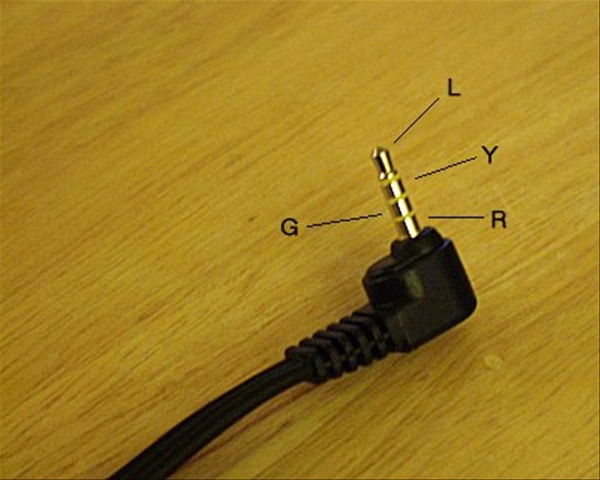
In the picture at the upper right (from CameraHacker.com) there are FOUR rings on this standard video cable.
- Tip - Left Channel
- First Ring - Video
- Second Ring - Ground
- Ring closest to the cable - Right Channel
Notice that the rings are very different...that wouldn't be a problem if the 1/8" jack was ONLY used for audio. However, remember that the iPod needs the jack to work for both standard headphones, and for video. Thus, they had to change the pin assignments for compatibility. (Folks have apparently accused them of changing pins to make money. I don't think so, this makes more sense.)
 Since they had to make the tip longer than a standard headphone tip, it makes sense that they'd put the video farther down (deeper into the headphone jack).
- Tip - Left Channel
- First Ring - Right Channel
- Second Ring - Ground
- Ring closest to the cable - Video
 This means that when using an standard RC 1/8" AV Cable on an iPod, that the Video now runs through the red wire and the Right Channel is now in the yellow wire.
After I figured this out, I saw this article on O'Reilly, but this gentleman, IMHO, got it wrong, as he has reversed his right and left audio channels now. You just need to swap Yellow and Red.
About Scott
Scott Hanselman is a former professor, former Chief Architect in finance, now speaker, consultant, father, diabetic, and Microsoft employee. He is a failed stand-up comic, a cornrower, and a book author.


About Newsletter

http://www.alpinetop.com/p/10002574/Apple-iPod-Video-30G/3.5-mm-to-RCA-Cable/product.html

Anyway, I'll get my 30gb iPod Video (I liked the smaller form factor) next week, and this comes so timely :)
Thanks!

Comments are closed.
is there a possibility that apple ships different combinations ?
Otherwise
=========
"so I went looking for a standard RCA adapter around the house that one uses to hook up a camcorder."
I need such an adapter for my SONY digital camcorder -- would you know where to get the cheapest one on the net ? What should I be looking for (what is the name for this adapter) .
Thank you,
BR,
~