HTTP Error 404.17 - PHP on IIS7 under 64bit Vista
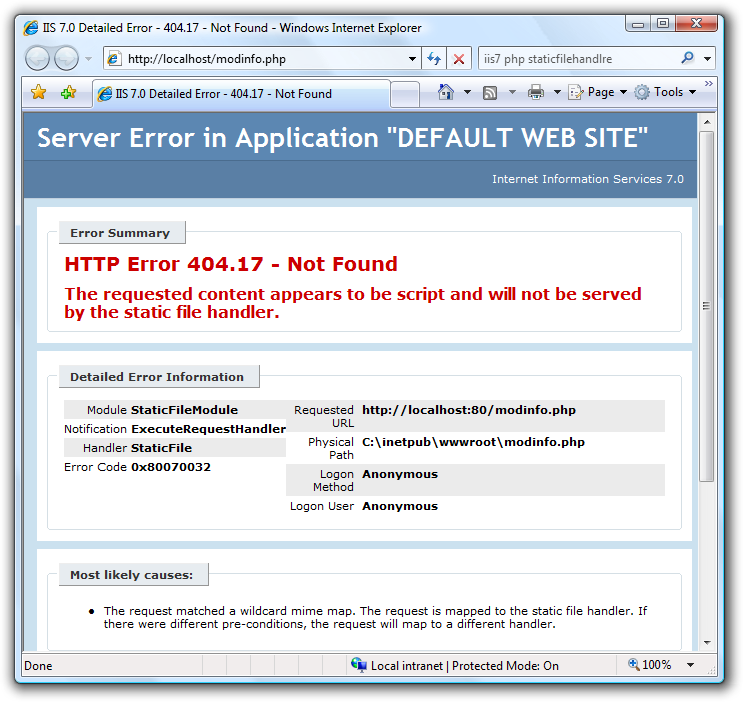 If you're getting...
"HTTP Error 404.17 - Not Found - The requested content appears to be script and will not be served by the static file handler."
...on Vista while trying to get PHP working under IIS7 with the standard ISAPI "php5isapi.dll" ask yourself, are you running 64-bit? That ISAPI DLL is a 32-bit DLL, so you'll have to either change your default Application Pool to enable 32-bit, or preferably create a separate 32-bit AppPool for your PHP Application.
Right click on the Application Pool and select "Advanced Settings" then "Enable 32-bit Applications."
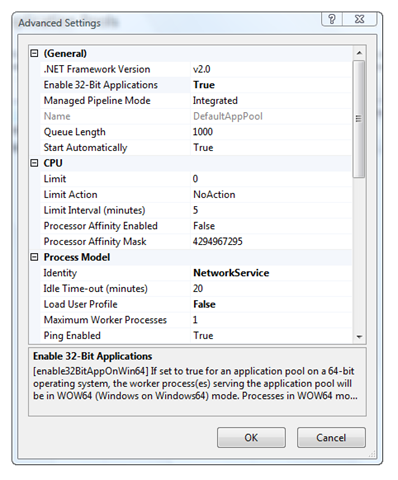
At this point, you're all set with the standard ISAPI PHP stuff.
%20-%20Windows%20Internet%20Explorer_2.png)
Even better, consider using the FastCGI for IIS component. I'll do a screencast on that soon.
About Scott
Scott Hanselman is a former professor, former Chief Architect in finance, now speaker, consultant, father, diabetic, and Microsoft employee. He is a failed stand-up comic, a cornrower, and a book author.


About Newsletter

 Windows
Additionally, on x64 ISAPI requires your php5isapi.dll be the same bitness as w3wp.exe, whereas with CGI and FastCGI php-cgi.exe can be a different bitness to w3wp.exe.

But good to see ! More PHP posts pl.
For starters what's your preferred editor / environment for php coding ?
Thanks for the great postings - keep'em coming!


http://blog.gadodia.net/php-5-on-iis-6-giving-404-error-and-how-to-fix-it/
I really had a tough time figuring that one out...

Comments are closed.