« 作者:Scott Hanselman 首席工程師 | Main | Building MSI files from NAnt and Updatin... »

Intellisense and NAnt .build files in VS.NET

Posted 2004-03-30 11:32 AM in Nant | XML.

This has been blogged about before here and there, but I wanted to share it as I had to mess with it yesterday. 

Getting Intellisquish to work with NAnt .build files in VS.NET:

  1. Copy this file: nant-current.xsd (101.06 KB) to 'C:\Program Files\Microsoft Visual Studio .NET 2003\Common7\Packages\schemas\xml' on your system.
  2. In your NAnt build file (I make my with the extension .build) include this xmlns attribute:

    <project default="all" basedir="." xmlns="http://nant.sf.net/schemas/nant-0.84.win32.net-1.0.xsd">

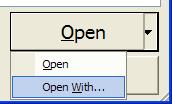
  3. When you File|Open your .build file, notice the TINY down arrow on the Open button.  Click it, go to Open With...

  4. In Open With, select HTML/XML Editor.  There you go, NAnt Build files with Intellisense. 

If anyone knows how to tell VS.NET to ALWAYS open .build files with the XML Editor (without messing up any other file types) tell me, and then we can skip steps 3 and 4.

There is also some nice stuff on MSDN about Authoring Custom XML Schemas for use in VS.NET.

Tracked by:
http://www.nantz.org/DasBlog/PermaLink.aspx?guid=818a283b-8e49-4f81-8efd-25c5e75... [Pingback]
"Intellisense and NAnt .build files in VS.NET" (吴海燕) [Trackback]
"Enable Intellisense for NANT build files in VS.NET" (Ram Gopinathan's Blog) [Trackback]
http://jemos.com/PermaLink,guid,ec3c96d1-8f13-4b73-aaaf-ae95e6b91a23.aspx [Pingback]


Tuesday, March 30, 2004 12:38:06 PM (Pacific Standard Time, UTC-08:00)
Do steps 1 and 2, but then go download VSTweak (http://www.gotdotnet.com/Community/Workspaces/Workspace.aspx?id=b9330ea5-096d-45b7-8a5b-17450d7a0d5a). It allows you to add a custom extension (.build) and have it treated like it was a common extension (.xml). Then when you open .build files, it automatically throws them into the HTML/XML editor.
Tuesday, March 30, 2004 1:05:39 PM (Pacific Standard Time, UTC-08:00)
Click the "Set as Default" button in the "Open With" dialog.
Tuesday, March 30, 2004 4:32:53 PM (Pacific Standard Time, UTC-08:00)
What Chris said.
Sean Malloy
Wednesday, April 07, 2004 9:13:58 AM (Pacific Standard Time, UTC-08:00)
When I follow the steps above, I get squiggly lines below all my property elements; the tooltip says "The active schema does not support the element 'property'." All of my properties work correctly when running NAnt, however.

Anyone know why this is and how to fix it?
Thursday, April 22, 2004 9:20:00 PM (Pacific Standard Time, UTC-08:00)
Same problem here, may someone help?
Jack
Thursday, August 19, 2004 6:38:22 AM (Pacific Standard Time, UTC-08:00)
It is very easy to create the schema file yourself...just create and run a simple build file as described on my Blog (http://dukeytoo.blogspot.com/2004/08/nant-schema-file-for-vss-2003.html).

(I tried to post it here in the comment, but ASPX compained about dangerous tags. I'm too lazy to escape them out, so...)
Thursday, August 19, 2004 12:23:55 PM (Pacific Standard Time, UTC-08:00)
I see you have already been told how to make it the default. Here is a posting from my Blog explaining the whole process.

http://objectsharp.com/Blogs/dave/archive/2004/06/04/575.aspx
Friday, January 14, 2005 8:05:16 AM (Pacific Standard Time, UTC-08:00)
The xsd for Nant is incorrect. (reason for squiggly lines). Inside of the project and target elements, it refers to an element properties of type nant:properties. I think the element name should be property in these two places (and possibly others).
Tim Wilson
Tuesday, January 31, 2006 3:29:01 PM (Pacific Standard Time, UTC-08:00)
Make sure if you have any nant include tasks that the included projects have the same namespace. If not you're likely to encounter an unlikely error: BUILD FAILED - Target 'foobar' does not exist in this project.

See details here:

http://dotnetbkm.blogspot.com/2006/01/nant-files-and-xml-namespaces.html
Comments are closed.

Contact

Sponsors

Hosting By

Hot Topics

Tags

Calendar

<November 2009>
SunMonTueWedThuFriSat
25262728293031
1234567
891011121314
15161718192021
22232425262728
293012345

Archives

November, 2009 (2)
October, 2009 (19)
September, 2009 (11)
August, 2009 (12)
July, 2009 (21)
June, 2009 (26)
May, 2009 (16)
April, 2009 (13)
March, 2009 (17)
February, 2009 (17)
January, 2009 (18)
December, 2008 (32)
November, 2008 (17)
October, 2008 (22)
September, 2008 (16)
August, 2008 (14)
July, 2008 (25)
June, 2008 (19)
May, 2008 (17)
April, 2008 (17)
March, 2008 (26)
February, 2008 (21)
January, 2008 (28)
December, 2007 (19)
November, 2007 (17)
October, 2007 (31)
September, 2007 (39)
August, 2007 (37)
July, 2007 (43)
June, 2007 (37)
May, 2007 (32)
April, 2007 (38)
March, 2007 (29)
February, 2007 (46)
January, 2007 (31)
December, 2006 (27)
November, 2006 (31)
October, 2006 (32)
September, 2006 (39)
August, 2006 (34)
July, 2006 (40)
June, 2006 (18)
May, 2006 (31)
April, 2006 (34)
March, 2006 (30)
February, 2006 (38)
January, 2006 (44)
December, 2005 (19)
November, 2005 (34)
October, 2005 (24)
September, 2005 (37)
August, 2005 (20)
July, 2005 (24)
June, 2005 (33)
May, 2005 (16)
April, 2005 (22)
March, 2005 (34)
February, 2005 (15)
January, 2005 (37)
December, 2004 (28)
November, 2004 (30)
October, 2004 (34)
September, 2004 (22)
August, 2004 (34)
July, 2004 (18)
June, 2004 (64)
May, 2004 (49)
April, 2004 (21)
March, 2004 (29)
February, 2004 (29)
January, 2004 (36)
December, 2003 (25)
November, 2003 (24)
October, 2003 (59)
September, 2003 (42)
August, 2003 (24)
July, 2003 (44)
June, 2003 (29)
May, 2003 (21)
April, 2003 (30)
March, 2003 (27)
February, 2003 (47)
January, 2003 (50)
December, 2002 (31)
November, 2002 (38)
October, 2002 (44)
September, 2002 (15)
May, 2002 (2)
April, 2002 (4)

Google Ads