NuGet Package of the Week #7 - ELMAH (Error Logging Modules and Handlers) with SQL Server Compact
Hey, have you implemented the NuGet Action Plan? Get on it, it'll take only 5 minutes: NuGet Action Plan - Upgrade to 1.3, Setup Automatic Updates, Get NuGet Package Explorer. NuGet 1.3 is out, so make sure you're set to automatically update!
The Backstory: I was thinking since the NuGet .NET package management site is starting to fill up that I should start looking for gems (no pun intended) in there. You know, really useful stuff that folks might otherwise not find. I'll look for mostly open source projects, ones I think are really useful. I'll look at how they built their NuGet packages, if there's anything interesting about the way the designed the out of the box experience (and anything they could do to make it better) as well as what the package itself does.
This week's Package of the Week is "ELMAH 1.2 with SQL Compact."

You may already use ELMAH. Don't stop reading now, because you're going to need this information!
Now, I've been blogging and promoting ELMAH (Error Logging Modules and Handlers) for years. It's the first thing I add to any ASP.NET project of any importance. It's one of the great little gems of ASP.NET open source.
I've shown "install-package elmah" in a number of talks and videos as my go-to demo for how NuGet and a well structured OSS package get you started quickly. Recently the ELMAH team has started to do some restructuring of their packages, and I wanted to showcase their work so you can not only learn from it, but also implement similar structures in your own packages.
First, spend a few minutes checking out how ELMAH works and how it can add to your ASP.NET project. Now, let's look at the (currently three, soon to be more) ELMAH packages that are up on NuGet.org.
There's currently:
- ELMAH Core Library (no config) - "Core library for ELMAH (Error Logging Modules and Handlers) without any configuration"
- This one includes just the library. If you already have a custom ELMAH configuration or you want to create a new one, you can use and depend on this "core" package.
- ELMAH - "ELMAH with initial configuration for getting started quickly. ELMAH (Error Logging Modules and Handlers) is an application-wide error logging facility that is completely pluggable. It can be dynamically added to a running ASP.NET web application, or even all ASP.NET web applications on a machine, without any need for re-compilation or re-deployment."
- This one includes the basics you'll need to for a drop-in/just-works configuration. This isn't the "core" library, but rather one that depends on the core. It's the "getting started" one.
- ELMAH on MS SQL Server Compact - "ELMAH with configuration for getting started quickly on a Microsoft SQL Server Compact database as the error log."
- This package depends on the Elmah library and Elmah.CoreLibrary package as well as SqlServerCompact and adds configuration for using them together.
- Dependency chain: elmah.sqlservercompact -> elmah -> elmah.corelibrary
Here's the web.config.transform that elmah.sqlservercompact adds to your base ELMAH web.config:
<configuration>
  <elmah>
    <errorLogtype="Elmah.SqlServerCompactErrorLog, Elmah"connectionStringName="elmah-sqlservercompact"/>
  </elmah>
  <connectionStrings>
    <addname="elmah-sqlservercompact"connectionString="Data Source=|DataDirectory|\Elmah.sdf"/>
  </connectionStrings>
</configuration>
 Give it a try, it's easy, just install-package elmah.sqlservercompact. This basic package dependency structure will enable the Elmah guys to create "quick starts" with different configurations that each depend on elmah, which depends on the elmah.corelibrary.
ELMAH supports many formats for storing errors, but I think that SQL Server Compact is a great choice for small to medium size applications.
- Everything in one place and queryable.
- No mess of text files or XML files
- Database survives application restarts/recycles
If you're using a WebFarm, you might want to use a central SQL Server instance, but I know a number of folks who run WebFarms and still prefer their errors on a per WebServer basis.
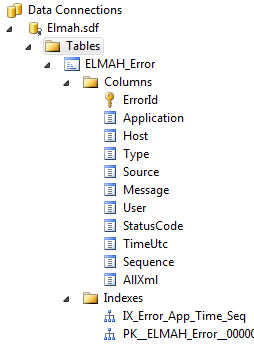
When your application starts up, ELMAH will put the Elmah.sdf in your ~\App_Data folder. The database is structured like this image at right. With the SQL Server Compact tooling that's added with Visual Studio 2010 SP1 you can open the SDF file right in VS and query it if you like.
If you prefer a different backend for your logs, we should soon see NuGet "quick start" packages for many of the supported ELMAH storage solutions. You can even get your errors as RSS or JSON!
- Microsoft SQL Server
- Oracle (OracleErrorLog)
- SQLite (version 3) database file
- Microsoft Access (AccessErrorLog)
- Loose XML files
- RAM (in-memory)
- SQL Server Compact Edition
- MySQL
- PostgreSQL
Also, be aware that Elmah has just be updated to version 1.2 with a number of new features and fixes. ELMAH works in .NET 1.1 and .NET 2, so there's no excuse for not checking it out!
_2.png "Screenshot of an ELMAH log")
Enjoy, and thanks to the ELMAH team for putting up with my nagging, bug reports and reviews over the last few months! It's only because I love the project so much!
Related Links
- ELMAH: Error Logging Modules and Handlers for ASP.NET (and MVC too!)
- ELMAH and Exception Driven Development FTW
- Good Exception Management Rules of Thumb - Back to Basics Edition
- Other blog posts in the NuGet Package of the Week category
About Scott
Scott Hanselman is a former professor, former Chief Architect in finance, now speaker, consultant, father, diabetic, and Microsoft employee. He is a failed stand-up comic, a cornrower, and a book author.


About Newsletter

 Justin King

ELMAH works in .NET 1.1 and .NET 2, so there's no excuse for not checking it out!
True, but just a clarification: Nuget only works in Visual Studio 2010, so if you plan to use it on earlier projects (VS 2005 or 2008), you must upgrade the project to 2010 or configure it manually. If you are still using VS 2003, then your only choice is manual configuration.
Keep the great articles coming, Scott!

If you prefer a different backend for your logs, we should get NuGet "quick start" packages for many of the supported ELMAH stores these. You can even get your errors as RSS or JSON!
I believe that there is words missing in the first sentence quoted above. Can it please be corrected.


Quick question Scott: how are you generating those command line graphics? They look cool.


We where using the old port from asp for a wile. Now it will be great to have this in silverlight also.


Can you tell me a way by which I can store the Elmah logs in a table that is part of my application database? I am using SQL CE .sdf database in my web application.

Perhaps you can help me. I am recruiting for my client, located in NNJ, who needs a Front-End Senior C# .Net Developer who has exp or knowledge of...
ELMAH (plus CSS, AJAX, Flex, Spark, JQuery - Grids in particular, and Squiggly). Contract, possible perm. I can offer a Competitive rate. Start asap. If interested, please contact me - thank you!
Regards,
Bob Sinno
Business Development Manager
Lancaster Systems, Inc.
IT Staffing Solutions Division
914-967-5700 (office)
bob@lancastersys.com

Comments are closed.