Released: ASP.NET and Web Tools 2012.2 in Context
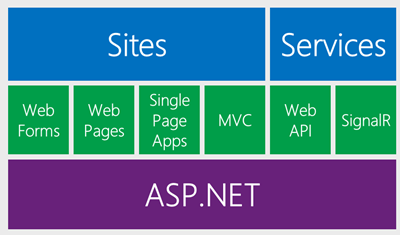 Last year the ASP.NET team started talking about something we're calling "One ASP.NET." I showed some mockups of our ideas last summer at the aspConf Keynote that you can watch online.
We also announced then that we would add new features to ASP.NET as out of band releases (OOB) without breaking existing functionality. This means that developers don't have to wait for the next version of Visual Studio for great web development features today. We're aiming to add to ASP.NET and Web Tools every 6 months.
For those that don't want to wait, Mads and the team also started a feature playground called Web Essentials. This is an extension to Visual Studio that updates all the time with ideas and brainstorms about how VS can be an even better editor for the web. As features "graduate" from Web Essentials, they move into ASP.NET and Web Tools proper. A bunch of features graduate with today's release.
Today we announced ASP.NET and Web Tools 2012.2. You can use the Web Platform Installer to get ASP.NET and Web Tools 2012.2 now.
Get it with the Online Installer:
Get ASP.NET and Web Tools 2012.2 with Web Platform Installer
OR use the Offline Installers:
1. Get the ASP.NET 2012.2 pieces then get one of these
2. Web Tools 2012.2 for any regular Visual Studio 2012 or Web Tools 2012.2 for Visual Studio Web Express
Here's some highlights:
Editors
Syntax Highlighting for client side templating languages within the HTML editor like:
- CoffeeScript
- Mustache
- Handlebars
- JsRender
Other editors get new features as well:
- Syntax Highlighting, intellisense and validation for LESS files.
- Intellisense for Knockout.js bindings!
- CSS Auto Sync - type into the CSS editor while the site running and get live updates in Page Inspector
- Everyone's favorite "Paste JSON as Class." Copy some JSON into the clipboard, paste and get either C# or VB classes for your JSON to serialize into.
Browsers
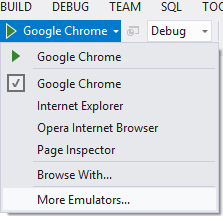 Mobile Emulator support adds extensibility hooks so that third-party emulators and unusual browsers can be installed as a VSIX. The installed emulators will show up in the F5 dropdown, so that developers can preview their websites on a variety of devices. Read more about this feature in my entry on the new BrowserStack integration with Visual Studio.
Packages
With today’s release, all of the ASP.NET templates have updated versions of jQuery, jQuery UI, jQuery Validation, Modernizr, Knockout, and other open source NuGet packages. Your existing projects won't update unless you update them explicitly.
ASP.NET
- OData support in ASP.NET Web API
- SignalR included out of the box and fully supported
- Web Forms now supports Friendly URLs (no more .aspx extension)
- Web Forms supports device (mobile) specific pages, so product.aspx can also have product.mobile.aspx.
- Updated Single Page Application template
- MVC Facebook Application Template
- Web Sites get the same publishing tools as Web Projects
These are just the highlights. But let me call out one specific feature that gets us closer to one of the main goals for One ASP.NET which is what I call a more level playing field.
Community Project Templates
One of the most significant "under the hood" changes is the ability to add a project template via a VSIX.
We'll be seeing an update to the Visual Studio Gallery soon that will make it so you can upload your own VSIX files (Visual Studio Extensions) that can be installed (and easily updated) into the ASP.NET MVC File New Project dialog with one click.
It's important to know that we're only halfway there. This is likely not what the final unified One ASP.NET dialog will end up looking like, but it's a start as it's a good place to open up for new templates.
Phrased differently, project templates should be as easy to share as NuGet packages. That's a goal.
Another goal is to be able to take an example project that looks the way you want, with the NuGet packages setup as you like them, then "Save As | Project Template" then publish the resulting template/VSIX to the gallery. That means projects like NancyFX, or FubuMvc or whatever you can think of can live next to out of the box templates.
Here's the initial documentation on how you can create VSIXs of project templates, get in this dialog and make it easy to spread your vision of a great web app. We are working to make this process fewer steps and unify things, but this works great now with VS2012.2 so you can get started today. Stay tuned for more on this.
In the near future we'd like to see the community sharing project templates that look the way the community wants them to look, living side by side with templates from Microsoft.
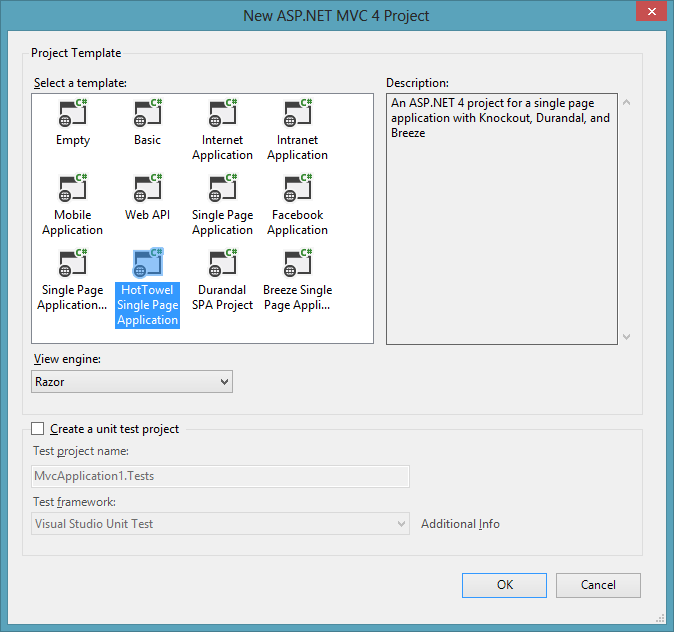
As start, we're announcing four Single Page Application (SPA) templates you can install now. Please note that these community templates could be anything, the VSIX hooks are wide open, it's just that the first few happen to be SPA templates.
- Ember - a template using Emberjs and Handlebars.
- Durandal - a template with Durandal at its heart, bringing in require.js, knockout.js and more.
- Breeze - a template using Breeze.js.
And, a clever play on words from John Papa (because what do you get in a SPA?)
- HotTowel - a more complex template that includes knockout, bootstrap, sammy, toastr, q, momentjs, breeze and puts them all together into one SPA example.
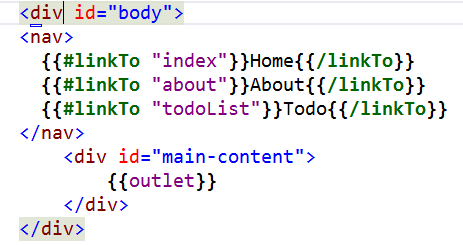
Note how nice the HTML editor looks when working on an Ember project, for example. We've got syntax highlighting, HTML5 Intellisense and coloring in our Mustache templates.
Remember, you'll need the 2012.2 release to see these new templates, so use Web Platform Installer to get ASP.NET and Web Tools 2012.2 now. And, if you want check out our future playground features like Zen Coding, CoffeeScript and lots more, also pick up Web Essentials. Note that Web Essentials is a small extension and if it causes you any trouble you can just disable it.
Should you fear this release?
ASP.NET and Web Tools 2012.2 doesn't change any GAC'ed (Global Assembly Cache) files. It won't mess up your install of ASP.NET or change any existing projects. It's changes are either tooling within Visual Studio, or additions and improvements via local NuGet packages.
Go get it. ASP.NET and Web Tools 2012.2
About Scott
Scott Hanselman is a former professor, former Chief Architect in finance, now speaker, consultant, father, diabetic, and Microsoft employee. He is a failed stand-up comic, a cornrower, and a book author.


About Newsletter


? Possibly was the previous download from that link a RC version and I need to uninstall and reinstall or something for this version?

One question, with Mads taking the LESS/CoffeeScript editors out of Web Essentials, does the new tooling in VS2012.2 replicate that functionality? (preview window, compile to .css and .min.css)
I just sold my team on using LESS based on the awesome support in WE. It would be a shame to lose that experience.

Nick - We move stuff out of Web Essentials and then into 2012.2. Nothing is lost, it's graduated from being a "labs" feature to being official. The LESS support is now a fundamental part of ASP.NET and Web Tools.


i am a big fan of your site it means also you.
boss i request you to send a project to me if you feel good to help me. i am not a genuine student, Actully it project either in visual studio, web based, oracle or even in C shark $ ASP.Net.
Sir my final semester is going and i a,m very tens about our final project. Kindly i request you.
Sir i am very thankful to you send me tow , three projects.because i final to choose one project.
< jutawaisx@gmail.com> Projects send on this id.
Regards:
AWAIS JUTT

Anyone have instructions on how to get off of the nightlies and onto the final stuff?

Just in time for my SignalR experiments to contain the RTW thing :).
Thanks ASP.NET Team!
Rock on!

Running the download you've linked to failed, with the suggestion that I should log on as an administrator, despite the fact that I *am* an administrator, and was running the install elevated.
Starting WebPI elevated and installing from there entered an infinite loop trying to install "Microsoft Web Tooling 1.2 for Visual Studio 2012 - Base locale - February ..."; I eventually had to cancel the setup.
After digging through several 10Mb+ log files, I found that the installer was unable to access the directory "C:\Program Files (x86)\Microsoft Web Tools\". Trying to access the directory in Windows Explorer resulted in several "Access denied" errors, and I couldn't even take ownership. This usually indicates that the directory is pending deletion, but something still has an open handle to it.
Eventually, by using the "close handle" feature from Process Explorer, I was able to close the two handles to this directory which Windows Explorer had opened, and the directory disappeared. The install then worked as expected.
So much for the "easy" install offered by the Web Platform Installer. It's a good job we're not expecting end-users to install this update!

So much for "It won't ... change any existing projects"! >:(
Also, knockout.js support is awesome. Thanks for the early look into 2012.2 :)


Vue - VS itself will get an Update 2 (for non ASP.NET stuff) in a few months, then that will update. Scroll down in that dialog to see Web Tools.
Also, Vue, SignalR is an ITEM template that you add to an existing project. You can also make an empty project, then install-package Microsoft.AspNet.Signalr.Sample.
As I see then most useful ones for wider audience from these for templates are Ember and Breeze as they can be compared with OOB SPA template (same thing, different implementation).
Durandal has simple example about showing images from Thumblr and now let's wait major upgrade to his template by John Papa. There were cool message boxes with fade effects but I would like to see some data moving too.

And no love for Backbone.js either?
But otherwise, awesome update!!


Any chance of the actual MSI direct link?

Where I work we have several applications that use a common template, and we are using a NuGet package to distribute the common parts (like custom web controls and the master page). This allows us to update all the existing applications when, for example, we need to change something in the master page.
This project templates feature looks very interesting, it would be great to have "update template" support in it.
By the way, I'll try it out as soon as possible :)
Thanks,
Paolo

A warning: i tend to watch images and read later (wrong ? wrong, i know), i kept searching for Durandal template, only finding ten minutes later that i had to manually install them.
Which is perfect, but i saw them in the photo and i wanted it :)
Cheers and thanks for the wonderful support.

Is this an all or nothing scenario, where I need to just update all my links/hrefs site-wide to the friendly, extensionless URLs, and update the paths in all of the web.configs?
The only information I could find on this was an MSDN article from 2009. Any additional info / insight would be much appreciated.

But, how can I change the color of the handlebars-expressions in the dark theme? I've some problems to see colors, and i cant see anything with that color.
All other colors of the dark theme are great!

I like the new intellisense for Knockout bindings. But this only works when I have a script tag in my HTML page referencing the Knockout lib.
I load Knockout via RequireJS, so I don't have a script tag, so how do I enable intellisense in my case?
Kind regards,
Maarten Docter


Right now the previously linked to Git-integration only supports Visual Studio 2012 Update 2 CTP.

Does this mean Mads and team will not be able to fix it via Web Essentials and we'll have to wait for the next cycle of the ASP .NET tooling?


Not to threadjack, but is WCF not getting much press because Web API/SignalR is the direction MS is moving towards, services-wise?


---------------------------
Microsoft Web Platform Installer
---------------------------
An error occurred while parsing EntityName. Line 42134, position 81.
---------------------------
OK
---------------------------
I wonder if this is because I'm using Visual Studio 2012 Update 2 CTP to try the Git support

Underscore is on our radar, but we do have a few issues with it since it uses the same syntax as WebForms code nuggets. That will produce runtime errors when used on .aspx pages. However, we are looking into supporting it for non-WebForms file types.
We're planning backbone support as well.
@Lukas Kohler
If you don't like the colors of the Mustache/Handlebar syntax highligting, you can change them in Tools -> Options. There are 3 colors you can set and they all start with "HTML Client..." in the Fonts and Colors settings page.
@Maarten Docter
VS needs a reference to your .js files containing the Knockout view models. You can add a reference by opening the /scripts/_references.js file and drag your .js files onto it to generate ///<reference tags. If you don't have a _reference.js file, you can just create one and VS will automatically pick it up.
@Sam
Most of the errors in the LESS editor have been fixed in the Web Tools 2012.2 download. Some of the errors that wasn't fixed can't be fixed through Web Essentials anyway, since it requires changes to the in-band CSS parser. Don't worry, the next Web Tools update is not that far away :)


Any suggestions?
Thanks

Great work!

Thanks again for all you do in our programming community Scott.

KnockoutJS intellisense for the above works great while this MVC razor call doesn't work at all:
@Html.TextboxFor(m=>m.FirstName, new { data_bind="value: FirstName"})
Nor this one does work:
@Html.EditorFor(m => m.FirstName, new { HtmlAttributes = new { data_bind="value: FirstName } })
Can you please add it too?

Are they not implemented at all?

http://webessentials.uservoice.com/forums/140520-general/suggestions/3588819-provide-syntax-highlighting-for-html-within-templa

Tim
Good times to be a web developer with an MS technology stack inclination, I guess !

There are no new templates etc. However if I go to Web platform installer it insists I have it.
Is there a way to test whether this update is installed in VS2012?

Intellisense for $parent etc. is not included in this first release of the KO Intellisense feature. Expect to see it in a future update.

Is there any framework (out of the box) thats support customer CSS-Themes and resource text files?
We have multiple customers and some of them would like to pay for their inhouse design, others need support multiple cultures...
How can we do this with SPA? Is it mature enough? Are there third party frameworks? Or any other thoughs...
Will there be a template to get an example application to demonstrate this?
Greatings from the Netherlands!
Rolf de Vries

However - if there is strong interest in another template that is a more thorough sample using HotTowel, I will create it. Perhaps at the same time as my new intro course on SPA at Pluralsight (March).

> A bunch of features graduate with today's release.
IMHO switching from a ~15-day release cycle to a 6-month release cycle sounds more like 'retirement' than 'graduation'. i guess it depends who you ask.


Recently I receive lots of feedback about the installation of ASP.NET and Web Tools 2012.2, but I'm not sure what's the root of this problem, you could refer relevant issues from the links below in our asp.net forum, hope for your help,
http://forums.asp.net/p/1884784/5318025.aspx/1?p=True&t=634976817590380160
http://forums.asp.net/t/1885029.aspx/1?ASP+NET+2012+2+Missing+Templates
With best regards
Angie xu

I found that the knockout intellisense and razor seem to clash on CSHtml pages, in particular with things like attr: { or any other binding that involves curly braces.
If I use data-bind="attr: {id : 'test' }", that's fine.
But if I use data-bind="attr: {id: '@Html.IdFor(m=>m.Id)'}", it causes an "Unterminated string constant" issue and the autoformat adds spaces after the razor syntax - which prevents any use of autoformatting in the documents.
Is there a way to turn this feature off / report the bug?


So far no one talked about Visual Studio 2012 Express for Web updating Web Tools 2012.2 yet, here it goes…
I've installed it via your Web Tools 2012.2 for Visual Studio Web Express, the installation were successfully, but it seems only installed:
MS Web Developer Tools 2012.2 - VS Express 2012 for Web
I don't see any extra templates, updated versions of jQuery etc. Only seeing changes FROM Web Developer Tools 1.0.30710.0 TO 1.2.40208.0
Does it suppose this way for VS 2012 Express for Web?
I can't install it via WPI, got infinite loop(first I tried regular version)! I guess I must only use the Express link for VS Express?
BTW, in the same machine, I have VS 2010 Premium with Web Essential(Web Standards Update), and Visual Studio 2012 Express for Web.
Problem/Question is - I don't get the Web Tools 2012.2 for my VS 2012 Express whatever I did.
Any help appreciated!
Thanks!

Microsoft ASP.NET and Web Frameworks 2012.2
http://download.microsoft.com/download/6/5/6/6562AFBE-9503-4E64-970C-1427133FCD73/AspNetWebTools2012Setup.exe
Thanks!
thx.

It seems that the Web Essentials configuration settings still allow you to change how Web Tools outputs LESS, ex minified, in a /css directory, etc. If it works, i guess I shouldn't complain.
One missing feature is that a file that contains an include will not recompile if the include is saved. Use Winless http://winless.org if you need that functionality.
Or did I miss that in Web Tools?
thx -- john

In order to further extend `VS2012 Javascript Intellisense` I have created this project on Github https://github.com/dotnetwise/VS2012-Javascript-Intellisense
Package also on Nuget https://nuget.org/packages/VS2012-Javascript-Intellisense/
This enables more icons to your javascript code members e.g `namespace`, `class`, `enum`, `interface`, fields by their type and even showing which methods come from `function's prototype` and even common shared from `Object.prototype`!
GitHub link for the above VS2012 Javascript Intellisense
And Nuget link

Site_Themed.less
@import "ThemeColors.less";
@import "Site.less";
ThemeColors.less
@foreground: red;
Site.less
body { color: @foreground; }That is, Site.less uses variables defined in a file that it doesn't import itself, but that are in scope everytime it's processed. I have multiple theme files that define the colours differently, and a wrapper for each to generate the actual CSS I use. Unfortunately, the editor don't really know how to resolve these variables and thus complains about every use. It'd be nice if there was a way to cluebat VS into looking for variable definitions in an arbitrary other file, using something similar to /// <reference ...> that Javascript IntelliSense files have.


Sooo confusing, I thought you guys (Microsoft) were going to do easier to understand product naming?


The HTML Editor looks absolutely horrible in Dark Theme as well.


Comments are closed.
Cheers