Ultimate Developer PC 2.0 - Part 3 - UPDATE on Building a WEI 7.9 and RFC for building a GOM (God's Own Machine)
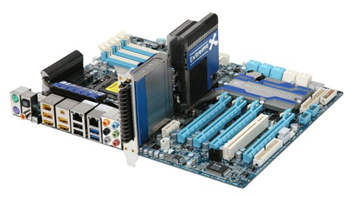 As a reminder, if you're just turning in, here's our glossary:
 - WEI - Windows Experience Index. How fast is your machine? If you say "I've got a WEI 6.0" you've got a good machine, for example.
- RFC - Request for Comments. This is crowdsourcing. I want to know what YOU think we need to do to make a machine that is so fast that it'll max out at WEI 7.9 and be a GOM.
- GOM - God's Own Machine. If the Good Lord had a computer, it'd be a 7.9. We want to build that machine.
There have been two posts so far:
- Ultimate Developer PC 2.0 - Part 1 - Building a WEI 7.9 and RFC for building a GOM (God's Own Machine)
- Ultimate Developer PC 2.0 - Part 2 - UPDATE and PODCAST on Building a WEI 7.9 and RFC for building a GOM (God's Own Machine)
- Also, we hosted a great podcast last week with some actual members of the WEI team and asked their ideas on how we could create the Ultimate Developer PC.
There were lots of great comments on both posts, and arguably there is more content in the comments than the posts! I want to give a big thank you to all the thoughtful people who have commented. You all know more than I do about this topic.
The point of this exercise is several-fold.
- First, I haven't built a machine in 3 years, since the first Ultimate PC, lead by Jeff Atwood. Every Jedi should build their own lightsaber.
- Second, it'd be interesting to see if it's easy (or how hard) to get a 7.9 WEI (the current maximum) on a machine given a $3000 limit. It's also interesting to see what a $1000 PC gets. Yes, we all realize that WEI is just one benchmark, but it's a public one and it's built into Windows, so it's interesting.
- Third, I am not much of a gamer (I have a Xbox for that) but I do run several large 24" to 30" monitors and don't like waiting for my Windows to repaint, so do like a faster video card.
Here's some scores, some results, and some commentary.
Baseline. My Laptop.
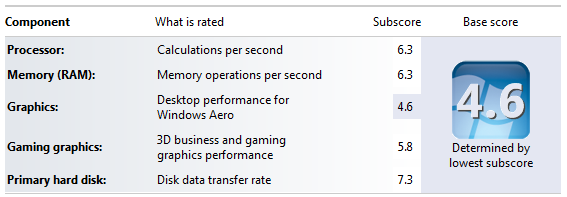
This is the WEI my stock Lenovo W500 8Gb with an aftermarket OCZ Vertex 256gig SSD.
Using Visual Studio 2010 and building the trunk of the NerdDinner project (a smallish sized ASP.NET app) is about 3 to 4 seconds. On my new PC, building NerdDinner from scratch happens before I can say "one one-thousand." I could try it from MSBuild and the command line...
Measuring Commands with PowerShell
Here's a better way to measure. Taking Chris Tavares' vsvars32.ps2, changed slightly for Visual Studio 2010 and run under PowerShell x86, I add this to my local machine's Microsoft.PowerShell_profile.ps1. (As well as running "set-executionpolicy unrestricted" as admin. Or set it to whatever you like).
function Get-Batchfile ($file) {
    $cmd = "`"$file`" & set"
    cmd /c $cmd | Foreach-Object {
        $p, $v = $_.split('=')
        Set-Item -path env:$p -value $v
    }
}

function VsVars32($version = "10.0")
{
    $key = "HKLM:SOFTWARE\Microsoft\VisualStudio\" + $version
    $VsKey = get-ItemProperty $key
    $VsInstallPath = [System.IO.Path]::GetDirectoryName($VsKey.InstallDir)
    $VsToolsDir = [System.IO.Path]::GetDirectoryName($VsInstallPath)
    $VsToolsDir = [System.IO.Path]::Combine($VsToolsDir, "Tools")
    $BatchFile = [System.IO.Path]::Combine($VsToolsDir, "vsvars32.bat")
    Get-Batchfile $BatchFile
    [System.Console]::Title = "Visual Studio " + $version + " Windows Powershell"
}
Thanks to Chris, now I can type "VsVars32" at any PowerShell prompt and I'm immediately setup with a Visual Studio Command Line environment. Just as an FYI, while MSBuild does report timings, since I'm using PowerShell, I can surround any command with "measure-command" as in.
measure-command { msbuild /t:rebuild .\NerdDinner.sln }
In this case from the command line, NerdDinner takes 1900ms on my laptop and 900ms on my desktop, so this isn't a good test as the app is far too small.
Of course, I can also run msbuild with the /m switch and get parallel builds on multi-core machines. However, since NerdDinner only has two projects, I only get a 10% performance increase. Let's try a more significant project.
The Upfront Conclusion: How about building yesterday's release of NHibernate 3.0 Alpha?
Here's the results, building NHibernate 3.0 Alpha using NHibernate.Everything.sln:
| Times are in seconds | Lenovo W500 w/ SSD | Ultimate PC 1.0 | Ultimate PC 2.0 |
|---|---|---|---|
| MSBuild /t:rebuild | 36.05 | 35.52 | 16.12 |
| MSBuild /t:rebuild /m | 24.98 | 25.57 | 12.53 |
| MSBuild | 6.17 | 6.99 | 3.11 |
| MSBuild /m | 5.91 | 6.66 | 2.72 |
Interesting that last year's laptop is very competitive with the original "Ultimate PC" from 2007 (still a beefy Quad Core) due to the laptop's new SSD.
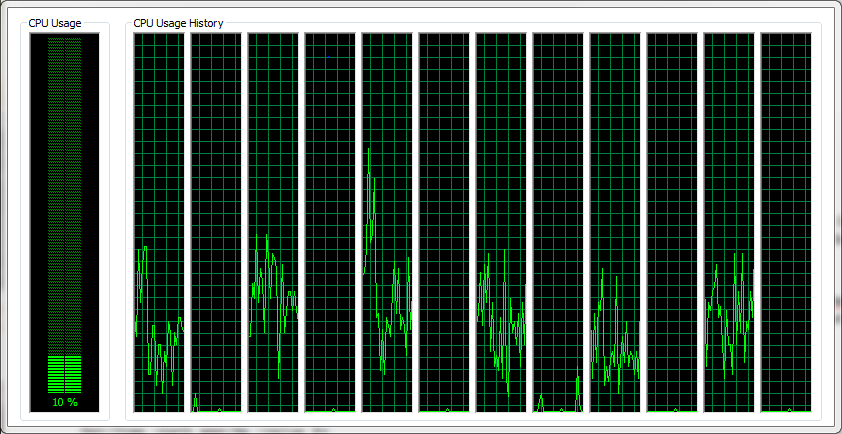
Still, against the best numbers the new PC is effectively twice as fast or more at everything. Yesterday I was encoding a large HD video for Channel 9 and while the Lenovo took 3 hours, the new Ultimate PC 2.0 took 15 minutes. In some cases, it'll save hours on computationally intensive tasks, I believe. Additionally, for computationally intensive multi-tasking that have caused me to use multiple computers in the past, this machine has handled easily. For example, while I was encoding that video, I was also streaming live 720p HD video over Office Communicator. This takes at least 2 procs working full and slowed my Ultimate PC 1.0 down to the point of uselessness. The aggregate CPU on the new machine never went above 12% while just streaming video.
While I did go overboard on the Video Card, I'm extremely happy with the computer so far. I threw in an NVidia GTX275 I had laying around to run another 22" monitor while the GTX480 is running the 30" and a 24". The GTX480 does run hot. For you, dear reader, a GTX275 or any decent $100 card would do you just fine and you'd save a lot of money.
Here's the final parts list along with some caveats. Remember, building your own PC does come with risks, as you're sometimes putting together different companies parts and things don't always work perfectly. You can get a great 7.x WEI machine for $1000 from just about anyone.
The Parts List
- $965 Intel Core i7-980X Extreme Edition 3.33GHz LGA 1366 130W Six-Core Desktop Processor
- I haven't overclocked this yet. I'm waiting for a better BIOS release from Gigabyte. If anyone is an expert overclocker and wants to have a chat and maybe do a show, give me a call.
- $699 (with combo actually $480) GIGABYTE GA-X58A-UD9 ATX Intel Motherboard
- This motherboard is picky about power. My original Silverstone refused to boot this board, so I took it back and got an ANTEC and it works first try. The UD5 or UD7 would also have been nice and would have been smaller, but I wanted the USB3 and SATA 6gb/s support.
- $374 OCZ Reaper Edition 12GB (3 x 4GB) 240-Pin DDR3 SDRAM DDR3 1333 (PC3 10666) Low Voltage Desktop Memory
- Apparently the Intel x58 "Nehalem" chipset is finicky about RAM. When I boot the machine - sometimes - it says I have only 8 gigs of RAM (even though the BIOS knows I have 12 gigs and see it). I have to reboot a few times to get the 12 gigs to stick. I'm hoping this is fixed in a BIOS update or a little more voltage on the mobo. This appears to be a widespread issue.
- $320 NVidia GTX 480
- Honestly, any good $100 card will do you. I know I went over the top on this.
- $610 Crucial RealSSD C300 CTFDDAC256MAG-1G1 2.5" MLC Internal Solid State Drive (SSD)
- I needed to flash the BIOS on this SSD before I set it up, but that involved just burning an image to a CD and booting off it. This SSD will get you a 7.9 if you plug it into a SATA 6Gb/s port, or a 7.7 if it's plugged into a SATA 3Gb/s port in my experience.
- $174 Antec TruePOwer TPQ-1000 PowerSupply
- Very quiet, worked nicely and immediately.
- $199 Cooler Master HAF-X Case
- This case is a beast, but it's required for the UD9 motherboard as extended ATX. To be clear, it's big. That said, it's got great airflow, and it's quiet even with all the fans running as they are big low RPM fans.
Also, Shay Erlichmen wrote some Google Apps Javascript and put up a LIVE Google Spreadsheet that will scrape NewEgg's site and put up the current total of all the components. Thanks to Shay!
The Build
I built the case over two 4 hour sessions and broadcasted live to 80 of my close internet friends on UStream. A lot of really smart people helped me out on this build and offered a lot of interesting points.
The first day build went bad because of the power supply issue so we got it built, then spent hours thinking it was a motherboard issue. It was the power supply.
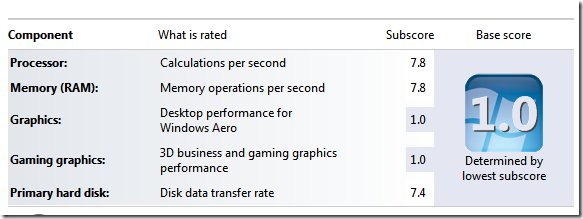
After we assembled the machine and before we installed any drivers, here was the first WEI score. The 1.0s happened because the standard VGA driver loaded.
After installing the Intel Chipset drivers for the Motherboard and the latest NVidia drivers, we were at 7.8 for video and 7.4 all up with the SSD holding us back.
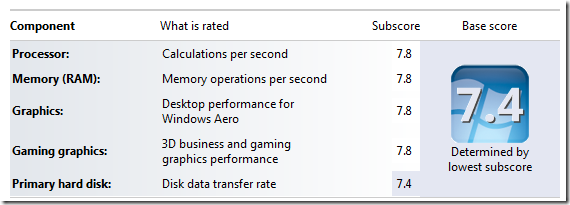
I moved the SSD to another SATA port as this motherboard has multiple SATA chipsets (Intel, Marvel) and installed the latest drivers. In one case, setting the BIOS to IDE instead of AHCI seemed to stick me at 5.9 for disk.
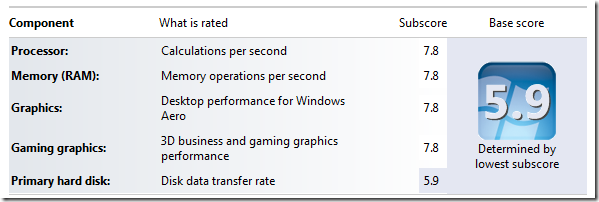
Once I moved onto the Marvel SATA 3 controller with 6 GB/s I got 7.9 on disk. Interestingly the same drive on the Intel SATA 2 controller gets 7.7. The Marvel gets 310MB/s out of the Crucial SSD while the Intel controller gets 270MB/s.
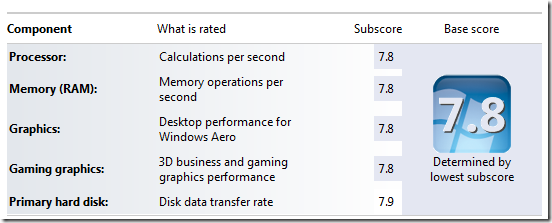
At this point, running everything stock and air-cooled, I have a nice 7.8 machine. I suspect I won't be able to get the Processor to 7.9 without overclocking to 4Ghz. As it is, the machine is running lovely. I wouldn't mind overclocking but I have decided against water cooling as I'm just too old and I need a machine to work 100% of the time. Pete Brown will be water cooling his, he says, so I'll be following his build. That said, if anyone wants to sit with me and chat about if it's possible to get this machine to 4Ghz using air-cooling, give me a holler. As for the graphics, I don't see how I can get to 7.9 without something drastic.
All in all, a great time was had by all. Thanks so much to everyone who helped and to all the wonderful (and waspish) commenters who made this a better experience.
Related Links:
- Hack: Parallel MSBuilds from within the Visual Studio IDE
- Faster Builds with MSBuild using Parallel Builds and Multicore CPUs
- Newegg Ultimate PC 2.0 Price and Links Spreadsheet
- Earlier posts:
- Ultimate Developer PC 2.0 - Part 1 - Building a WEI 7.9 and RFC for building a GOM (God's Own Machine)
- Ultimate Developer PC 2.0 - Part 2 - UPDATE and PODCAST on Building a WEI 7.9 and RFC for building a GOM (God's Own Machine)
- Also, we hosted a great podcast last week with some actual members of the WEI team and asked their ideas on how we could create the Ultimate Developer PC.
- Pete Brown's parallel Ultimate PC Build
- Ultimate PC 1.0
- Podcasts
- Blog Posts
- The CodingHorror Ultimate Developer Rig Throwdown: Part 1 - The idea is presented and my list of
demandsgoals is kicked around. - The CodingHorror Ultimate Developer Rig Throwdown: Part 2 - The hardware list from NewEgg with a total of $1903.00. It'd be probably $1600 or less today, just a few months later.
- The CodingHorror Ultimate Developer Rig Throwdown: Part 3 - Jeff gets my system to boot and I link to him excessively.
- Building a PC, Part I - The Basic Build. Jeff unpacks and get my system to POST in two hours.
- Building a PC, Part II - Lots of pics as Jeff moves beyond BIOS POST and adds my 10,000 RPM Raptor Drives.
- Building a PC, Part III - Jeff digs into the magic and voodoo that is overclocking and pushes my system nearer to 3 Ghz. We're conservative overclockers, though. Remember this is a developer machine, not a Gamer PC.
- Building a PC, Part IV - Jeff adds some damping foam and greats a Basic, Premium and Deluxe Parts List.
- The CodingHorror Ultimate Developer Rig Throwdown: Part 1 - The idea is presented and my list of
Obligatory Taskman Screenshot!
Woohoo!
.About Scott
Scott Hanselman is a former professor, former Chief Architect in finance, now speaker, consultant, father, diabetic, and Microsoft employee. He is a failed stand-up comic, a cornrower, and a book author.


About Newsletter

 Keith Combs
[)amien


But in WHAT Universe does my 1.6GHz Core I7 processor outperform your 3.33GHz Core I7???

First video truncates at 4:37 short first day; this is more of a false start.
http://www.ustream.tv/recorded/8374935
The missing video continues 2 minutes later. (Is not linked to this page)
- a masochist.
I am suprised about your RAM choice only being 1333Mhz it looks like 1600Mhz memory would have got you the 7.9 although you could have gone higher was this just a cost thing?


http://morten.lyhr.dk/2010/01/optimizing-build-times.html
/Morten Lyhr

Seriously, where did you get a GTX 480 for $320?, here in the UK the cheapest i can find is £360 ($560)


This allows me to use my workhorse from anywhere. My laptop is more silent. Putting the workstation in a closet out of the study leaves more room for billy bookshelves ;)


Excellent job on the build - you picked a great set of components! I was wondering if you might be doing another crowdsourced series trying to find the best WEI in a laptop? Rob

hrmmm, godsownmachine.com is available.
Check out these crazy speeds.
That is where the bottleneck is.
http://www.ocztechnologyforum.com/forum/showthread.php?70461-Post-CRYSTAL-DISK-MARK-scores-here&highlight=raid

(Do Two GeForce GTX 460s Beat One GTX 480?). And yes they do so that will give you a 7.9 I think.


The wei has many flaws, the disk subtest is decent but the rest I wouldn't pay much attention to. The memory test is geared towards timings rather than size or clock speed so tightening up your ram a small bit should be plenty to get a 7.9 if you're interested.
You may want to look at Futuremark's PCMark Vantage for what is probably the best multipurpose computing benchmark, heavily weighted to storage performance.
That said as you surely know by now your computer is awesome so congratulations.
Comments are closed.