Visual Studio 2010 - Help Viewer Power Tool BETA - Help Index and Standalone Help
The help system changed in Visual Studio 2010. I totally had a "Who Moved My Cheese" moment, as did many folks.
- Where's my "as I type" Help Index?
- Where's my separate Help Viewer? I don't want help in my browsers, it clutters my tabs.
If you don't install the Help Documentation at the end of the Visual Studio 2010 setup, you help will be online and shown in your default browser. Personally, I like the idea of an external help viewer. I just saw on the Help Team's blog that they released the Help Viewer Power Tool today. It's an unsupported local content Help Viewer.
First, make sure your Help Content is installed locally, rather than served from the web.
- Click Help | Manage Help Settings.
- Click Choose Online or Local. Select Local, a path, then OK.
- Click Install Content from Online (or from Disk)
- Select your content by clicking Add on each topic you want, click OK.
When you've got local help content setup, go install the Help Viewer Power Tool. So what do you get?
The Help Viewer Power Tool supports two modes: in-browser and standalone.
- The Power Tool defaults to an in-browser experience that adds two additional tabs – Index and Search – to the left pane using a Silverlight control. In addition, the left pane is now fully resizable.
- The Power Tool can be configured to provide a standalone experience with three tabs for navigating content: Contents, Search Results, and Index. This mode provides some additional features over the in-browser experience:
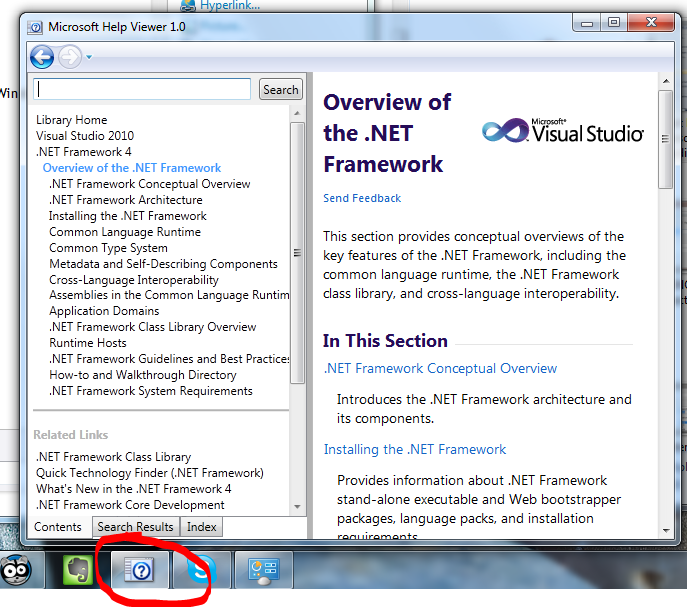
- The help window has its own icon and is easily located in the task bar.· The help window can be pinned to the Win7 Taskbar.
- F1 queries overlay the previous help topic (eliminates tab proliferation).
- The standalone window is resizable and can be positioned independently without affecting browser settings.
Here's what your in-browser Help will look like. Notes the Contents, Search Results and Index on the left:
_2.png "in-browser help")
Here's the standalone Help Viewer. Once you've run it, you can also pin it to Explorer in Windows 7.
How do I switch to standalone mode?
- From your system drive, run the following from an elevated command prompt
(note you might be in \Program files (x86))
cd \program files\microsoft help viewer\v1.0
hlpvwpt.exe standaloneviewer=true - Shut down any instances of the Help Library Agent. Right-click on the Help Library Agent icon in the taskbar and select ‘Exit.
How do I switch back to in-browser mode?
- From your system drive, run the following from an elevated command prompt:
cd \program files\microsoft help viewer\v1.0
hlpvwpt.exe standaloneviewer=false - Shut down any instances of the Help Library Agent. Right-click on the Help Library Agent icon in the taskbar and select ‘Exit.
If you're installing on a non-English system, make sure you read the Readme to make sure your localized help is shown. Also, if you only have IE6, you'll need IE8.
Another way to find the Help Viewer Power Tool
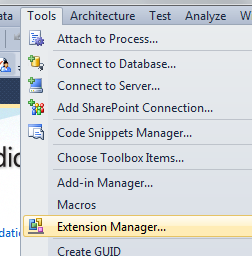
As an aside, you can also just go to the Tools | Extension Manager inside VS2010, and query something like "help viewer power" and you can get to the download page from inside VS.
_2.png "Extension Manager (2)")
Related Links
- How To: Updating multiple VS 2010 installations' Help content with a single download - This technique will show you how to share help between multiple developers via a Shared Drive. This is helpful in constrained bandwidth environments.
- A comment from my blog: "Also, while the updating feature is great, the downloads appear quite large and if you have a number of machines to update then this can be a slow and bandwidth consuming task, is there any way to download and share the help system updates between multiple installations?
- Community Created H3Viewer.exe - Alternative VS 2010 help viewer in the style of DExplore. Features a full TOC, full Index, Search and favorites.
- Keyword Index for Visual Studio 2010 Help Documentation - An unsupported inside-the-IDE Help Client with keyword index.
- Developer Documentation and Help Forum - Ryan, the developer of this tool, will be watching the forums for your feedback.
About Scott
Scott Hanselman is a former professor, former Chief Architect in finance, now speaker, consultant, father, diabetic, and Microsoft employee. He is a failed stand-up comic, a cornrower, and a book author.


About Newsletter

 Eduardo Molteni

Thanks Scott - I've been looking forward to seeing this since you mentioned it last week. I really appreciate your following up on this and kudos to the Help Team for the effort to give some of use our "cheese" back. This will get installed just as soon as I can download it.


Brock - Doesn't the content tab give you the multi-layered view?
Next step is how to add silverlight 4 help contents to the visual studio help ?

I had resigned myself to think VS 2010 was the "Windows Vista" of Visual Studio releases and I had simply reverted to using Visual Studio 2008's MSDN Library for everything except .NET 4.0-specific features/additions.
The thought hadn't really occurred to me to go looking for an alternative help viewer, which is pretty bad, come to think of it, especially since I have just watched Kathy Sierra's presentation at the Business Of Software 2009 conference where she specifically mentioned upgrades causing users to feel like they suck. That was me: feeling helpless (pun intended) after an "upgrade" because the fabulous documentation viewer was replaced with a sucky documentation viewer and neither option in the "Help settings" menu would bring the fabulous documentation viewer back.
Anyway, thanks again for posting about this newfound cheese. :)
- Oli

Help Viewer Power tool looks good though not perfect. It's a step in right direction. Keep up the great work.

As VS2010 don't bring that much new features , we stay with VS2008. And the new help system is much to blame. Serious, what idiot thought that a help index is not important.
H3Viewer solved some of the problems. And I still haven't heard from Microsoft the reason WHY the help system is changed. What issues are now solved that justify this horrible help system?

I will try to get the answer as to WHY it changed, because *I* don't know.

it does not exist in the index?
neither "list" not "List<T>" does produce a result in the Index.
I can find "List<T>" in the index, if I enter "list" and then scroll manually down until I find it.
datacontext
.datatable
.where
(
linq expression
)
indented a few tabs in, and I insert a #region between the datatable and the where my tabbing gets all messed up.
I was fond of DEXPLORE.EXE after getting used to it. So when I first opened the VS2010 local help I cringed at the lack of an index. Ah well, these things happen, at least search was still there.
I'm going to download the Help Viewer Power Tool ASAP.
BTW, MSDN online ScriptFree view absolutely, positively rocks. It's so fast that I've started using online help again. It occasionally misplaces an image but if I really need to see the image in position then I can switch to Classic. The gods of content delivery clearly favor ScriptFree because it's probably the fastest text site I've ever accessed (at least in recent memory).


Is this a known issue?


Brian - I'm not seeing that. Uninstall/reinstall? I'll get the author to join us in the comments here, or you can report it in the forums.
RR - You're preaching to the choir.
Do the words "Windows Help" mean anything to anyone?


Nope -- it only show the ancestors and the immediate children. The VS2008 help viewer contents tree view allowed you to expand the nodes in the tree without changing the topic you were viewing. You could then get an idea of how deep the child nodes were and see the siblings as well.
I have a problem with my local MSDN help in VS 2010. Each time I want to install local help from HelpContentSetup.msha I get the error message:
Tag:Help library manger-Microsoft Help Viewer 1.
Message: An exception has occurred. See the event log for details.
I don't know what is the problem.
please hep me with this.
Yours,
Afi


Comments are closed.