VS Refactoring Essentials (formerly) NR6Pack - Free analyzers and refactoring for Visual Studio 2015
There are some amazing free and open source C# and VB.NET analyzers and refactorings that you can download and use now in Visual Studio 2015. Formerly called "NR6Pack" they have now be renamed VS Refactoring Essentials, a nice nod to VSWebEssentials I must say.
The best part, of course, is that since the Visual Studio Community Edition is not only FREE but also now supports extensions, that any open source or indie developer can get pack some serious power into their Visual Studio installations.
There's some interesting history here as the project and its core technology has been around for a while. It's moved from SharpDevelop into NRefactory, then NRPack, and now with the major Roslyn refactor by Mike Krüger, you've got a nice Roslyn code-base and a free extension for all called VS Refactoring Essentials.
There's lots of great refactorings, too many to include screenshots for all of them, but here's a few favorites.
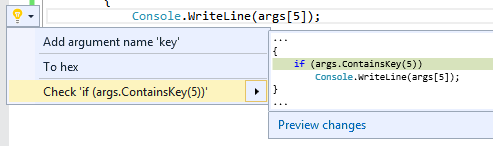
Sometimes you'll dig deep into a dictionary without being defensive. VS Refactoring Essentials will notice and check the dictionary key first. Note that you'll always get a preview of what it's going to change first!
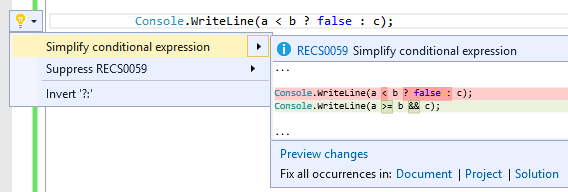
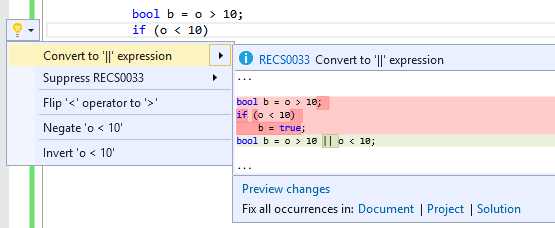
Conditionals can sometimes get away from you. VS Refactoring Essentials will simplify common conditionals and make them easier to read.
When setting boolean flags you'll sometimes set it, check something, and update that same flag. This refactoring will notice that and do it all on one line for you.
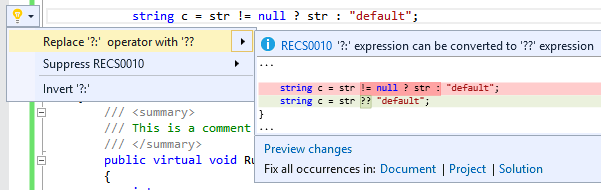
I never get ?: and ?? correct. VS Refactoring Essentials will help you move between ternary operators and null coalescing.
FYI - This is a purely open source project that is not affiliated with Microsoft. It's part of the SharpDevelop OSS project and is MIT-licensed. Big thanks to the SharpDevelop team!
NOTE: Visual Studio 2015 will launch on July 20th. Be sure to download Visual Studio 2015 Community on that date. Until then, the V2015RC of Community is here.
Be sure to follow @VSRefactoring on twitter and thanks for them for their hard work and community focus! Go download Refactoring Essentials here for VS2015. Report issues on their GitHub.
About Scott
Scott Hanselman is a former professor, former Chief Architect in finance, now speaker, consultant, father, diabetic, and Microsoft employee. He is a failed stand-up comic, a cornrower, and a book author.


About Newsletter



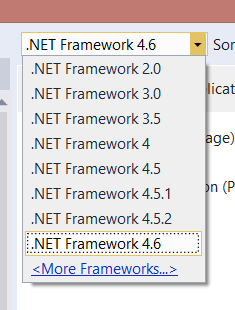 I've been working with Visual Studio 2015 lately, even for older projects. You can create and edit all kids of .NET app from .NET 2.0 all the way up through .NET 4.6, as well as ASP.NET 5 apps on the Core CLR.