Scott Hanselman

Totally unsupported hacks - Add Windows Terminal to the Win+X Shortcut menu

August 27, 2019 Comment on this post [13] Posted in Win10
Sponsored By

You shouldn't do this and if you choose to do this you may hurt yourself or one of your beloved pets.

You have been warned.

The Windows+X hotkey has been around for many years as is a simple right-click style context list of Developer/Administrator stuff that your techies might need in the course of human events.

There's one obscure setting in Settings | Taskbar where you can set the main option for the Command Prompt to be replaced with PowerShell, although that was flipped to "on" by default many years ago.

Replace Command Prompt with PowerShell

I want Windows Terminal in that Win+X menu.

Fast Forward to a world with lots of alternative console hosts, Linux running on Windows natively, not to mention cross-platform open source PowerShell Core, AND the new open source Windows Terminal (that you can just go download right now in the Windows Store) we find ourselves in a middle place. We want to replace the default console with the Windows Terminal everywhere as the default but that's gonna be a while.

Until then, we can integrate the Windows Terminal into our lives in a few obvious ways.

  • Pin Windows Terminal to your taskbar
  • Train yourself to Win+R and run "wt" rather than "cmd.exe" at wt.exe is a shim that launches the store-based Windows Terminal.
  • Add Windows Terminal to the Win+X menu.

It is that last one that concerns me today.

The Win+X implementation is a totally bonkers thing that I just don't understand with its origins lost to the mist of forgotten time.

You can go check out C:\Users\USERNAME\AppData\Local\Microsoft\Windows\WinX and find it full of LNK files. Just drop yours in there, right? Well, I say nay nay!

They didn't want just anyone dropping stuff in there so to add a new application to Windows+X you need to:

  • Make or find a LNK file for your application.
    • BUT! Your lnk file can't (today?) be a LNK to a Windows Store app - more on that later. They appear to be ignored today.
  • Store a special hash in your LNK file per Rafael's excellent writeup here so that they are considered "Approved Links."
  • Make a new Group 4 folder in the \WinX folder above OR update Group 3 and copy your link in there considering the numbering scheme.
    • Note the ordering in the registry at HKEY_LOCAL_MACHINE\SOFTWARE\Microsoft\Windows\CurrentVersion\ShellCompatibility\InboxApp

OR

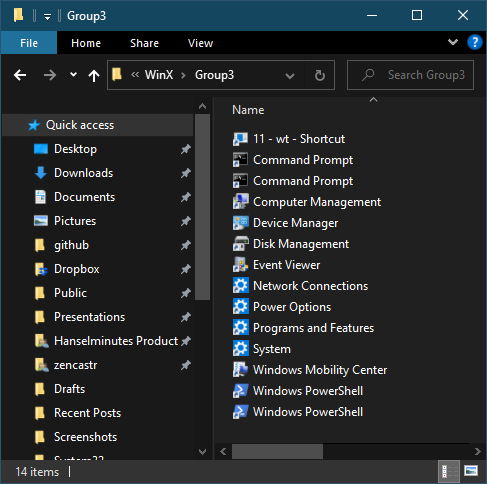
Here's my WinX\Group3 folder . Note the shortcut at the top there.

image

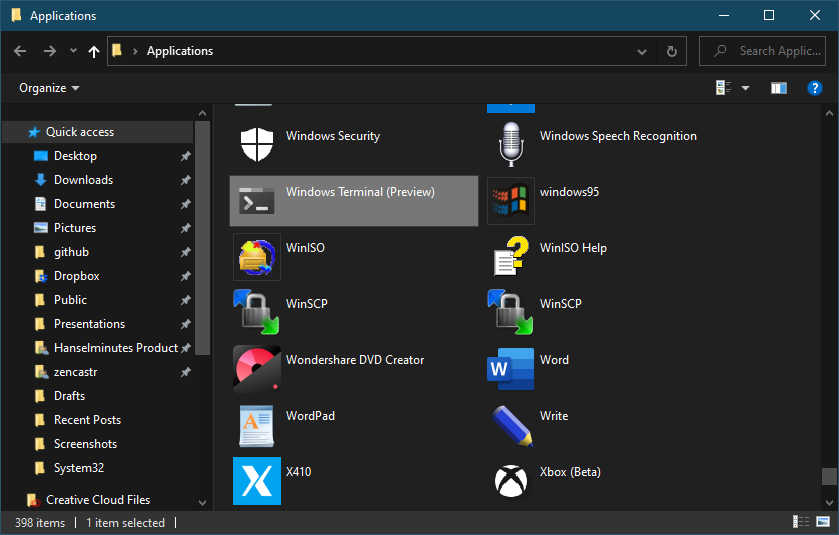
I wanted to find a link to the Windows Terminal but it's harder than it looks. I can't find a real LNK file anywhere on my system. BUT I was able to find a synthetic one and make a copy by going "Win+R" and running "shell:AppsFolder" which brings you to a magic not-a-folder folder.

Not a folder folder

That is a folder of lies. I tried making a copy of this LNK, moving it to my deskop, hashing it with Rafael's util but it's ignored, presumably because it's a Windows Store LNK. Instead, I'll head out to cmd.exe and type "where wt.exe" to find the wt.exe shim and make a link to that!

C:\Users\scott>where wt.exe
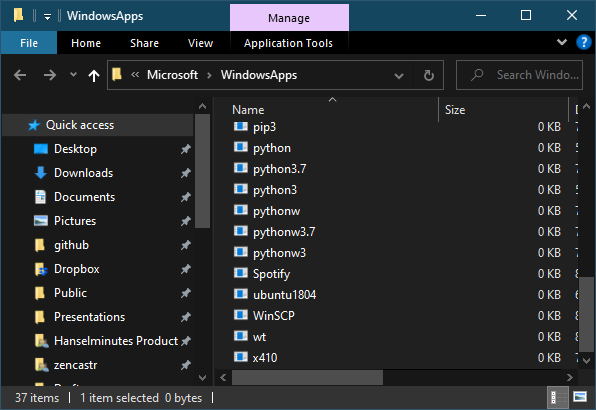
C:\Users\scott\AppData\Local\Microsoft\WindowsApps\wt.exe

These files are also lies, but lies of a another type. Zero byte lies.

Zero Byte Lies

Right-click wt.exe and Create Shortcut. Then drag that shortcut out of there and into somewhere else like your Desktop. You can then use hashlnk and move it to the WinX folder.

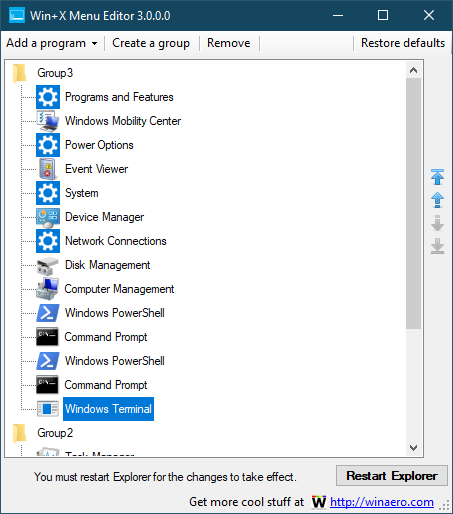
OR, you can use this scary and totally unsupported utility hosted at a questionable website that you have no business visiting. It's called Win+X Menu Editor and it was a chore to download. So much so that I'm going to hide a copy in my DropBox for the day in the near future when this utility and website disappear.

Be careful when you go download this utility, the site is full of scary links that say Download Now but they are all lies. You want the subtle text link that points to a ZIP file, just above the Donate button that says "Download Win+X Menu Editor."

In this utility you can add an item that points to your new WT.LNK file and it will use Rafael's code and copy the LNK file to the right place and re-number stuff if needed. Again, be careful as you never know. You might mess up your whole life with stuff like this. It worked for me.

Win+X Menu Editor

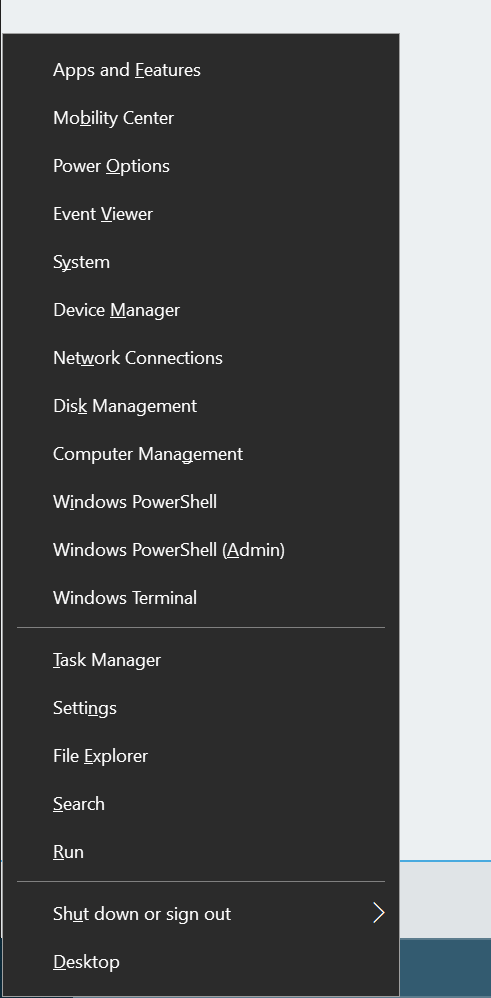
And there you go.

Windows Terminal in the WIN+X menu

Lovely. Now IMHO in some ideal future this should just happen out of the box, but until then it's nice to know I can do it myself.


Sponsor: Looking for a tool for performance profiling, unit test coverage, and continuous testing that works cross-platform on Windows, macOS, and Linux? Check out the latest JetBrains Rider!

About Scott

Scott Hanselman is a former professor, former Chief Architect in finance, now speaker, consultant, father, diabetic, and Microsoft employee. He is a failed stand-up comic, a cornrower, and a book author.

facebook bluesky subscribe
About   Newsletter
Hosting By
Hosted on Linux using .NET in an Azure App Service

dotnet new worker - Windows Services or Linux systemd services in .NET Core

August 22, 2019 Comment on this post [9] Posted in DotNetCore | Open Source
Sponsored By

dotnet new workerYou've long been able to write Windows Services in .NET and .NET Core, and you could certainly write a vanilla Console App and cobble something together for a long running headless service as well. However, the idea of a Worker Process, especially a long running one is a core part of any operating system - Windows, Linux, or Mac.

Now that open source .NET Core is cross-platform, it's more than reasonable to want to write OS services in .NET Core. You might write a Windows Service with .NET Core or a systemd process for Linux with it as well.

Go grab a copy of .NET Core 3.0 - as of the time of this writing it's very close to release, and Preview 8 is supported in Production.

If you're making a Windows Service, you can use the Microsoft.Extensions.Hosting.WindowsService package and tell your new Worker that its lifetime is based on ServiceBase.

public static IHostBuilder CreateHostBuilder(string[] args) =>
Host.CreateDefaultBuilder(args)
.UseWindowsService()
.ConfigureServices(services =>
{
services.AddHostedService<Worker>();
});

If you're making a Linux worker and using systemd you'd add the Microsoft.Extensions.Hosting.Systemd package and tell your new Worker that its lifetime is managed by systemd!

public static IHostBuilder CreateHostBuilder(string[] args) =>
Host.CreateDefaultBuilder(args)
.UseSystemd()
.ConfigureServices((hostContext, services) =>
{
services.AddHostedService<Worker>();
});

The Worker template in .NET Core makes all this super easy and familiar if you're used to using .NET already. For example, logging is built in and regular .NET log levels like LogLevel.Debug or LogLevel.Critical are automatically mapped to systemd levels like Debug and Crit so I could run something like sudo journalctl -p 3 -u testapp and see my app's logs, just alike any other Linux process because it is!

You'll notice that a Worker doesn't look like a Console App. It has a Main but your work is done in a Worker class. A hosted service or services is added with AddHostedService and then a lot of work is abstracted away from you. The Worker template and BackgroundService base class brings a lot of the useful conveniences you're used to from ASP.NET over to your Worker Service. You get dependency injection, logging, process lifetime management as seen above, etc, for free!

public class Worker : BackgroundService
{
private readonly ILogger<Worker> _logger;

public Worker(ILogger<Worker> logger)
{
_logger = logger;
}

protected override async Task ExecuteAsync(CancellationToken stoppingToken)
{
while (!stoppingToken.IsCancellationRequested)
{
_logger.LogInformation("Worker running at: {time}", DateTimeOffset.Now);
await Task.Delay(1000, stoppingToken);
}
}
}

This is a very useful template and it's available from the command line as "dotnet new worker" or from File New Project in Visual Studio 2019 Preview channel.

Also check out Brady Gaster's excellent blog post on running .NET Core workers in containers in Azure Container Instances (ACI). This is super useful if you have some .NET Core and you want to Do A Thing in the cloud but you also want per-second billing for your container.


Sponsor: Get the latest JetBrains Rider with WinForms designer, Edit & Continue, and an IL (Intermediate Language) viewer. Preliminary C# 8.0 support, rename refactoring for F#-defined symbols across your entire solution, and Custom Themes are all included.

About Scott

Scott Hanselman is a former professor, former Chief Architect in finance, now speaker, consultant, father, diabetic, and Microsoft employee. He is a failed stand-up comic, a cornrower, and a book author.

facebook bluesky subscribe
About   Newsletter
Hosting By
Hosted on Linux using .NET in an Azure App Service

Review: UniFi from Ubiquiti Networking is the ultimate prosumer home networking solution

August 20, 2019 Comment on this post [20] Posted in Hardware | Reviews
Sponsored By

* I use Amazon referral links and donate the little money to my kids' school. You support charter schools when you use these links.

UniFi mapI LOVE my Amplifi Wi-Fi Mesh Network. I've had it for two years and it's been an absolute star performer. We haven't had a single issue. Rock solid. That's really saying something. From unboxing to installation to running it (working from home for a tech company, so you know I'm pushing this system) it's been totally stable. I recommend Amplifi unreservedly to any consumer or low-key pro-sumer who has been frustrated with their existing centrally located router giving them reliable wi-fi everywhere in their home.

That said...I recently upgraded my home internet service provider. For the last 10 years I've had fiber optic to the house with 35 Mbp/s up/down and it's been great. Then I called them a a few years back and got 100/100. The whole house was presciently wired by me for Gigabit back in 2007 (!) with a nice wiring closet and everything. Lately 100/100 hasn't been really cutting it when I'm updating a dozen laptops for a work event, copying a VM to the cloud while my spouse is watching 4k netflix and two boys are updating App Store apps. You get the idea. Modern bandwidth requirements and life has changed since 2007. We've got over 40 devices on the network now and many are doing real work.

I called an changed providers to a cable provider that offered true gigabit. However, I was rarely getting over 300-400 Mbp/s on my Amplifi. There is a "hardware NAT" option that really helps, but short of running the Amplifi in Bridged Mode and losing a lot of its epic features, it was clear that I was outgrowing this prosumer device.

Give I'm a professional working at home doing stuff that is more than the average Joe or Jane, what's a professional option?

UniFi from Ubiquiti

Amplifi is the consumer/prosumer line from Ubiquiti Networks and UniFi (UBNT) is the professional line.  You'll literally find these installed at business or even sports stadiums. This is serious gear.

Let me be honest. I knew UniFi existed. Knew (I thought) all about it and I resisted. My friends and fellow nerds insisted it was easy but I kept seeing massive complex network diagrams and convinced myself it wasn't worth the hassle.

My friends, I was wrong. It's not hard. If you are doing business at home, have a gigabit network pipe, a wired home network, and/or have a dozen or more network devices, you're a serious internet person and you might want to consider serious internet networking gear.

Everything is GREAT

Now, UniFi is more expensive than Amplifi as it's pro gear. While an Amplifi Mesh WiFi system is just about $300-350 USD, UniFi Pro gear will cost more and you'll need stuff to start out and it won't always feel intuitive as you plan your system. It is worth it and I'm thrilled with the result. The flexibility and customizability its offered has been epic. There are literally no internet issues in our house or property anymore. I've even been able to add wired and wireless non-cloud-based security cameras throughout the property. Additionally, remember how the house is already wired in nearly every room with Cat6 (or Cat5e) cabling? UniFi has reintroduced me to the glorious world of PoE+ (Power over Ethernet) and removed a half dozen AC wall plugs from my system.

Plan your Network

You can test out the web-based software yourself LIVE at https://demo.ui.com and see what managing a large network would be like. Check out their map of the FedEx Forum Stadium and how they get full coverage. You can see a simulated map of my house (not really my house) in the screenshot above. When you set up a controller you can place physical devices (ones you have) and test out virtual devices (ones you are thinking of buying) and see what they would look like on a real map of your home (supplied by you). You can even draw 3D walls and describe their material (brick, glass, steel) and their dB signal loss.

UniFi.beginner.950

When you are moving to UniFi you'll need:

  • USG - UniFi Security Gateway - This has 3 gigabit points and has a WAN port for your external network (plug your router into this) and a LAN port for your internal network (plug your internal switch into this).
    • This is the part that doles out DHCP.
  • UniFi Cloud Key or Cloud Key Gen2 Plus
    • It's not intuitive what the USG does vs the Cloud Key but you need both. I got the Gen2 because it includes a 1TB hard drive that allows me to store my security video locally. It also is itself a PoE client so I don't need to plug it into the wall. I just wired it with a single Ethernet cable to the PoE switch below and left it in the wiring closet. There's a smaller cheaper Cloud Key if you don't need a hard drive.
    • You don't technically need a Cloud Key I believe, as all the UniFi Controller Software is free and you can run it in on any machine you have laying around. Folks have run them on any Linux or Windows machine they have, or even on a Synology or other NAS. I like the idea of having it "just work" so I got the Cloud Key.
  • UniFi Switch (of some kind and number of ports)
    • 8 port 150 watt UniFi Switch
    • 24 port UniFi Switch - 24 ports may be overkill for most but it's only 8 lbs and will handle even the largest home network. And it's under $200 USD right now on Amazon
    • 24 port UniFi Switch with PoE - I got this one because it has 250W of PoE power. If you aren't interested in power over ethernet you can save money with the non-PoE version or a 16 port version but I REALLY REALLY recommend you use PoE because the APs work better with it.
      PoE switch showing usage on many ports

Now once you've got the administrative infrastructure above, you just need to add whatever UniFi APs - access points - and/or optional cameras that you want!

NOTE/TIP - A brilliant product from Ubiquiti that I think is flying under the radar is the Unifi G3 Flex PoE camera. It's just $75 and it's tiny but it's absolutely brilliant. Full 1080p video and night vision. I'll talk about the magic of PoE later on but you can just plug this in anywhere in the house - no AC adapter - and you've got a crystal clear security camera or cameras anywhere in the house. They are all powered from the PoE switch!

I had a basic networking closet I put the USG Gateway into the closet with a patch cable to the cable modem (the DOCSIS 3.1 cable modem that I bought because I got tired of renting it from the service provider) then added the Switch with PoE, and plugged the Cloud Key into it. Admin done.

Here's the lovely part.

Since I have cable throughout the house, I can just plug in the UniFi Access Points in various room and they get power immediately. I can try different configs and test the signal strength. I found the perfect config after about 4 days of moving things around and testing on the interactive map. The first try was fine but I strove for perfect.

There's lots of UniFi Access Points to choose from. The dual radio Pro version can get pretty expensive if you have a lot so I got the Lite PoE AP. You can also get a 5 pack of the nanoHD UniFi Access Points.

These Access Points are often mounted in the ceiling in pro installations, and in a few spots I really wanted something more subtle AND I could use a few extra Ethernet ports. Since I already had an Ethernet port in the wall, I could just wall mount the UniFi Wall Mounted AP. It's both a wireless AP that radiates outward into the room AND it turns your one port into two, or you can get one that becomes a switch with more ports and extends your PoE abilities. So I can add this to a room, plug a few devices in AND a PoE powered Camera with no wall-warts or AC adapters!

NOTE: I did need to add a new ethernet RJ45 connector to plug into the female connector of the UniFi in-wall AP. Just be sure to plan and take inventory. You may already have full cables with connectors pulled to your rooms. Be aware.

There are a TON of great Wireless AP options from UniFi so make sure you explore them all and understand what you want.

In-Wall AP

Here's the resulting setup and choices I made, as viewed in the UniFi Controller Software:

List of Ubnt devices

I have the Gateway, the Switch with PoE, and five APs. Three are the disc APs and two are in-wall APs. They absolutely cover and manage my entire two story house and yards front and back. It's made it super easy for me to work from home and be able to work effectively from any room. My kids and family haven't had any issues with any tablets or phones.

As of the time of these writing I have 27 wireless devices on the system and 11 wired (at least those are the ones that are doing stuff at this hour).

My devices as viewed in the UniFi controller

Note how it will tell you how each device's WiFi experience is. I use this Experience information to help me manage the network and see if the APs are appropriately placed. There is a TON of great statistics and charts and graphics. It's info-rich to say the LEAST.

NOTE: To answer a common question - In an installation like this you've got a single SSID even though there's lots of APs and your devices will quietly and automatically roam between them!
Log showing roaming between APs

The iPhone app is very full-featured as well and when you've got deep packet introspection turn on you can see a ton of statistical information at the price of a smidge of throughput performance.

iPhone StatsiPhone Bandwidth

I have had NO problem hitting 800-950Mbs over wired and I feel like there's no real limit to the perf of this system. I've done game streaming over Steam and Xbox game streaming for hours without a hiccup. Netflix doesn't buffer anymore, even on the back porch.

a lot of bandwidth with no drops

You can auto-optimize, or you can turn off a plethora of feature and manage everything manually. I was able to twitch a few APs to run their 2.4Ghz Wi-Fi radios on less crowded channels in order to get out of the way of the loud neighbors on channel 11.

I have a ton of control over the network now, unlimited expandability and it has been a fantastically stable network. All the APs are wire backed and the wireless bandwidth is rock solid. I've been extremely impressed with the clean roaming from room to room while streaming from Netflix. It's a tweakers (ahem) dream network.

* I use Amazon referral links and donate the little money to my kids' school. You support charter schools when you use these links.


Sponsor: Get the latest JetBrains Rider with WinForms designer, Edit & Continue, and an IL (Intermediate Language) viewer. Preliminary C# 8.0 support, rename refactoring for F#-defined symbols across your entire solution, and Custom Themes are all included.

About Scott

Scott Hanselman is a former professor, former Chief Architect in finance, now speaker, consultant, father, diabetic, and Microsoft employee. He is a failed stand-up comic, a cornrower, and a book author.

facebook bluesky subscribe
About   Newsletter
Hosting By
Hosted on Linux using .NET in an Azure App Service

SharpScript from ServiceStack lets you run .NET apps directly from a GitHub Gist!

August 15, 2019 Comment on this post [10] Posted in DotNetCore | Open Source
Sponsored By

I've blogged about ServiceStack before. It's an extraordinary open source project - an ecosystem of its own even - that is designed to be an alternative to the WCF, ASP.NET MVC, and ASP.NET Web API frameworks. I enjoy it so much I even helped write its tagline "Thoughtfully architected, obscenely fast, thoroughly enjoyable web services for all"

ServiceStack is an easy drop-in that simplifies creating Web Services in any ASP.NET Web App, but also in Self Hosting Console Apps, Windows Services and even Windows and OSX Desktop Apps - supporting both .NET Framework and .NET Core. The easiest way to get started is to create a new project from a ServiceStack VS.NET Template.

ServiceStack has released a new and amazing project that is absolutely audacious in its scope and elegant in its integration with the open source .NET Core ecosystem - #Script (pronounced "sharp script.")

Scripts IN your app!

There are a number of .NET projects that simulate REPL's or allow basic scripting, like "dotnet script" as an example or ScriptCS but I'm deeply impressed with #Script. To start with, #Script is somewhat better suited for scripting than Razor and it doesn't require precompilation. #Script is appropriate for live documents or Email Templates for example.

Here's a basic example of embedding a ScriptContext in your app:

var context = new ScriptContext().Init();
var output = context.EvaluateScript("Time is now: {{ now | dateFormat('HH:mm:ss') }}");

Where ServiceStack's #Script really shines is its use of .NET Core Global Tools. They've nabbed two global tool names - web and app (sassy!) and allow one to create SharpApps. From their site:

Sharp Apps leverages #Script to develop entire content-rich, data-driven websites without needing to write any C#, compile projects or manually refresh pages - resulting in the easiest and fastest way to develop Web Apps in .NET!

The web tool is cross platform and the app global tool is great for Windows as it supports .NET Core Windows Desktop Apps.

Your app IS a script!

You can write interactive SharpScripts or SharpApps that uses Chromium as a host.

You can literally run a "desktop" app self contained from a GitHub Gist!

Sharp Apps can also be published to Gists where they can be run on-the-fly without installation, they're always up-to-date, have tiny footprints are fast to download and launch that can also run locally, off-line and cross-platform across Windows, macOS and Linux OS's.

There's also a "gallery" that maps short names to existing examples. So run "app open" to get a list, then "app open name" to run one. You can just "app open blog" and you're running a quick local blog.

SharpApps

Easy to develop and run

The global tools make SharpApp a complete dev and runtime experience because you can just run "app" in the source folder and as you make code changes the hot-reloader updates the site as you Ctrl-S (save) a file!

If you've got .NET Core SDK installed (it's super quick) then just grab the local tool here (app on Windows and web anywhere else):

dotnet tool install --global app

And if you have a existing .NET Core web app you can launch it and run it in a Chromium Embedded Framework (CEF) browser with "app foo.dll" Check out this example on how to make and run a .NET Core app on the Windows Desktop with #Script.

ServiceStack CEF App

Then you can make a shortcut and add it to to the desktop with

app shortcut Acme.dll

Slick!

Code in #Script is done in markdown ```code blocks, while in Razor it's @{ } but it does use mustache template style. Go try out some of their Starter Projects!

#Script and SharpApps is an extraordinary addition to the .NET Core ecosystem and I'm just touching the surface. Do check out their site at https://sharpscript.net.

What do you think?


Sponsor: Develop Xamarin applications without difficulty with the latest JetBrains Rider: Xcode integration, JetBrains Xamarin SDK, and manage the required SDKs for Android development, all right from the IDE. Get it today!

About Scott

Scott Hanselman is a former professor, former Chief Architect in finance, now speaker, consultant, father, diabetic, and Microsoft employee. He is a failed stand-up comic, a cornrower, and a book author.

facebook bluesky subscribe
About   Newsletter
Hosting By
Hosted on Linux using .NET in an Azure App Service

I miss Microsoft Encarta

August 13, 2019 Comment on this post [51] Posted in Musings
Sponsored By

imageMicrosoft Encarta came out in 1993 and was one of the first CD-ROMs I had. It stopped shipping in 2009 on DVD. I recently found a disk and was impressed that it installed just perfectly on my latest Window 10 machine and runs nicely.

Encarta existed in an interesting place between the rise of the internet and computer's ability to deal with (at the time) massive amounts of data. CD-ROMs could bring us 700 MEGABYTES which was unbelievable when compared to the 1.44MB (or even 120KB) floppy disks we were used to. The idea that Encarta was so large that it was 5 CD-ROMs (!) was staggering, even though that's just a few gigs today. Even a $5 USB stick could hold Encarta - twice!

My kids can't possibly intellectualize the scale that data exists in today. We could barely believe that a whole bookshelf of Encyclopedias was now in our pockets. I spent hours and hours just wandering around random articles in Encarta. The scope of knowledge was overwhelming, but accessible. But it was contained - it was bounded. Today, my kids just assume that the sum of all human knowledge is available with a single search or a "hey Alexa" so the world's mysteries are less mysterious and they become bored by the Paradox of Choice.

image

In a world of 4k streaming video, global wireless, and high-speed everything, there's really no analog to the feeling we got watching the Moon Landing as a video in Encarta - short of watching it live on TV in 1969! For most of us, this was the first time we'd ever seen full-motion video on-demand on a computer in any sort of fidelity - and these are mostly 320x240 or smaller videos!

First Steps on the Moon

A generation of us grew up hearing MLK's "I have a dream" speech inside Microsoft Encarta!

MLK I have a Dream

Remember the Encarta "So, you wanna play some Basketball" Video?

LeBron James from 2003

Amazed by Google Earth? You never saw the globe in Encarta.

Globe in Encarta

You'll be perhaps surprised to hear that the Encarta Timeline works even today on across THREE 4k monitors at nearly 10,000 pixels across! This was a product that was written over 10 years ago and could never have conceived of that many pixels. It works great!

The Encarta Timeline across 3 4k monitors

Most folks at Microsoft don't realize that Encarta exists and is used TODAY all over the developing world on disconnected or occasionally connected computers. (Perhaps Microsoft could make the final version of Encarta available for a free final download so that we might avoid downloading illegal or malware infested versions?)

What are your fond memories of Encarta? If you're not of the Encarta generation, what's your impression of it? Had you heard or thought of it?


Sponsor: Develop Xamarin applications without difficulty with the latest JetBrains Rider: Xcode integration, JetBrains Xamarin SDK, and manage the required SDKs for Android development, all right from the IDE. Get it today!

About Scott

Scott Hanselman is a former professor, former Chief Architect in finance, now speaker, consultant, father, diabetic, and Microsoft employee. He is a failed stand-up comic, a cornrower, and a book author.

facebook bluesky subscribe
About   Newsletter
Hosting By
Hosted on Linux using .NET in an Azure App Service

Disclaimer: The opinions expressed herein are my own personal opinions and do not represent my employer's view in any way.