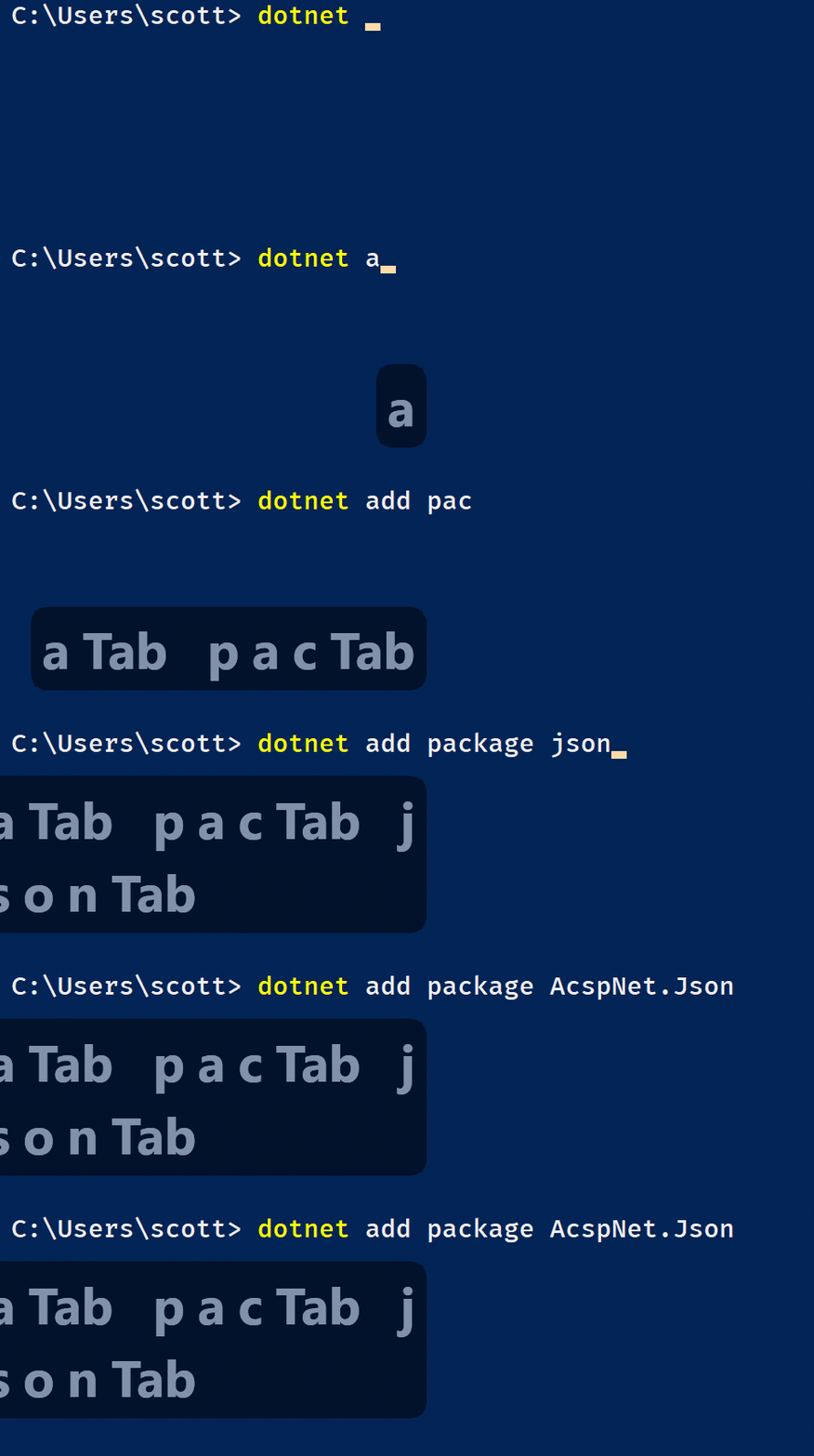
RANDOM BUT ALSO USEFUL: "dotnet serve" - A simple command-line HTTP server.
Here's a useful little global tool - dotnet serve. It launches a server in the current working directory and serves all files in it. It's not kestrel, the .NET Application/Web Server. It's just a static webserver for development.
The latest release of dotnet-serve requires the 2.1.300-preview1 .NET Core SDK or newer. Once installed, run this command:
dotnet install tool --global dotnet-serve
Then whenever I'm in a folder where I want to server something static (CSS, JS, PNGs, whatever) I can just
dotnet serve
It can also optionally open a web browser navigated to that localhost URL.
Sponsor: Get the latest JetBrains Rider for debugging third-party .NET code, Smart Step Into, more debugger improvements, C# Interactive, new project wizard, and formatting code in columns.do
About Scott
Scott Hanselman is a former professor, former Chief Architect in finance, now speaker, consultant, father, diabetic, and Microsoft employee. He is a failed stand-up comic, a cornrower, and a book author.
I was talking to Toni Edward Solarin on Skype yesterday about his open source spike (early days) of Code Coverage for .NET Core called "coverlet." There's a few options out there for cobbling together .NET Core Code Coverage but I wanted to see if I could use the lightest tools I could find and make a "complete" solution for Visual Studio Code that would work for .NET Core cross platform. I put my own living spike of a project up on GitHub.
Now, keeping in mind that Toni's project is just getting started and (as of the time of this writing) currently supports line and method coverage, and branch coverage is in progress, this is still a VERY compelling developer experience.
There's a lot going on here but take a moment and absorb the screenshot of VS Code above.
Our test project is using xunit and the xunit runner that integrates with .NET Core as expected.
That means we can just "dotnet test" and it'll build and run tests.
Added coverlet, which integrates with MSBuild and automatically runs when you "dotnet test" if you "dotnet test /p:CollectCoverage=true"
(I think this should command line switch should be more like --coverage" but there may be an MSBuild limitation here.)
I'm interested in "The Developer's Inner Loop." . That means I want to have my tests open, my code open, and as I'm typing I want the solution to build, run tests, and update code coverage automatically the way Visual Studio proper does auto-testing, but in a more Rube Goldbergian way. We're close with this setup, although it's a little slow.
Coverlet can produce opencover, lcov, or json files as a resulting output file. You can then generate detailed reports from this. There is a language agnostic VS Code Extension called Coverage Gutters that can read in lcov files and others and highlight line gutters with red, yellow, green to show test coverage. Those lcov files look like this, showing file names, file numbers, coverage, and number of exceptions.
I should be able to pick the coverage file manually with the extension, but due to a small bug, it's easier to just tell Coverlet to generate a specific file name in a specific format.
dotnet test /p:CollectCoverage=true /p:CoverletOutputFormat=lcov /p:CoverletOutput=./lcov.info .\my.tests
The lcov.info files then watched by the VSCode Coverage Gutters extension and updates as the file changes if you click watch in the VS Code Status Bar.
You can take it even further if you add "dotnet watch test" which will compile and re-run tests if code changes:
dotnet watch --project .\my.tests test /p:CollectCoverage=true /p:CoverletOutputFormat=lcov /p:CoverletOutput=./lcov.info
I can run "WatchTests.cmd" in another terminal, or within the VS Code integrated terminal.
NOTE: If you're doing code coverage you'll want to ensure your tests and tested assembly are NOT the same file. You might be able to get it to work but it's easier to keep things separate.
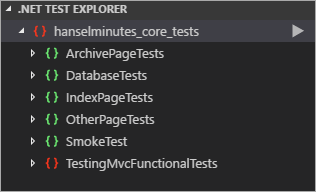
Next, add in the totally under appreciated .NET Core Test Explorer extension (this should have hundreds of thousands of downloads - it's criminal) to get this nice Test Explorer pane:
Even better, .NET Test Explorer lights up some "code lens" style interfaces over each test as well as a green checkmark for passing tests. Having "debug test" available for .NET Core is an absolute joy.
Finally we make some specific improvements to the .vscode/tasks.json file that drives much of VS Code's experience with our app. The "BUILD" label is standard but note both the custom "test" and "testwithcoverage" labels, as well as the added group with kind: "test."
This lets VS Code know what's for building and what's for testing, so if I use the Command Palette to "Run Test" then I'll get this dropdown that lets me run tests and/or update coverage manually if I don't want the autowatch stuff going.
Here's a call to action for you! Toni is just getting started on Coverlet and I'm sure he'd love some help. Head over to the Coverlet github and don't just file issues and complain! This is an opportunity for you to get to know the deep internals of .NET and create something cool for the larger community.
What are your thoughts?
Sponsor: Get the latest JetBrains Rider for debugging third-party .NET code, Smart Step Into, more debugger improvements, C# Interactive, new project wizard, and formatting code in columns.
About Scott
Scott Hanselman is a former professor, former Chief Architect in finance, now speaker, consultant, father, diabetic, and Microsoft employee. He is a failed stand-up comic, a cornrower, and a book author.
At its heart, the RasPad is quiet elegant and simple. It's a housing for your Raspberry Pi that includes a battery for portable use along with an integrated touchscreen LCD. However, it's the little details where it shines.
It's not meant to be an iPad. It's not trying. It's thick on one end, and beveled to an angle. You put your RaspberryPi inside the back corner and it sits nicely on the plastic posts without screws. Power and HDMI and are inside with cables, then it's one button to turn it on. There's an included power supply as well as batteries to run the Pi and screen for a few hours while portable.
I've found with my 10 year old that this neat, organized little tablet mode makes the Pi more accessible and interesting to him - as opposed to the usual mess of wires and bare circuit boards we usually have on my workbench. I could see a fleet of RasPads in a classroom environment being far more engaging than just "raw" Pis on a table.
The back of the RasPad has a slot where a GPIO Ribbon cable can come out to a breakout board:
At this point you can do all the same cool hardware projects you can do with a Raspberry Pi, with all the wires, power, touchscreen, ports, and everything nice and sanitary.
The inside hatch is flexible enough for other boards as well:
I asked my 10 year old what he wanted to make with the RasPad/Raspberry Pi and he said he wanted to make a "burglar alarm" for his bedroom. Pretty sure he just wants to keep the 12 year old out of his room.
We started with a Logitech 930e USB Webcam we had laying around. The Raspberry PI can use lots of off-the-shelf high-quality web cams without drivers, and the RasPad keeps all the USB ports exposed.
Then edited /etc/motion/motion.conf with the nano editor (easier for kids then vim). You'll want to confirm the height and width. Smaller is easier on the Pi, but you can go big with 1280x720 if you like! We also set the target_dir to /tmp since motion's daemon doesn't have access to ~/.
There's a number of events you can take action on, like "on_motion_detected." We just added a little Python script to let people know WE SEE YOU"
It's also cool to set location_motion_style to "redbox" so you can see WHERE motion was detected in a frame, and be sure to set stream_localhost to "off" so you can hit http://yourraspberrypiname:8081 to see the stream remotely!
When motion is detected, the 10 year old's little Python script launches:
And as a bonus, here is the 10 year old trying to sneak into the room. Can you spot him? (The camera did)
Sponsor: Get the latest JetBrains Rider for debugging third-party .NET code, Smart Step Into, more debugger improvements, C# Interactive, new project wizard, and formatting code in columns.
About Scott
Scott Hanselman is a former professor, former Chief Architect in finance, now speaker, consultant, father, diabetic, and Microsoft employee. He is a failed stand-up comic, a cornrower, and a book author.
This is one of those "Did you know you could do THAT?" Many folks have figured out that C#/F#/.NET is cross-platform and open0source and runs on basically any operating system. People are using it to create micro services, web sites, and webAPI's all over. Not to mention iPhone/Android apps with Xamarin and video games with Unity and MonoGame.
But what about cross platform UIs?
While not officially supported by Microsoft - you can do some awesome stuff...as is how Open Source is supposed to work! Remember that there's a family of .NET Runtimes now, there's the .NET Framework on Windows, there's xplat .NET Core, and there's xplat Mono.
Eto.Forms has been in development since 2012 and is a cross-platform framework for creating GUI (Graphical User Interface, natch) applications with .NET that run across multiple platforms using their native toolkit. Not like Java in the 90s with custom painted buttons on canvas.
It's being used for real stuff! In fact, PabloDraw is an Ansi/Ascii text editor that you didn't know you needed in your life. But you do. It runs on Windows, Mac, and Linux and was written using Eto.Forms but has a native UI on each platform. Be sure to check out Curtis Wensley's Twitter account for some cool examples of what PabloDraw and Eto.Forms can do!
OS X: MonoMac or Xamarin.Mac (and also iOS via Xamarin)
Linux: GTK# 2 or 3
Windows: Windows Forms (using GDI or Direct2D) or WPF
Here's an example Hello World. Note that it's not just Code First, you can also use Xaml, or even Json (.jeto) to layout your forms!
using Eto.Forms; using Eto.Drawing;
public class MyForm : Form { public MyForm () { Title = "My Cross-Platform App"; ClientSize = new Size(200, 200); Content = new Label { Text = "Hello World!" }; }
[STAThread] static void Main() { new Application().Run(new MyForm()); } }
Or I can just File | New Project with their Visual Studio Extension. You should definitely give it a try.
There's so much cool stuff happening in open source .NET right now, and Eto.Forms is actively looking for help. Go check out their excellent Wiki, read the Tutorials, and maybe get involved!
Sponsor: Get the latest JetBrains Rider for debugging third-party .NET code, Smart Step Into, more debugger improvements, C# Interactive, new project wizard, and formatting code in columns.
About Scott
Scott Hanselman is a former professor, former Chief Architect in finance, now speaker, consultant, father, diabetic, and Microsoft employee. He is a failed stand-up comic, a cornrower, and a book author.
I added Application Insights to the site in about 10 min just a few days ago. It was super easy to setup and basically automatic in Visual Studio 2017 Community. I left the defaults, installed a bit of script on the client, and enabled the server-side profiler, and AppInsights already found a few interesting things.
It took 10 minutes to set up App Insights. It took two days (and work continues) to fix what it found. I love it. This tool has already given me a deeper insight into how my code runs and how it's behaving - and I'm just scratching the service. I'll need to do some videos and/or more blog posts to dig deeper. Truly, you need to try it.
Slow performance in other countries
I could fill this blog post with dozens of awesome screenshots of the useful charts, graphs, and filters that I got by just turning on AppInsights. But the most interesting part is that I turned it on really expecting nothing. I figured I'd get some "Google Analytics"-type behavior.
Then I got this email:
Huh. I had set up the Azure CDN at images.hanselminutes.com to handle all the faces for each episode. I then added lazy loading so that the webite only loads the images that enter the browser's viewport. I figured I was pretty much done.
However I didn't really think about the page itself as it loads for folks from around the world - given that it's hosted on Azure in the West US.
Ideally I'd want the site to load in less than a second, but this is my archives page with 600 shows so it's pretty heavy.
Yuck. I have a few options. I could pay and load up another copy of the site in South Asia and then do some global load balancing. However, I'm hosting this on a single small (along with a dozen other sites) so I don't want to really pay much to fix this.
I ended up signing up for a free account at CloudFlare and set up caching for my HTML. The images stay the same. served by the Azure CDN.
Fixing Random and regular Server 500 errors
I left the site up for a while and came back later to a warning. You can see my site availability is just 93%. Note that there's "2 Servers?" That's because one is my local machine! Very cool that AppInsights also (optionally) tracks your local development server as well.
When I dig in I see a VERY interesting sawtooth pattern.
Pro Tip - Recognizing that a Sawtooth Pattern is a Bad Thing (tm) is an important DevOps thing. Why is this happening regularly? Is it exactly regularly (like every 4 hours on a schedule?) or somewhat regularly (like a garbage collection issue?)
What do these operations have in common? Look closely.
It's not a GET it's a HEAD. Remember that HTTP Verbs are more than GET, POST, PUT, DELETE. There's also HEAD. It literally is a HEADer call. Like a GET, but no body.
HTTP HEAD - The HEAD method is identical to GET except that the server MUST NOT return a message-body in the response.
I installed HTTPie - which is like curl or wget for humans - and issue a HEAD command from my local machine while under the debugger.
C:>http --verify=no HEAD https://localhost:5001 HTTP/1.1 500 Internal Server Error Content-Type: text/html; charset=utf-8 Date: Tue, 13 Mar 2018 03:41:51 GMT Server: Kestrel
Ok that is bad. See the 500? I check out AppInsights and see it has the full call stack. See it's getting a NullReferenceException as it tries to Render() the Razor page?
It turns out since I'm using Razor Pages, I have implemented "OnGet" where I do my data base work then pass a model to the pages to generate HTML. However, if someone issues a HEAD, then the pages still run but the local data work never happened (I have no OnHead() call). I have a few options here. I could handle HEAD myself. I could no-op it, but that'd be a lie.
THOUGHT: I think this behavior is sub-optimal. While GET and POST are distinct and it makes sense to require an OnGet() and OnPost(), I think that HEAD is special. It's basically a GET with a "don't return the body" flag set. So why not have Razor Pages automatically delegate OnHead to OnGet, unless there's an explicit OnHead() declared? I'll file an issue on GitHub because I don't like this behavior and I find it counter-intuitive. I could also register a global IPageFilter to make this work for all my site's pages.
The simplest thing to do is just to delegate the OnHead to to the OnGet handler.
public Task OnHeadAsync(int? id, string path) => OnGetAsync(id, path);
Then double check and test it with HTTPie:
C:\>http --verify=no HEAD https://localhost:5001 HTTP/1.1 200 OK Content-Type: text/html; charset=utf-8 Date: Tue, 13 Mar 2018 03:53:55 GMT Request-Context: appId=cid-v1:e310025f-88e9-4133-bc15-e775513c67ac Server: Kestrel
Bonus - Application Map
Since I have AppInsights enabled on both the client and the server, I can see this cool live Application Map. I'll check again in a few days to see if I have fewer errors. You can see where my Podcast Site calls into the backend data service at Simplecast.
I saw a few failures in my call to SimpleCast's API as I was failing to consistently set my API key. Everything in this map can be drilled down into.
Bonus - Web Performance Testing
I figured while I was in the Azure Portal I would also take advantage of the free performance testing. I did a simulated aggressive 250 users beating on the site. Average response time is 1.22 seconds and I was doing over 600 req/second.
I am learning a ton of stuff. I have more things to fix, more improvements to make, and more insights to dig into. I LOVE that it's creating all this work for me because it's giving me a better application/website!
Sponsor: Get the latest JetBrains Rider for debugging third-party .NET code, Smart Step Into, more debugger improvements, C# Interactive, new project wizard, and formatting code in columns.
About Scott
Scott Hanselman is a former professor, former Chief Architect in finance, now speaker, consultant, father, diabetic, and Microsoft employee. He is a failed stand-up comic, a cornrower, and a book author.