Back To Basics: Algorithms and Going Back To Virtual School
 Before I graduated from College/University I was convinced that school was for lamers. Then I graduated from school and decided that NOT going to school was for lamers. That shows you what a wishy-washy person *I* am. ;) School is for some folks and not for others. Wear the shoe that fits you best.
Totally random retrospective self-focused aside: I graduated from OIT with a BS in Software Engineering in 2003. Yes, that's 2003. It took me only 11 years to get a 4-year degree. ;)
I've been a programmer since 1992, so about 16 years, but 11 of those I was going to school at night. Basically I worked 9a-5p and went to school 6p-10p. For the first few years I took a lot of courses, but then work happened and I tapered off to one course a term. This was fine for a long time but then credits started falling off the other side. Basically courses I took 7+ years before became obsolete. I actually lived through four Deans while I was there. I made a deal with one of them that if I taught .NET I could keep my credits longer. That let me keep taking courses while working the whole time. The result took 11 years and two schools. But now I can just say, "I've got my degree and just not mention that I got it 5 years ago. Don't tell. Lots of experience sounds better than "slow learner at school."
Whether you went to school or are self-taught, even though the Internet was originally more a place to put academic papers than a place to meet "friends", there's a LOT more really good academic information on the web than I remember. It also takes more interesting forms than just pages of class syllabi. Here's the syllabus for the CST407 class I taught in Fall of 2003.
You can learn via Googling, you can learn via Book Readin' but you can also setup a more focused "curriculum" for yourself. I know a lot of devs that I admire that do this. They'll pick a discipline, area, language, whatever, and create a mini-class for themselves. Actually that much-teased "Learn Whatever in 24 Hours" books have more structure in this way than most programming books.
These days there's all the good content at iTunesU from colleges that didn't return my calls back in my High School years. There's even 1986 video of the legendary MIT lectures "Structure and Interpretation of Computer Programs" with Hal Abelson and Gerald Jay Sussman. There's MIT's excellent OpenCourseWare Videos of the Introduction to Algorithms class up on Google Video.
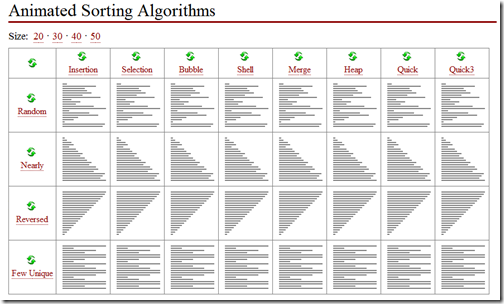
Professors are creating better and better tools to visualize things, like this amazing JavaScript-based page on "Animated Sorting Algorithms" by David R. Martin. It's utterly brilliant, not just because it's a Visualizer, but because the code is in Javascript, so you're seeing it happen. It's impressive like when you're playing a video game and you discover a particularly amazing cut-scene isn't prerendered, it's rendered in-engine. (UPDATE: And it would be impressive if it were true. I'm crushed. They ARE prerendered. Well, still. It's cool. Thanks, Adam!)
I recently stumbled on Massimo Di Pierro's site and his code. He's got a CSC309/321 class that he teaches at DePaul University and has a great Python application called "Algorithms Animator." His slides on basic OOP in C++ are excellent but the Algorithms Animator is really cool. There's a video of Algorithms Animator running over at Vimeo.
He's got all sorts of common algorithms, sorts, traversals, searches, etc. The algorithms are all in src/csc321algorithms.py, like this simple binary tree example.
def isNullTree(tree):
    if tree is None: return true
    if len(tree)==0: return true
    return false

rootnode=0
leftchild=1
rightchild=2

def BinaryTree(node,left=[],right=[]):
    list=[node,left,right]
    if not isNullTree(left):
        left[rootnode].parent=list
    if not isNullTree(right):
        right[rootnode].parent=list
    return list
There's also more complex ones like a Huffman encoding example. But it's not the source code that interesting, although it is. The syllabus is really detailed, with the kind of detail you really only see in academia:
Huffman Encoding Definition: A minimal variable-length character encoding based on the frequency of each character. First, each character becomes a trivial tree, with the character as the only node. The character's frequency is the tree's frequency. The two trees with the least frequencies are joined with a new root which is assigned the sum of their frequencies. This is repeated until all characters are in one tree. One code bit represents each level. Thus more frequent characters are near the root and are encoded with few bits, and rare characters are far from the root and are encoded with many bits.
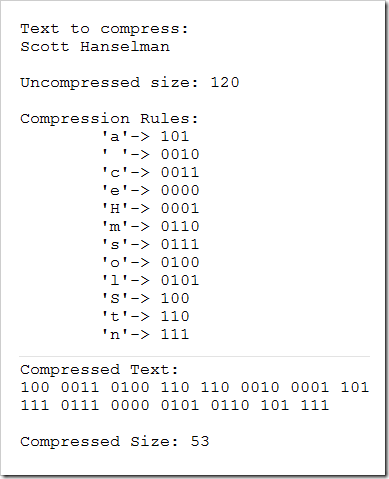
The Program accepts the text to be compresses as input and produces a text report showing compression rules and compressed text. The Program also shows in an animation how the Huffman tree is built.
Huffman encoding provides an example of Greedy strategy.
What's cool about this guy's way of teaching algorithms is that his app uses animation to show the algorithm happening step by step.
For example, if I use Huffman Encoding on the string "Scott Hanselman," here's Frame 0 of the animation.
"First, each character becomes a trivial tree, with the character as the only node."
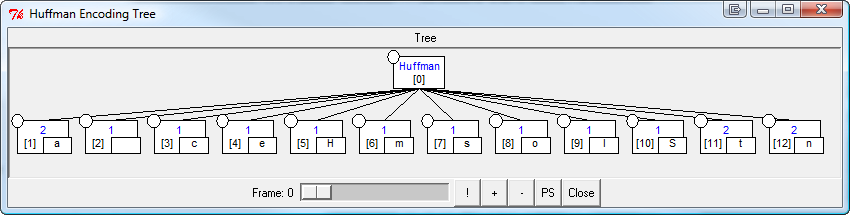
Here's Frame 15 as the the character's frequencies are counted and the tree is in the process of being built.
"One code bit represents each level. Thus more frequent characters are near the root and are encoded with few bits, and rare characters are far from the root and are encoded with many bits."
_4.png)
Here's Frame 22 as the tree has been built out and the bit values are applied.
_2.png)
...and the result is in the image below showing the compression rules/map and the final bits.
I'm not sure about you, but I'm not able to bust out a QuickSort on a whiteboard under pressure anymore (I'm old). I found this guy's stuff to be a great algorithms refresher, and using the little Python app to explore them made it very enjoyable. I wish we had this kind of stuff when I was in school. It's kind of nice to pretend I'm back in an Algorithms class and tickle the neurons that haven't fired in a while.
Related Posts
- Three Things I Learned About Software WHILE NOT in College
- 2003 - Leaning at the Tape...a B.S. in Software Engineering squeezed into 11 short years...
- A College Project: Rescuing the Tiny OS in C#
- Six Essential Language Agnostic Programming Books
- Books: We need more So What, Now What and What For? and less just What
- Article about me on OIT's Alumni Site
About Scott
Scott Hanselman is a former professor, former Chief Architect in finance, now speaker, consultant, father, diabetic, and Microsoft employee. He is a failed stand-up comic, a cornrower, and a book author.


About Newsletter


I appreciate all your posts & pods such great content. This is another example of a very interesting post.
Thx,
Catto


It's interesting to see how long different browsers take to render the GIFs.
These are approximate timings when the size is 20:
IE -- 22 seconds
Firefox -- 8 seconds
Chrome -- 31 seconds
Opera -- 25 seconds

It has a Visual Sort Design Control and a Visual Search Designer Control for visually showing the algorithm :)


I love the blog. Keep the posts comin'.
It takes longer to get a degree when you don't know know what major you want to pursue. At least after I decided it was done in four years, even while working full time. And I was in the first graduating CSET class of OIT Portland. Go Owls!

I decided not (I'm old too). Thankfully I don't write much code anymore so I'd like not be going for the kind of job that really required you to be able to do so.
Oh, I did 2 out of 3 years of a UK CS degree, bailed when offered a job and never looked back. I don't think the lack of degree from '92 has hurt me and given I was giving the lecturer notes and examples on Borlands OWL at the time I suspect the degree wouldn't have helped me much save for having the paper with a nice stamp on it for employees who value those things.
I myself am slowly working my way through the "seven-year" plan... Working full-time and then taking 6 credits is tough... one semester, I took almost 11 credits. (Three full term night classes and a couple of weekend workshops.) That was intense!!
Thanks for this post. It has encouraged my to keep on truckin'

I feel a bit like a superman :) after reading about your aside about working and studying at the same time. In my case, it took 6 years to complete a 4-year degree while *consulting* full-time. It took another year and a half to complete the Masters. It took a lot of discipline and hard work on my part to get that done. Another important thing was flexibility I had as a consultant to allocate my time with the client as needed.
Here is my aside: if employers treated their employees as consultants - and provided more time-flexibility for top performers, a number of people attending universities would probably increase. I am not suggesting this as some kind of a "program" but as an enabling measure. Great post, thank you.

To all the students: what benefits have you found in going to school over self-study and job experience? I'm trying to weigh my options before next semester!

I am now ninth year finishing a "four year" bachelors degree in guess what Software Engineering as well. I am just a few credits away from graduation-two semesters to be exact and I have had some embarassing times going to classes and meeting the people there. Somehow I feel like a real moron and ashamed being stuck in the 4 year degree after nine years. I am seriously thnking of giving up Scott until I found this post! Thank God, I feel much more motivated to get back and finish the whole thing up.
I had difficulties adapting to the busy work schedule and also some personal issues, but now I feel that I am not the only one having to go through all this. Thanks for sharing your experience. Please keep posting and I will let you know when I finally graduate, if I can get the motivation up.
To Ben, please continue with the study and keep posting here, it helps us get through the most challenging times when we feel very inclined to quit. I believe you need the degree and the job experience but during difficult times we all want to rationalize our actions and find an easy way out.
And Gary, good luck and keep up the good work.

Comments are closed.
Well, to be fair, those sorting animations are actually "prerendered cut-scenes"... the animations are animated GIFs.