Clean up your Temp Files
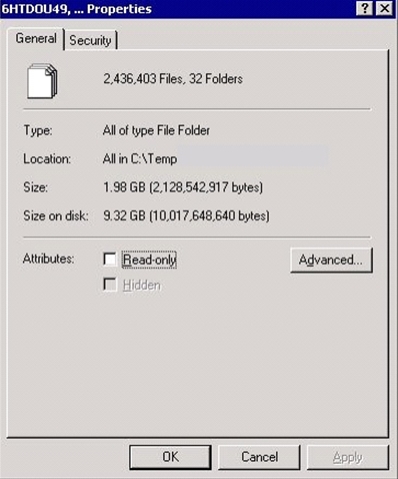
I was doing some tidying up on a website for a family friend recently. His ASP.NET application was taking longer and longer to start up. It also happened to use a lot of XmlSerializers, and of course, as an ASP.NET app, there's a lot of page-by-page compilation as he's not on 2.0 and doesn't use aspnet_compiler.
Additionally, there's some code that this client wrote that writes out temp files but doesn't clean up after themselves. When there's this many files in a folder, calls to GetTempFileName can block for many seconds.
Not only can "excessive temp file growth" cause pain at runtime, but it'll easily crush Explorer.exe's usefulness. It'll also become impossible to apply Attributes to the folder.
The point is, that there's a few folders that you need to watch out for file growth in.
I like to modify the options inside Microsoft Drive Cleanup using Shawn A. Van Ness's registry file. You can extensively modify what appears in the Drive Cleanup list, even adding your own file types and your own application-specific directories and files that you might want cleaned up.
Check out your own systems...drop out to a command prompt (cmd.exe) and do:
- cd %tmp% and cd %temp% - You'll usually end up in C:\DOCUME~1\username\LOCALS~1\Temp.
- At this point, I like to do the equivalent of a deltree and go up a directory and:
- cd ..
- rd Temp /s (it usually won't manage to delete the whole dir. Someone will have a file open and the final directory deletion will fail)
- md Temp (in case it was deleted.)
- Everything in %windir%\temp - There's lots of Perfmon counters in here, so you won't be able to delete everything. Often you can del *.* and anything that shouldn't be deleted is currently open.
- If you are a developer, and have developed ASP.NET for years/months, clean up %windir%\Microsoft.NET\Framework\ <VERSION> \Temporary ASP.NET Files. I had 4 dozens sites in here.
Tidy up, my friends.
About Scott
Scott Hanselman is a former professor, former Chief Architect in finance, now speaker, consultant, father, diabetic, and Microsoft employee. He is a failed stand-up comic, a cornrower, and a book author.


About Newsletter

That's nothing! Find someone who hasn't run spyware on their computer. Holy bejeezuss. Figure 100+ if this person browses at all.


@echo off
del "%TEMP%\*.*" /s /f /q
for /d %%d in (%TEMP%\*) do rmdir "%%d" /s /q
del "%WINDIR%\TEMP\*.*" /s /f /q
for /d %%d in (%WINDIR%\TEMP\*) do rmdir "%%d" /s /q
pause
Comments are closed.
<code>
use File::Find;
my $UserTemp;
$UserTemp = $ENV{Temp};
$WinTemp = $ENV{windir};
$WinTemp="$WinTemp\\Temp";
find(\&Wanted, $UserTemp);
&smash("$UserTemp");
find(\&Wanted, $WinTemp);
&smash("$WinTemp");
print "\n\tSUCCESS: \"$UserTemp\" has been cleared!";
print "\n\tSUCCESS: \"$WinTemp\" has been cleared!\n";
sub Wanted {
#print $File::Find::topdir."\n";
opendir(DIR,$File::Find::topdir) or return;
my $current = $_;
my @List=readdir(DIR);
closedir(DIR);
splice(@List,0,2);
if (-f $current) {
unlink $File::Find::name;
}
}
sub smash {
my $dir = shift;
opendir DIR, $dir or return;
my @contents =
map "$dir/$_",
sort grep !/^\.\.?$/,
readdir DIR;
closedir DIR;
foreach (@contents) {
next unless !-l && -d;
&smash($_);
rmdir $_;
}
}
</code>