Coloring Windows Folders with Custom Icons
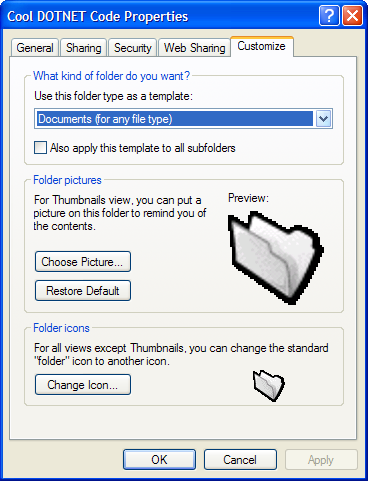 Recently folks were pointing to iColorFolder, a freeware application that "let's you add some color to your folders." I think it's cool that this guy wrote an application do this, but the funtionality is built into Windows.
Just right-click on the folder you want to mess with, select Properties, the the Customize Tab. Select "Change Icon" and set the folder icon.
Here's my zip file of collected folder icons.
File Attachment: foldericons.zip (113 KB)
This is what happens in the hidden Desktop.ini file when you do this:
[.ShellClassInfo]
IconFile=%SystemDrive%\icons\Snow.ico
IconIndex=0
I may be the utils guy, but if I can avoid loading something, I will. I figure this fellow's iColorFolder application just edits the desktop.ini of the folder anyway.
About Scott
Scott Hanselman is a former professor, former Chief Architect in finance, now speaker, consultant, father, diabetic, and Microsoft employee. He is a failed stand-up comic, a cornrower, and a book author.


About Newsletter


On the WTF stuff, I'm using many gigs a day of bandwidth and needed to cut back. BlogLines is on my WHITELIST, and I just logged into my BlogLines.com account and I see the images fine. Can you try CTRL-F5 and see if it helps? Otherwise, do you have some anti-spyware or anonymizer software that might like Norton that might be messing up your HTTP referer?
Also, the CAPCHA is case sensitive. Maybe I'll turn it off and see if more folks comment.


Comments are closed.
So, back to the point. I already typed this all out and lost it, so this is take two. Why do you have hotlinking images turned off? Perhaps you were really hit hard by some previous hotlinking related bandwidth costs, I dunno (I'm new to your blog). I read your blog as a feed in bloglines. Today all your images showed up as your "wtf" image. I came to the page to see them, and was forced to refresh since my browser had already cached the "wtf" image. That was kind of annoying.
And one more addendum: I just typed this out, typed in the captcha code, and submitted. The page is still here, with a different captcha code. Was the code not accepted? Was something wrong with my information? Is my comment waiting approval?