Forcing an update of a cached JavaScript file in IIS
 This might seem obvious to some folks, but to others it's not, so it's worth mentioning. Regardless, it's a good example of a "white box" attitude. Don't assume. Always assert your assumptions with good tests.
A client wanted to know how to 'force' a client to update some javascript that the browser had cached. The easy answer is "change the file."
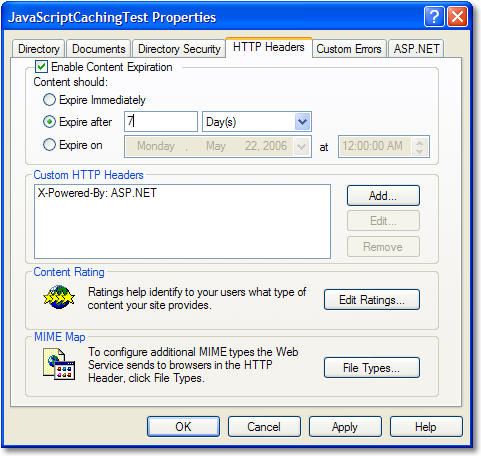
Here's what happens with a single HTML file and a single JavaScript file, running locally on my machine. The main directory is set to "Expire Immediately" via IIS's properties dialog. That means "keep it fresh."
Underneath the main directory is a directory called /js that is set to expire in 7 days, as seen at right.
Here's an abridged HTTP Header view (via ieHttpHeaders) after hitting the page for the first time ever important stuff in bold.
GET /javascriptcachingtest/default.htm HTTP/1.1
User-Agent: Mozilla/4.0 (compatible; MSIE 6.0; Windows NT 5.1; SV1; .NET CLR 1.1.4322; .NET CLR 2.0.50727; InfoPath.1)
HTTP/1.1 200 OK
Server: Microsoft-IIS/5.1
X-Powered-By: ASP.NET
Cache-Control: no-cache
Expires: Fri, 12 May 2006 19:03:59 GMT
Date: Fri, 12 May 2006 19:03:59 GMT
Content-Type: text/html
Last-Modified: Fri, 12 May 2006 18:53:33 GMT
ETag: "b01be5ef575c61:df3"
Content-Length: 115
GET /javascriptcachingtest/js/test.js HTTP/1.1
Referer: http://localhost/javascriptcachingtest/default.htm
User-Agent: Mozilla/4.0 (compatible; MSIE 6.0; Windows NT 5.1; SV1; .NET CLR 1.1.4322; .NET CLR 2.0.50727; InfoPath.1)
Connection: Keep-Alive
HTTP/1.1 200 OK
Server: Microsoft-IIS/5.1
X-Powered-By: ASP.NET
Cache-Control: max-age=604800
Expires: Fri, 19 May 2006 19:03:59 GMT
Date: Fri, 12 May 2006 19:03:59 GMT
Content-Type: application/x-javascript
Last-Modified: Fri, 12 May 2006 18:54:28 GMT
ETag: "50b1c1d4f775c61:df3"
Content-Length: 151
Note that both files were returned with HTTP 200 OK and the Javascript file had a Last-Modified header returned and an Expires date a week in the future. Now I'll hit F5 to refresh.
GET /javascriptcachingtest/default.htm HTTP/1.1
User-Agent: Mozilla/4.0 (compatible; MSIE 6.0; Windows NT 5.1; SV1; .NET CLR 1.1.4322; .NET CLR 2.0.50727; InfoPath.1)
HTTP/1.1 200 OK
Server: Microsoft-IIS/5.1
X-Powered-By: ASP.NET
Cache-Control: no-cache
Expires: Fri, 12 May 2006 19:11:30 GMT
Date: Fri, 12 May 2006 19:11:30 GMT
Content-Type: text/html
Last-Modified: Fri, 12 May 2006 18:53:33 GMT
ETag: "b01be5ef575c61:df3"
Content-Length: 115
GET /javascriptcachingtest/js/test.js HTTP/1.1
Referer: http://localhost/javascriptcachingtest/default.htm
If-Modified-Since: Fri, 12 May 2006 19:03:59 GMT
If-None-Match: W/"50b1c1d4f775c61:df3"
User-Agent: Mozilla/4.0 (compatible; MSIE 6.0; Windows NT 5.1; SV1; .NET CLR 1.1.4322; .NET CLR 2.0.50727; InfoPath.1)
Host: localhost
Connection: Keep-Alive
HTTP/1.1 304 Not Modified
Server: Microsoft-IIS/5.1
Date: Fri, 19 May 2006 19:03:59 GMT
X-Powered-By: ASP.NET
Cache-Control: max-age=604800
Expires: Fri, 19 May 2006 19:03:59 GMT
ETag: "50b1c1d4f775c61:df3"
Content-Length: 0
 Note that the JavaScript file wasn't return (Content-Length: 0), the ETag is the same, and instead a 304 Not Modified was returned. This is the essense of client side caching and is something you should be exploiting (Sadly, fewer folks than you think do this) to get good throughput, efficiency and save on bandwidth costs.
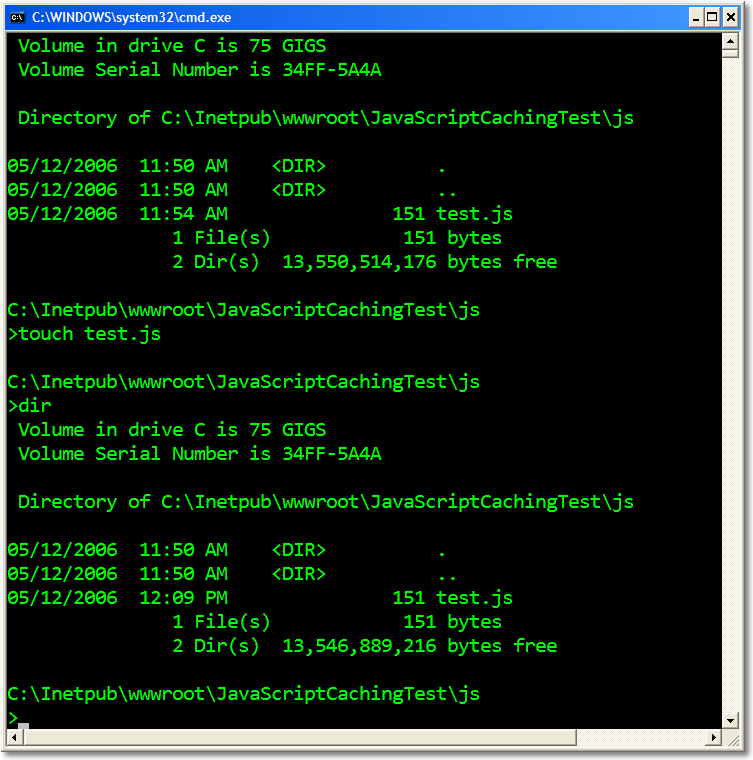
Now, I'll "touch" the file - change it's modified date using the touch.exe I've got in my c:\utils folder (from http://unxutils.sourceforge.net/). Of course, there are other ways to do this, but you get the idea.
We've touched the file, so we'll hit F5 again to refresh:
GET /javascriptcachingtest/default.htm HTTP/1.1
User-Agent: Mozilla/4.0 (compatible; MSIE 6.0; Windows NT 5.1; SV1; .NET CLR 1.1.4322; .NET CLR 2.0.50727; InfoPath.1)
HTTP/1.1 200 OK
Server: Microsoft-IIS/5.1
X-Powered-By: ASP.NET
Cache-Control: no-cache
Expires: Fri, 12 May 2006 19:11:30 GMT
Date: Fri, 12 May 2006 19:11:30 GMT
Content-Type: text/html
Last-Modified: Fri, 12 May 2006 18:53:33 GMT
ETag: "b01be5ef575c61:df3"
Content-Length: 115
GET /javascriptcachingtest/js/test.js HTTP/1.1
Accept: */*
Referer: http://localhost/javascriptcachingtest/default.htm
Accept-Language: en-us
Accept-Encoding: gzip, deflate
If-Modified-Since: Fri, 12 May 2006 19:03:59 GMT
If-None-Match: "50b1c1d4f775c61:df3"
User-Agent: Mozilla/4.0 (compatible; MSIE 6.0; Windows NT 5.1; SV1; .NET CLR 1.1.4322; .NET CLR 2.0.50727; InfoPath.1)
Host: localhost
Connection: Keep-Alive
HTTP/1.1 200 OK
Server: Microsoft-IIS/5.1
X-Powered-By: ASP.NET
Cache-Control: max-age=604800
Expires: Fri, 19 May 2006 19:11:30 GMT
Date: Fri, 12 May 2006 19:11:30 GMT
Content-Type: application/x-javascript
Last-Modified: Fri, 12 May 2006 19:11:29 GMT
ETag: W/"804647dff775c61:df3"
Content-Length: 151
Notice that the browser asks for the JavaScript not only "by name" but also by date, and by ETag, a mostly unique identifier. The IIS server responds with an HTTP 200 OK, returning the freshly changed (in IIS's mind) file along with a new ETag and a new Last-Modified date.
As an aside, DasBlog does a pretty good job in its RSS Syndication Code of programmatically managing If-Modified-Since behavior. Remember that ASP.NET's <%OutputCache%> is SERVER-SIDE. It's not what we've just seen here. If you want this kind of behavior in your ASP.NET code, you'll need to do it manually in code. I'll post examples of that later.
About Scott
Scott Hanselman is a former professor, former Chief Architect in finance, now speaker, consultant, father, diabetic, and Microsoft employee. He is a failed stand-up comic, a cornrower, and a book author.


About Newsletter

 Lee
Lee

Personally I like to version javascript with a versioned path.

http://msdn2.microsoft.com/en-us/library/system.web.ui.outputcachelocation.aspx
Not trying to a wise guy - honestly asking. I was under the impression (though never investigated), that ASP.NET DOES handle sending appropriate headers to the client and handling the request headers appropriately.

Generally speaking, "static" types known to IIS like GIFs and JS files will send 304 not modified responses to these files, assuming of course that clients send the if-modified-since information. However, the _most_ important point is this:
If you set the content expiration to, say, 7 days, the browser may not request the file at all for those 7 days. That's why touching the file may do no good -- if you've modified it, the browser will never get the file until it expires. This is by design, to cut down on the number of request/responses sent to and from the server. 304s are not as lightweight as people assume -- the connection and overhead still slows page load time, and sometimes, if files are small (<4K) it's just as performant to resend the file. With JS files, though, this kind of sync-problem happens all the time, and as suggested here already, the best approach is to version the files in the filename. If you're expiring content after some timeframe, touching the files will likely not work... I blogged about this awhile ago:
http://www.structuretoobig.com/home/show.aspx?bid=173
-Brian

Brian - F5 will not force a refresh of an HTTP GET if the files exist in local cache on any browser that I know of. Now, *CTRL-F5* will supress the browser's If-Modified-Since headers and effectively "blow through" the cache.
You say, the browser may not request the file for 7 days. Per the spect the browser must always request the file (unless you're using FasterFox or some http-spec breaking client side tool. It always does request the file in my experience (while sniffing HTTP.) Do you have evidence that points to the browser not requesting at all? (like an HTTP trace I could repro?)
Yes, 304s aren't very lightweight, especially if you have an AuthenticationTicket or some cookies, they can be as much as 1-2K.
Sure, I can probably demo this behavior using Fiddler. When I set the expiration of files to some date, say, 7 days, the browser (IE 6 in my test case) will NOT request the file again for that time.
Whether or not IE will refresh, or whether or not F5 has an effect depends on the cache settings of the browser. I just double-checked, and it's working as I've described ... let me set up a test page and we can both test it out...
-Brian
First, here's a page that does NOT use content expiration for anything:
http://clanmda-seattle.dyndns.org/test_noexpire.aspx
On most default installations, either hitting F5 or clicking the link that just navigates to the page again will result in the one aspx page being requested, and then 10 image requests (should be 304). Note: no content expiration is set for anything, but we're still getting 304's (as expected).
Now on to this page:
http://clanmda-seattle.dyndns.org/test_expire.aspx
When you first load the page, you should get the 11 200's for the aspx and the image files. All images have a 7 day expire window. I can see this in Fiddler with the max age field.
If you click the link to go to the page again, both IE 6 and IE 7 (on my installations) will ONLY request the aspx page -- no images are requested. If I hit F5 (NOT ctrl-f5) I'll get the single 200 for the aspx page, then 10 304's for the images. You see, the images are NOT being requested unless I instruct the browser to refresh.
Becaues these images are only 1K in size, the 304 is almost as bad because the image can be resent with nearly the same efficiency as sending the 304.
I actually did (back when I blogged that entry) a few long distance tests with some machines in NY connecting to my machines in Seattle to test responsiveness. A buddy of mine performed the test, and I confirmed the images were not even requested after the original GET. Pages that have a huge number of images get some huge perf benefit by not requesting the file.
Now, most people can tinker with their default behavior of browsers to control the cacheability. The safest assumption is: when setting content expiration, do not assume that touching the file will be suffient -- in most cases, it won't be. That's where the ol' filename-based versioning is so useful :)
Let me know how your test goes...
-Brian
One think I would point out though, that the second result only seems to hold during a single browser session. When I shut IE6 down and visited again, the browser issued 304s.
That indicates to me that if the user shuts down the browser and returns later, the "touch" will work because of the 304s. If the files change WHILE the 'session' is up, then you're right.
That's interesting ... I tried closing my browser (I actually had a reboot, too) and tried connecting to my expire test page... and got the same result (only the 1 request, no images). Even if I set IE6 to check for new versions on each request, it still didn't request it unless I hit F5. There's obviously a setting somewhere you and I have different :)
I'm not sure if the same behavior is true for Javascript, it may not be. But if there's anything I learned, I never rely on the client. Even between the two of us there's some differences in behavior that could be disasterous (relatively speaking, of course) if clients were so unpredictable. It would be nice to have a very clear standard for cacheability, wouldn't it?
But, overall, I do agree with the browser not re-requesting the file. On some controls that have a zillion <1K GIFs that never change, I've seen it be a real bottleneck.
Have you used Fiddler with Firefox? I haven't done that yet (not sure how easy it is to configure)...
Referring to "myScript.js" in a line of code becomes "myScript.js?preventCache<%=Now%>".
This works by adding timestamp into the path, IIS will treat this request as a unique file and force-load a new version to the browser - works just as well for graphics. This is an example from an ASP page, I'm sure there is an alternative technique for any server-side scripting language. I'll usually use this technique during development to prevent my browser from displaying old versions of files I've been workign on, then stripping out all the preventCache code when the site goes live.

Comments are closed.