Forcing Google Apps for your Domain (GAFYD) into Mobile Mode on your iPhone
 I'm thinking I'm going to take the iPhone back. I want to like it, I really do, but there's just so many things that don't fit into my life's workflow. For example, I just couldn't get the contacts and calendar to sync with Outlook for the life of me so I ended up going Outlook->Plaxo->Google Calendar->Spanning Sync->iCal->iPhone. Rube Goldberg would be proud. It's ridiculous. If it only had Exchange support...it'd be perfect. Anyway, I'm 85% going to take it back next week and pay the $40 restocking fee.
While I've been trying to get it to work I've also been totally hating the Gmail support. How can they possibly call POP3 support for Gmail support for Gmail?
The whole POINT of Gmail is that it's a view on this massive amount of email. POP3 support for Gmail apply filters (how could it?) and oddly, your own sent items come back at you as new inbox items. It's untenable if I want to keep a tidy mailbox. If Google added IMAP support, again, the problem would largely go away.
The Gmail Web Interface is yummy and wonderful in a real browser. It's utterly unusable and craptastic in the iPhone browser. The screen is too small.
Side bar: iGmail is a great compromise that Apple should take note of. It's a little Rails app that will give you an iPhone-looking interface that's really a web-proxied-face over Gmail. However, I haven't figured out how to make it point to my Google Apps Hosted Domain (where mail.hanselman.com is hosted) as GAFYD (Google Apps For Your Domain) is a fork of Gmail...it's not the same code.
So, since the Gmail Web Interface isn't usable and the POP3 solution isn't usable, what could be? Welll, Google Apps have a "mobile mode" that it'll switch into automatically when it detects a mobile device like a Windows Mobile Device or smaller phone. However, it doesn't see the iPhone this way and gives the desktop experience.
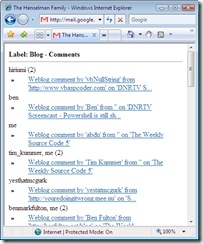
 Turns out you can add /x at the end of a Gmail URL to force mobile mode like:
It's great if you're on a slow link in Africa. However, for hosted GAFYD sites the URL is different and less obvious. Also, the Gmail browser sniffer on the server side appears to really want to prevent you from "hurting yourself" and will stay in standard mode anyway.
However, try this
The trick appears to be the "?btmpl=mobile" and it works great on an iPhone, but also in IE7.
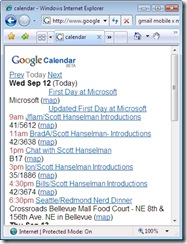
In Google Calendar for your Domain you'd add /m to the URL:
Both of these, in my opinion, make Google Apps for your Domain more usable on the iPhone until Google decides to detect the iPhone as a mobile device and not only make the experience better but also conserve a lot of bandwidth and make for a snappier experience.
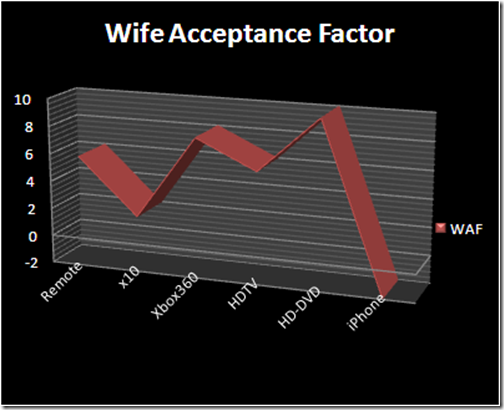
I'm still taking the iPhone back though. Actually, I think this is the my first truly failed technology purchase in recent memory. I should have paid more attention to the WAF (Wife Acceptance Factor) numbers. ;)
About Scott
Scott Hanselman is a former professor, former Chief Architect in finance, now speaker, consultant, father, diabetic, and Microsoft employee. He is a failed stand-up comic, a cornrower, and a book author.


About Newsletter

Very nice the WAF, It should be a concept under study.
Women... we could not live with them...

Give a try to iGmail, you gona probably love it...
http://www.naan.net/trac/wiki/igmail
The source code is available, and it's ruby...

I looked around the Internet and found a solution - at least for me. THe culprit was a Microsoft add-in for Live Maps. It had caused problems before and was, in fact, already disabled in Outlook. THat, however, was not enough. I had to completely uninstall it. Once I did that, my calendar came over 100%.
Good luck with the iPhone. I'd hang in there if I were you. It is a new device after all.
thanks al lot for this cute url:
"http://mail.google.com/a/YOURDOMAIN.com/x/?btmpl=mobile"
Finally _now_ I can use gmail on my mobil, it's good to know that we have you out there, helping to fix our probs! The "?btmpl=mobile" works also very fine on symbian\UIQ
Tamir


The WAF line chart is really funny. I see she really enjoyed the TV.
Thx,
Catto

http://mail.google.com/hosted/mydomain.com
That puts me in mobile mode. It's right there in the domain name, clear as mud.

Having read this post twice now, I feel that you are just trying to rant about the iPhone in your various posts. All of _your_ problems that you have mentioned so far, are publicly known. At least I did not find any of them being strange or new. (I must add that I do not own and iPhone - can't as I do not live in America.) Little online research is sufficient to understand what the iPhone offers on these fronts.
I usually also have to justify tech purchases to myself as well.
I am sorry to hear the iPhone sucks. I was considering picking one up.
These articles are an interesting read into Apple vs. Microsoft:
[ http://www.pbs.org/cringely/pulpit/2007/pulpit_20070906_002891.html ] - On Steve Jobs
[ http://themacsucks.com/joomla/content/view/309/28/ ] - On Apple becoming the bully and MS not so much

IPhone = Crap
else
Purchase TyTnII
Seriously you should take a look at the TyTnII that is coming out, it is one bad ass phone that the IPhone could only wish it was, granted it doesnt have the shiny pearly blackness but its not ugly either.
http://www.htc.com/product/03-product_tytn_II.htm#

You're sorry to hear the iPhone sucks? So this blog is the be all end all of product review?
Linking an article from themacsucks.com - sounds like a completely unbiased source of information...NOT.
Why do fanbois on both sides always end up turning everything into an Apple vs. Microsoft debate? Scott says the iPhone doesn't work *for him*. There are lots of other people who love the iPhone.
So just because gmail doesn't work the way Scott wants it to doesn't mean Bill Gates is god and Steve Jobs is the devil (or vise verse). It also doesn't mean the iPhone sucks.
Thanks Scott!!

HiTech - Maybe this is a rant, I don't personally feel it is. I'm just saying that the iPhone isn't fitting in with my fairly intricate personal workflow. If I had a mac and a .mac or yahoo account and just a few emails a day, it'd be cool. However, I get 100s of emails a day, all via a Gmail Hosted Account and the iPhone wasn't designed to handle that kind of volume.
This post isn't about the iPhone, but rather the Gmail Mobile URL Hack.

Just kidding, but as you said, it just doesn't fit your needs. I'm not going to apologize for Apple's shortcomings, because:
1. I don't have a reason to
2. it's kinda pointless.
While it may not fit your's it certainly is working out for me. I'm sure you're not giving it up because of the overall interface design and other great features, it just doesn't fully meet all of your needs. In your current world, that's very important. If the tool doesn't work, get a new tool. As far as Apple products go, I'm pretty happy with my iPhone and MacBook Pro. Mostly, I'm very happy I can still run XP and Vista as well as Mac on one machine. My Zune works with this combo quite nicely, too!
I'm looking forward to the rumored "Death Star" update, if it is really going to happen. (It's still just a rumor, folks...)
Good luck with your search for the next phone/pda/media tool, and I look forward to hearing what you have to say about that one! But, as any good consumer should do, I'm going to compile that into all the other reviews that I find.

Dave - Wow, if you have to worry about GAF then I feel sorry for ya. Be very careful upgrading to WAF. :)

I'm glad you mentioned that. I've seen that happen with Blackberry email too when connecting to a GMail account. I thought it was something to do with the BB email server. It's annoying as hell. I've never seen that behavior before with a POP3 account.

If the iPhone is for your own personal use, what does the WAF got to do with this?
So she didn't like HDTV but liked HD-DVD.. why is that?
If the gmail interface is problematic, one can get a webmail interface which taps into gmail's pop3 server.
It's even easy to develop one and make it work the way you want it to.
Anyways, to fix your Outlook syncing, look here: http://www.iphoneatlas.com/2007/08/24/special-report-troubleshooting-iphone-sync-problems#Outlook
Either way, good luck with your hunt for a decent phone - if your tethered to GMail/Outlook, there's nothing out there that won't make you want to smash the damn thing ;)

@Groby - Totally. Good point! While IMAP has problems, the fact that in 2008 both companies are not supporting is interesting. I wonder if there's a technical or security reason? Still, while Gmail and Exchange aren't standards, they are clearly DE FACTO standards, and Closed Standards didn't keep the iPhone from near-perfect integration with Yahoo. However, these are business drivers, not technology one, right?
@Abdu - She didn't like the TV initially because standard def TV looks like poo on an HD-TV. She likes HD-DVD because it's freaking gorgeous.
@Frank - x10 is a protocol that runs over the power wiring in your house letting you control/address lights, fans, etc with a central controller. This was my attempt at a "smart home." The parts are now in a box in the garage.
Regarding the XBox360, she loves it (she NEVER plays games) because she can:
* Hook up her Zune and listen to it.
* Listen to music from the Music Server
* Pay DVDs
For her, the XBox360 is a really smart DVD player.
(I brought this note here before)
I assume you're making some amount of money from Google Sense ads from your blog which you can use to buy 'expensive toys'. It makes sense to have some kind of reserve money from each spouse.
------
Only very recently I got my first HDTV (Plasma) and analog TV looks beautiful to me. The TV has all kinds of resolutions from 480-720-1080 i/p so maybe the TV is automatically adjusting itself. I am no TV buff and watch very little TV and ironically it was my wife who wanted to switch to HD and I resisted since I was happy enough with my 15 year old 26" TV! Time for a HAF.
Wife Acceptance Factor? Well, she doesn't know yet. I'm hoping by the time she figures out that I have one, I can tell her I've had it for a while and its not new... ;-)
However, I"m sure she'll apprecicate it on our next trip.

I find the best way to prove yourself right is to try to prove yourself wrong.
I want an iPhone bad. So what I am looking at is not just what is good about it, but what doesn't work so well. So when I check out product reviews, I look at more than one source. Actually in this case from consumer reports, blogs of people who bought one (technically inclined), people who are biased one way or another, etc.
In this case, when I am thinking of a phone, I expect it to do it's primary function in an acceptable manner, and that is work like a phone. From what I am hearing, iPhone doesn't exactly meet this expectation.
PS. I am not a fanbois of one side versus the other, I am actually a fan of both.
I always thought it was due to the way Google handles "conversations.'

Gotta co-worker here who types fast too. It's funny to see the things he comes up with sometimes.
Just had to give ya a little fun razz...
- Calendar hack works great (currently, the new iPhone GCal interface does not automatically load on the touch).
- GAFYD gmail does not seem to be working. I can force Firefox into mobile mode using this:
http://mail.google.com/a/YOURDOMAIN.com/x/?btmpl=mobile
but, cannot make it work on iPod touch. Any thoughts?

The whole POINT of Gmail is that it's a view on this massive amount of email. POP3 support for Gmail apply filters (how could it?) and oddly, your own sent items come back at you as new inbox items. It's untenable if I want to keep a tidy mailbox. If Google added IMAP support, again, the problem would largely go away.
It is actually possible to disable the "functionality" which adds your sent items to the inbox. There is a setting called "Use recent mode" under advanced settings.. Turn it off.. :-)

Comments are closed.
To this day, I still can't even mention an iPhone when she's around, without catching preemptive hell over it.