IBM Laptop Wireless Adapter Turns Off Automatically Without Asking
 I updated all the IBM (Lenovo) ThinkPad Craplets with the IBM
 Virus Software Installer this week. Mistake.
My wireless adapter started turning off every 3 minutes. Not losing signal, not disabling, TURNING OFF. The internal hardware would switch off.
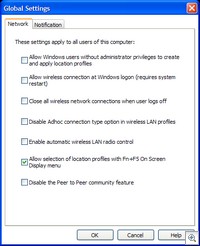 Windows was/is set up to manage the Wireless Connection, but it seems that the IBM Access Connections (their view of networking) still influences things. Kind of a wireless "shadow government."
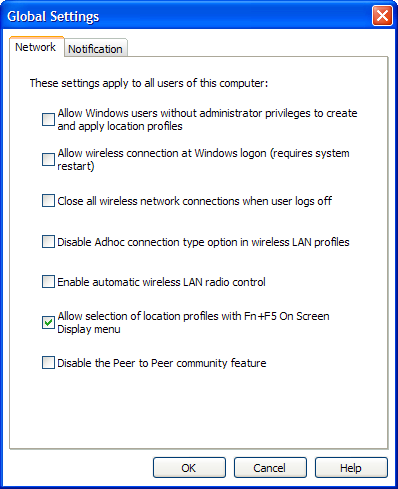
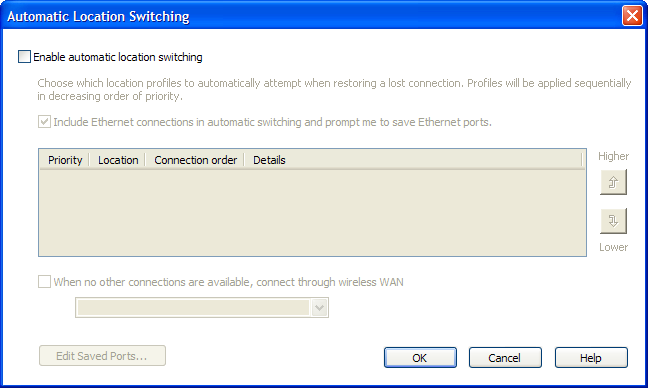 I don't see this documented anywhere, but I figured out that you have to run the Access Connections and go to Configure|Automatic Location Switching and TURN OFF "Enable automatic location switching." You also have to go Configure|Global Settings and TURN OFF "Enable automatic wireless LAN radio control."
And all is well. Today.
About Scott
Scott Hanselman is a former professor, former Chief Architect in finance, now speaker, consultant, father, diabetic, and Microsoft employee. He is a failed stand-up comic, a cornrower, and a book author.


About Newsletter

 Scott Schecter


most often either turning the wireless hardware off (that handy button on the left) or hitting ctrl-alt-del and waiting for the keyboard widget to refresh brings it out of it's funk.
it's incredibly annoying. I have a coworker in the same boat on a non-tablet,non-toshiba so I don't think it's just one combination that causes it.
It's almost like it takes a really long time to update the routing tables after it loses one route.
anyway, can you not turn captcha back on, but with a longer time delay?

Thanks again for putting this info out there and showing me where to look to fix this problem!

Comments are closed.