Introducing RockScroll
When I came to Microsoft I saw a really cool tool being used internally and immediately wanted to work with the author, Rocky Downs (who is blogless, but exceeding talented), to get it released. Fast forward to now, plus an installer, and here it is.
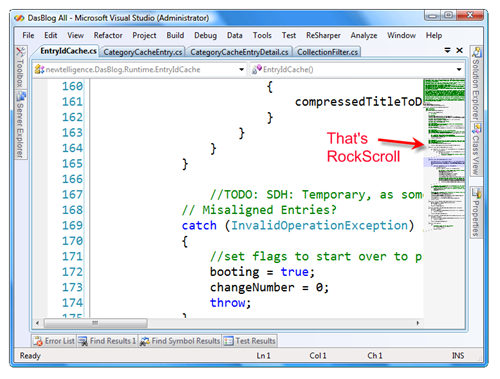
The basic (as in "only") idea is that RockScroll extends the scrollbar in Visual Studio to show a syntax highlighted thumbnail view of your source. This is really useful for those excessively long source code files you know you have. It's just one DLL and you can turn it off from Tools|AddIns just by un-checking the checkbox.
Enjoy!
 Download
  Works On My Machine Disclaimer: This is released with exactly zero warranty or support. If it deletes files or kills your family pet, you have been warned. It might work great, and it might not. It hasn't been tested against the myriad of other VS Add-Ins, but it works on my machine in both VS2005 and VS2008. It does look a little odd next to Resharper, a tool that also adds a scrollbar. Good luck.
A reader, Hans, says: "I have found that (not suprisingly) RockScroll works very well with split windows, if you bind a shortcut key to the "Window.Split" command." for those of you having trouble with split windows.
About Scott
Scott Hanselman is a former professor, former Chief Architect in finance, now speaker, consultant, father, diabetic, and Microsoft employee. He is a failed stand-up comic, a cornrower, and a book author.


About Newsletter

Still, definetly worth trying out for a bit of time.


Thanks for showing this off.. It's awesome!

Some folk may take this as making it easier to keep writing unwieldy, unmaintainable, spagetti code. I'm sure that's not Rocky's intent, but it may be an unintended side-effect. Shouldn't it be painful to write bad code?

Support for all file types would be great. Anyway I'll give it go, thanks for the link.

@kevwil-It's easy enough to write crap code as is. I don't see this making it easier.
My only (admittedly trivial) gripe is that you can't set the highlighter colors for it different from what's used in the actual code window (I code in mainly White on Black text, which comes out a little monochrome in the scroll bar).
Another unadvertised feature. It draws a little red box for every breakpoint that's set.
I'd love to see the source for this bad boy<hint - hint> Maybe you could lean on Rocky?


Thanks also to Rocky Downs for writing it.
-- Stu


Another issue is that, if you want to turn it off using Tools|AddIns..., it doesn't remove untill you close the code file. In general, it may be a good utility for those, who does not organize their code in regions.

Pointing the link on image to the installer download is very confusing. I clicked on the image thinking that it will show the enlarged image and It displayed download dialog. This looks like cheap marketing stretegy. And you are not marketing RockScroll, are you :).
I use this add-in as my Visual Studio scrollbar. I find it useful for large and small files. The double click – instant find in file is my favorite feature. I end up double clicking on identifiers often when I am debugging or refactoring code. Many times I use the double click to do a find in file rather than using find all references or go-to definition. You can clear a find in file by right clicking in the scrollbar.
Breakpoints and bookmarks are visualized in the right side of the scrollbar. Recent edits are visualized on the left size (orange for unsaved changes and blue for saved changes).
In the scrollbar C++ and C# single line comments are colored green. Other comment syntax is not recognized now.
To address some concerns mentioned above:
XML type files are not supported. There are several file extensions that fall into this type. The reason for this is to keep Rockscroll out of the resource editor. If you really want to use a certain file type with Rockscroll you can either change the extension or dissociate that extension with that document type in VS. (I am at home right now and do not have the latest tools at home, but it is something like:
HKEY_LOCAL_MACHINE\SOFTWARE\Microsoft\VisualStudio\7.0\Editors\{C76D83F8-A489-11D0-8195-00A0C91BBEE3}\Extensions )
I would like to support outlining at some point. As others have noted, the scrollbar gets out of sync when there are collapsed nodes. Personal preferences vary, but I find the scrollbar with its single click navigation and visualizations to give me a workflow that competes with outlining.
All colors are currently hardcoded. I would like to hook it up to the VS fonts and colors at some point. The width is hardcoded as well. I always wanted to make the width dynamic so you could drag it out wider if needed.
I will look into a codeplex project in the future. The major current item holding me back is that this tool is really hard to build. This tool does not use any private interfaces or APIs, but some of COM interfaces I use are being pulled in through internal source files. So, I would need to divorce myself from those files first. Also, it would possibly require VSIP to build.
Thanks,
Rocky


About the code region part: In a perfect world - where you work with good specifications and people that know what they are doing - code regions should not exist. Alas, in the real world were you work on projects with tight deadlines and many people that are geographically separated, code regions may be the last resort to make ugly, bad code readable. Sad but true.


Again, thanks for sharing this. Love it!

Again, thanks for sharing this. Love it!
Very thanks for sharing!

Nice to know I've got some company out there.
What is it with this technique of putting every dang method/property in a region anyway?
Maybe I've just become "an old coot"<g>
Would really love to see the source code for this one.
Thanks guys.

Kevin, I don't like someone forcing me to do the "right thing", as I would rather have the choice myself.

Kevin, I don't like someone forcing me to do the "right thing", as I would rather have the choice myself.
Nice tool. There are a few repainting issues at times, especially with Resharper installed. Otherwise it's great!

Mark.
It'd be nice if it supported VB comments. I'm one of those evil VB developers :) Even without the comments though, it's mad useful for finding "arrow code". And getting some kind of extra spatial sense of where I am in a code file is fab. Good job Rocky

this is really a great tool! It's one of those simple but extremely good ideas, my congratulations!
I would suggest, you divorce yourself from the COM-components if you have the time. Bringing the project to codeplex would make many people happy (me included). There are definitely points that have to be in control of the user to make it THE tool, but hey, that's what the tool will converge to at codeplex.
I will definitely recommend it to my colleagues and friends!
@Scott: Please let us know, which way the tool will go!
Regards,
Dennis

...Regions need to be supported (I like them when used consistently)
...I would also like my default Scrollbar to remain (perhaps make this an option)
...I would like vb syntax highlighting
Otherwise, quite nice. More and more people seem to be making use of the scrollbar area.
For example Coderush's Beta feature - Code Analysis (Code Issues)
Good stuff. I will be interested in any follow up information of the development of this addin.

2. RegionsSuck++
3. Works ok with R#, but the display is a little funky. Passable though.
Suggestion: put it in a pane, so that its undockable, hide able, pin able, etc.

I like the idea.
But I had to uninstall it because it doesn't work with split screens. The option is removed.
Eric

A question for Rocky, how are you getting the greeked text representation? Just a bitmap of the editor region and scaling it down or somthing cooler?
Thanks for the tool!


I sometimes use regions, depends on the project. I often use the internal "non region" method collapser. The navigation of large files in VS leaves a lot to be desired and this tool goes a long way towards fixing it.
What do you mean by this?
The exceeding people always have blogs?
blogs makes you a better professional?
Don't take me in the wrong way, I love to read your blog.
Just that comment was strange ;)

Though it is a little confusing when there are collapsed region in editor area. Hope this can be fixed soon.


I too am baffled by the region usage - I worked w/ someone that used them a LOT and it was quite disturbing since he insisted on collapsing the region we were looking at before moving on to look at other code.
Add another plea for a codeplex release.
John

I'm getting the occasional crash with RockScroll. I have submitted the crash report through the automated tool.
It seems that when closing a file, RockScroll can become confused.
Even if you don't open the source, Rocky, you might wish to find a home for it so you can organize feedback and releases.
Thanks, again,
John
Can we PLEASE have a regkey to set an RGB color for the double-click highlight color? Pretty please!!? Did I mention I love it?
John

The region issue is also a problem for me. I agree that regions should not be misused, but sometimes they are just nice so i can avoid seeing the same boilerplace code and having to scroll through it all the time.
Besides the region issue some files just make the scrollbar go crazy, so it shows icons for pinning windows, or other random content from my screen. When this happens i cant scroll at all and end up having to use pageup to navigate :(


Wish EVERYTHING had rockscroll!!
Word documents. Web pages. Emails. Disk drives. Movies. Books.
Rockscroll!!! ROOOOCCCCCCKKKKKKK SCROLLLLLLLLLLLLLL!!!!

Comments are closed.
It can be of great help on the project where I'm now, with 350Kb and 10k lines code files :)
I can also act as stress test for the tool :)
Will test it next Monday...