Paste XML as XLinq XElement Visual Studio AddIn
In the May 2006 CTP of Visual Studio there was a great "Paste XML as XElement" feature that didn't make it into the product. However, seems features can be snuck in included as Samples.
In VB9, you can do really cool things like this with XML literals:
 Dim books = <bookstore xmlns="http://examples.books.com">
                        <book publicationdate=<%= publicationdate %> ISBN=<%= isbn %>>
                            <title>ASP.NET Book</title>
                            <price><%= price %></price>
                            <author>
                                <first-name><%= a.FirstName %></first-name>
                                <last-name><%= a.LastName %></last-name>
                            </author>
                        </book>
                    </bookstore>
In C# it's more of a hassle, because you have to build the XElement tree yourself:
  XNamespace ns = "http://example.books.com";
        XDocument books = new XDocument(
            new XElement(ns + "bookstore",
                new XElement(ns + "book",
                    new XAttribute("publicationdate", publicationdate),
                    new XAttribute("ISBN", isbn),
                    new XElement(ns + "title", "ASP.NET Book"),
                    new XElement(ns + "price", price),
                    new XElement(ns + "author",
                        new XElement(ns + "first-name", a.FirstName),
                        new XElement(ns + "last-name", a.LastName)
                        )
                    )
               )
            );
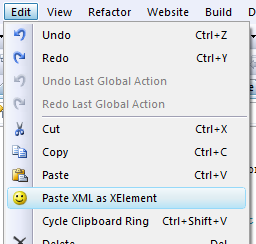
However, the Paste XML as XLinq/XElement Addin Sample in Visual Studio 2008 adds a new menu item to the Edit Menu.
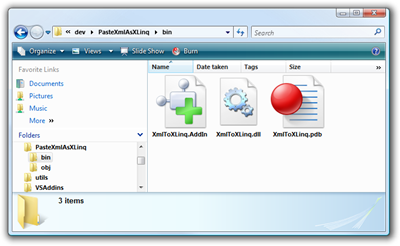
From Visual Studio 2008 Beta 2, select Help, then Samples. Click on Visual C# Samples, Linq Samples, then PasteXmlAsXLinq. At this point, you're actually inside a Zip file, so you might want to backup before you drag them out, or just unzip the whole "C:\Program Files (x86)\Microsoft Visual Studio 9.0\Samples\1033\CSharpSamples.zip" to a development directory.
 Drop out to a Visual Studio 2008 command prompt and run MSBuild PasteXmlAsLinq.csproj (or compile it inside of VS). Take the XmlToXLinq.dll and XmlToXLinq.AddIn and put them in one of the addin folders. Usually this is in something like c:\Users\Scott\Documents\Visual Studio 2008, but I like my things tidy, so I made a separate folder in my Dev Folder just for AddIns. From VS, to Tools|Options|Environment|AddIns and add a new folder if you like and copy those two files in there.
Restart VS and you'll get this new option. It'll take whatever XML you have in the clipboard and paste it as an XElement declaration.
It's not XML Literals for C#, but it does make life easier.
About Scott
Scott Hanselman is a former professor, former Chief Architect in finance, now speaker, consultant, father, diabetic, and Microsoft employee. He is a failed stand-up comic, a cornrower, and a book author.


About Newsletter

 Josh Stodola


Comments are closed.