PowerShell CMDLET Visual Studio 2005 Item Template
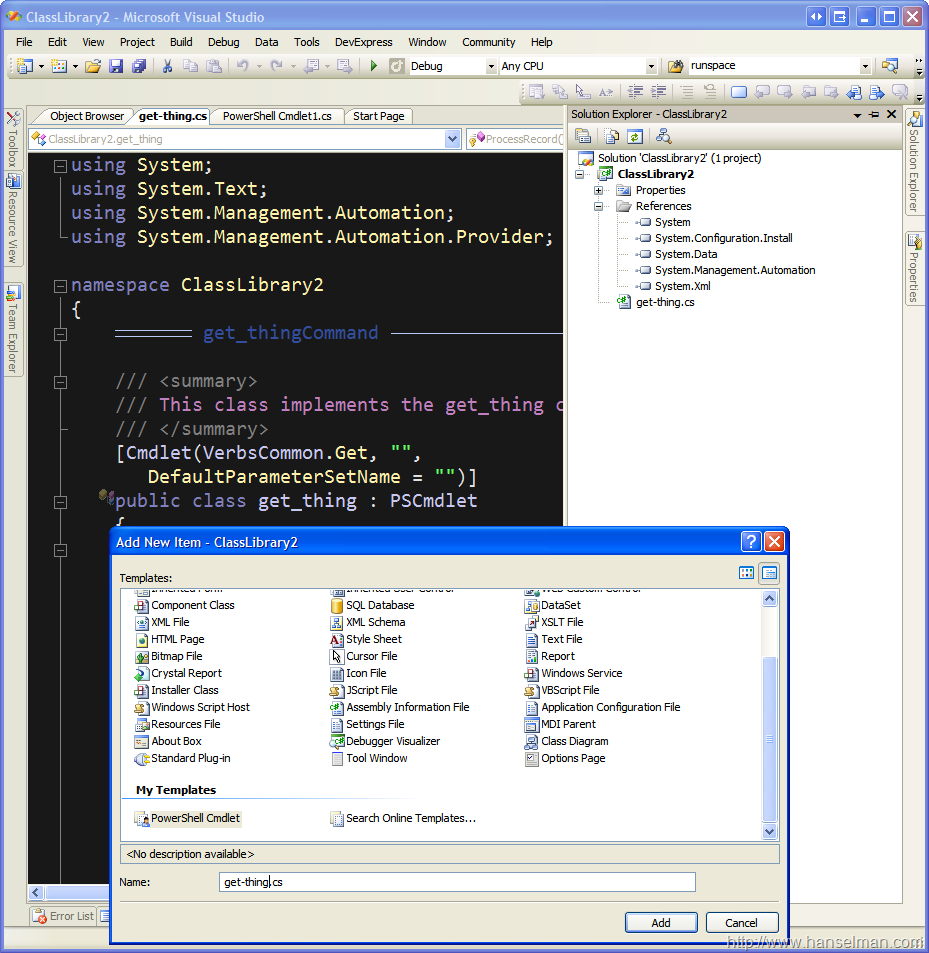
Jason Scheuerman from my company has created a PowerShell Cmdlet Visual Studio 2005 Template so you can create PowerShell Cmdlets using File|Add New Item.
In the screenshot at right, I've select File|Add New Item and entered get-thing.cs as the name of my new Cmdlet.
If you want to use this Item Template, drop this zip file into your C:\Documents and Settings\<YourUserNameHere>\My Documents\Visual Studio 2005\Templates\ItemTemplates.
Don't unzip it, just put the ZIP itself in that folder.
You can learn more about creating Cmdlets (they're different from PowerShell Scripts (PS1 files) in that they can integrate more tightly with the pipeline and they can use parameter binding) at MSDN.
There's more about the difference between Cmdlets and scripts in my interview with Jeffrey Snover at Hanselminutes.com.
About Scott
Scott Hanselman is a former professor, former Chief Architect in finance, now speaker, consultant, father, diabetic, and Microsoft employee. He is a failed stand-up comic, a cornrower, and a book author.


About Newsletter


The color scheme that Scott uses looks like, Brad Wilson's Dark Visual Studio.
http://www.agileprogrammer.com/dotnetguy/archive/2006/09/07/19030.aspx
I use at home and rocks :)


By the way, when I create a new Cmdlet from the template,
the resion inside the class is collapsed.
Is there a way to prevent the source code folding so that right after creating a new class, one would not have to unfold the source?
Thank you in advance.

1) Open the zip file
2) Extract the .cs template file in there
3) Remove the #region statement lines
4) Put the .cs file back in the zip
Comments are closed.
Would you export your VS setting and make them available for download?
Thanks,
Stephen