Progress Bars in PowerShell
PowerShell has a thousand nice features, but one of the nicer ones that I end up using all the time is the built in Write-Progress cmdlet. Shady the Intern came by today with a PowerShell script that printed dots to report progress, like:
Doing some stuff........................
I recommend he switch to Write-Progress. A nice feature of Write-Progress that I don't see used enough is the assigning of IDs to Activities, and then referencing those IDs as ParentIDs when writing out the progress of a Child Activity.
for ($i = 1; $i -le 10; $i++)
{
  write-progress -id 1 -activity "Doing some stuff" -status "whatever" -percentComplete ($i*10);
   sleep 1;
   for ($j = 1; $j -le 10; $j++)
   {
      write-progress -id 2 -parentId 1 -activity "Doing some child stuff" -status "yay" -percentComplete ($j*10)
      sleep 0.75
   }
}
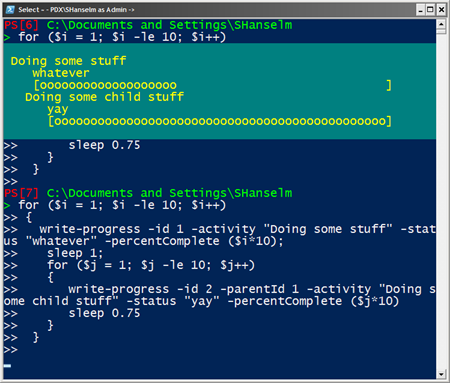
Here's a trivial example. Two for loops, each sleeping for a bit. The second for is a child of the first. Notice that ID of first loop is -activity 1 and the second references that activity via -parentActivity. This really adds, in my opinion, to the fit and finish of any script.
About Scott
Scott Hanselman is a former professor, former Chief Architect in finance, now speaker, consultant, father, diabetic, and Microsoft employee. He is a failed stand-up comic, a cornrower, and a book author.


About Newsletter


Any chance you could post your settings?


Is their perhaps a progress cmdlet that does this?

Comments are closed.
i was doing this in a much more long winded way.
one thing -- it'd be good to stick semi colons in your example, on the end of these two lines:
write-progress -id 2 -parentId 1 -activity "Doing some child stuff" -status "yay" -percentComplete ($j*10) ;
sleep 0.75;
cause otherwise when you copy and paste it all as one line, powershell thinks 'sleep' is a parameter to the write-progress command.
nifty trick, thanks!
lb