Removing Security from Downloaded PowerShell Scripts with Alternative Data Streams
I was trying to run a PowerShell script that I downloaded from the Internet today and got this security warning:
Security Warning
Run only scripts that you trust. While scripts from the Internet can be useful, this script can potentially harm your
computer. Do you want to run foo.ps1?
[D] Do not run [R] Run once [S] Suspend [?] Help (default is "D"):
I've written about Signing PowerShell Scripts before, but not about totally unsigned, totally un-trusted scripts. When a script is downloaded via Internet Explorer from the Internet or an Intranet, an NTFS Alternative Data Stream is added to the file with a Zone Identifier, indicating the file's origin.
You can use the free streams.exe from SysInternals to see the Alternate Data Stream for each file/script.
C:\>streams foo.ps1Streams v1.5 - Enumerate alternate NTFS data streams
Copyright (C) 1999-2003 Mark Russinovich
Sysinternals - www.sysinternals.comC:\foo.ps1:
:Zone.Identifier:$DATA 26
You can see clearly that there's a Zone.Identifier stream attached alongside this foo.ps1 script.
It can be easily opened in notepad like this:
notepad foo.ps1:Zone.Identifier
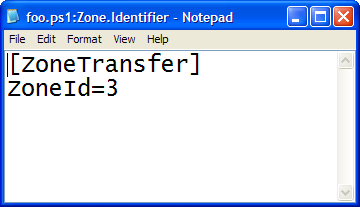
And see the hidden ini file with a Zone Identifier. There's six possible values
public enum SecurityZone
{
  NoZone = -1,
  MyComputer = 0,
  Intranet = 1,
  Trusted = 2,
  Internet = 3,
  Untrusted = 4,
}
Notepad is kind of a coarse, but effective, way to access these streams. The PowerShell Guy has created an extension method for System.IO.FileInfo called GetStreams that lets you get at these streams from PowerShell.
In Vista, you can use the new /R switch to DIR as in DIR /R.
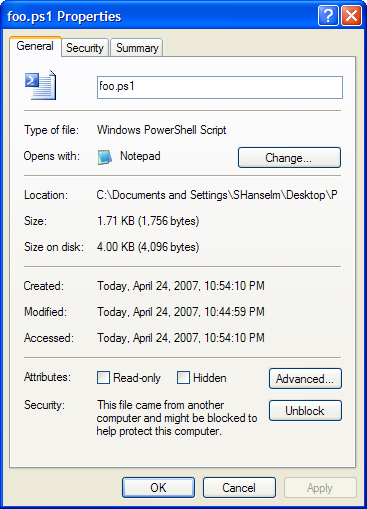
Personally, I like to just use the built-in (have you see this?) support in Explorer's General Property Pages for the file. You can just select Properties and under Security click "Unblock." Clicking Unblock completely removes the Zone.Identifier Alternative Data Stream and makes scripts (and other things) executable again.
To summarize, there's lots of ways to manipulate Alternative Data Streams:
- Use Notepad.exe filename:streamname
- Use extensions to PowerShell's FileInfo object
- Use Streams from SysInternals.
- In Vista use DIR /R
- On any OS, use more < foo.ps1:Zone.Identifier
SECURITY NOTE: Firefox doesn't appear to know about zones at all, so PowerShell scripts that are downloaded from the Internet with Firefox are not marked with this Alternative Data Stream, and are therefore immediately executable, so take care. Firefox on Windows could fix this by calling IAttachmentExecute (MSDN).
About Scott
Scott Hanselman is a former professor, former Chief Architect in finance, now speaker, consultant, father, diabetic, and Microsoft employee. He is a failed stand-up comic, a cornrower, and a book author.


About Newsletter

 Gulli
Gulli

Aaron - Nope, this is baked into the DNA (via the ADS's) of each file, on a file by file basis...that way it's copied along with the file. If you copy a file to a non-NTFS file system you'll get a warning that this information will be lost.


a@http://msdn2.microsoft.com/en-us/library/ms537029.aspx@http://msdn2.microsoft.com/en-us/library/ms537029.aspx
Enjoy!

http://msdn2.microsoft.com/en-us/library/ms537029.aspx
Comments are closed.