Replacing Explorer.exe - The Return of Norton Commander with xplorer2 and FAR
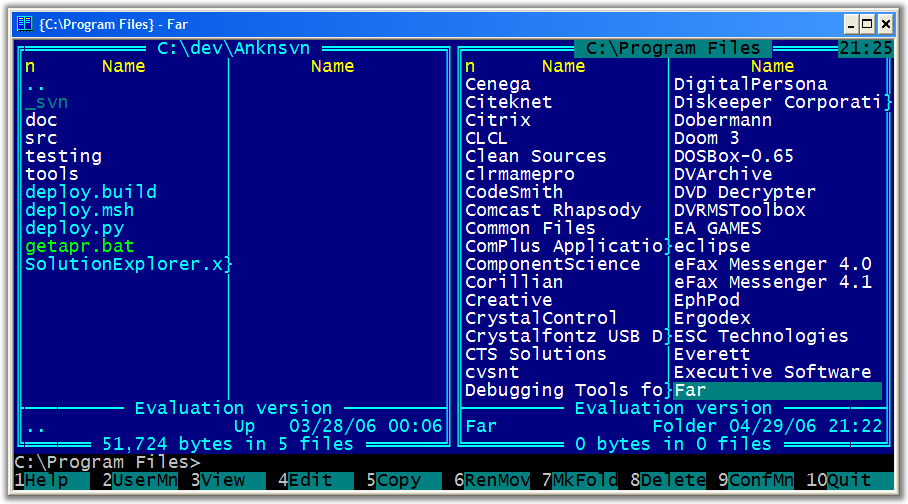 "The Norton Commander is the most useful DOS program ever written" says the Commander Homepage, a site dedicated to Norton Commander. And true it is. NC was flippin' fabulous. I used the crap out of that program. You think I'm fast now, back in day™ I was fast as lightning on a stac'ered 386sx. Those were the days.
Misha Bergal emailed me recently reminding me of FAR, a text-mode Norton Commander clone with Windows long filename support. Wow, takes me back.
Sure, PowerShell is a better shell. The best ever, even, there's no question of that (Seriously, get on board, the PowerShell is poised to take over the planet, but I digress...) but if you really want to stop dragging files around in Explorer and start doing some serious damage, take a look at these potential additions to your tools list.
The first is FAR and the real story is it's plugin support. Some of my favorite features? Start it up and press Ctrl-UpArrow for a while, then Ctrl-DownArrow. Now try Alt-F9. Try Ctrl-W. It'll take a while to get used to, but wow, you can fly once you've taken off.
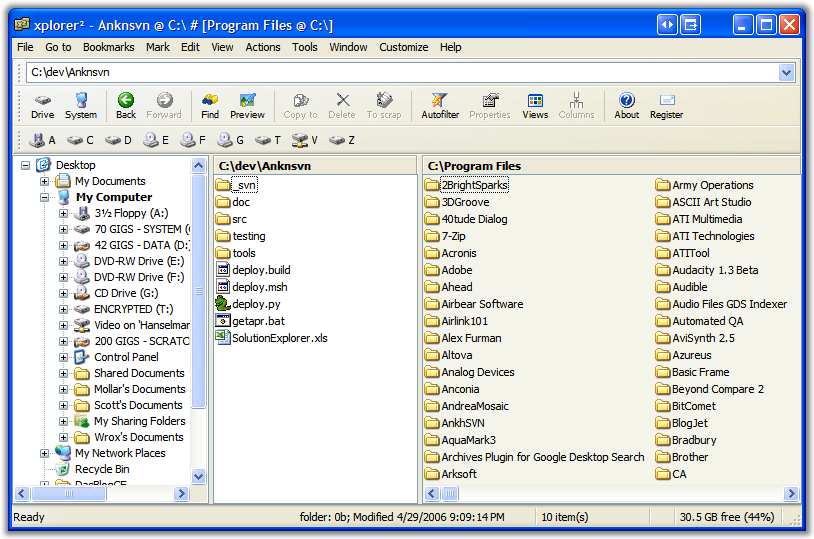
My other favorite Explorer Replacement is xplorer2 from Zabkat. There's so much goodness in xplorer2 I will have to blog about it separately. It's got the same familiar Norton Command dual-pane view with the quick switching with "Tab" feature. It has integrated file preview and all the things you'd expect, but also throws in a great folder synchronizer, an amazing "mass file rename" token language for those large tricking bulk renames, rule-based file section, a macro language and it starts up faster than a new explorer window.
Both of these great tools are bound to hotkeys on my systems and make my life easier.
About Scott
Scott Hanselman is a former professor, former Chief Architect in finance, now speaker, consultant, father, diabetic, and Microsoft employee. He is a failed stand-up comic, a cornrower, and a book author.


About Newsletter

Especially the synchronising-function for detailed comparing of two folders, the multi-rename-tool and the recent support for TABs is great


Cheers,
Andre
PS - I love the hanselminutes podcast - look forward to it every week. :)

You should really take a look at Servant Salamander (yes, I know - very strange name for a file manager). It's a plug-in based file manager that does SOOO much - file comparisions, fast viewing of images and most doc types, zip rar etc support, ftp support, ISO & registry navigation, etc. It's not free, but I've been using this for years now. There are short-cut keys for everything, too. Check it out since they just released v2.5 RC1:
http://www.altap.cz/salam_en/newver.html
Enjoy!
Derek

http://www.ztree.com/html/ztreewin.htm
It was last updated on 1/1/2006, so its still active. And a license is affordable @ $29.95. There is a 30-day free trial.
Give it a whirl. I'm sure it will give Norton Commander a run for the money. :-)
Harry


Sorry for the shameless self promotion, but I did write about it on my blog a while back: http://pauked.com/blog/?p=37


Norton Commander 5.0 for DOS has to be just about one of the greatest pieces of software that ever existed. I even used the Norton Commander for Windows versions that Symantec created, but they never felt the same.
I've since switched to Directory Opus and while it doesn't hold the same place in my heart that NC did, it is a great product in its own right.
I enjoy your podcast, too, Scott. I hope you'll do an update to your Ultimate Tools List and talk about it in your podcast someday.


http://weblogs.asp.net/nleghari/articles/exploreproductivity.aspx
For a menu facilitiy, yeah, Start Menu>Programs isn't good when you have so many programs. My current fav is Pegtop PStart - in which I only put the shortcuts that I want to be accessible quickly. For all the rest of the programs which have been installed all over the place and I can't remember where and what they are - ESP - http://www.espsw.com

I've used (for years) the Win32 port of Midnight Commander (http://people.freenet.de/franco.bez/mc/mc.html) which was ported from Linux and does have limitations (but is open source). I never use explorer.exe and live, die, and eat cheese by the command line (and command line tools). All that crazy double clicking to get into folders when I could just type "cd/win[TAB]/sys[TAB]/driv[TAB]/etc?"
The plugin aspect of Far (and maybe Total Commander) really rock my boat as I can never have enough pet projects to do.

I tried Total Commander and the one feature that beats of xplorer2 is the Directory Tree with incremental search. Other than that it doesn't seem better than xplorer2.
In xplorer2, after a search, I can Quick Preview with the search terms highlighted in each file while I conveniently scroll through the list. Once you've used it you can't do without it.


So this company Enriva created a product that reminds me of some of those Amiga shells called Magellan Explorer. I've used the demo, but never quite decided to buy it simply because I have so many systems (multiple work, home, etc.) that I've just learned to deal with Explorer's quirks and inefficiencies...
My favorite for a while was SID and I do remember a bit of a flame war over how much Directory Opus looked like SID initially.

/sean

Comments are closed.
When I first tried it out, I didn't "get it" and gave up. It took a seoncd look at it for me to get it. It just takes time to get used to it and then there's no looking back.
BTW I have no connection whatsoever with TC. I'm just a very happy user.