The Best Visual Studio 2010 Productivity Power Tools, Power Commands and Extensions
One of the things I'm digging about VS2010 is its extensibility model. I'm collecting add-ins in VS like I collect Add-Ins in FireFox. Here's my current of the best Visual Studio 2010 Extensions I'm using.
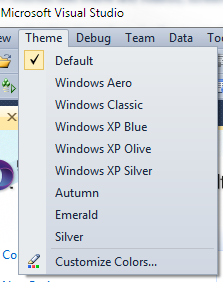
Visual Studio Color Theme Editor
I've blogged before about the Visual Studio Color Theme Editor. It's great and lets you make VS look like whatever OS you want. Some crazy people try to make Visual Studio 2010 look like Visual Studio 2008! ;)
PowerCommands for Visual Studio 2010
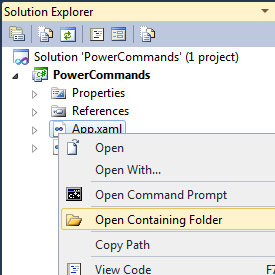
This crazy add-in adds 25 additional commands to Visual Studio! It's a collection of really convenient little improvements like Open Containing Folder and Open Command Prompt. But it's also subtle things like Undo Close that will reopen the most recent tab with the cursor just where it was. There's a lot of Copy/Paste improvements, letting you copy and paste a whole class, or copy and paste references between projects. It even adds "Format Document on Save" that will tidy up your whitespace every time you save your document. Lovely.
Visual Studio 2010 Pro Power Tools
Where PowerCommands adds lots of little commands in subtle ways, Pro Power Tools changes UI things in much bigger ways.
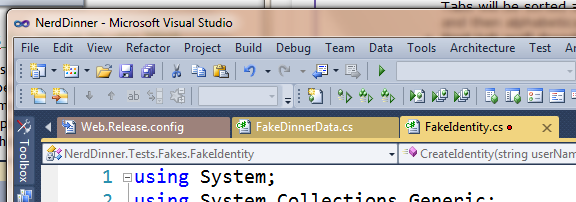
Two of the big changes are the "Document Well" that changes how tabs behave. It'll color tabs based on what project they came from, which is nice for large solutions. It also introduces optional tab recycling that will close old tabs as you open new ones. If you prefer a pile of tabs, you can get multiple rows or columns of tabs.
You can also Highlight Current Line, nice for large monitors. It adds HTML Copy that puts code in the clipboard as in the HTML format if if you like, but most of all, it adds a new Searchable Add Reference Dialog. Magic.

CodeCompare
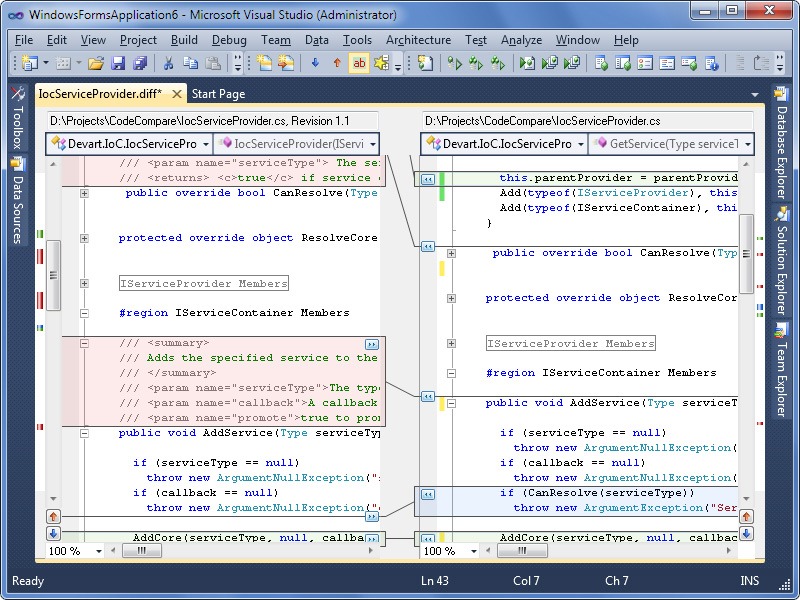
I'm a fan of BeyondCompare from Scooter Software, but I like integrated stuff as well. CodeCompare is a free Diff tool that runs inside VS itself. It's nice because it's using the VS editor so it has the features you're used to like Ctrl-Scroll to change the font sizes. I wish the two panes changed sizes in sync though, and I've seen one or two crashes. Still, an excellent free compare tool, and I like that I can drag the second file in.
tangible T4 Editor
T4 (Text Template Transformation Toolkit) Code Generation is Visual Studio's best kept secret. It's built in and it's yummy. However, there's no syntax highlighting and opening .tt files in Visual Studio directly is a smidge scary, as it's hard to tell what's code generating code and what's the code you're generating. With the free tangibile T4 editor you get coloring and Intellisense.
_2.png "T4MVC.tt - Microsoft Visual Studio (2)")
What are your favorites, Dear Reader?
About Scott
Scott Hanselman is a former professor, former Chief Architect in finance, now speaker, consultant, father, diabetic, and Microsoft employee. He is a failed stand-up comic, a cornrower, and a book author.


About Newsletter

+ Visual Studio Color Theme Editor
+ PowerCommands for Visual Studio 2010
+ Visual Studio 2010 Pro Power Tools
I have also a license of Beyond Compare and I really like it, but thank for the suggestion of integrated compare. I will give it a try!

But they all look good :) Thanks for sharing!

Some of the ones I like, in addition to your list:
PowerConsole
http://visualstudiogallery.msdn.microsoft.com/en-us/67620d8c-93dd-4e57-aa86-c9404acbd7b3
Team Foundation Sidekicks (includes 2010 add-in)
http://www.attrice.info/cm/tfs/
Open Data Protocol Visualizer
http://visualstudiogallery.msdn.microsoft.com/en-us/f4ac856a-796e-4d78-9a3d-0120d8137722


VS10x Method Block Highlighter
VS10x Code Marker
VS10x Editor View Enhancer
I must admit: I did not have a chance to test them myself.
PS: I'm not connected in any way whatsoever to Michael Kiss or AxTools.


If MS folks don't feel it is good enough, do you think others will?
How soon before it is axed?


Here is my list.
BTW: I prefer the Expression look of Visual Studio.


You're kidding, right?
There does not exist a T4 editor that doesn't utterly suck. Please vote this feedback item up: https://connect.microsoft.com/VisualStudio/feedback/details/565760/please-take-pity-on-us-give-us-a-decent-t4-editor

For Add Reference, I prefer the traditional classic dialog with Search enabled: http://visualstudiogallery.msdn.microsoft.com/en-us/02c0bded-4739-40ec-af07-9eb002a27246


I'm obviously incredibly biased, but I think cc2vs is a must-have if you write lots of JavaScript in Visual Studio. I mean, who wouldn't want to catch compile-time errors in their code?
1. Go to Tools -> Options -> Source Control -> Visual Studio Team Foundation Server, and click the "Configure User Tools" button, then click the Add button in the Configure User Tools dialog.
2. In the Configure Tool dialog:
In the "Command" text box enter the path to BC2.exe. On a 64bit default install this should be C:\Program Files (x86)\Beyond Compare 2\BC2.exe
In the "Arguments" text box enter "%1 %2 /title1=%6 /title2=%7" without quotes.
Save your way out of there.


-Chris

Oh wait, productivity *enhancing*?


It's got some really cool features like attach to local IIS or ability to group items together (like when you have a designer and code begind) http://visualstudiogallery.msdn.microsoft.com/en-us/d491911d-97f3-4cf6-87b0-6a2882120acf

It was released for VS2010 but didn't work and is now unavailable.
Coding without it is not an option.
I'm going to have to shamelessly promote my 2 extensions. But I do think they are absolutely awesome and use them more than any other ones...
http://tinyurl.com/alignby - Noah Richards wrote a similar extension which is distributed with the Productivity Power Tools, but mine is like that, but on steroids. I've written a big description on the extension page.
http://tinyurl.com/solexp - Allows for easy maintenance of the solution explorer. It allows you to collapse everything except your current document. And it allows for a less coupled track active item - it doesn't track it automatically but hit 1 button and it selects it.

Comments are closed.
http://visualstudiogallery.msdn.microsoft.com/en-us/site/profile?userName=Waldek%20Mastykarz