The Weekly Source Code 31- Single Instance WinForms and Microsoft.VisualBasic.dll
I got an interesting question recently emphasis mine:
I am regular reader of you blog. I need some help in single instance winform. I have to open application when a file (.ext) is clicked (File is associated with that application like .doc with WINWORD). Application should be single instance. When I click the .ext file it should open the application with that content. If an instance is runnng it should ask the user whether you want to close this application and then open the new .ext file. Need help in C#.
Some questions are more interesting than others, but I think we've all had to solve this "Single Instance" problem over and over again over the last 15 years. I did this with a Dan Appleman VBX in Visual Basic 3 and I've seen piles of solutions with Mutexes and all sorts of overly complex dancing to solve this apparently simple problem. This is a really old technique, but three years later, there's just not enough people that know that the WindowsFormsApplicationBase class exists and has a lot of useful functionality in it.
There was an interesting thread over here about handling this. Someone asked the question and someone said "WinForms 2.0 has support for single instance apps built in." and the next guy said "Only for Visual Basic applications, though."
Microsoft.VisualBasic.dll has got to be one of the most useful standard installed parts of the .NET Framework out there. Folks are afraid to reference it from C#. It feels wrong.
Kind of like busting out with French words in the middle of English sentences, referencing Microsoft.VisualBasic.dll has that je ne sais quoi that tends to give C# folks a feeling of mal de mer but that assembly has a specific raison d'être. See? Feels wrong, but it still works. There's good stuff in Microsoft.VisualBasic.dll, and just because it isn't System.Something doesn't mean you shouldn't reference it with abandon. Go nuts.
Back to the problem. There's many examples, but the easiest one I've seen was over at OpenWinForms.com and it was written in C# referencing Microsoft.VisualBasic.dll. I've modified it here to make a single instance app that will open a text file name passed in on the command line. If you call the same application a second time, it'll take the new command line argument and load that text file in the first instance.
Launching it as "SuperSingleInstance foo.txt" from a command line...
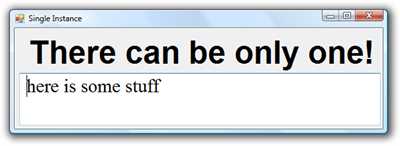
Then, from the same command line, while the first one runs, launching a second "SuperSingleInstance bar.txt" from a command line. The first instance is reused, brought to the front, and gets an event letting us know someone tried to launch us and that event includes the new command line.
_3.png)
The code is really cool as all the work is in WindowsFormsApplicationBase. It's a little confusing because you have to call a controller instance and tell it about your MainForm, rather than calling Application.Run(). The StartupNextInstance event is called in your first application when a second instance of your app gets fired up. It talks cross process between the new second instance and your original one and passes over the command line.
using System;
using System.Windows.Forms;
using Microsoft.VisualBasic.ApplicationServices;

namespace SuperSingleInstance
{
    static class Program
    {
        [STAThread]
        static void Main()
        {
            Application.EnableVisualStyles();
            Application.SetCompatibleTextRenderingDefault(false);
            string[] args = Environment.GetCommandLineArgs();
            SingleInstanceController controller = new SingleInstanceController();
            controller.Run(args);
        }
    }

    public class SingleInstanceController : WindowsFormsApplicationBase
    {
        public SingleInstanceController()
        {
            IsSingleInstance = true;

            StartupNextInstance += this_StartupNextInstance;
        }

        void this_StartupNextInstance(object sender, StartupNextInstanceEventArgs e)
        {
            Form1 form = MainForm as Form1; //My derived form type
            form.LoadFile(e.CommandLine[1]);
        }

        protected override void OnCreateMainForm()
        {
            MainForm = new Form1();
        }
    }
}
The Form is trivial, just loading the text from the file into a TextBox.
using System;
using System.Windows.Forms;
using System.IO;

namespace SuperSingleInstance
{
    public partial class Form1 : Form
    {
        public Form1()
        {
            InitializeComponent();
        }

        protected override void OnLoad(EventArgs e)
        {
            base.OnLoad(e);
            string[] args = Environment.GetCommandLineArgs();
            LoadFile(args[1]);
        }
        public void LoadFile(string file)
        {
            textBox1.Text = File.ReadAllText(file);
        }
    }
}
There's other nice functionality in WindowsFormsApplicationBase like support for SplashScreens and network availability events. Again, check out the good stuff over at http://www.openwinforms.com/, like the Controller I used in this post.
About Scott
Scott Hanselman is a former professor, former Chief Architect in finance, now speaker, consultant, father, diabetic, and Microsoft employee. He is a failed stand-up comic, a cornrower, and a book author.


About Newsletter



MdB - I will bring up your point with the team that wrote it though.

A quick reboot into safe mode confirms <a href"http://www.flawlesscode.com/post/2008/02/Enforcing-single-instance-with-argument-passing.aspx">my implementation</a> based on named pipes works nicely though! :)


Having your app crash unconditionally under those circumstances, simply by checking a Microsoft-supplied checkbox ("Use Application Framework" in VB.NET's compile options) is extremely galling, and having your bug reports about it closed as "by design" even more so...
Sean: most socket code will not work in Safe Mode, as the network stack isn't loaded, and even simple things like resolving 'localhost' will fail. Named pipes are a good alternative, and what I use in production apps. I didn't look at your code in detail (it's C#, which hurts my feeble VB.NET brain), but one gotcha here is that using the default NULL security descriptor on the pipe will cause issues on Vista. If one instance of the app is elevated, but the other isn't, they may not be able to talk to each other, depending on the direction of communication. Granting explicit RW rights to, say, BUILTIN\Users will fix that.
--Michiel

It's a small world..


Example:
public void Run()
{
//Check to see if Application is already running...
bool isOwned = false;
Mutex appStartMutex = new Mutex(
true,
"[UniqueApplicationName]",
out isOwned
);
if ( !isOwned )
{
string message = "There is already a copy of the application" +
" '[UniqueApplicationName]' running. " +
"Please close that application before starting a new one.";
MessageBox.Show(message);
Environment.Exit( 0 );
}
StartAppProcess();
}

And coming from VB to C# recently I can definitely vouch for the really nice abilities the assembly has. It's nice to be able to rake them back into my C# code when I miss them, even if it does feel wrong hehe.

Though that code does prevent multiple instances of an app from running, it does not provide the behavior of forwarding the command line parameters to the instance that is currently running and allowing it to deside what todo. If the just click the shortcut twice, then the existing instance can be activated.
This feature is like what Photoshop (or MS Word) does when you double-click on an image when Photoshop is already running. That new image is opened in the existing instance of photoshop.
By providing the parameter forwarding to the existing instance, you provide a better user experience, versus rapping them on the knuckles for inadvertently starting a second instance.


Comments are closed.
Using the single-instance feature, for example, will make your app crash with a System.Net.SocketException when Windows is running in Safe Mode. Apparently, the cross-process event code uses networking features that are not available in Safe Mode.
The resulting exception isn't handled, and since it occurs before your own Main() routine is even reached, there is nothing you can do about it: your app will just crash with a standard "send fatal error details to Microsoft?" dialog. Instant Windows Logo fail for everyone!
And there's more where that came from, such as unchecked writes to the event log (which will cause a crash if the log is full). Microsoft.VisualBasic.ApplicationServices is a cool idea, but even in .NET 3.5 it's far from ready for prime time...