The Weekly Source Code 34 - The Rise of F#
First, let me remind you that in my new ongoing quest to read source code to be a better developer, Dear Reader, I present to you thirty-fourth in a infinite number of posts of "The Weekly Source Code."
F#, everyone is agog over F# and getting all functional. Again. ;) The F# September 2008 CTP came out a few weeks back and folks I'm talking to are digging it. Here's the goal:
"F# developed as a research programming language to provide the much sought-after combination of type safety, succinctness, performance, expressivity and scripting, with all the advantages of running on a high-quality, well-supported modern runtime system."
Looks like it's more than a research language as it's inside Visual Studio and looking pretty with syntax highlighting and intellisense and everything. This might be old news to you, Dear Reader, but F# is reaching a very significant level of polish. This release is moving F# to the level of being a peer of C# and VB. It's got its own F# DevCenter at MSDN. How's that for legit?
Here's a great one paragraph explanation from Vertigo's Rick Taylor about what/why/how F#:
"Unless you specify otherwise, everything in F# is immutable, much like the string construct in C#. This extends to areas that you might not expect. For instance, once you set an int to some specific value, that's it – you can't change it, unless you have marked it as mutable. The reason for this is because the language is primarily a functional one. Programs in functional languages contain functions which return values, which are then further used, etc – but each value or set of values is its own entity, and to change it while within a function is to produce a side effect, something undesirable in a functional language. In the strictest sense, functions return values but do not alter their parameters, or the outside world (which, incidentally, gives rise to the monad pattern mentioned earlier). F# follows these rules of functional programming, but also allows you to break those rules with the mutable keyword."
What's the best way to jump into F#? Well there's a few great ways. First, a little blatant self-promotion. I've done two F# podcasts with smart F# fanboys and there's great .NET Rocks and Herding Code episodes too.
- Starting Small with F# with Dustin Campbell
- F# with Robert Pickering
- .NET Rocks had Ted Neward and Amanda Laucher talking F# recently
- F# on Herding Code - Matt Podwysocki digging into F#
Books
- I enjoyed Robert's "Foundations of F#" book very much.
- Also, if you're a freaking ninja rocket scientist, you can always read "F# for Scientists." Seriously. I dare you to buy that, in person, at Borders. Freaking scientists. (Seriously, though, it's a fabulous book and you can get some free excerpts here)
- Don Syme, the creator of F# has "Expert F#" available and it's very highly rated.
F# Blogs
- Don Syme's blog
- Luke Hoban's blog
- Jomo Fisher's blog and his Zero to Execute in 10 seconds post.
- Brian McNamara's blog
- Andrew Kennedy's blog
- Dustin Campbell has a lovely F# samples category that is profoundly nerdy and of course, all things F#-esque ultimately flow from hubFS. Check out his F# Interactive post and Project Euler category.
- Chris Smith's F# in 20 Minutes
- Matthew Podwysocki's F# Category
Code
F# Eye for the C# Guy
However, as a F# newbie with a few years of Haskell in the back of my head, the presentation that has clicked with me the most was Leon's F# eye for the C# guy PowerPoint. Scandalous, I know, as you may know Leon as the cruel bully who called me Hanselgirl in public recently at TechEd Australia. I promptly boxed his ears (it was more of a slap-fight actually) and there was also a public arm-wrestling. Between the two of us I'm sure there was the potential to splice together one normal-sized male arm, but I digress. You can download his deck here, but I've also taken the liberty to put it on SlideShare and embedded it here.
I had intellectualized slides 42 through 45, but the way he described it clicked. He did what I would do:
"I worked this out using Reflector. I did not work this out from reading books or papers or listening to podcasts or quizzing intelligent people. A simple let statement is a static function, under the hood. When you see let, think function."
Check out those few slides,. It's a great deck, and I'm sure Leon wouldn't mind YOU, Dear Reader, showing his talk at your local User Group or having a Programmer's Lunch at work and taking complete credit for it. That's what I fully plan on doing. ;) Suck it Bambrick!*
Let's see three bits of code.
First, something basic.
Remember there are no variables. No side-effects.
#light

let sqr x = x * x
let multiply x y = x * y

print_int (sqr 3)
print_int (multiply 3 4)

// recursive function fibonacci series using pattern matching
let rec fib x =
   match x with
   | x when x <= 0 -> failwith "An integer greater than 0 is required."
   | 1 -> 1
   | 2 -> 1
   | x -> fib (x - 1) + fib (x - 2)

print_int (fib 15)

// functions as values
let add x y = x + y
let a1 = add 3
let a2 = a1 4

print_int a2
Second, something shiny.
Units of Measure in F#. What? Andrew Kennedy's PhD thesis from 13 years ago just happens to be a feature in F#. He's done a three part series:
- Units of Measure in F#: Part One, Introducing Units
- Units of Measure in F#: Part Two, Unit Conversions
- Units of Measure in F#: Part Three, Generic Units
Basically they've added static checking and inferences for units-of-measure. Not any specific ones, but the concept itself.
"As far as F# is concerned, ft and m have nothing to do with each other. It's up to you, the programmer, to define appropriate conversion factors."
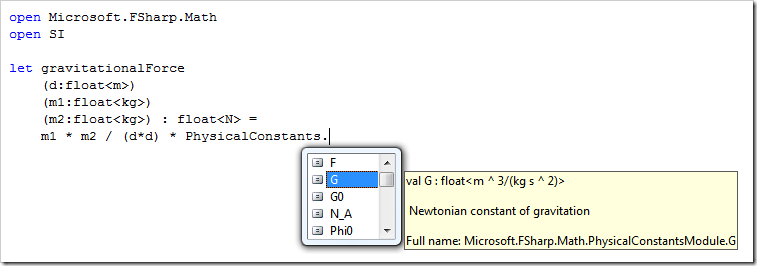
Here's a screenshot from his blog that says a thousand words and showcases the FSharp.Math.PhysicalConstants namespace, along with the International System of Units (SI) namespace.
Also from Andrew's blog:
"You can define mutually recursive measures using "and" to connect them and placing the Measure attribute immediately before the name of the measure:"
type [<Measure>] km =
 static member toM = 1.0/1000.0<m/km>
and [<Measure>] m =
 static member toKm = 1000.0<km/m>
Third, something silly.
A fun little 2D Tron-Clone game from last year, written in only 182 lines of F# by Phil Trelford. You can download it from hubFS and read how he wrote it on the Applied Games Group Blog. The game even supports Xbox 360 controllers! Sweet.
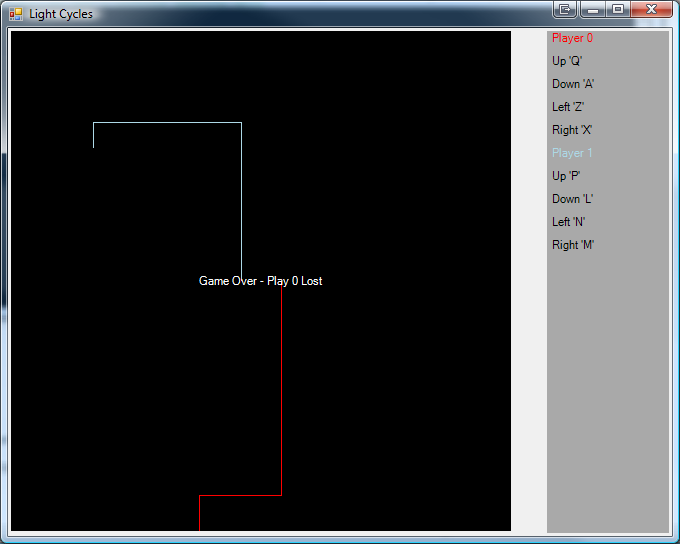
Here's all 182 lines, not counting the first 4 lines of comments.
//-----------------------------------------------------------------------------
// LightCycles.fs  Mini game using windows forms
// 2007 written by Phillip Trelford
//-----------------------------------------------------------------------------

#light

#if DIRECTX
#R @"C:\WINDOWS\assembly\GAC_32\Microsoft.DirectX\2.0.0.0__31bf3856ad364e35\Microsoft.DirectX.dll" // Feb 206
open Microsoft.DirectX.XInput   // Required to read XBox 360 controllers
#endif

open System
open System.Drawing
open System.Windows.Forms

/// Game states
type GameState = | Start | Play | Over

/// Form key handler type
type KeyHandler (form:Form) =
    do form.KeyPreview <- true
    let keys = Enum.GetValues (type Keys) :?> (Keys [])
    let keysDown = Array.create keys.Length false
    let FindKeyIndex code = keys |> Array.find_index (fun x -> code = x)
    do  form.KeyDown.Add    (fun e -> keysDown.[FindKeyIndex e.KeyCode] <- true)
    do  form.KeyUp.Add      (fun e -> keysDown.[FindKeyIndex e.KeyCode] <- false)
    member this.IsKeyDown (keyCode:Keys) = keysDown.[FindKeyIndex keyCode]
    member this.AnyKeyDown () = keysDown |> Array.exists (fun x -> x)

/// Player direction type
type Direction = | Left | Right | Up | Down

/// Player type
type Player (color,startX,startY,direction,keys,keyHandler:KeyHandler) =
    let mutable x = startX
    let mutable y = startY
    let mutable d = direction

    member this.Color = color
    member this.X = x
    member this.Y = y
    member this.Keys = keys

    /// Reset player to start values
    member this.Reset () = x <- startX; y <- startY; d <- direction

    /// Updates player position
    member this.Update i =
        // Read keyborad
        let mutable newD = d
        let up, down, left, right = keys
        if keyHandler.IsKeyDown(up) then newD <- Up
        if keyHandler.IsKeyDown(down) then newD <- Down
        if keyHandler.IsKeyDown(left) then newD <- Left
        if keyHandler.IsKeyDown(right) then newD <- Right
#if DIRECTX
        // Read XBox 360 controller
        let state = Controller.GetState(i)
        if state.IsConnected then
            let pad = state.GamePad
            if pad.UpButton then newD <- Up
            if pad.DownButton then newD <- Down
            if pad.LeftButton then newD <- Left
            if pad.RightButton then newD <- Right
#endif
        /// Don't allow suicide move
        match (d,newD) with
            | (Left, Right) | (Right, Left) | (Up, Down) | (Down, Up) -> ()
            | _ -> d <- newD
        /// Update position with direction
        match d with
            | Up    -> y <- y - 1
            | Down  -> y <- y + 1
            | Left  -> x <- x - 1
            | Right -> x <- x + 1

/// Main form
let form = new Form (Text="Light Cycles", Width=680, Height=544)

do  /// Layout for game window and status panel
    let layout = new TableLayoutPanel(Dock=DockStyle.Fill, ColumnCount = 2)
    layout.ColumnStyles.Add( ColumnStyle(SizeType = SizeType.Percent, Width = 100.0f ) ) |> ignore
    layout.ColumnStyles.Add( ColumnStyle(SizeType = SizeType.Absolute, Width = 128.0f) ) |> ignore
    /// Play area in pixels
    let playArea = 500
    /// Game play area bitmap
    let bm = new Bitmap(playArea, playArea)
    /// Clears screen
    let ClearScreen () =
        using (Graphics.FromImage(bm)) (fun graphics -> graphics.Clear(Color.Black))
    /// Draws text to screen
    let DrawText s =
        using (Graphics.FromImage(bm)) (fun graphics ->
            let rect = new RectangleF(0.0f,0.0f,float32 playArea,float32 playArea)
            let align = new StringFormat(Alignment=StringAlignment.Center, LineAlignment=StringAlignment.Center)
            graphics.DrawString(s, form.Font, Brushes.White, rect, align)
        )
    // Initialise screen
    ClearScreen ()
    DrawText "Press any key to start"
    /// PictureBox to contain game bitmap
    let pictureBox = new PictureBox(Dock=DockStyle.Fill)
    pictureBox.Image <- bm
    layout.Controls.Add(pictureBox)

    let keyHandler = KeyHandler (form)

    /// Players array
    let players =
        [|  Player (Color.Red,playArea/2+20,playArea/2,Down,(Keys.Q,Keys.A,Keys.Z,Keys.X),keyHandler);
            Player (Color.LightBlue,playArea/2-20,playArea/2,Up,(Keys.P,Keys.L,Keys.N,Keys.M),keyHandler)  |]
    players |> Array.iter (fun player -> bm.SetPixel(player.X,player.Y,player.Color))

    /// Display player controls
    let statusPanel = new TableLayoutPanel(Dock=DockStyle.Fill, ColumnCount=1, BackColor=Color.DarkGray)
    players |> Array.iteri (fun i player ->
        let name =
            [| ((new Label (Text=sprintf "Player %d" i, ForeColor=player.Color)) :> Control) |]
        let up, down, left, right = player.Keys
        let controls =
            Array.combine [|"Up";"Down";"Left";"Right"|] [|up;down;left;right|]
            |> Array.map (fun (name,key) -> (new Label (Text=sprintf "%s '%O'" name key)) :> Control )
        Array.append name controls
        |> statusPanel.Controls.AddRange
    )
    layout.Controls.Add(statusPanel)
    form.Controls.Add(layout)

    /// Game play - returns true if there has been a collision otherwise false
    let PlayGame () =
        let collisions = players |> Array.mapi (fun i player ->
            player.Update i
            let x, y = (player.X, player.Y)
            let wall = x < 0 || x >= playArea || y < 0 || y >= playArea
            if wall then
                true
            else
                let bgColor = bm.GetPixel(x, y)
                bm.SetPixel (x, y, player.Color)
                players |> Array.exists (fun player -> let c = player.Color in c.R = bgColor.R && c.G = bgColor.G && c.B = bgColor.B )
        )
        pictureBox.Refresh ()

        match collisions |> Array.tryfind_index (fun x -> x = true) with
        | Some(i) -> i
        | None -> (-1)

    /// Current game state
    let gameState = ref GameState.Start
    let gameOverWaitCount = ref 200
    let r = new Random()

    /// Timer instance
    let timer = new Timer()
    timer.Interval <- 1000/50
    // Timer event
    timer.Tick.Add (fun _ ->
        match !gameState with
        | Start ->
            if keyHandler.AnyKeyDown () then
                ClearScreen ()
                gameState := GameState.Play

        | Play ->
            let i = PlayGame ()
            if i>=0 then
                gameState := GameState.Over
                gameOverWaitCount := 200
                DrawText (sprintf "Game Over - Play %d Lost" i)
                pictureBox.Refresh ()
        | Over ->
            // Shake screen
            form.Left <- form.Left + if !gameOverWaitCount > 150 then r.Next(5) - 2 else 0
            // Decrement Game Over wait
            decr gameOverWaitCount
            if !gameOverWaitCount <= 0 then
                gameState := GameState.Start
                players |> Array.iter (fun player -> player.Reset ())
                ClearScreen ()
                DrawText "Press any key to start"
                pictureBox.Refresh ()
    )
    timer.Start ()

[<STAThread>]
do Application.Run(form)
Try to learn ONE new language each year!
Related Posts
- The (Programming) Language Explosion
- Programmer Intent or What you're not getting about Ruby and why it's the t**s
- Is Microsoft losing the Alpha Geeks?
- The Weekly Source Code 20 - A Web Framework for Every Language
- Six Essential Language Agnostic Programming Books
* Oh, relax, Dear Reader. Leon and I are, like, totally, BFF. We're peas and carrots. Truly. The bastard.
About Scott
Scott Hanselman is a former professor, former Chief Architect in finance, now speaker, consultant, father, diabetic, and Microsoft employee. He is a failed stand-up comic, a cornrower, and a book author.


About Newsletter

What troubles you about it is actually one of the most important concepts of functional languages, which is currying.
http://en.wikipedia.org/wiki/Currying
The idea is having high order functions (such as fold, map or filter) and create other functions by instantiating some of the parameters of those functions. This is possible only through currying.
If you look at the type of "add" in a language like Haskell, it is Int -> Int -> Int. In other words, it is a function that receives an integer and returns a function that receives an int and returns another. So, "add 3" is a function that takes a single integer and returns its value plus 3.

The point of confusion is what the line 'let a1 = add 3' means. It actually defines a function a1 that takes *one* argument. In effect, you're defining a1 as 'let a1 y = add 3 y'. You may ask 'why not just include the explicit argument? In that case, yes, but there are times when you want to use a partially applied function but not necessarily define it.
For example, say you have a list of integers and you want to add 3 to each element of the list - you can do this:
let x = [1;2;3;4];;
let x_plus_3 = List.map (add 3) x;;
or, more idiomattically(sp?)
let x = [1;2;3;4];;
let x_plus_3 = List.map ((+) 3) x;;
The operator '+' is a function that you can refer to *as a function* using '(+)'.
Then of course, you can write a function to add some value 'n' to all elements of a list:
let incBy value list = List.map ((+) value) list;;
or (using partial function application again)
let incBy value = List.map ((+) value);;
Both definitions of
incByare equivalent. In the second case, the F# compiler uses type inferrence to work out that there's a missing parameter.
HTH!!!

Thanks, guys! Both of your explanations were helpful. I'm starting to get it.
(I think I've been spending too much time on stackoverflow.com lately; I had an odd compulsion to give both of your posts a "+1".) :-)

let add x y = x + y
let add3 = add 3
let result = add3 4
printfn "" + 4 = %i" result
Cheers,
Rob


Robert Pickering's comment about naming is something I feel will be a big issue is the near future. We have people naming identifiers x and y after years of telling oo devs to use self documenting code. I'd like to see some more focus there. In fp, identifiers can often be used in many ways, and devs don't want to add limits by giving strict names. In .NET, give descriptive names so ninjas can get back to their cool jobs and stop deciphering our code.

But would F# be a good language for web developers?

These examples are all very basic (and I know intentionally so), but if it's not an ideal fit for line of business applications then I don't want to put an inordinate amount of time in learning it.

>I'm not sure if this will build to run on my Newton MessagePad 2100.
Maybe not Newtie, but F# does treat Linux and other operating systems as absolute first class citizens. Everything is tested on mono and more. Pretty classy stuff.
regarding code like this this...
let a1 = add 3
A fair way for a c# person to understand this, is to know that under the covers it creates a little object that defines the a1 function and holds the parameters that you did define. When you later call a1, you're really calling that little object's a1 method and takes the rest of the parameters that you didn't send.
like this:
let a1 = add 3
is similar to C# code that says...
static class LittleClass {
//a static copy of the parameters that were supplied...
private static int MyState = 3;
//a function that will accept the rest of the parameters...
public static int a1 (int TheRestOfTheParameters) {
return add(MyState, TheRestOfTheParameters);
}
}
obviously, the F# version is much simpler.

A question, what tool did you used to format the F# code? and what do you use to format the c# code.
PD: I wanna see more fight between Leon and you !!


Comments are closed.
The first line is straightforward. We're defining a function named "add" which takes two parameters, x and y; the function's behavior is to return the sum of the two parameters (x + y). (Sorry if my terminology is off here; I'm coming from a C# perspective trying to understand this.)
The second line is what threw me for a minute. We're defining a function named "a1" which takes zero parameters; the function's behavior is to call the add function and pass it argument 3 and ... wait a minute, that's all it says. That's not enough parameters -- the "add" function takes two params, not one!
Continuing on, the third line defines a function named "a2" which takes zero parameters; the function's behavior is to call function "a1" and pass it one argument, 4. This time, there are too many parameters: a1 takes zero params!
I had to think about this for a minute. What seems to be going on is when a2 is called (from the print_int statement), the "extra" argument, 4, gets "tacked on" to the end of the call to a1; and then when a1 calls the add function, that argument 4 is passed along as an argument to the add function, along with the 3 that's a part of the definition of a1. The end result is that add gets called with arguments 3 and 4, and the result of the snippet is that 7 gets printed.
Assuming my understanding of the code as described above is correct (it might not be -- I haven't actually tried running it yet to find out!), the definitions of a1 and a2 (where another function is called with the "wrong" number of parameters) seem weird to me. The definitions of a1 and a2 seem almost more analogous to C macros than to C# methods.
I'm wondering at this point if doing this type of thing is pretty much standard practice in an F# program, that wouldn't require comments to be included with the code to help explain to readers what the code is doing? It seems like if the definitions of add, a1, and a2 weren't all adjacent to one another in the code, it might not be straightforward for someone reading the code to figure out what was going on. (I understand that the code snippet is just a contrived example, not "real" code; but at the same time, it is simple enough that it seems like the meaning should be straightforward, even out of context.)