Visual Studio 2012 RC is released - The Big Web Rollup
Today Visual Studio 2012 RC (Release Candidate) came out. (It's 2012, so 11 make less sense than 2010+2) There's a lot of nice improvements for Web Development in this release candidate as we march towards a final release. Here's some of my favorite new features from the "Angle Brackets Team." That's my name for the Web Platform and Tools team. I hope it sticks.
Web Optimization
There's been some significant changes to the web optimization (minification and bundling) framework since beta. There wasn't enough control over what was bundled and in what order in the beta, so that's been moved into a BundleConfig.cs (or .vb) where you have total control, but everything just works out of the box. The API has been simplified and is slightly more fluent which means it's easier to read and easier to write.
Rendering bundles in Beta required some goofy syntax and a lot of repetitive namespaces. In RC it's nice and simple:
@Styles.Render("~/Content/themes/base/css")
@Scripts.Render("~/Scripts/js")
And you can change with a params array:
@Styles.Render("~/Content/themes/base/css", "~/Content/css")
Also, bundles aren't bundled when you're in debug mode but are when released without you having to change your markup. The regular compilation flag in web.config controls it and you can certainly override with the BundleTable.EnableOptmizations property if you have specific needs.
The best part is that you can plug in custom libraries. If you don't like the included minification technique or perhaps want to add your own, you can. Howard and the team showed me this small example to add support for LESS files and turn them into CSS as a transform, then minify the results.
public class LessTransform : IBundleTransform
{
    public void Process(BundleContext context, BundleResponse response)
    {
        response.Content = dotless.Core.Less.Parse(response.Content);
        response.ContentType = "text/css";
    }
}
Then bundle up the *.less files and transform them as you like.
var lessBundle = new Bundle("~/My/Less").IncludeDirectory("~/My", "*.less");
lessBundle.Transforms.Add(new LessTransform());
lessBundle.Transforms.Add(new CssMinify());
bundles.Add(lessBundle);
Templates and more
Having good Templates is very important and we'll have even more additions and improvements to templates between now and the final release. Also, because the Web Team has externalized the templates (the web templates themselves are extensions that can be updated out of band) you can expect cool and useful updates even beyond the final release. The Web tends to move fast and we'd like to move fast as well.
There's an Empty template introduced for ASP.NET MVC. Like really empty. Folks asked for it! The markup is cleaner in all templates and as before, is HTML5 by default.
The ASP.NET Web Forms template includes support for the Web Optimization framework as mentioned above. ASP.NET Web Forms (like it or not, haters! ;) ) continues to share features with ASP.NET MVC because, as I've said before, it's all One ASP.NET. That means Routing, Providers, Model Binding, HTML5 support, Web Optimization and more are all features you can count on. They are part of ASP.NET no matter which framework you're choosing to use.
Web API now includes scaffolding support (and Web Forms will soon as well) so you can easily make a CRUD (Create, Read, Update, Delete) API from your model. As with all scaffolding, you can customize it as you like.
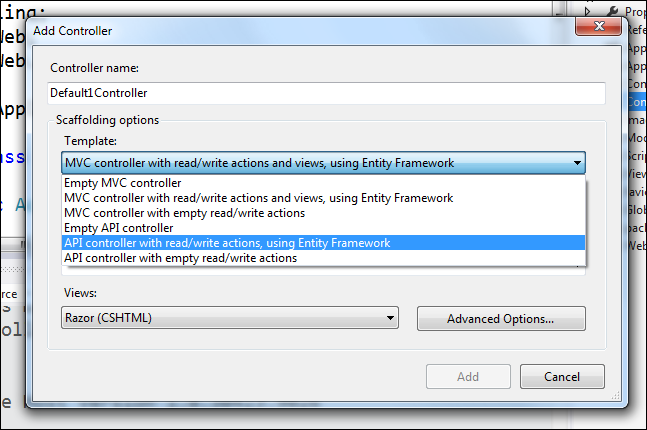
I also like that we're shipping Modernizr, Knockout, jQuery, jQuery validation and jQuery Mobile in our templates and you can bring it hundreds more with NuGet as you like.
Tiny Happy Features for Front End Web Developers
Take note, front end people. The team has looked at the complete experience from File | New Project, through development and debugging and tried to (and continues to tyy to) improve the "tiny cuts" that hurt you when developing web apps. Big new features are fun, but sometimes little features that fit into the middle of your workflow make life better and smooth the way. I like tiny happy features.
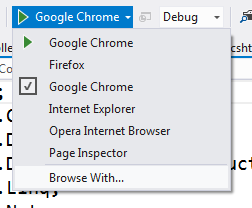
If you pull the Debug menu down you'll see it finds all your browsers so you can not only use the one you like without hunting but also change your default quickly. Plus, they've added a Browse With menu to this pull down so ASP.NET MVC folks don't have to go digging for it in right-click context menus.
If you select Browse With it'll bring up this familiar dialog. Now, try Ctrl-clicking on multiple browsers and click Browse.
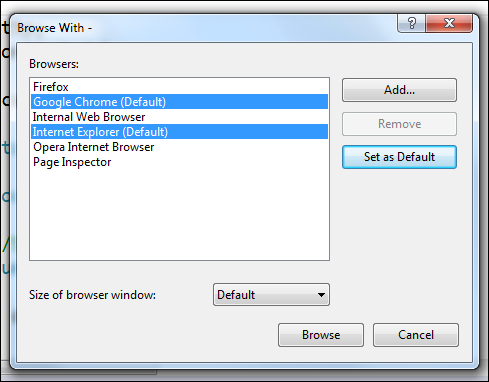
The toolbar will change so now you can startup more than one browser with one click, with with F5 or Ctrl-F5.

When you click it, you can select a specific browser for step-through debugging, then the other browser will launch as well.
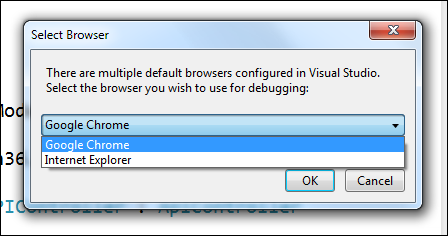
This is a small, but happy feature that I appreciate.
CSS, JavaScript, and HTML Editor Improvements
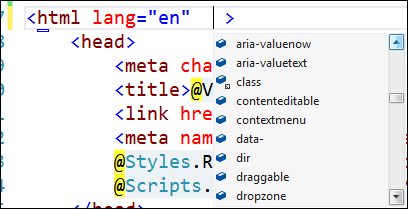
Dozens and dozens of improvements and new "smarts" have gone into the CSS, JavaScript and HTML editors. For example, the HTML editor is updated with the latest HTML5 intellisense and validation based on the latest W3C standards. All the attributes and tags that you want are there.
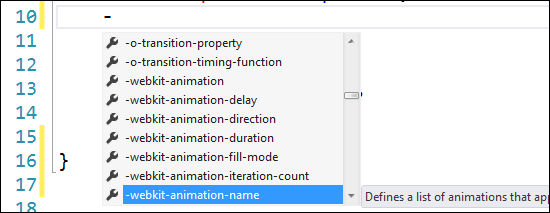
If I type a hyphen (dash) in the CSS editor I get a smart list of all the vendor specific prefixes, even Opera! These lists include help text as well for properties which was no small amount of work.
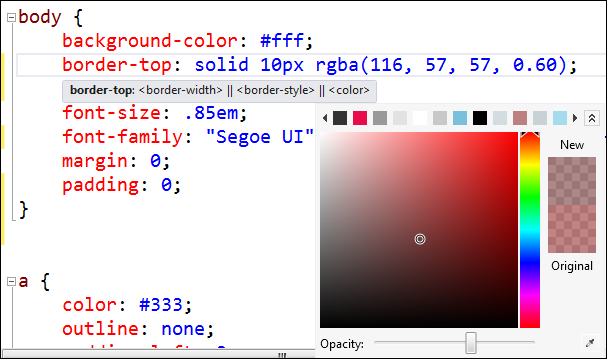
There's drop-downs and pickers for fonts and colors (my favorite) as well as a color picker.
These are just a few bits of polish. There's lots of new snippets and expansions as well.
Publishing
Be sure to sign up for the 6/7 Meet Windows Azure event with Scott Gu online to see some VERY cool improvements to publishing in Visual Studio. Before then, you can check out new features for Publishing like:
- Updated cleaner and simpler publish UI
- Running EF Code First migrations on the publish dialog
- Incremental database schema publish and preview
- Update connection strings in web.config on publish (including complex EF connection strings)
- Prompting for untrusted certificates on publish dialog during publish
- Automatically convert VS2010 publish profiles to the new VS2012 format
- You can easily publish from the command line using a publish profile:
- msbuild mywap.csproj /p:DeployOnBuild=true;PublishProfile=MyProfileName
- You can also create profile specific transforms, i.e. web.Production.config, but we haven’t updated the tooling yet to create these. In this case if you have a profile specific transform we will execute the build config one first and then the profile one.
ASP.NET and ASP.NET Web Forms
In addition to the new features I've talked about before like Model Binding and better HTML5 support there's:
- Updates to assist in async ASP.NET development:
- HttpResponse.ClientDisconnectedToken: A CancellationToken that asynchronously notifies the application when a client has disconnected from the underlying web server.
- HttpRequest.TimedOutToken: A CancellationToken that asynchronously notifies the application when a request has run longer than the configured request timeout value.
- HttpContext.ThreadAbortOnTimeout: Allows applications to control the behavior of timed out requests. Defaults to true. When set to false ASP.NET will not Thread Abort the request but rather leave it to the application to end the request.
- Protection against race conditions and deadlocks that can be introduced by starting async work at invalid times in the request pipeline
- Added ability for applications to forcibly terminate the underlying TCP connection of a request via HttpRequest.Abort()
- Improved support for async in Web Forms including support for async page & control event handlers
- ScriptManager support for the new ASP.NET bundling & minification library
- Improvements for extending the Web Forms compilation system:
- New ControlBuilderInterceptor class to enable customization of the Web Forms page & control compilation output
- TemplateParser.ParseTemplate method that allows the application to generate an ITemplate instance from a string of ASPX markup
- Support for Entity Framework enums and spatial data types in Dynamic Data
ASP.NET Web API and MVC
Both ASP.NET MVC and ASP.NET Web API have had a number of improvements since Beta.
- We now use and support the open source Json.NET serializer for handling of JSON data.
- You now can easily build custom help and test pages for your web APIs by using the new IApiExplorer service to get a complete runtime description of your web APIs.
- ASP.NET Web API now provides light weight tracing infrastructure that makes it easy to integrate with existing logging solutions such as System.Diagnostics, ETW and third party logging frameworks. You can enable tracing by providing an ITraceWriter implementation and adding it to your web API configuration.
- Use the ASP.NET Web API UrlHelper to generate links to related resources in the same application.
- ASP.NET Web API provides better support for IoC containers through an improved dependency resolver abstraction
- Use the Add Controller dialog to quickly scaffold a web API controller based on an Entity Framework based model type.
- Create a unit test project along with your Web API project to get started quickly writing unit tests for your Web API functionality.
- EF 5 database migrations included out of the box in the ASP.NET MVC 4 Basic Template
- Add Controller to any project folder
- Bundling and minification built in
- The configuration logic For MVC applications has been moved from Global.asax.cs to a set of static classes in the App_Start directory. Routes are registered in RouteConfig.cs. Global MVC filters are registered in FilterConfig.cs. Bundling and minification configuration now lives in BundleConfig.cs.
Visual Studio Theme
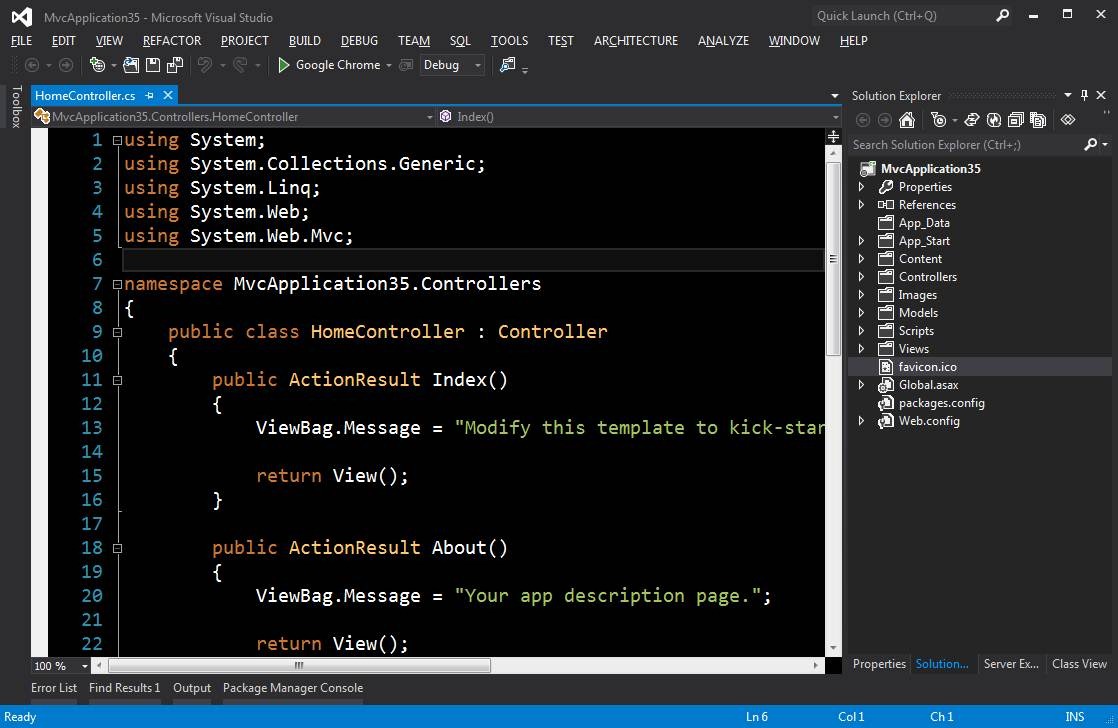
Ah, the controversial theme change. They've added a bunch of splashes of color, brightened the background and made the status bar change color depending on your status. I'm not sure what I think about the ALL CAPS menus but I honestly don't look at them much. They seem to be the last thing that folks are freaking out about. My guess (I am NOT a designer) is that there's an implied horizontal rule along the top edge of the letters and if you used mixed case they'd just be floating words. We'll see what happens, maybe it'll be a option to change, maybe not. I'm more worried about the web functionality than the look of the menus. I think the RC looks way way better than the initial Beta, myself, and I understand there are more changes coming as well as clearer icons in the dark theme for the final release. You can read more and look at side by side examples and decide for yourself at the Visual Studio Blog. It's growing on me.

I've even tried out the Dark Theme along with Rob's Wekeroad Ink theme from http://studiostyl.es. While I'm not sure if I'm ready to fully make the dark theme switch, it's pretty nice.
Other non-Webby Features
Some other features and cool things of note to me (there are lots more than this) are:
- Customization is back to make for a smaller installation.
- Install the RC directly over the Beta. No need to uninstall. Whew!
- Windows Vista support for .NET Framework 4.5
- XAML compiler incremental builds in Metro apps is now twice as fast as beta.
- Go-Live license, which means you can publish apps live today and get support if you need it.
Obscure Gotchas and Known Issues
Be sure to go through the readme to make sure that there aren't known issues that might mess you up. As with all pre-release software, be careful. Test things and don't blindly install on systems you care about. I'm installing this "on the metal" but I'm keeping a Visual Studio 2010 SP1 virtual machine around just in case something obscure is discovered.
One gotcha that I know of so far for those of you who are totally riding the beta train. If you install Visual Studio 2012 RC on Windows 8 Release Preview and are trying to get an ASP.NET 3.5 (that's 3.5, be aware) application to work, you'll have trouble with IIS Express. You can work around it by installing IIS8 from the Windows 8 Add Features control panel. Just installing IIS8 will fix a bad registry key created by IIS8 Express. This will be fixed in release. Obscure, but worth noting.
Related Links
- MSDN Developer Tools Blog (the one blog to follow for all things developer related!)
- Visual Studio 2012 RC Home Page
- Details on:
- Feedback and Bugs:
- Ask a question on the Visual Studio or Windows forums
- File a bug on the Visual Studio, LightSwitch, or Blend Connect sites (or with the Visual Studio Feedback Tool)
- Submit a suggestion on UserVoice
All The Download Links - including OFFLINE installers inside ISOs
- Visual Studio 2012 Ultimate RC
- Web installer http://go.microsoft.com/?linkid=9810263
- ISO Image http://go.microsoft.com/fwlink/?LinkId=247147
- Visual Studio 2012 Premium RC
- Web installer http://go.microsoft.com/?linkid=9810243
- ISO Image http://go.microsoft.com/fwlink/?LinkId=247144
- Visual Studio 2012 Professional RC
- Web installer http://go.microsoft.com/?linkid=9810223
- ISO Image http://go.microsoft.com/fwlink/?LinkId=247141
- Visual Studio 2012 Express RC for Windows 8
- Web installer http://go.microsoft.com/?linkid=9810150
- ISO Image http://go.microsoft.com/?linkid=9810160
- Visual Studio 2012 Test Professional RC
- Web installer http://go.microsoft.com/?linkid=9810304
- ISO Image http://go.microsoft.com/fwlink/?LinkId=247152
About Scott
Scott Hanselman is a former professor, former Chief Architect in finance, now speaker, consultant, father, diabetic, and Microsoft employee. He is a failed stand-up comic, a cornrower, and a book author.


About Newsletter

 Mark Sarson


@if (true) {then I go down a line and press '}' it reformats to
@if (true)
{
}
(it moves the opening curly brace down to the next line)
Even worse, if I type
@if (true) {
} else {
then go down a line and hit '}' it reformats to
@if (true)
{
}
else
{
}
which makes me want to pull out my few remaining hairs.
Can I turn this behavior off so that the curly brace remains on the line where I originally put it? This is a "tiny cuts" issue for me.
Thanks for the hard work!

What's the implications of installing over VS11 Beta, if any? If none, is there a simple way?
Thanks for the heads up as always!
Jon

Do you really -need- to shoehorn your personal preference for K&R braces style into the C# language which by default follows Allman style? Is this override really important to you? Give it some thought -- you might realise it's actually "okay" and you can leave it alone. It's Doing The Right Thing. It's not worth accumulating stress over.
I like to think of this as a "when in Rome" kind of thing. When in C#, use the Allman braces convention like most others do.... but when in Javascript, use K&R convention, like most people do. Pretending you're in Rome when you're actually in Vienna just doesn't make a lot of sense to me.

If they are set right, then we are doing something wrong. Send me an email (anurse at microsoft dot com) and we'll see if we can figure out what's going on.

Slightly baffled, but ended up just uninstalling and installing the RC afterwards.


In mvc 4 beta above code always look for Site.css, is that fixed?
thanks.


If this is the main concern then the top part could use a slightly different background shade like Expression Blend which would give it a region and not float around. However, there are many other areas in the current design where things float: Properties, Solution Explorer, etc. tabs in the bottom right, the Toolbox or anything anchored in the left side, and open files (other than the current).
I personally turn off all the toolbars and leave only the solution explorer. I would prefer if I could turn off / hide the main menu as well -- similar to how IE hides it. I very rarely use it, and if I could pin a few buttons next to the "quick launch" area I could gain one more row for code. This would be really sweet!
When debugging with Chrome or FF, does VS know that a browser window is closed, so that it would stop the debugging?
Thanks,
Peter


Wow. I'm not doing web forms any more but if that's what I think it is that's some pretty powerful stuff.
"•The configuration logic For MVC applications has been moved from Global.asax.cs to a set of static classes in the App_Start directory. Routes are registered in RouteConfig.cs. Global MVC filters are registered in FilterConfig.cs. Bundling and minification configuration now lives in BundleConfig.cs."
Interesting. I might like that. Less clutter in Global.asax.cs.

Regards

Anyway lets see the VS'12.
-
Krunal.


for Web
Customers expect web experiences that are interesting, attractive and interactive. Visual Studio Express 2012 for Web makes web development accessible to any developer. It provides the tools and resources to "build and test HTML5, CSS3, and JavaScript code", and to deploy on web servers or to the cloud with Windows Azure.
This is taken from http://www.microsoft.com/visualstudio/11/en-us/products/express
There is no mention of Asp.Net in VS 2012 express for Web. Why should I believe that Asp.net is still important to Microsoft?

About VS11 vs Visual Studio 2012 RC: as with any other product VS11 was the '<a href=http://en.wikipedia.org/wiki/Microsoft_codenames">code name</a>', like we used to have Whidbey, Orcas, Whistler and Longhorn, Cairo (remember?) etc. They all evolved to actual products with real marketing names.
Perhaps MS should go back to more abstract code names, as to not confuse the masses. I vote for you Scott, you always come up with good names. (or maybe you should be in charge of the actual 'marketing' product names, but I guess the world is not yet ready for that, not just yet...)
And lastly, I admire your style of communication towards the out-side of Microsoft, and your drive for the "tiny cuts" and having the a[b|g]ility to release smaller and more frequently. I would like to read a post about how you attempt to drive this deeper into 'DevDiv'. Nuget all the things


When upgrading a VS2011 Beta project using this:
@System.Web.Optimization.Styles.Render("~/Assets/StyleSheets")
to this:
@Styles.Render("~/Assets/StyleSheets")
Don't forget to add this namespace to your web.config if it isn't there already:
<add namespace="System.Web.Optimization" />
Great blog Scott.
Bernie

PM> Install-Package WebGrease
Apologies.
Look at your Program Files folder and you'll understand.

Will there be a guide on how to update a beta MVC4 project to the RC? Because instead of just making new versions of the nuget packages, the package Id's have changes so it's apparently not as simple as just updating all the nuget packages in the project.
In fact it says there are no updates except for EF5.
The intellisense additions to the web are extremely welcome, especially little touches like multiple browser selection etc.
Not sure if I will dive in just yet, and does this version impose .Net 4.5 on you?
Oh, and seriously, are some of you really getting confused about VS11 & VS2012...? Talk about nit-picking, jeez..

Invalid Licence data
Reinstall is required.
And it sais Ultimate 2012 RC when i downloaded professional. I will try to reinstall, but perhaps something someone should look into before RTM?

Reading at some comments, it looks like all the programmers are turned into UX experts overnight? Every one is suggesting some changes to design.
Guys instead how about we make stuffs more better where it matters! For eg, CoffeeScript Intellisense, SASS Intellisense and helpers to write mixins etc, there are tons of constructive criticism that we can do. Let's do that instead of chagning case or putting colors and so forth.


Thanks a lot Scott! I have Vista installed at home so I couldn't download and see it for myself. Also many blogs and articles have mentioned the same thing thats why I was worried. Thanks for replying urgently!


I upgraded and now I'm getting blank images in my site.

Dell Vostro
750Gb WD Scorpio Black
4Gb RAM
Core i5-2410M
Intel HD 3000 Graphics Card.
Windows 7 64bit - recent install (c. 3 months)
Machine generally runs pretty good. I ran the install over the beta rather than a fresh install if that makes a difference.
I have VS11 beta on my laptop. Downloaded VS2012 Professional RC from MSDN downloads and installed. Installation was successful but when I launch the application it opens as "Ultimate 2012 RC" ..Invalid Licence Data..Reinstall is required.
This morning I installed VS2012 Prof RC on office PC which has no VS2011 Beta installed. VS 2012 launches correctly and works fine. Scott says VS12 RC can be installed on top of VS11 Beta. What's wrong with the installation on my laptop?

How do i change the color of the bright colored status bar at the bottom (found out how to remove it, but i want to keep it)? It is to bright and sticks out to much.
How do you use the minification and bundle feature with a CDN?
Last but not least, if you have BuildViews set to true in the project file for a MVC project, the publish feature don't work without having to manually clean the project every single time, and making sure not going to the preview tab (which will make it compile to compare with the server). It is very annoying and the bug was also in VS 2010.

Are the any way to fix this?

the intent is to reduce focus on menus, and increase focus on the code which I think is one of the big goals here, isn't it?
UX StackExchange
and from there a more detailed analysis: here. Great example at the bottom


I tried running Install-Package WebGrease (which btw what is WebGrease? The nuget page does not link to any info on what it is and Googling microsoft webgrease returns nothing useful.)


the readme on the installer doesn't mention vista as supported
http://www.microsoft.com/visualstudio/11/en-us/downloads#net-45
Is it not up to date?
Thanks,
Ike

The CAPSLOCK for the menu is also a nice touch, especially since .Net naming conventions (Stylecop) say caps are bad; even for constants.
For my next web project, I'm going to hire a bunch of YouTube commenters for my website UI.

Ok, I am always afraid to uninstall visual studio and this time there was a mess of some VS2010 stuff (which probably were installed with VS2011 beta), VS2011 beta and VS2012 RC - you never know if you do it in the right order.
This time I simply uninstalled VS2012RC and then VS2011 beta and left the rest behind. Then I installed VS2012RC again. It complained about some C++ library that didn't install properly, but it seems to work now.


guessing there is some configuration missing from the bundle setup by default?
Cheers
Tim
@Scripts.Render("~/bundles/modernizr") and
@Scripts.Render("~/bundles/jquery") references still work?
Tim
HKEY_CURRENT_USER\Software\Microsoft\VisualStudio\11.0\General\SuppressUppercaseConversion
REG_DWORD value: 1


While looking through the new API for the Bundling, it was nice to see how it has become simpler and more intuitive. I did want to ask if there would be more documentation about it, as there is none at the moment. Just to understand little things, like why the dependence on WebGrease (what value is it providing) and what is the Instrumentation Mode used for (and why is it depending on the Eureka UserAgent)?
Thanks for the info.

I had to update existing working code back to @Url.Content("")
This worked perfectly in the beta and immediately after the upgrade to RC stopped working.

WebGrease is the new minification framework coming from the MSN team. It is a much more efficient minifier than their old AjaxMin library. It's used for minifying both CSS and JavaScript files.
Eureka is the Page Inspector (early codename) and it instruments all the code (server-side & client-side) in order to do what it does. That includes bundled CSS and JavaScript files. That is how Page Inspector still works correctly with bundles instead of individual files.

Sheesh, the one item I was really excited about and it's on the back-burner...
Is there timeframe for SPA?
... http://www.asp.net/single-page-application says see the Codeplex site and Codeplex says to see http://www.asp.net/single-page-application. Its a circular reference.

http://codepolice.net/get-the-dark-theme-for-the-editor-but-not-for-the-rest-of-the-ui-in-visual-studio-11/
Anyone figured out how to do this with the RC?
I have tried to import a theme like http://studiostyl.es/schemes/vs-11-black-theme this but i can't get rid of a stupid white border around the selected line in the code window.


I can't look at code for more than a minute without my eye being pulled to the bright blue area telling me that visual studio is "Ready." Yes, You're still ready. Thanks, vstudio.
Seems a common theme here - instead of de-emphasizing the areas we *don't* care about, the designers are determined to make us look at them. THE MENU YELLS, the status bar screams in blue. And yet, I don't care about either of those things 99.9% of the time I'm using the app. I'd hide both if possible
VS2012 has very little color, so that color demands attention. Ask them to use it well, or better yet - ALLOW US TO CHANGE IT.


I haven't read through all the comments yet but, here is my experience.
I started with a Windows Server 8 beta (Hyper VM) install with VS11 beta installed.
I uninstalled VS11 beta and ran VS2012 RC: Setup Blocked
"The .Net Framework installed on this machine does not meet the minimum required version: 4.5.50501."
I noted your comment, reinstalled VS11, ran VS2012 RC again, same result.
I have a Windows 8 beta VM also with VS11 beta installed, I'll try to run the RC on it tomorrow.

Create new WPF Application (4 or 4.5 framework) project.
Open said WPF Application project in Blend for VS2012 RC.
I get no Design view whatsoever.
Whats the deal?

thanks.

We have several .NET 4.0 applications running on XP and 2003, so if we install 4.5, we can't maintain those applications any more. Even if we target 4.0, we'll still get the 4.5 bug-fixes on the dev box, which aren't available on the live systems.
And yes, I've heard the arguments that XP is ten years out of date; that doesn't mean that our customers can suddenly magic-up the funds and time to upgrade all their computers to the latest version overnight.

I just can't have too much sympathy for organizations which waited until now to upgrade. The writing has been on the wall for six years.

To get rid of the white border around the selected line in the code window, go into Tools > Options > Expand Text Editor > Select General > Under Display > Uncheck "Highlight current line"
Yeah, that was driving me batty as well.
_Dennis

If we'd known two years ago that .NET 4.0 wouldn't be supported on XP/2003, then we'd have stuck with 3.5; as it is, XP and 2003 were supported, so we made the mistake of using 4.0 in the belief that it would continue to be supported on those systems.
I'd love to be able to drop support for older OSs, but one of the projects in question is for a government department. By the time they've upgraded to Windows 7, we'll be on .NET 9.7 SP3 and VS19R2, which won't support anything earlier than Windows XV SP7!
After installing RC2012, as you warned, it does mess up VS 2010 (Ultimate). I list messages here, hope they are helpful in the future release. The installing 2012RC is smooth, successful, no any warnings and error messages. However,
1. when VS2010 opened after 2012RC installing, ONE message window pop up first: "The 'SqlStudio Profile Package' package did not load correctly" ...
2. when loading existing VS 2010 project (based on Framework 4.0), a series messages pop up:
(1) The 'VSTS for Database Professionals Sql Server Data-tier Application package did not load correctly...
(2) The 'SqlStudio Editor Package' package did not load correctly...
(3) The 'RadLangSvc.Package, RadLangSvc.VS, Version=10.0.0.0, Culture=neutral, PublicKeyToken=.... did not load correctly
(4) The 'Microsoft.VisualStudio.Data.Tools.SqlLanguageServices.Package, Microsoft.VisualStudio.Data.Tools.SqlLanguageServices, Version =10.3.0.0... did not load correctly
(5) The 'Language Package' package did not load correctly
The existing project finally loaded. For my specific simple MVC 3 project, it runs ok without problem. I havn't got chance to load other complicated projects, not sure whether they are still working.
Thanks for your attention,
Shirley Qin

I was using the beta of MVC 4, .net 4.5 and VS 11. I uninstalled those and updated to the RC but when I create a new project it get this error:
Could not load type 'System.Web.Http.RouteParameter' from assembly 'System.Web.Http, Version=4.0.0.0,Culture=neutral, PublicKeyToken=31bf3856ad364e35'.

PROJECT.RouteConfig.RegisterRoutes(RouteCollection routes) in \App_Start\RouteConfig.cs:28

PROJECT.MvcApplication.Application_Start() in Global.asax.cs:25
thoughts?

i couldn't find visual studio installer under Other Project Types->Setup and Deployment
is it 2012 RC version still under process .
one thing i still love working on 2010
no doubt 2012 is cool in looks n in installing point of view but 2010 is best IDE

If you don't like the upper case menu, then there is a registry change to suppress them, add the following key and value. Thanks to Richard Banks for this
HKEY_CURRENT_USER\Software\Microsoft\VisualStudio\11.0\General\SuppressUppercaseConversion
REG_DWORD value: 1

can you please post a sample of what worked in Beta but does not work in RC?

I love the new "EMO-Despair" theme in either dark gray and light gray or light gray and dark gray. I am going to take it a step further and request that my employer remove all traces of color and joy from the rest of my working environment. No more green plants, red exit signs. Lets go for grey carpet, grey walls, grey ceilings, so as not to be distracted. And how about the distracting road signs - distracting red,yellow,green traffic lights, distracting yellow warnings signs, blue hospital signs green street signs - lets turn them all grey. And UPPERCASE.
But Seriously! Please provide a skin to bring back something like the VS2010 style. IMHO it was the best look and feel ever - just the right amount of subtle color and style to provide context and orientation. The vs UI has improved steadily over the years until now. Please get someone besides Voldamort to design your UI or at least provide an alternative. I know its not the most important thing in the world, but c'mon. I spend too many of my waking hours in front of VS and I am not looking forward to it bleeding the joy from my existence.
Ok. I feel better now.


<blockquote cite"Scott">Install the RC directly over the Beta. No need to uninstall. Whew!</blockquote>
According to the Visual Studio 11 RC Readme:
1.1.2 Earlier versions of Windows SDK and LocalEspC files aren't removed on upgrade to Visual Studio 2012 RC
When you upgrade to Visual Studio 2012 RC, the Windows SDK and LocalEspC files that were installed with Visual Studio 11 Beta are not removed and are not upgraded.
To resolve this issue:
Before you upgrade to Visual Studio 2012 RC, at an elevated command prompt, run the following commands to uninstall the earlier versions of the Windows SDK and LocalEspC files...


[MissingMethodException: Method not found: 'Void System.Web.UI.ScriptResourceDefinition.set_LoadSuccessExpression(System.String)'.]
one forum suggested me to check "REMOVE ADDTIONAL FILES" option under Publish Web Site but Publish is not there in Express Web 2012 RC

My Files are all empty! With Debug = true it is ok. The Bundle is transformed.
What can I do?


If you like the Current line highlighting, change the foreground to automatic for "Highlight Current Line" in fonts and colors. That will keep your highlighting but get rid of the horrible white border for those of us that use inverted color schemes.


Suggest any book about mvc .net nhibernate tutorial
Thanks
Agha


I tried a lot of debug tweaks with symbols etc, checked Windows Event Log, etc. Nothing points me to a problem.
Event Tracing in config, Stack Trace, everything seems normal. Any Idea how to pinpoint the speed issues?
Win7 Enterprise/Corsair Force GT 256 SSD/Intel(R) Xeon(R) CPU W3550 @ 3.07GHz (8 CPUs) 18432MB RAM, NVIDIA Quadro 600, Rating WEIndex 6.6

I have just uninstalled, VS2011 beta, and installed VS2012. I have opened up an ASP WEB API project I have been working on for several months under the beta. I am getting errors relating to System.json.
First of all, the dll is gone. It is in the BIN directory of my old project, but when I open the project in 2012 it is no longer there, and the reference is now marked broken. In fact the number of dlls in my bin dir has been reduced by half (whats up with that?). If I go to add System.Json in NUGET.. first of all it tells me that it's installed (What?)... so I go and remove it from the package.xml and install it. Everything compiles, but when I run the website I get errors in Global.asax telling me the Newtonsoft JSon 4.5 has not been installed? I have not upgraded this project to net 4.5.. so I don't get where this is coming from. Never the less, I loaded Newtonsoft Json from NUGET, and then everything runs... however all my ajax calls from jquery back to controllers are now broken. The POSTS (i only have posts right now) no longer find their controller methods. I was able to fix one call by packaging the parameter in a user object (as opposed to a parameter list) and then it worked... but then all my returning json objects (that use system.json) are now empty! The structure is there but they have no content.
Can you please shed some light on this?
Sam

thanks for your advise, but after hours i've finally found the problem. I use the Telerik AJAX Control, which uses also the WebResource.axd, but I use them in a ASP.NET MVC4 Projekt with WebForms. The problem was caused in hundreds of exceptions with the System.Web.Optimization Libary. After I updated to the latestest beta2 and changed the Bundles to JavaScript/CSS Bundles. Ta-da... Speed while debuging back to normal... Keep up your brilliant work. Cheers Otto.
I know that VS 2012 represents a lot of hard work, and I LOVE some of the new features, but the lack of color and "regions?" "containers??" "borders??" make it both harder to use and very unengaging to work with all the way around.
Features: MAJOR HIT! AWESOME!!
UI: Can you maybe release an update pack or something?


Why is Microsoft making offline registration so darn difficult? I don't have Internet connection on my work computer. Other companies, such as NativeInstruments, make it a breeze.
It's a real shame. Microsoft is sending me form site to site and I end up running around in circles with no outcome.
John.

In my comment I was referring to Express 2012 Web and Desktop. John.

By mistake I hit some key and now the word " Main ()" suffixed to Sub is remain hidden from my Visual Basic Studio 2012 Module. I tried to retrieve it but of no luck. This had happened while I was on Tools for some other job. I would be grateful, if you could let me know of its solution.

Comments are closed.