Windows Defender Errors 0x8024402c 0x80240022 and 1609
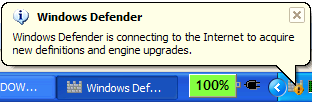 Just installed
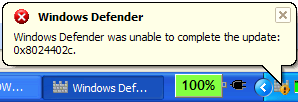
 Giant Microsoft Antispyware Defender Beta 2. Installed nicely, looks pretty, a lot like the Defender that is integrated with the December drop of Vista. However, Defender was unable to update my signatures, instead throwing a COM-ish 0x8024402c. Others are getting Error 1609 and still others 0x80240022.
Word on the street a fix is to remove the Signature Files and reinstall them thusly:
- Remove the current signature file. To do this, click Start, click Run, type Msiexec /x {A5CC2A09-E9D3-49EC-923D-03874BBD4C2C}, and then click OK.
- Open Windows Defender. To do this, click Start, click Programs, and then click Windows Defender.
 Check for new definitions. To do this, click the Help options arrow next to the Windows Defender Help icon, click About Windows Defender, and then click Check for Updates.
While this worked for some, it didn't work for me. I had to visit http://update.microsoft.com to get mine updated. Hopefully this will be fixed soon. I'll update this post as more news arrives.
About Scott
Scott Hanselman is a former professor, former Chief Architect in finance, now speaker, consultant, father, diabetic, and Microsoft employee. He is a failed stand-up comic, a cornrower, and a book author.


About Newsletter

 Garibaldi


Thanks!


START > RUN > type Service.msc and select OK, restarted Background Intelligent Transfer Service and Automatic Updates. Seem that this Windows Defender will not download updates with either service not running.

Comments are closed.