Windows Home Server Unsupported Feature - Backup Duplication
 My wife's laptop died last week and I just successfully restored it from a backup using the Windows Home Server bootable CD. It's so simple it's creepy. I just bought a new harddrive, booted off a CD, and selected a day from over a week's backups and restored. Twenty minutes later I've got her machine back up with a larger hard drive.
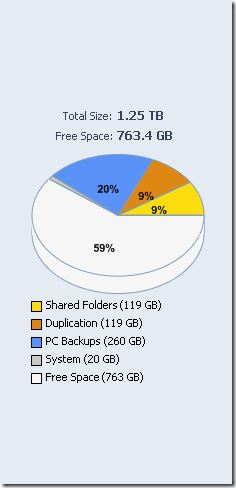
As I was poking around my WHS I noticed how much hard drive space was being used on my Storage Tab. I've got four machines backed up, and about 260gigs is used.
Now, "Duplication" (the WHS software-RAID-like feature) isn't turned on by default for backups in Windows Home Server. All my files are duplicated in all my shared, but since a backup is already a duplication of the original, and since you can store multiple days of backups (I have 7 days, so a week's worth of backups over four machines) there's really no reason to duplicate the backup again.
That said, you can go to this totally unsupported and may well go away in the future no warranty express or implied you're on your own don't ask for support from anyone it's your butt not mine Registry key from Regedit:
HKEY_LOCAL_MACHINE\SOFTWARE\Microsoft\Windows Home Server\Storage Manager\Folders
From a list of GUIDs, find the one that has the FriendlyName of "Windows Home Server Computer Backup." Under that key there is an "Attributes" sub-key. Create a DWORD value "Reliable" = 1.
(If these instructions are too technical or don't make sense, you might want to reconsider heading down this path, or you can find a nerd to do this. I don't want to make this too easy because if you do this unsupported thing, I'd hate to have your house burst into flames because if it.)
Setting this value does one simple thing, it turns on duplication of the backups database.
Disclaimer:
- This value isn't referenced or mentioned in the WHS SDK, so it's officially unsupported right now.
- It might go away some day.
- I don't work for the WHS team, so you probably shouldn't listen to me but rather to them.
You might freak out and ask yourself, "why wasn't this turned on by default?" Well, there are some pretty good reasons actually. There can be a significant performance impact. From a team member:
"Whenever you change the contents of a duplicated file, after you close the file, the migrator copies the entire contents of the file to the second disk. The nature of backup is that it frequently makes small changes to large files, meaning that the migrator may end up doing far more work than the backup process does."
That makes sense. If I'm running nightly backups of four machines I could easily see the migrator (the service that makes duplicates) running all night long on my machine. But, I'm also paranoid about losing data so I think this key is for me. It may not be for you, but it's nice to know it's there.
About Scott
Scott Hanselman is a former professor, former Chief Architect in finance, now speaker, consultant, father, diabetic, and Microsoft employee. He is a failed stand-up comic, a cornrower, and a book author.


About Newsletter



Brendan - It was a 60 gig backup size to a fresh 100 gig drive over a 1Gbps network.

I've setup a subversion repository on my WHS and it's root folder is a share, one of the folders in the big disk cloud. Because I'm paranoid about losing my repository I set it for duplication but it seems like it fails now and then and I'm pretty sure it's because of how the file structure is used to handle the repository. Lots and lots of little writes all over the place and I think that confuses the migrator. Plus it doesn't help that when it fails I can't seem to find any way to find the real error details. If I can just get my repository duplicated I'd feel *a lot* better.


Lance - You can restore anything to anything as long as the hard drive is larger. What Windows chooses to do with that change is not WHS's issue, but Windows. Worst case scenario you'd have to reactivate Windows over the phone, AFAIK.
Example, despite Linux being able to run on external media, like CD, DVD, Blue-ray, USB, eSATA and the sort, Windows isn't. Don't forget, Windows also requires them hardware drivers, and it does create a record of this during install, which prevents you from wanting to copy "Windows" to yet another different computer...
none of this should surprise anyone... knowing how Microsoft functions... all that Antipiracy code, activation, validation, WGA and so forth is designed to prevent you from doing this...
But you can use Acronis to restore your Windows operating system to any new different hardware computer, just as long as you acquire the hardware drivers to install. WHS doesn't allow this, so you must hope nobody needs to replace their computer, and God forbid all your backup images are lost by WHS due to data corruption, theft or hard drive failure...

Comments are closed.
Also I am just wondering since you mention it is a laptop that it might have just been because of a small drive or perhaps the configuration you have there which facilitated this pretty reasonable speed. Wondering how long it might take to perform a backup with a large drive.