Back to Basics: var != Dim
Someone said today after seeing the C# var operator for implicitly typed variables, "Oh, now C# has Dim." Well, not exactly. Not even close.
I like what this C# tutorial says about var.
...[var is] a new keyword that means, "I want to declare a variable, but I’m too lazy to write out its type."
One way to look at the power of VB's Dim operator is to say,
Dim kind of means, "I want to declare a variable but I can't tell you much about how it behaves until much later."
Dim lets you do actual late-binding while in C# (today) you do late-binding with reflection. I wanted to find a way to clearly express this in a very visceral sample.
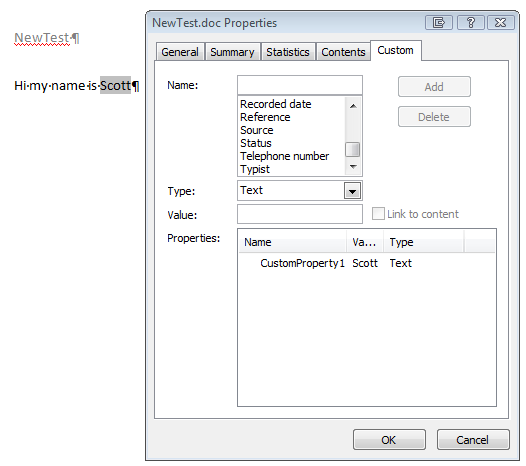
A friend wanted to change a value in the CustomDocumentProperties in Word and see that change reflected in an updated field. In the document properties dialog below, you can see there's a "CustomProperty1" that has the value of "Scott" in it. Then in the document, there's a Field that is bound to that property. It's not meant to be a mail merge, but more of a MadLibs kind of a thing for writing applications that update forms and templates within Word or Excel documents.
His language of choice is C#, so he started off in C#. He added a reference to the Microsoft.Office.Interop.Word PIA (Primary Interop Assembly) and fought with the system for some hours. After a while, I got enlisted, and after I figured out that the specific COM interface he needed was a late-bound IDispatch interface, we were able to crack with the Reflection.
I'm starting to think of Reflection much the way I think about Regular Expressions. If you have to solve your Problem with Reflection, you may just end up with Problems, plural!
Notice a few things. First, the need for some of those obvious strings and booleans to be of type Object. Notice all the System.Reflection.Missing.Values passed by reference. Most of all, notice the custom GetCustomPropertyValue and SetCustomPropertyValue that had to use Reflection.
  ApplicationClass WordApp = new ApplicationClass();
  WordApp.Visible = true;
  object missing = System.Reflection.Missing.Value;
  object readOnly = false;
  object isVisible = true;
  object fileName = Path.Combine(AppDomain.CurrentDomain.BaseDirectory, @"..\..\..\NewTest.doc");
  Microsoft.Office.Interop.Word.Document aDoc = WordApp.Documents.Open(
      ref fileName,ref missing,ref readOnly,ref missing,
      ref missing,ref missing,ref missing,ref missing,
      ref missing,ref missing,ref missing,ref isVisible,
      ref missing,ref missing,ref missing,ref missing);

  aDoc.Activate();

  string propertyValue = GetCustomPropertyValue(aDoc, "CustomProperty1");
  SetCustomPropertyValue(aDoc, "CustomProperty1", "Hanselman");

  foreach (Range r in aDoc.StoryRanges)
  {
     r.Fields.Update();
  }
}

public string GetCustomPropertyValue(Document doc, string propertyName)
{
  object oDocCustomProps = doc.CustomDocumentProperties;
  Type typeDocCustomProps = oDocCustomProps.GetType();
  object oCustomProp = typeDocCustomProps.InvokeMember("Item",
        BindingFlags.Default |
        BindingFlags.GetProperty,
        null, oDocCustomProps,
        new object[] { propertyName });

  Type typePropertyValue = oCustomProp.GetType();
  string propertyValue = typePropertyValue.InvokeMember("Value",
       BindingFlags.Default |
      BindingFlags.GetProperty,
      null, oCustomProp,
      new object[] { }).ToString();

  return propertyValue;
}

public void SetCustomPropertyValue(Document doc, string propertyName, string propertyValue)
{
  object oDocCustomProps = doc.CustomDocumentProperties;
  Type typeDocCustomProps = oDocCustomProps.GetType();
  typeDocCustomProps.InvokeMember("Item",
        BindingFlags.Default |
        BindingFlags.SetProperty,
        null, oDocCustomProps,
        new object[] { propertyName, propertyValue });
}
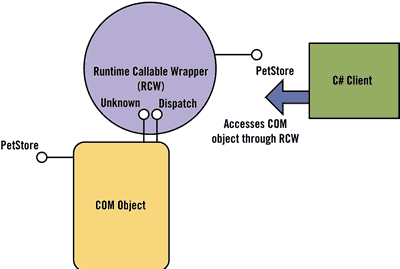 There's a great article from 7 (yes SE7EN) years ago on Dr. Dobb's about Invoking COM Components from C# that provided me this diagram. The RCW (Runtime Callable Wrapper) sits in front of the COM Object and makes my reflection calls work.
Sure, I could have created some IDL and laid out an IDispatch implementation for these CustomDocumentProperties, but that's getting REALLY involved. Actually, there's supposed to be an implementation for CustomDocumentProperties but the MSDN Sample fails with this:
"Unable to cast COM object of type 'System.__ComObject' to interface type 'Microsoft.Office.Core.DocumentProperties'. This operation failed because the QueryInterface call on the COM component for the interface with IID '{2DF8D04D-5BFA-101B-BDE5-00AA0044DE52}' failed due to the following error: No such interface supported (Exception from HRESULT: 0x80004002 (E_NOINTERFACE))."
Competing with that non-working MSDN sample is this KB article from 2007 that provided the bulk of the yucky, but straightforward reflection code.
Why is this a Back to Basics post? Well, two fold. First, COM is Old and it's Basic. Seriously, though, the secondly (and only) reason is that, in my opinion, C# 3.0 is lousy for this kind of late-bound, COM-interop, Office Automation work.
Don't believe me? Here's the same code in VB. See the named parameters on the Open()? Notice the late-bound COM stuff just works without Reflection? (I've got Option Strict to Off for this code)
Dim WordApp = New Microsoft.Office.Interop.Word.ApplicationClass
WordApp.Visible = True

Dim fileName = Path.Combine(AppDomain.CurrentDomain.BaseDirectory, "..\..\..\NewTest.doc")
Dim aDoc As Document = WordApp.Documents.Open(FileName:=fileName, ReadOnly:=True, Visible:=True)
aDoc.Activate()

Dim PROP = "CustomProperty1"
Dim propertyValue = aDoc.CustomDocumentProperties(PROP).Value
aDoc.CustomDocumentProperties(PROP).Value = "Hanselman"
For Each r As Range In aDoc.StoryRanges
   r.Fields.Update()
Next
VB.NET is really well suited for this kind of thing, and my buddy will likely use it in this scenario.
I hear this big difference in dynamism will change for the next version of C#. I'll talk to the team and try to get some details or rewrite my C# sample in C#.Next. I've also asked John Lam to help me write this sample in IronRuby. I suppose it'd look nice in PowerShell also.
The Point is, and until some future date, var != Dim.
The Back to Basics thing to remember is that the language you know might not always be suited for the problem you have. Just because you CAN solve a problem in a certain language doesn't mean that you should. If something REALLY doesn't feel right in a certain language, ask around, perhaps there's another that makes more sense for what you're trying to do.
About Scott
Scott Hanselman is a former professor, former Chief Architect in finance, now speaker, consultant, father, diabetic, and Microsoft employee. He is a failed stand-up comic, a cornrower, and a book author.


About Newsletter



aDoc.Fields.Update()
For Each s In aDoc.StoryRanges
   s.Fields.Update()
Next
For Each t In aDoc.TablesOfContents
   t.Update()
Next
For Each r In aDoc.Sections
   For Each f In r.Footers
       f.Range.Select()
       f.Range.Fields.Update()
   Next
   For Each h In r.Headers
       h.Range.Select()
       h.Range.Fields.Update()

   Next
Next
WordApp.ActiveWindow.View.Type = WdViewType.wdMasterView
WordApp.ActiveWindow.View.Type = WdViewType.wdPrintPreview

var aboutMyArgs = (from a in Environment.GetCommandLineArgs() select new { slashy = a.StartsWith("/"), dashy = a.StartsWith("--") }).First();Here, aboutMyArgs doesn't seem to have a type you could type.

MD5CryptoServiceProvider md5 = new MD5CryptoServiceProvider();
when you can have:
var md5 = new MD5CryptoServiceProvider();

C# developers like to knock VB.NET but you definitely provide a good example where VB.NET makes C# look extremely cumbersome

About that UPDATE ALL FIELDS sample. Just a comment. There are a handful of field types in Word, that if you update them like this, you'll end up popping dialogs (for instance, the ASK field is one that comes to mind).
If you're code doesn't mind prompting the user during your update, have at it. But if there's lots of them, that might be a PITA for people.
Good post though. C# looks like a real pain for any sort of Office automation work.
Good to know.

About the only thing you can do is to enumerate all the fields in each collection, check each field's TYPE property, and if it's a UI driven field, don't update it.
I know these can cause problems....
wdFieldFillIn
wdFieldAsk
wdFieldFormTextInput
but what makes this issue even more fun (believe me, I know WAY too much about Word automation), is that you can actually have documents with +nested+ fields.
If the outer field is a normal field, but it +contains+ one of these prompting type fields, updating the outer field will force an update of the inner field, and, pop, up comes a dialog.
So it's not an easy thing to get around no matter what way you go.

Sayed Ibrahim Hashimi

Sayed - Nice catch! I'm glad you noticed!
We usually end up with VB.Net wrapper classes for the Office objects, that way they can get consumed in a C# project without all the boilerplate reflection code, and we still get a certain degree of intellisense despite using late bound GetObject calls under the covers that return a plain System.Object rather than something like Microsoft.Office.Interop.Word.Document.

Why should using 'var' mean I am lazy? While var may simply be compiler trickery, it would not be possible to use anonymous types if we didn't have this feature. I use anonymous types all the time, especially when writing up sample code to test something real quick or to answer someone's post in a forum. It's much easier than having to write an entire class just so that I can have some data to throw in a Grid. Not to mention anonymous types are needed with LINQ. It (var) also lends itself to better code readability, which should be a goal of every developer.
I know that wasn't the main focus of this post. Thanks for explaining the difference between var and Dim. I have just started learning VB and posts like this are quite helpful when I continually try to justify to myself why I should learn it.

However there are limits to this and I would think this is the perfect situation for a partial class in which the "option strict off" switch should be thrown.
This allows you to apply "option strict off" to a single method if need be.

Lazy is such a poor word to explain it to be honest with you. And of course in this case can mean efficient and effective, and it means it. However I find it mostly as a better way to communicate idea by not cluttering my code:
var someVeryPowerfulSuperhero = myPowerfulSuperHeroFactory.getPowerfulSuperhero("HULK");
I already gave descriptive name to my variable, I don't need to embellish it with MightyStuff.SuperHeroes.IPowerfulSuperhero; it reads alright and I have all the IDE intelli powers to execute some MightyDeed.
I don't need to introduce new namespace using, importing possibly hundreds of unwanted classes/interfaces/... names, keeping my intellisense clear and simple while still nicely communicating what I want to do.
And I don't need to repeat myself: SomeUsefulClass somethingUseful = new SomeUsefulClass(); I know it's SomeUsefulClass what's the value of adding the class name in front of the variable when you gonna give the name of the class in the same line anyway?
Yes I know this wasn't the topic but you just had to use word lazy, did you? :)
Cheers,
Mihailo

Not as "Nice" as I hoped as I needed Reflection also as the CustomDocumentProperties COM Object does not expose TypeInfo.
$msWord = New-Object -com word.application
$doc = $msword.Documents.Open('c:\test1\test.doc')
$doc.Activate()
$type = $doc.CustomDocumentProperties.gettype()
$prop = $type.InvokeMember("Item","GetProperty",$null,$doc.CustomDocumentProperties,"CustomProperty1")
$PropType = $doc.CustomDocumentProperties.gettype()
"Old : " + $Proptype.InvokeMember("Value","GetProperty",$null,$prop,$null)
$Proptype.InvokeMember("Value","SetProperty",$null,$prop,"Mow2")
"New :" + $Proptype.InvokeMember("Value","GetProperty",$null,$prop,$null)
"Updated fields :" + $doc.StoryRanges |% {$_.Fields.Update()}
Enjoy,
Greetings /\/\o\/\/

However I know that's just not reality....or could it be? Please?

OT, Here is something interesting in VB.NET with Option Strict. If you turn it ON at the project level, you can not shut it off at the file level. Makes a nice experiment for those who might be interested. I know it works this way in VS2005, but I haven't tried VS2003 or VS2008.


As for type inference, it's certainly not about laziness. LINQ and anonymous types aside it's about the DRY principal - how is it useful to a developer and especially the compiler to specify the type of a variable initialized at declaration twice? Read the Essentials of Interaction Design 3.0 and you'll find new appreciation for software not asking dumb questions of your users.

Robz: "If you turn it ON at the project level, you can not shut it off at the file level. "
Erm Robz.... thats not right
The following code works fine under VS2005 and VS2008 with project-level option strict turned on :
-------------------------------------------------------------
Option Strict Off
Module Module1
Sub Main()
Dim WordApp As New Object
WordApp.Visible = True
End Sub
End Module
-------------------------------------------------------------
...and removing the "Option Strict Off" statement brings the error "Option Strict On disallows late binding"
Dim obj2 = New ExternalHandler()
I should be able to do this, but I am not able to. If I go to Project Properties and change Option Strict to Off, the application will compile.
----
Option Strict Off
Option Explicit Off
Public Class TestOptionStrict
Public Sub OptionStrictTest()
Dim thisVar As Integer
Dim obj As Object = New ExternalHandler()
Dim obj2 = New ExternalHandler()
thisVar = 1000 ' Declared variable does not generate error.
' Attempting to convert Double to Integer generates a COMPILER ERROR.
thisVar = 1234567890.9876542 ' causes ERROR
' Late-bound call generates a COMPILER ERROR.
obj.Method1() ' causes ERROR
obj2.Method1()
End Sub
Private Sub OptionExplicitTest()
Dim thisVar As Integer
thisVar = 10
' The following assignment produces a COMPILER ERROR because
' the variable is not declared and Option Explicit is On.
thisInt = 10 ' causes ERROR
End Sub
End Class
----
Another fun thing is how thing get mixed up when they are introduced at the same time. I've seen several argue that var is a nice thing because we need anonymous types for LINQ but that's actually mixing things up.
var x = new Dictionary<string,string>();
Is not saying "I want x to be of an anonymous type". It's saying use type inferences to determine that the type of x should be Dictionary<string,string>() that's not anonymous. if it were you would not be able to do:
from pair in x
select new {Name = x.Key, First= x.Value[1]};
An anonymous type do not implement IEnumerable<KeyValuePair<string,string>> but the Dictionary given above does.
The LINQ statement returns an IEnumeration<anonymous type> where the anonymous type have two properties Name and First.
In the var statement there's no anonymous type and in the select part of the LINQ there's no var so clearly anonymous type is not a valid argument for var. The compiler trickery needed to make anonymous type work (type inferrence) can be used to make the var statement possible but the var statement is not needed for anonymous types to work.

It takes the tools out of the hands of the programmer by saying one language is superior to another.
I love the CLR because I can chose the best language to express my ideas.
I love shoving arrays build in c# and vb.net to APL.
Save a lot of code in language that was built for array processing.

Actually "Dim lets you do actual late-binding while ..." should read "Dim ... as Object lets you do actual late-binding while ..."
Martin


You might find the VSTO Power Tools interesting. I remember the announcement back in february but since I'm not a regular C# coder, I didn't look into it.
http://blogs.msdn.com/andreww/archive/2008/02/21/vsto-vsta-power-tools-v1-0.aspx
http://www.microsoft.com/downloads/details.aspx?FamilyId=46B6BF86-E35D-4870-B214-4D7B72B02BF9&displaylang=en
Hope this helps
I ran into similar problems with automation of Adobe InDesign, and ended up creating massive amounts of wrapper classes. I used CodeSmith and Reflection to create the classes, which also enabled me create a very typesafe, and somewhat interface based library. This was back in the 1.1 days, but now with generics, extension methods etc. I've started to experiment with something like this:
public static class WordExtensions
{

    public static Document Open(this Documents documents, string filename, DocumentOpenOptions options)
    {
        object filenameobj = filename;
        return documents.Open(ref filenameobj,
            ref options.ConfirmConversionsValue,
            ref options.ReadOnlyValue,
            ref options.AddToRecentFilesValue,
            ..........
    }
}

public class DocumentOpenOptions
{
    internal object ConfirmConversionsValue = Missing.Value;

    public bool? ConfirmConversions
    {
        set { ConfirmConversionsValue = value.HasValue ? (object)value : Missing.Value; }
    }

    internal object ReadOnlyValue = Missing.Value;

    public bool? ReadOnly
    {
        set { ReadOnlyValue = value.HasValue ? (object)value : Missing.Value; }
    }

    internal object AddToRecentFilesValue = Missing.Value;

    public bool? AddToRecentFiles
    {
        set { AddToRecentFilesValue = value.HasValue ? (object)value : Missing.Value; }
    }
}
..which allows constructs like this:
Document aDoc = WordApp.Documents.Open("", new DocumentOpenOptions { ReadOnly = false,AddToRecentFiles=true,ConfirmConversions=false });
Using code generation and reflection, this kind of code can be generated en masse.


If "dynamic invocation" becomes something that is explicitly activated through the use of the DLR, then fine, but don't adapt the entire language to it.
Scott, I replied to your previous post, but I think the reply is stuck in some kind of review system. Should links be avoided?
What I mean by this is just that if you set "option explicit" aren't these two kinds of snippets equivalent?
var req = from table where condition...;
and
Option explicit
...
Dim req = From table Where condition...;
(I've used Linq for the sample, but any case where the "Dimmed" variable type is immediately inferred would have worked).
Apart from this, I just wanted to confirm the usefulness of VB.net when dealing with Word PIA. And I'm in general rather reluctant at using VB... just a matter of taste (Office Interop is the only case where I code using VB).

Comments are closed.
sometimes it is already bad enough with String vs string, BOOL vs bool (C++) why make it any more complicated, I just don't get it.