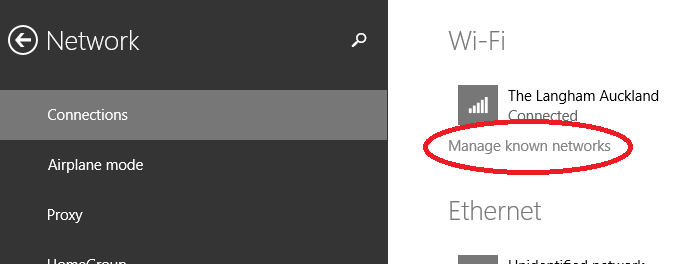
I have a personal MSDN account so I download and installed the Windows 8.1 Update as soon as I could. It'll roll out to the rest of the world slowly in the coming weeks.
The verdict? It's a significant improvement. I use an X1 Carbon Touch laptop, and while it has a touchscreen, I spend most of my time on the mouse and keyboard. I'm comfortable with moving between Store (fullscreen) apps and Desktop apps but it's always a little jarring. You're leaping between two universes. I want to live in one universe and this Windows update merges them in a measured way that means I'm moving faster when using my computer.
I've just put up a brand new 5 minute YouTube video to give you a tour of just a few of the new features.
After you get the update, you'll notice immediately that the Windows Store - a full screen app, mind you - is pinned to your Windows Desktop's Taskbar. You can now pin any app, desktop or store, to your Taskbar.
Even better, you can close them with a right click, just like you're used to:
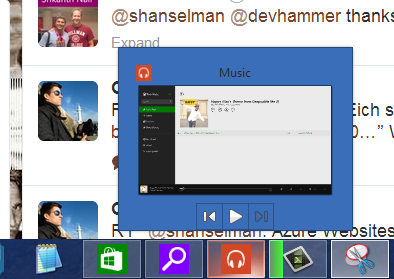
And Windows Store apps like Xbox Music that use the Media Controls can also get taskbar enhancements like the Media Controls within the Taskbar button. Here I'm controlling the music in my Windows Store app while I'm in the desktop. The "universal" music controls also pop up when you press your hardware volume keys as well.
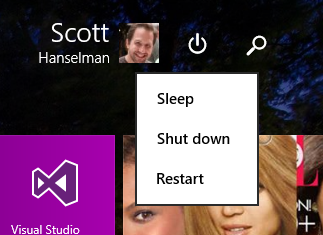
The Start Screen now includes a power button and search button, always.
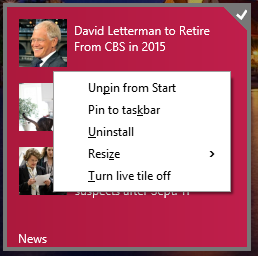
If you right click a pinned Tile with the mouse (or Shift-F10 with the keyboard) you'll get the familiar context menu. You can change sizes, pin to the taskbar, and more.
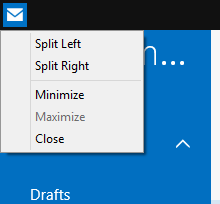
You can move the mouse to the top of a Windows Store app and a title bar will appear. Click in the left side of that title bar, and you can now control Window Splitting.
Windows Store apps also get Minimize and Close buttons as well.
Newly installed apps are easier to find and a notification appears on your Start Screen:
Fullscreen IE11 also has an option to always show open tabs, useful if you're an "out of sight, out of mind" individual.
All in all, it works surprisingly well. I'm moving around Windows faster than before and actually using more Store apps like Mail and Music.
Please do pass that link along to family and friends, or via Social Media. Thanks!
About Scott
Scott Hanselman is a former professor, former Chief Architect in finance, now speaker, consultant, father, diabetic, and Microsoft employee. He is a failed stand-up comic, a cornrower, and a book author.
Lately, I've been noticing that the more experience I gain, the longer it takes me to complete projects, or certain tasks in a project. I'm not going senile yet. It's just that I've seen so many different ways in which things can go wrong. And the potential pitfalls and gotchas that I know about and remember are just getting more and more.
Trivial example: it used to be just "okay, write a file here". Now I'm worrying about permissions, locking, concurrency, atomic operations, indirection/frameworks, different file systems, number of files in a directory, predictable temp file names, the quality of randomness in my PRNG, power shortages in the middle of any operation, an understandable API for what I'm doing, proper documentation, etc etc etc.
This really hit me because THIS IS ME. I was wondering recently if it was age-related, but I'm just not that old to be senile. It's too much experience combined with overthinking. I have more experience than many, but clearly not enough to keep me from suffering from Analysis Paralysis.
I have two side projects I'm doing on vacations and in the evenings when the house is asleep. One is a port of popular iOS application to Windows Phone, the other is a iOS app with a cloud service startup with my buddy Greg. Both projects have had awesome beginnings and then stalled when things just got overwhelming.
I kept starting features, the stalling. I felt like I was thrashing to disk, spending more time swapping ideas around in my head rather than just doing them. I'm still getting lots of things done, in general, I'm productive, but when I code I just thrash.
I'm overthinking stuff. "Write settings to a file" turns into a mess of paranoia around concurrency situations, upgrading settings from previous versions of the app (that don't exist, mind you), and it just snowballs from there. It's not exactly scope creep, but it's a kind of architectural paranoia. I see so many issues and possible bugs that I've learned over the years that could derail a feature that I end up derailing the feature.
YAGNI
The answer, they say, is You Aren't Gonna Need It. "Perfect is the enemy of the good" reminds user Telastyn. These are easy to intellectualize but hard to internalize. User Mouviciel says:
Looks like you are not experienced enough :). The next lesson is: stick to requirements, not more.
I get that, but me, I often need another brain to complement my own.
How I Solve Overthinking
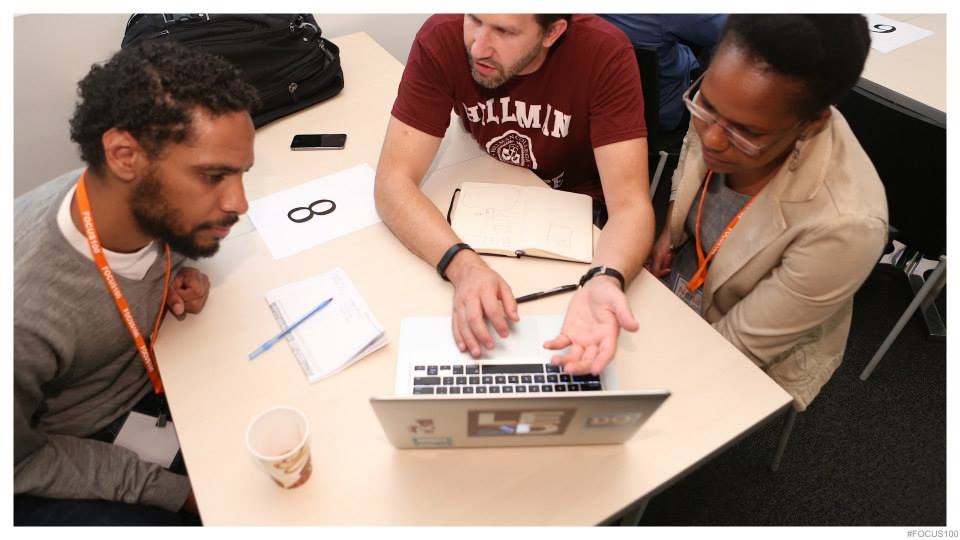
I learned about Agile from James Shore while I was working at Corillian some years ago, but it's Pairing that resonates with me the most. With a good pair, you'll get 3 times the work, not double.
I worked my way through both these startup issues by bringing in another brain. I'm not the best programmer, but I do OK. But somehow we are both better when we pair. I paired with Greg on the iOS and my new friend Jan Hanneman on the other. They are both clearly better coders than I, which is intimidating, but I'm still sure I provide value. What they gave me was a fresh perspective and a focus to say "YAGNI" and just get features done. The ironic part is, if I'm brought in on a project to pair, that's what I bring also.
My wife thinks this is hilarious. It's the old relationship joke where your partner says something for years and years, then one day you rush home from work to share this amazing new "insight" from a stranger...the same insight your partner has been sharing all this time.
Since I work remotely, all my Pair Programming has to happen over video chat and screen sharing. I use Skype, Lync, Join.me, and whatever else works. We take turns working through features in Trello boards, sharing one person's screen, talking and coding, designing and brainstorming, then commiting to Git, syncing, and switching the share.
This seems to work well for sessions as long as 3 hours, but after that, we get pretty wasted. However the feeling of accomplishment when you work through a problem with a partner is also magnified.
Does your coding life get paralyzed? How do YOU work through it?
Scott Hanselman is a former professor, former Chief Architect in finance, now speaker, consultant, father, diabetic, and Microsoft employee. He is a failed stand-up comic, a cornrower, and a book author.
Note Scott Hanselman (me): I had been meaning to write up my productivity tips for years. Isn't that ironic? However, after giving a presentation at SXSW on Productivity this year, Danny Schreiber from Zapier took it upon himself to do just that. I had no idea that Danny did this until I saw he shared his very excellent write up on the Zapier Blog. It is also reproduced here with Danny's permission. So this is my talk, filtered through Danny's brain, out his fingers, and now back on my blog. Which is something. Thanks Danny and Zapier, for not only attending, writing it up, and giving it back to me, but also for making a great product. Zapier is a web workflow system for everyone that lets you automate hundreds of web apps with rules like "As I post Instagram photos, post them to DropBox" or "SMS me when my Azure Website gets Deployed." They are great example of an app that empowers you to avoid tedious work and avoid duplication of effort. Check Zapier out.
What follows is Danny Schreiber's summary of my Productivity Talk. If you'd like me to give a version of this talk at your company or event, contact me.
"Don't worry, just drop the ball."
This counterintuitive advice is one of a dozen-plus productivity practices preached by Scott Hanselman, a program manager at Microsoft, author and avid blogger and speaker.
"Dropping the ball is sometimes the right answer," Hanselman says. "Let a ball drop. Tell people, 'I'm just not going to do that.'"
Hanselman's not the person you'd to expect to hear encourage dropping the ball and discourage burning the midnight oil. On top of his day job, he balances a full load: he blogs, records a podcast, engages on Twitter and attends and speaks at conferences regularly. In the past six years, he's co-authored more than a half-dozen books, and at home, he has a wife and two childen. In short, he's one productive individual.
How does he do it? Why does he do it? If you're asking yourself those questions, you're not alone.
"A lot of people say, 'Well, Scott, you're doing all this stuff. Why do you do it? Are you not sleeping?" Hanselman says. "It's because, I must dance. I can't stop. Whenever I think about stopping, I think about this little boy and how excited he is about doing what he's doing."
"It turns out," he continues, "the less that you do, the more of it that you can do. This is the standard law of scale."
Scale Yourself
In a 40-minute talk Hanselman originally delivered in 2012, and has since presented several times—most recently at South by Southwest Interactive earlier this month—he shares his productivity practices. From his "one email rule" to follow to his reasoning for reading lots of blogs, all his tips are immediately actionable.
The following is a recap of his popular talk, featuring quotes from his October 2012 presentation at GOTO Conference and his original talk at Webstock earlier that year.
Look for Danger Signs
Staying focused hasn't always been a challenge—there hasn't always been hundreds of pages of new content to consume daily or a constant stream of new information interrupting you. Instead, Hanselman says, when he wanted to learn programming, he needed to know everything in just two books.
"Then the Internet happened and suddenly there's Exabytes of information being created, and half of it is garbage and a third of my day is wasted by interruptions," he says.
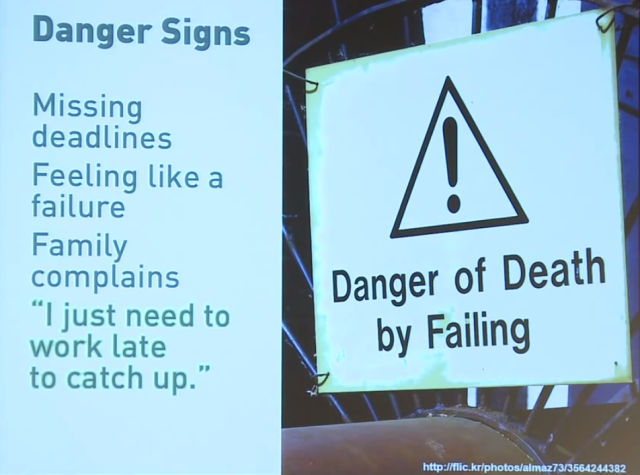
"I'm completely overwhelmed, and we tell ourselves that we're going to be able to pull it off if 'we just work late tonight.'" Stop. This is a danger sign.
"If you find yourself saying, 'I need to work late to catch up,' then that's a problem, that's a big problem," he says, admitting he's guilty of using this phrase himself. The remedy isn't as easy as "hoping" you'll catch up with your to-do list.
"Hope is not a plan," Hanselman says. "Hope is nothing but waiting and letting life happen to you."
So what do you do when you see danger signs? Hanselman has an antidote, but before he unveils it, he sets the record straight on what it means to be effective versus what is means to be efficient.
Understand Effectiveness Versus Efficiency
"Effectiveness is goal orientation. This is picking something to do. This is doing right things—picking a goal and doing that goal," Hanselman says. "Efficiency is doing things in an economical way, process-oriented.
"So phrased differently: Effectiveness is doing the right things, but efficiency is doing things right. That means effectiveness is picking a direction and efficiency is running really fast in that direction," he says.
Effectiveness is doing the right things.
Efficiency is doing things right.
"When you realize those two things are different, it becomes an extremely powerful tool that you can use."
Define "Work"
With effectiveness in mind, Hanselman stresses the importance of understanding David Allen's threefold nature of work, which is:
Pre-Defined Work - Work you've set up ahead of time
Work As It Appears - Work that interrupts you
Defining Work - You sit down and think about what work you need to be doing
More time needs to be spent on the last bullet point, Hanselman says.
"How often have you actually put on your calendar one-hour of time to say, 'I'm going to sit down and think about what work I need to be doing.'" he says. "No, we panic and we look at our (to-do list) and we sort it. Then we just kind of freak out for a while and then the (to-do list) gets larger."
Instead of this haphazard approach, take time to define your work. Allen says it'll take an average of one hour per day for the typical professional.
Do It, Drop It, Delegate It and Defer It
Hanselman points to another David Allen's practices from his popular Getting Things Done manual, that of the "Four Ds":
Do It
Drop it
Delegate it
Defer it
Applying this to your inbox, Hanselman says, is a useful tool.
"Only do it if it's going to take a minute and it's been scheduled. Otherwise, it's really just drop it, delegate it and defer it, that means I'm not going to do it, someone else is going to do it (or I'll do it later )," he says.
Drop the Ball
Allen's "drop it" point leads Hanselman to encourage the practice of "dropping the ball." Though this sounds irresponsible, this will lead you to feel better about yourself as you'll be better able to focus in on your work rather that juggle responsibilities.
"Saying 'no' is difficult, but the guilt associated with saying 'yes' is often worse than the guilt associated with saying 'no'," Hanselman says. He points out that all systems that work, including the Internet, have flow control, which includes dropped packets of data.
"Communication by its nature is fault tolerant," he says. "If you've ever had communication with someone over a cell phone and a couple words drop out, you could still understand what they were saying."
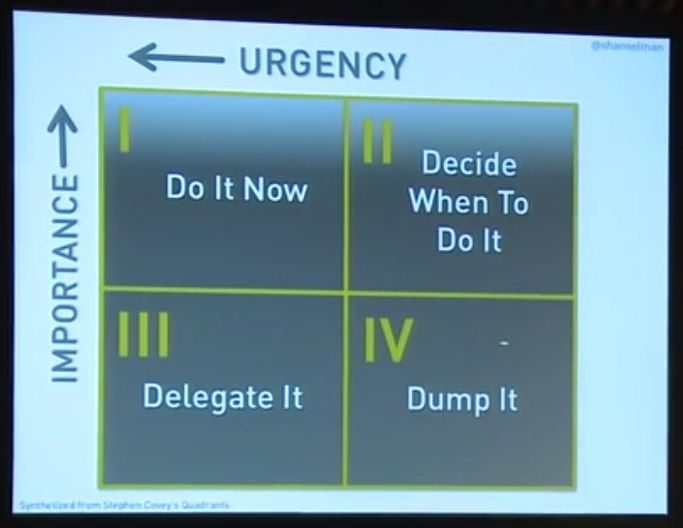
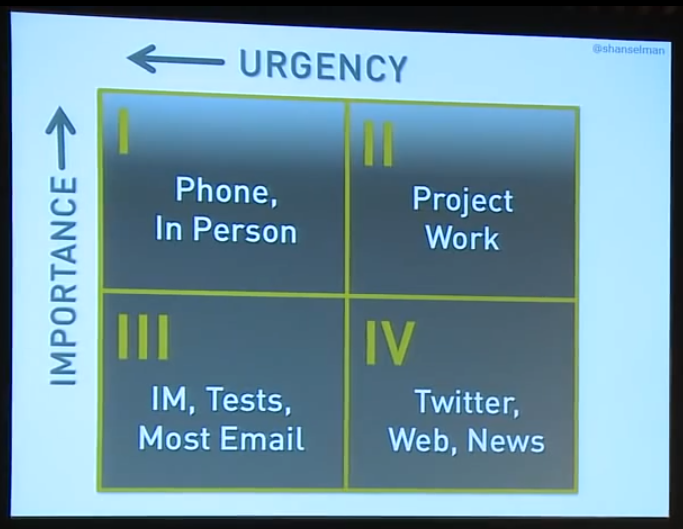
To decide what to drop, Hanselman recommends using Stephen Covey's four quadrants:
"When something is both urgent and important, like a pregnant wife or an appendix being burst, you should probably do that now," Hanselman says. "If it is neither urgent nor important you should dump it. But unfortunately what happens is that we spend our time on things that feel urgent but are not important at all, but the urgency is an addiction."
Resolve Inbox Issues
One of the most common areas to add effectiveness to your work is your email inbox. Hanselman, who receives hundreds of emails daily, shares five tips for inbox management.
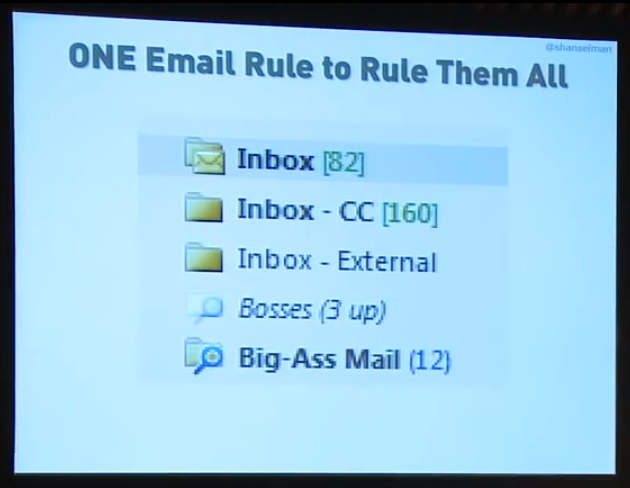
Follow This One Email Rule
Changing how emails are displayed in your inbox, Hanselman says, will "fundamentally change how you think about email." The change: set up a folder for emails that you're Cc'd on and a folder for emails that come directly to you. The emails automatically filtered to the "CC" folder, Hanselman says, are not important.
"Next time your boss sends you a to-do and Cc's you on it, don't do it," he says. "Then when he says, 'Why didn't you do it?' (Say,) 'Oh well, you Cc'd me, I thought you were just informing me.' He'll never do that again."
In his community management role at Microsoft, Hanselman uses one more folder in his inbox. "Notice how the inbox 'External'—my community, people who don't work for my company, they're important to me—I've answered all of their emails," he says.
Don't Check Email in the Morning (or at Night)
It's simple: if you reply to email in the morning, the sender will reply right back. What you thought was going to be less than an hour chore, quickly consumes half your day.
What happens is if you check email in the morning, you time travel. You wake at 9, you check email. Boom, it's lunch, and then you go to lunch. Boom, it's 2:30. Then it's like, 'OK, it's 2:30, I'm going to start working now.' That all happened because you checked email in the morning.
"Don't put more energy into things you don't want to," Hanselman says, paraphrasing David Allen.
Moreover, replying to email in the morning teaches people that they should expect future replies from you at that time. The same goes for answering email late at night.
"Remember, if you're the person who answers email at 2 in the morning, you just taught you're boss that you're the person who answers email at 2 in the morning," Hanselman says. You've also taught them that you're addicted to urgency.
Instead, check email at noon, and put it on your calendar. "You'll be surprised at how much work you get done," he says.
Find Your Aggregator
You shouldn't be constantly checking your email for fear of keeping up, Hanselman says. "I've got probably 500 emails—I usually have zero but I'm on vacation (in Sweden)," he says.
At the conference he was giving this talk, he observed other speakers give their talk and then rush back to their laptop to check their email, or as he puts it, delete their email.
"Has my job really come to this?" Hanselman says. "Is this my job: deleting email?"
To fend that habit off, Hanselman uses what he calls "trusted aggregators," colleagues who can be asked, "What's going on?" Or, they're blogs like The Verge or others that aggregate good content.
I used to have 1,000 blogs that I would read. And then who's the greatest blog reader in the world? Folks are always talking about how many blogs that he reads. So I finally decided, 'I'm not that guy.' He's a freak, and it's not healthy to keep up on that many blogs. So you know what I do? I read his blog. So I took the thousand blogs that I read and I pick five link blogs. I found my favorite aggregators. Blogs that cherry pick the best content from other blogs. And I read those five blogs and they give me an aggregated news. It's like why we listen to the BBC news on the hour, because it tells us what's going on so I don't have to watch all the other news. Find your aggregator inside of the company.
Ask yourself: Who is the person who can tell me what's going on and keep me up to date? That person is your aggregator.
Remain in Your Flow
"Remember that anything important that happens in the world, in the news, in you life, in your work , will come your (way) many times," Hanselman says. "If there's another 9-11, somebody will tell you. You probably didn't learn it by hitting refresh on your favorite news site."
His advice: remain in your flow. "Be wrapped up like a child in the thing that captures your attention," he says, quoting Stowe Boyd. "Get that excitement back, and that excitement does not involve Alt-Tabbing over to Gmail."
Conserve Your Keystrokes
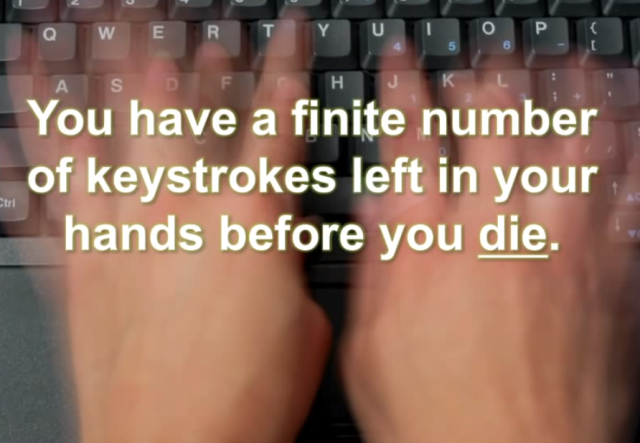
Pulling a page from author and software developer Jon Udell, Hanselman encourages you to "conserve your keystrokes." What does this mean? He explains by example:
If Brian emails me a really interesting question about ASP.net … and I send him back an exciting and long, five-paragraph with a code sample email that solves his problem, I just gave him the gift of 10,000 of my keystrokes. But there is a finite number of keystrokes left in my hands before I die, and I am never going to get those keystrokes back and I've just gifted them to Brian. And I don't even know if he reads that email. So what should I do to multiply these keystrokes given that there is a finite number of those keystrokes left in my hands? I write a blog post and I mail him the link. Then after I'm dead, my keystrokes multiple—every time I get a page view that's 5,000 keystrokes that I did not have to type.
Keep your emails to 3-4 sentences, Hanselman says. Anything longer should be on a blog or wiki or on your product's documentation, FAQ or knowledge base. "Anywhere in the world except email because email is where you keystrokes go to die," he says.
Triage the Inbox of Your Life
On top of email, you have a constant stream new information coming into the "inbox of your life," which includes everything form your social media activity, to new episodes to watch on Netflix to snail mail. The items in this inbox of your life, Hanselman says, need to be triaged.
Triage - from the French verb trier, meaning to separate, sort, sift or select.
He offers a gruesome analogy: if you're in a parking lot full of injured people, you must act. It's your job to put a toe tag on each individual—are they dead or alive, how should they be treated?
"We don't ruthlessly (go through the) inboxes of our lives and do that," Hanselman says. "We get wrapped up in the little details and then we're putting bandaids on cancer while someone else is loosing an arm."
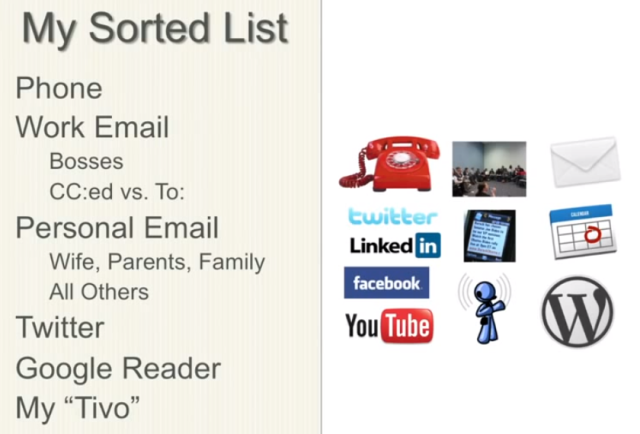
He instructs you to identify the data streams in your life—Twitter, Facebook, email, SMS and chat, for example—and sort them by signal versus noise. What provides you value and what doesn't? Which ones can be dropped? Drop them.
Here's how Hanselman defines his data streams:
Get Rid of Psychic Weight
You've just signed up for Netflix, giving you access to all episodes of House of Cards. Finally, you think, now you can watch the full second season whenever you want. But this isn't as freeing as it seems.
"I realized that this was psychic weight that was pressing me down," Hanselman says, recounting the time when he gained access to all episodes of Law & Order on TiVo.
"'OK, we got like seven Law & Orders on the thing," he says as if he were talking to his wife. "We'll put the kids to bed early tonight, and we're going to bang through Law & Order and then we're going to get this thing under control and we're going to handle it. And then we'll be back on track."
TiVo, it turned out, wasn't a "gift from God" as Hanselman originally thought. This "glorious productivity thing," he says, became the primary source of psychic weight in his life.
"(When) I think about the things that I want to get done, I want to think about: what are the three things I can get done today? What are the three things I want to get done this week, this year?" Hanselman says.
This practice, called the "Rule of 3", comes from fellow Microsoft program manager J.D. Meier.
Write down three outcomes for the day.
… for the week.
… for the year.
"When you're going through your week, you need to have a vision on Monday of what your week looks like, and on Friday you need to stop and look back on your week and think about the reflection," Hanselman says.
Ask yourself: Was that a successful week? What could I have done differently? What could I change?
"The point is to end the day without guilt, to end the day without psychic weight," he says. "Maybe I'm just talking to myself here, but I truly believe that we have had that feeling at the end of the day where, 'I didn't do a damn thing today.'"
Try the Pomodoro Technique
The Pomodoro Technique, invented by Francesco Cirillo in the late 1980s, has you focus on one task for 25 minutes. Between each of these task sprints, you get a break.
Try this approach, Hanselman encourages, and when you do track the interruptions that impede the 25 minutes. Put a tick on a piece of paper each time an internal—one triggered yourself—or external—one by a co-worker, for example—interruption occurs.
First, you'll record six interruptions in that 25-minute sprint. Then one. Then none at all.
"Then you'll start thinking about productivity in your life as how many Pomodoros that you got done in a day," Hanselman says. "You'll say, 'Man, that was a four Pomodoro day, I got a lot of work done.'"
Realize that Being Busy is a form of Laziness
Being busy is a form of laziness—lazy thinking and indiscriminate action. - Timothy Ferriss
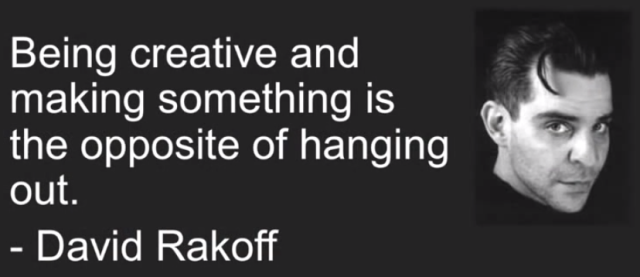
"Being busy is not thinking about what you should be doing so that you're not so busy," Hanselman says. "We find ourselves just being busy. It turns out, that 'being creative and making something is the opposite of hanging out.'
Hanselman takes notice when someone he sees tweet a lot suddenly stops tweeting and then a month later comes back with a new creation.
"Wow, that person just made a list of the things they needed to get done and Twitter wasn't one of them," he says. "They went off and they created and they came back and they shared it with us.
Face the Fact: Multitasking is a Myth
"Multitasking does not work," says Hanselman. "The optimal number of threads in any system is one thread. That is a computer science fact and if you think you can multitask, you're wrong."
When you do multitask you're really doing what Hanselman refers to as "task-switching," which requires context switching. To explain, he offers this example:
You ever been working on something and working on something and then the phone rings and you're mean, to like, your dad? Why was I so mean to my dad? Well, he called you at work at 3 in the afternoon and you were totally focused on something. Then afterwards (you were) like, 'I'm sorry, I was really working on something.' … Then I'm sad for like 10 or 15 minute. That's the context switch, as I get back from that phone call that I screwed up, back to the work. 'OK what was I thinking about?' Context switching doesn't work.
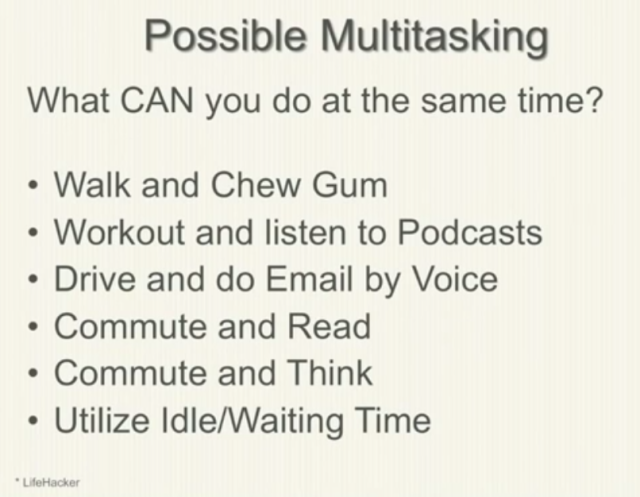
But Here's What You Can Multitask
There are some things, Hanselman notes, that you can multitask. For example, walking and chewing gum. Or for him, listening to podcasts or watching TV when he's working out.
There's also idle and waiting time to take advantage of in your day. Hanselman unabashedly shares how he makes the most of his visits to the bathroom.
"The iPhone has completely changed the way that I poop," he says. "I have no idea what we were doing in there before. Weren't you thinking, 'This is completely unproductive time.' And then the iPhone came along, and Instapaper, and now poop time is good time."
Clean Out Mental Clutter
Near the end of his talk, Hanselman offers the following quote to boil down a decision process to pinpoint what's important in your life.
If it's not helping me to make money, if it's not improving my life in some way, it's mental clutter and it's out." - Christopher Hawkins
Get rid of the "make money" part, he says. Instead, ask yourself: "If it's not helping me to—what is your goal? Spend time with your kids? Pay off your house? Grow your business?
"In any decision, if you're going to do something, is that helping you with that blank—whatever that blank is for you.
For Hanselman, that blank is his family.
"I stopped caring about my career when I had kids," he says. "Everything that I do, every decision that I make, is how I can get home to my four-year-old and six-year-old faster."
Homework
Hanselman ends his talk with a five-part assignment:
Audit and sort your sources
Schedule work sprint
Turn off distractions
How are you triaging your inbox? Are you effective? Are you efficient?
Consider your personal toolbox
"Notice that I didn't talk about Evernote or any of these fancy systems," he says. "You can spend more time reading productivity books and making productivity systems when maybe all you need is a (to-do list).
"Maybe what you really need is the will to do it and the recognition in your mind that there is a difference between being busy and doing the work that you want to do," he says.
Scott Hanselman is a former professor, former Chief Architect in finance, now speaker, consultant, father, diabetic, and Microsoft employee. He is a failed stand-up comic, a cornrower, and a book author.
I got an email from a reader who noticed some very odd errors happening in her web site's global error handler. Fortunately she's using ELMAH for error handling, which as you may know, is a JOY.
She was seeing:
Access to the path 'C:\Windows\security\database\secedit.sdb' is denied
Well, that's enough to make your heart skip a beat.
She looked around and found a file simply named "list.aspx" that she didn't recognize. The weird part was that this file was in the /uploads folder. That's where users can upload files with her particular CMS.
The list.aspx even has authors listed. Perhaps for their LinkedIn page?
Thanks Snailsor,FuYu,BloodSword,Cnqing,
Code by Bin
Make in China
I won't list the full list.aspx here, but rather call out some highlights of this clear malware.
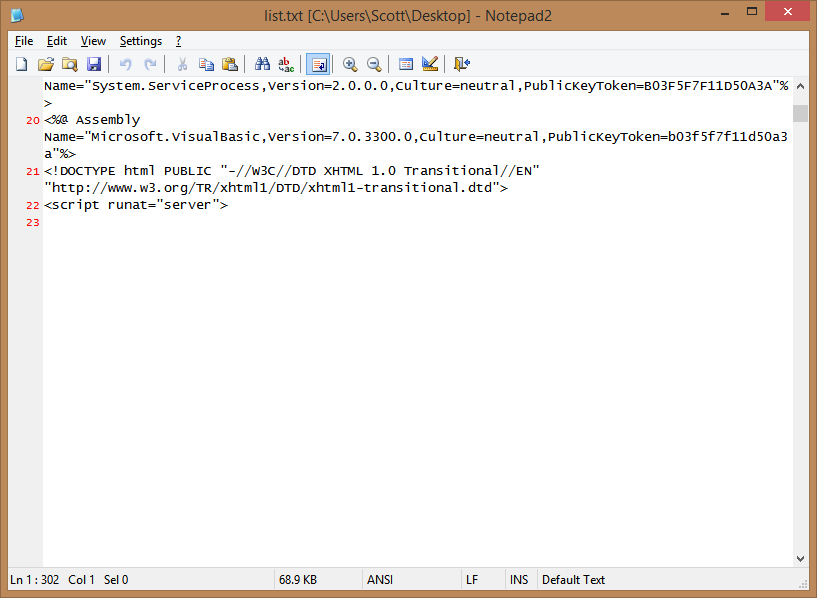
It had a LOT of spaces in the opening of the file.
Meaning, they were assuming you wouldn't scroll down. Seriously. Oddly, though, it was spaces, not carriage returns. Note Line 23 never ends. It's SUPER long.
It pointed to a lot of (comparatively) unusual domains
It had links inside to things like
www.rootkit.net.cn
r57c99.com
Note that the second one actually serves malware and bad JavaScript, so avoid it.
It's a whole admin console for a bad guy to attack your computer
This file actually has a dropdown with "Please select a database" with values like (this is just a taste):
Use master dbcc addextendedproc('sp_OACreate','odsole70.dll')
select * from openrowset('microsoft.jet.oledb.4.0',';database=c:\windows\system32\ias\ias.mdb
c:\bin.asp' backup database @b to disk=@t WITH DIFFERENTIAL,FORMAT;drop table [bin_cmd];
Exec master.dbo.xp_cmdshell 'net user'
EXEC sp_configure 'xp_cmdshell'
They're going for complete control of the system, and this file is just the start.
It serves JavaScript from elsewhere
This bad aspx file also tries to bring in some bad JS from the second domain above.
That JavaScript tries to bring in even worse JavaScript from another location via an indirection. I won't even list these bits for fear that I'll get blocked for serving it!
The root of all of this is: Don't let users upload and execute code.
A fix for arbitrary code execution in user upload folders
What was the fix? Well, certainly not allowing someone to upload a file with a .aspx or .php extension for one, but also to mark the entire uploads folder as not executable! Here is the updated web.config:
I'm not a security expert, but I'd love to hear from YOU, Dear Reader, and some of the crazy stuff you've discovered on systems you manage.
About Scott
Scott Hanselman is a former professor, former Chief Architect in finance, now speaker, consultant, father, diabetic, and Microsoft employee. He is a failed stand-up comic, a cornrower, and a book author.
I've been exploring Automated Browser Testing recently, and also checking out F# for unrelated reasons. However, when you combine the two you end up with "canopy." Canopy is a "f#rictionless web testing" framework that combines the flexibility of Selenium with the clean look of the F# language. F# is much terser (more elegant, even) than C#, and is garnering the interest of a lot of the .NET Open Source community. Folks are creating cool domain specific languages of their own using F# as the base.
F# is open source and cross platform, running on Linux, Mac OS X, Android, iOS, Windows as well as HTML5 and GPUs. F# is free to use and has an OSI-approved open source license.
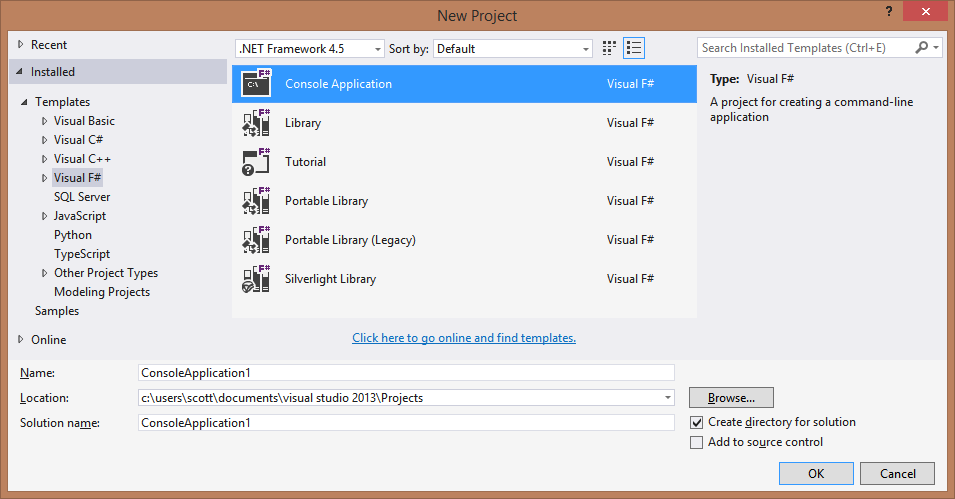
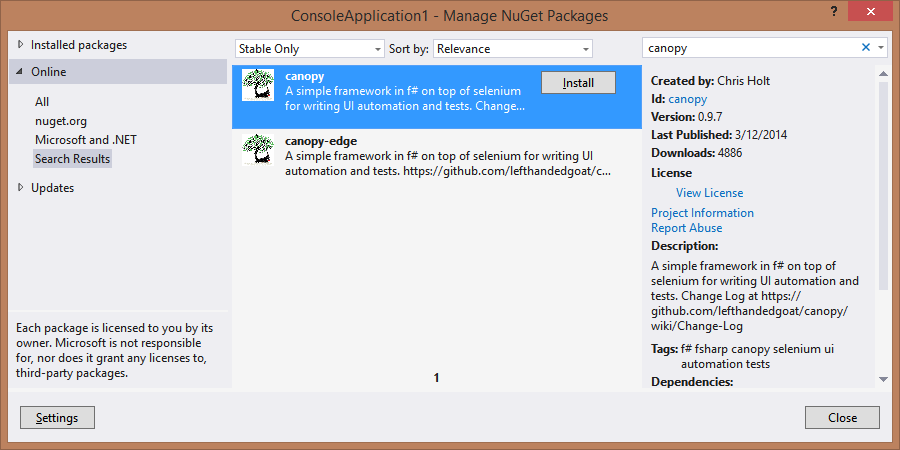
Anyway, back to Canopy. Make a new Console app and NuGet in the canopy package:
The NuGet package will bring in Selenium as a dependency.
Then, try out their "Hello World" web testing sample, that I've also pasted here.
//these are similar to C# using statements
open canopy
open runner
open System

//start an instance of the firefox browser
start firefox

//this is how you define a test
"taking canopy for a spin" &&& fun _ ->
    //this is an F# function body, it's whitespace enforced

    //go to url
    url "http://lefthandedgoat.github.io/canopy/testpages/"

    //assert that the element with an id of 'welcome' has
    //the text 'Welcome'
    "#welcome" == "Welcome"

    //assert that the element with an id of 'firstName' has the value 'John'
    "#firstName" == "John"

    //change the value of element with
    //an id of 'firstName' to 'Something Else'
    "#firstName" << "Something Else"

    //verify another element's value, click a button,
    //verify the element is updated
    "#button_clicked" == "button not clicked"
    click "#button"
    "#button_clicked" == "button clicked"

//run all tests
run()

System.Console.WriteLine("press [enter] to exit")
System.Console.ReadLine() |> ignore

quit()
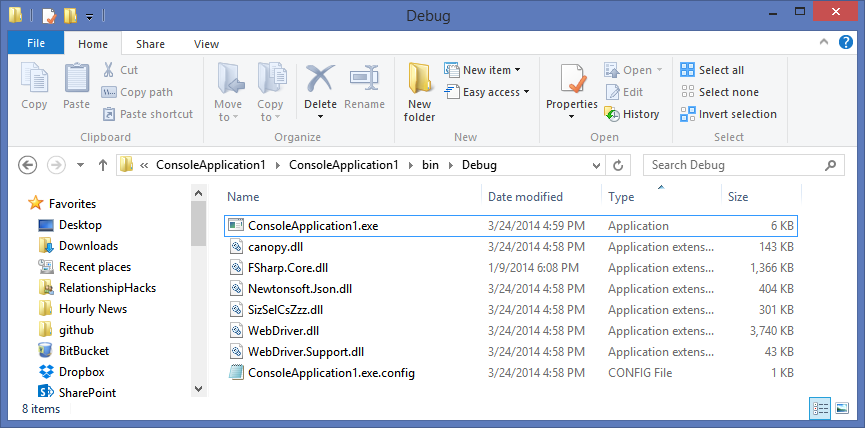
And boom, it just works. You can run this .NET application just like any other. .NET apps are .NET apps, as they say. It doesn't matter what language it's written in. When (if) you distribute this application you'd just include the contents of your Debug folder. No need to "install" F# or anything on the target machine.
You can do all sorts of Selenium testing with canopy, like:
//start a bunch of browsers and switch around
start firefox
let mainBrowser = browser
start chrome
let secondBrowser = browser
//switch back to mainBrowser after opening secondBrowser
switchTo mainBrowser

//take screenshots
let path = Environment.GetFolderPath(Environment.SpecialFolder.ApplicationData) + @"\canopy\"
let filename = DateTime.Now.ToString("MMM-d_HH-mm-ss-fff")
screenshot path filename

//get an element
element "#firstName" |> someParent

//press buttons
press tab
press enter
press down
press up
press left
press right

//check and click things
check "#yes"
click "#login"

//or even drag things!
drag ".todo" ".inprogress"
Oh, and by the way, the canopy library builds itself using FAKE, the F# Build System we talked about last week! Go check these projects out and offer to help or support them. There's a lot of interesting open source happening in the .NET space lately that may have been flying under your radar.
Scott Hanselman is a former professor, former Chief Architect in finance, now speaker, consultant, father, diabetic, and Microsoft employee. He is a failed stand-up comic, a cornrower, and a book author.