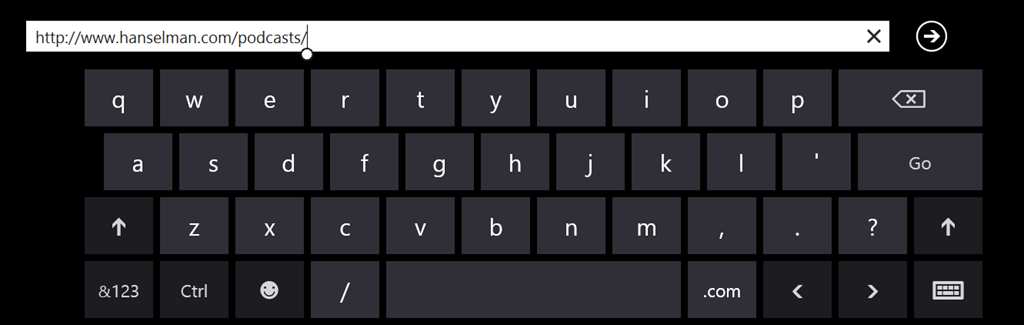
It's lovely, isn't it. It's the Windows 8 on-screen keyboard, except I don't need or want to see it. I have a Lenovo X1 Carbon Touch and it already has a keyboard. I will never ever want to use the Windows 8 touch keyboard. Unfortunately there is no checkbox or "just turn it off" way to disable the keyboard with a supported option.
However, there is a way to effectively disable the keyboard by stopping the service that controls it.
Press the Windows key + W
Type "services," and press Enter
Scroll down to "Touch screen keyboard and handwriting panel"
You can either right click and "Stop" or you can double-click and change it from "Automatic" startup to "Manual."
This will of course, disable both the touch keyboard and handwriting service, so you'll lose handwriting recognition. This was totally worth it to me and has made my touch screen laptop experience much better, especially when I'm using the Full Screen Browser. I hope this helps!
Note that if you have a touch only device, or a detachable keyboard, you could get yourself into a tough spot without an on-screen keyboard, so just have your mouse ready and a plan to turn this service back on if you get in trouble. ;)
Scott Hanselman is a former professor, former Chief Architect in finance, now speaker, consultant, father, diabetic, and Microsoft employee. He is a failed stand-up comic, a cornrower, and a book author.
P.P.S. You know you can forward this to your friends, right?
About Scott
Scott Hanselman is a former professor, former Chief Architect in finance, now speaker, consultant, father, diabetic, and Microsoft employee. He is a failed stand-up comic, a cornrower, and a book author.
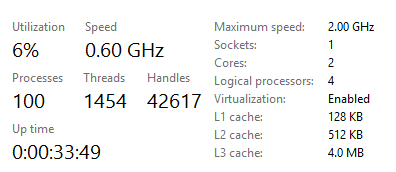
My buddy Damian and I both recently bought the Lenovo X1 Carbon Touch. It's got Intel SpeedStep technology so it changes the CPU speed dynamically based on load. These two laptops of ours are identical. However, here's Damian's Task Manager when mostly idle.
Here's mine.
What the heck is going on? His CPU is reporting 0.60 GHz of a potential speed of 2GHz, indicating that the chip has chilled out. Mine is reporting "full speed ahead!" at a speed that it doesn't even support, 2.49GHz!
We went around and around on this for a while until we realized that I had turned on Hyper-V Virtualization for Windows Phone Development and my Ubuntu VM. He hadn't.
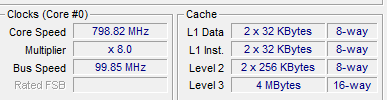
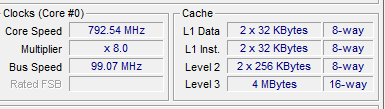
We installed CPU-Z, a low level and very smart CPU utility and got the truth. In fact, both machines are stepping down, but my Kernel is running within the Hypervisor and it's CPU speed is being reported incorrectly to Task Manager. Task Manager is showing the MAX speed, and not the real (Hyper-V virtualized) speed.
NOTE: CPU-Z is lovely but the Download.com wrapper that they put around it is evil spyware and you need to really pay attention when you install or you'll end up installing a bunch of toolbars. Be warned.
I hope this helps someone! It wasted 30 minutes of my life.
About Scott
Scott Hanselman is a former professor, former Chief Architect in finance, now speaker, consultant, father, diabetic, and Microsoft employee. He is a failed stand-up comic, a cornrower, and a book author.
I’ve long said when in doubt, turn on tracing. Sometimes "got here"-debugging is a great tool. I tend to use System.Diagnostics.Trace a lot in my code. Then I'll use ELMAH or Glimpse to get more insight.
Then later if I want to restart, start, stop, etc I can certainly
azure site restart mysite
But I was talking to one of the devs a while back and said I really wanted
azure site log tail mysite
And they made it! Check this out. You can try it right now.
Add Tracing to your App
First, make an app that has some tracing. Here's mine. Any ASP.NET app is fine, MVC or Web Forms or Web Pages, doesn't matter. Note the Traces.
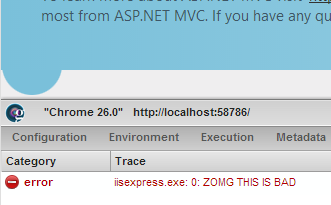
public class HomeController : Controller { public ActionResult Index() { ViewBag.Message = "Modify this template to jump-start your ASP.NET MVC application."; System.Diagnostics.Trace.TraceError("ZOMG THIS IS BAD"); return View(); }
Then, upload it to Azure. I did a Publish directly from VS in this case, just right click, Publish and Import the Publish Profile that you download from the portal. You can publish however you like.
Local Tracing with Trace.axd
You likely know that you can enable tracing locally with trace.axd in your ASP.NET app (and MVC apps) by adding trace listeners to your web.config:
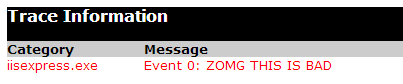
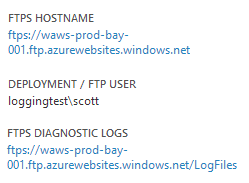
When my app is in Azure, I can get to the tracing info as well. From the management portal, I can see where the log files are, right?
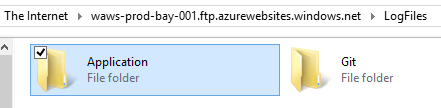
And I can FTP in and see them, as I always could. Notice I am using Explorer to FTP in. I can just copy paste the URL into Explorer itself, then enter my deployment credentials.
I can also do this with my favorite FTP app, or the browser. Inside the Application Folder is where the tracing files are.
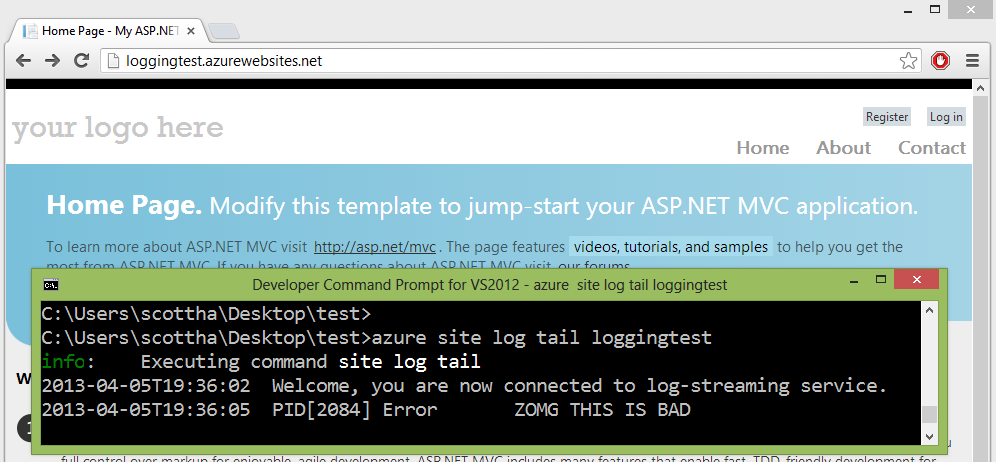
From the command line, I can do this, and the logs are streamed to me.
C:\>azure site log tail mysite
info:    Executing command site log tail
2013-04-05T19:45:10  Welcome, you are now connected to log-streaming service.
2013-04-05T19:45:13  PID[2084] Error       ZOMG THIS IS BAD
This works with both .NET apps and nodejs apps, by the way. All logs written to the LogFiles folder can be streamed in real time. The Application trace logs collected under the LogFiles/Application folder are streamed out by default. you can also get at IIS logs written to the LogFiles/Http folder. Any files created in a custom folder e.g. LogFiles/<Custom> will have their contents streamed as well.
I can also filter for specific characters with --filter, so:
C:\>azure site log tail loggingtest --filter ZOMG
info:    Executing command site log tail
2013-04-05T19:45:10  Welcome, you are now connected to log-streaming service.
2013-04-05T19:45:13  PID[2084] Error       ZOMG THIS IS BAD
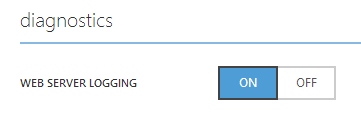
I can also turn on Web Server Logging:
If you are using node.js, you'll need to turn on logging in the iisnode.yml. Make sure logging is turned on in your iisnode.yml:
# For security reasons, logging, dev errors, and debugging
# should be disabled in production deployments:
loggingEnabled: false
debuggingEnabled: false
devErrorsEnabled: false
node_env: production
And stream the raw IIS logs as well!
C:\>azure site log tail loggingtest -p http
info:    Executing command site log tail
2013-04-05T20:03:59  Welcome, you are now connected to log-streaming service.
2013-04-05 20:04:15 LOGGINGTEST GET / X-ARR-LOG-ID=5a267b3f-6c0e-4a1d-9cb6-d872e
31a2f2e 80 - 166.147.88.43 Mozilla/5.0+(Windows+NT+6.2;+WOW64)+AppleWebKit/537.3
1+(KHTML,+like+Gecko)+Chrome/26.0.1410.43+Safari/537.31 ARRAffinity=edd1561bc28b
b0ea9133780b878994b30ed4697656295364ebc8aadc14f54d2;+WAWebSiteSID=57051e6cd07a4
I can also just download the logs directly to disk from the command line.
C:\>azure site log download loggingtest
info:    Executing command site log download
+ Downloading diagnostic log
info:    Writing to diagnostics.zip
info:    site log download command OK
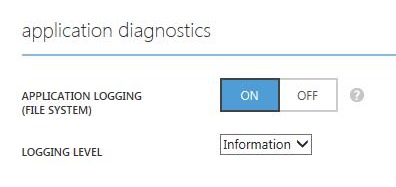
This feature is in Azure today, and in a few days the UI will appear in the management portal as well. It will look like this. The best part of this UI is that it will allow you to turn it on and off plus change the logging level without recycling the app domain.
Changing the web.config causes an app restart. Since you often want to change your log levels without a restart, these Azure-specific trace settings are stored in /site/diagnostics/settings.json within your instance. You can FTP in and see if you like.
Azure will use your existing trace settings from web.config unless these overriding settings exist.
Remember, you can view these streamed logs on the client using Windows Azure PowerShell (Windows) or Windows Azure Cross Platform Command Line Interface (Windows, Mac and Linux).
Things to be aware of
Turning logging on will turn it on only for 12 hours. You don't usually want logs on forever. Conveniently, if you connect a streaming client, then logging gets auto enabled.
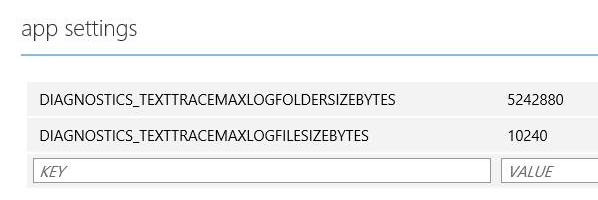
The defaults are to split log files at 128k and keep your app logs under 1MB and the whole logs folder under 30MB. If you need more, you can override some advanced settings directly in the portal.
Here I'm setting the log file splits to 10k and the max Application log to 5MB.
Here's some advanced settings you can override:
DIAGNOSTICS_LASTRESORTFILE - "logging-errors.txt"
The name (or relative path to the LogDirectory) of the file where internal errors are logged, for troubleshooting the listener.
In the future, I expect we'll see easy ways to put logs in Azure table storage as well as command line querying by time, pid, etc. It would also be nice to be able to get to these logs from inside of Visual Studio.
Routing More Data to Tracing with Glimpse
If you haven't used Glimpse, you're in for a treat. I'll post again about Glimpse next week. Glimpse is a client side debugging framework for your web app.
I used NuGet to bring in "Glimpse.Mvc4" (Be sure to get the right one for you, like Glimpse.Mvc3, or Glimpse.EF5, etc. Check out http://getglimpse.com for more details).
Glimpse doesn't do anything until you turn it on. Locally I hit http://localhost:xxxx/Glimpse.axd and turn it on. Now, I visit the Trace tab and the Trace from earlier is there.
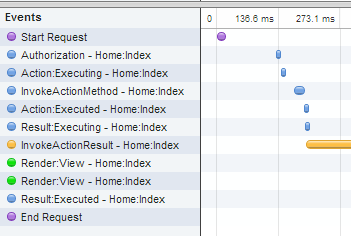
But if I go to the Timeline Tab, I get way more information, including all the ASP.NET events that are interesting to me. These "bracketing" events about befores and afters could be super useful if they were routed to System.Diagnostics.Trace.
How do I get this timeline view information routed to Tracing? Easy. I'll watch the Glimpse Timeline and route!
using Glimpse.Core.Extensibility; using Glimpse.Core.Message;
public class TimelineTracer : IInspector { public void Setup(IInspectorContext context) { context.MessageBroker.Subscribe<ITimelineMessage>(TraceMessage); }
private void TraceMessage(ITimelineMessage message) { var output = string.Format( "{0} - {1} ms from beginning of request. Took {2} ms to execute.", message.EventName, message.Offset.Milliseconds, message.Duration.Milliseconds);
Now I get lots of great Glimpse-supplied timing info in my Trace log as well that I can stream from the command line.
C:\>azure site log tail loggingtest
info:    Executing command site log tail
2013-04-05T20:22:51  Welcome, you are now connected to log-streaming service.
2013-04-05T20:23:32  PID[1992] Information Start Request - 0 ms from beginning of request. Took 0 ms to execute.
2013-04-05T20:23:32  PID[1992] Information Authorization - Home:Index - 224 ms from beginning of request. Took 0 ms to execute.
2013-04-05T20:23:32  PID[1992] Information Action:Executing - Home:Index - 239 ms from beginning of request. Took 0 ms to execute.
2013-04-05T20:23:32  PID[1992] Error       ZOMG THIS IS BAD
2013-04-05T20:23:32  PID[1992] Information InvokeActionMethod - Home:Index - 289 ms from beginning of request. Took 29 ms to execute.
2013-04-05T20:23:32  PID[1992] Information Action:Executed - Home:Index - 320 ms from beginning of request. Took 0 ms to execute.
I'm pretty stoked that it's was so easy to get subsystems like ASP.NET, Glimpse and now Web Sites on Azure to work together and share information.
I'm not sure which way I'll finally end up using them, but I'm definitely planning on instrumenting my code and calling System.Diagnostics.Trace more often since I can so easily route the results.
Finally, it's worth mentioning in case you didn't know, that all the Azure SDK is open source and is calling web services on the backend that you can call yourself. If you dig this log streaming feature, did you know you could have watched it get checked in from a Pull Request 3 months ago? Madness. It's a kinder, gentler Death Star over here at Microsoft.
About Scott
Scott Hanselman is a former professor, former Chief Architect in finance, now speaker, consultant, father, diabetic, and Microsoft employee. He is a failed stand-up comic, a cornrower, and a book author.
P.P.S. You know you can forward this to your friends, right?
About Scott
Scott Hanselman is a former professor, former Chief Architect in finance, now speaker, consultant, father, diabetic, and Microsoft employee. He is a failed stand-up comic, a cornrower, and a book author.



_3.png "His speed is 2.49 GHz")