Allow ability to choose subset of local monitors for RDP session (full screen)
Allow ability to select a subset of current monitors with full screen. Currently can choose all or 1 but cannot choose for instance 2 of 3 (full screen).
That seems useful, I wish it did that. I know about this checkbox that says "Use all my monitors" but I can't say just use 1 and 2 but not 3, right?
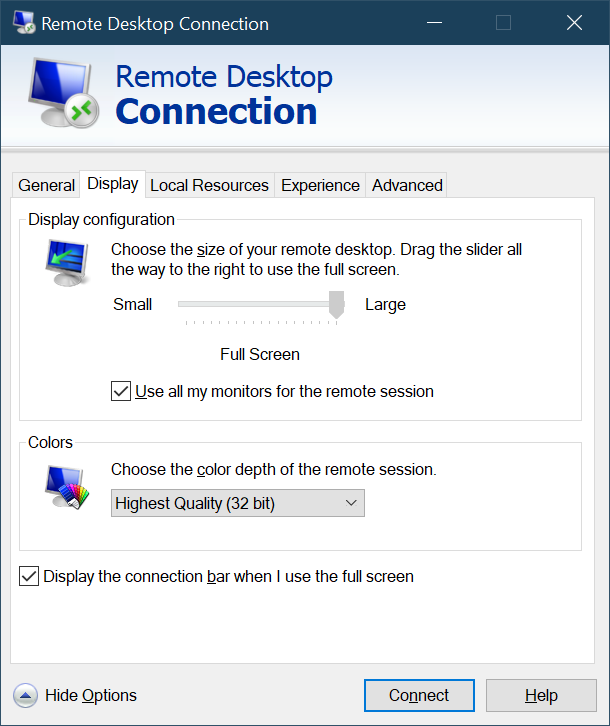
Turns out that you CAN span n monitors but it's just buried/internal and has no UI.
Save your RDP file, and open it in Notepad. Everyone's RDP file is different but yours may look like this:
full address:s:x.x.x.x:3389
prompt for credentials:i:1
administrative session:i:1
screen mode id:i:2
span monitors:i:1
use multimon:i:1
selectedmonitors:s:0,1
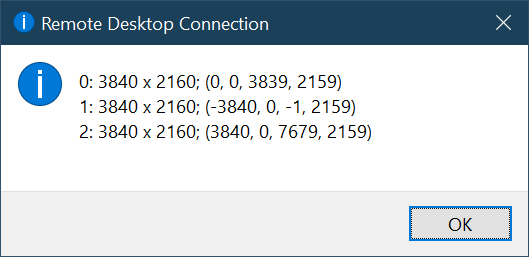
I can put on selectedmonitors:s:x,y and then use the zero-based numbers to indicate my monitors. To get a list of monitors, I can run mstsc /l to LIST out all my monitors on my machine. I can also use mstsc /multimon as a command line to use multiple monitors.
So I set my selectedmonitors:s:0,1 to use my left and middle monitor and skip my right one.
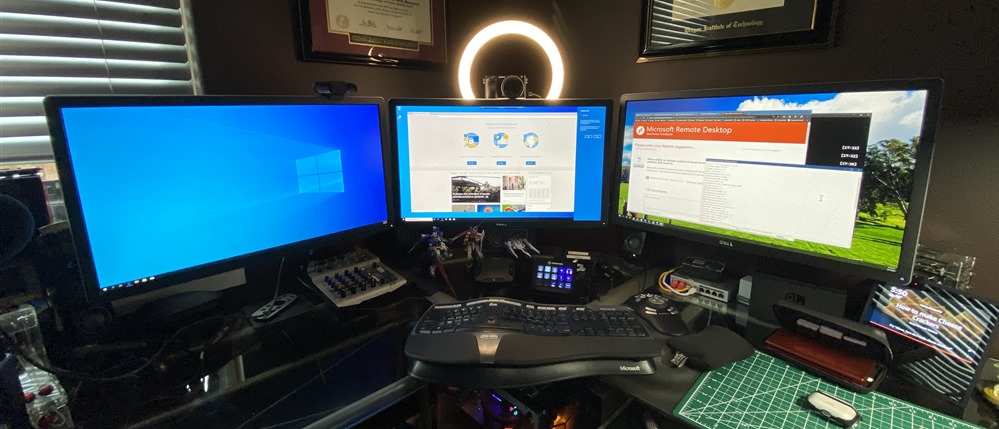
In this picture, I'm RDP'ed into a remote Windows 10 machine in Azure on Monitors 1 and 2 while Monitor 3 is my local one.
Sweet.
Sponsor: Protect your apps from reverse engineering and tampering with PreEmptive, makers of Dotfuscator. Dotfuscator has been in-the-box with Microsoft Visual Studio since 2003. Mention HANSELMAN for savings on a professional license!
About Scott
Scott Hanselman is a former professor, former Chief Architect in finance, now speaker, consultant, father, diabetic, and Microsoft employee. He is a failed stand-up comic, a cornrower, and a book author.
But, if I'm NOT using IIS - meaning I'm running my ASP.NET app in a container or on Linux - this will be ignored. Since I recently moved to Linux, I assumed (my bad for no tests here) that it would just work.
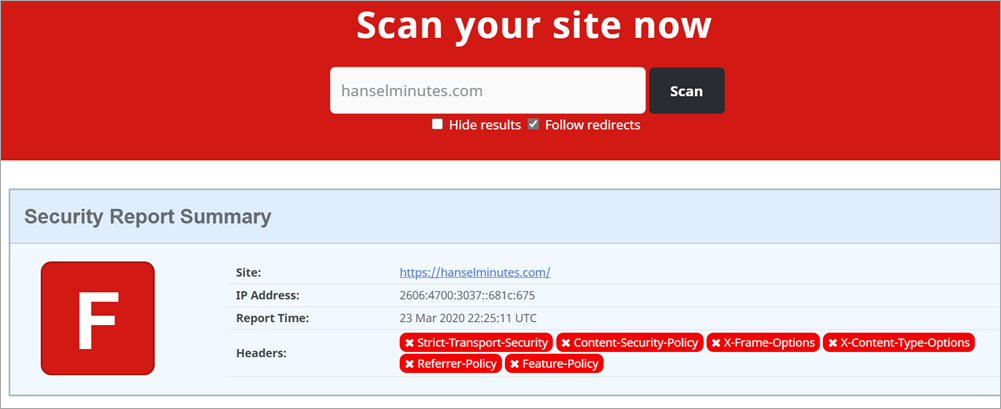
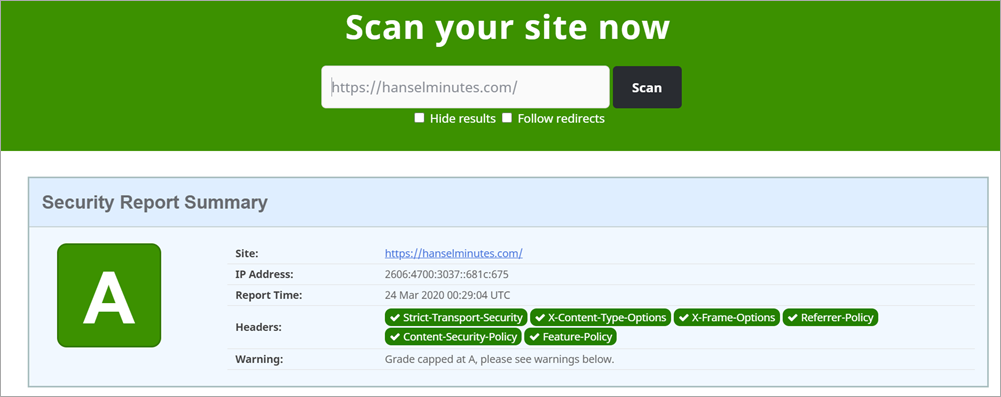
My site is hosted on Azure App Service for Linux, so I want these headers to be output the same way. There are several great choices in the form of Open Source NuGet libraries to help. If I use the ASP.NET Core middleware pipeline then these headers will be output and work the SAME on both Windows AND Linux.
TO BE CLEAR: Yes I, or you, can add these headers manually with AddHeader but these simple libraries ensure that our commas and semicolons are correct. They also offer a strongly typed middleware that is fast and easy to use.
Taking the same web.config above and translating it to Startup.cs's Configure Pipeline with NWebSec looks like this:
There is one experimental HTTP header that NWebSec doesn't support (yet) called Feature-Policy. It's a way that your website can declare at the server-side "my site doesn't allow use of the webcam." That would prevent a bad guy from injecting local script that uses the webcam, or some other client-side feature.
I'll do it manually both to make the point that I can, but also that you aren't limited by your security library of choice.
That was pretty straightforward and took less than an hour. Your mileage may vary but that's the general idea!
Sponsor: Protect your apps from reverse engineering and tampering with PreEmptive, makers of Dotfuscator. Dotfuscator has been in-the-box with Microsoft Visual Studio since 2003. Mention HANSELMAN for savings on a professional license!
About Scott
Scott Hanselman is a former professor, former Chief Architect in finance, now speaker, consultant, father, diabetic, and Microsoft employee. He is a failed stand-up comic, a cornrower, and a book author.
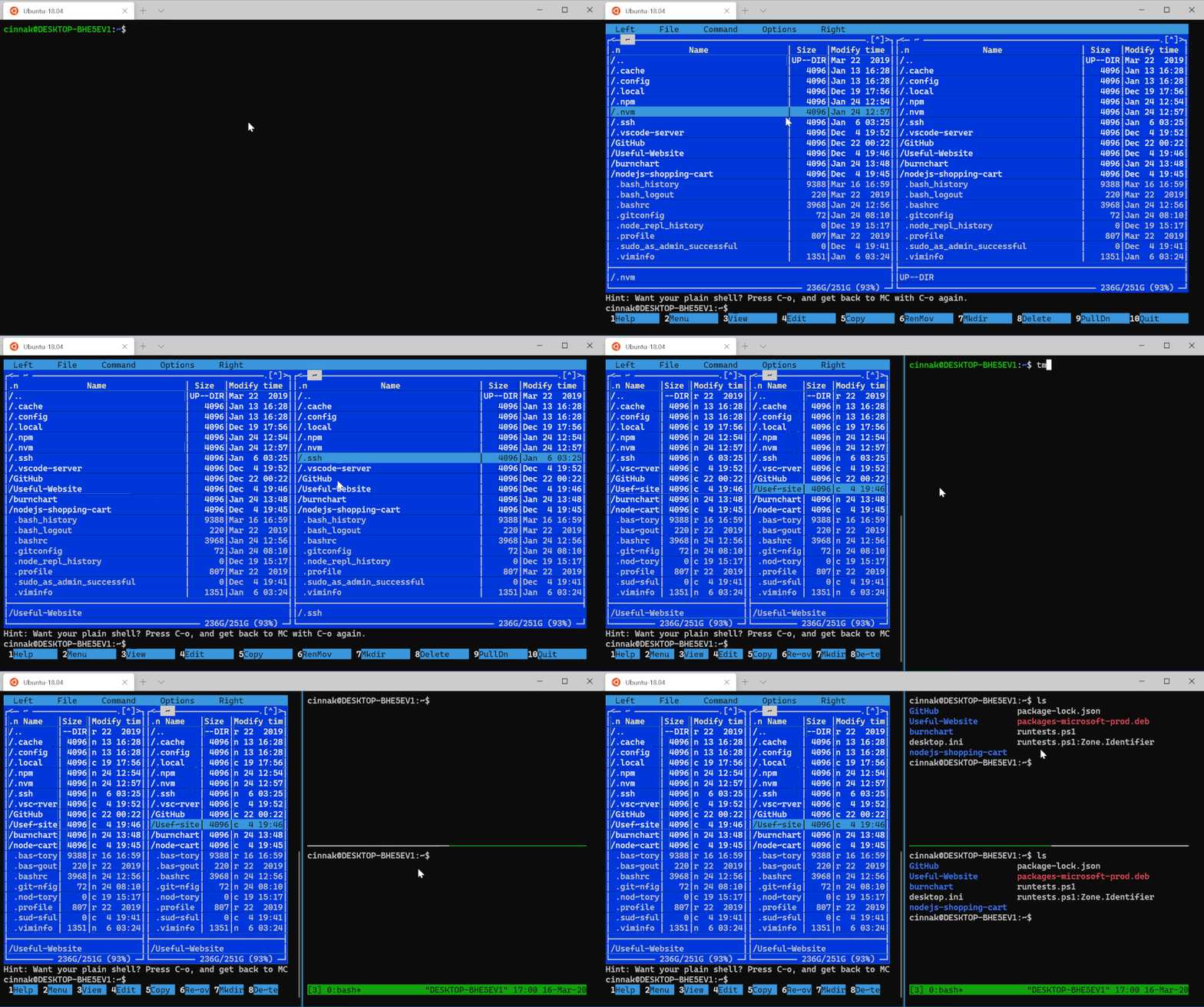
What's that mean, doesn't it already support mice? This means Text-Mode mouse support. So your apps like tmux and Midnight Commander can receive and react to mouse events, event when you're ssh'ed in remotely! That's because it's using VT (virtual terminal) textual commands under the covers.
Mouse Support for text mode is super useful if you use apps like Midnight Commander under Linux, or if you split plans with tmux.
Split Pane
You can change Windows Terminal in any way with themes, colors, gifs, key bindings and more. Many of you use screen or tmux under Linux and you can and should do that.
Terminal also supports splitting natively and for any shell (remember terminal != console != shell) and they just added a lovely splitMode=duplicate that makes a copy of the shell/profile in focus.
So I can split with ctrl+shift+d and get a copy of whatever is in front. I can use ctrl+| to get my default terminal, and I can use ctrl+shift+w to close the pane in focus, while ctrl+w close the current tab. Yummy.
Currently, the Terminal teams says they are fixing bugs to prepare for the release of v1. Windows Terminal v1 will be released in May!
Sponsor: Couchbase gives developers the power of SQL with the flexibility of JSON. Start using it today for free with technologies including Kubernetes, Java, .NET, JavaScript, Go, and Python.
About Scott
Scott Hanselman is a former professor, former Chief Architect in finance, now speaker, consultant, father, diabetic, and Microsoft employee. He is a failed stand-up comic, a cornrower, and a book author.
However, now that we are a remote workers - my entire company has everyone working remotely until further notice - I've found that an extra webcam or two can really be helpful if I want to point a camera at something on my desk, or get a wider view, look at a whiteboard, etc.
Of course, you can always change video inputs in any application but there's that...pause...that...hang...that moment. You have to switch into your apps Device Settings, do the dropdown, switch, wait, and then you've changed the camera.
What if you could change cameras - scenes - like you were a movie director. But, you have minimal budget. What can you do for nothing or next to nothing? A lot.
What's the goal?
With minimal setup, you can feed all your webcams, your desktop itself, and really anything you can express as a 'scene' into a software video compositor and then output them as a virtual webcam.
Then you select and use that Virtual Webcam in your remote video conferencing tool of choice! The results are amazing.
Setup
First, get OBS and NDI Tools, specifically NDI Virtual Input.
This is a software package that creates a virtual camera input.
NDI Plug for OBS : obs-ndi - This allows the OBS software to send its output to NDI, the virtual camera.
ALTERNATE:
You can avoid using NDI Tools (which is an extra hop) and use OBS-VirtualCam as plugin instead. It will create a Virtual Camera locally and directly send 1080p video to a Virtual Cam called OBS-VirtualCam.
They've got 6- and 15-key decks. The have full color LCD keys and you can make the icons look however you want. Ya, it's a portable hotkey button machine, but it's amazing. Note in the upper right corner of my Stream Deck I have three OBS buttons, one for each scene and the active one lights up. I've also made buttons to change my primary monitor's resolution. More on that in a future blog post. I've also got Elgato Stream Deck buttons to change my audio inputs an outputs as well, with a how-to.
You could also buy Touch Portal for about $12 and use any old Android phone you have laying around as a remote control for this purpose!
Install these three things and run OBS. When you run OBS after installing the NDI plugin, you'll need to go to Tools, NDI Output Settings and select Main Output. Leave OBS running.
Then run Virtual Input and right click on it in your tray (near the clock) and set it's output to your computer name | OBS. Mine is IRONHEART in the picture below. If you see None, you likely don't have OBS running.
Define your Scenes. Scenes are a collection of sources.
Add and name a scene, then add a Video Capture Device for your camera. I also like to set the Resolution manually.
I made one Fullscreen Scene per webcam, and one for my desktop that also includes my camera in PIP in the corner.
NOTE: If you're a teacher, perhaps you share just your lesson plans or browser window and yourself in video another way. You can be split screen, pip, or whatever makes you happy! Your scenes can be as complex as you'd like and include lesson plans, links, resources, and more!
To review:
OBS is a compositor that feeds into
NDI Virtual Input
And Scenes can be changed dynamically (see animation at top of this post) by a Stream Deck, hotkey, or Stream Deck Mobile
Select "NewTek NDI Video" as your webcam in Teams or Skype or Zoom!
At this point you can change camera angles and select scenes when you're on a call! The transitions will be be instant and smooth for your viewers. This also works great for workshops and teachers teaching classes!
Thanks Jeff Fritz for your help with this! Do you have any OBS teams, dear reader?
Sponsor: Couchbase gives developers the power of SQL with the flexibility of JSON. Start using it today for free with technologies including Kubernetes, Java, .NET, JavaScript, Go, and Python.
About Scott
Scott Hanselman is a former professor, former Chief Architect in finance, now speaker, consultant, father, diabetic, and Microsoft employee. He is a failed stand-up comic, a cornrower, and a book author.
Recently through an number of super cool random events I got the opportunity to interview actor Chris Conner who plays Poe on Altered Carbon. I'm a big fan of the show but especially Chris. You should watch the show because Poe is a joy and Chris owns every scene, and that's with a VERY strong cast.
I usually do my interviews remotely for the podcast but I wanted to meet Chris and hang out in person so I used my local podcasting rig which consists of a Zoom H6 recorder.
I have two Shure XLR mics, a Mic stand, and the Zoom. The Zoom H6 is a very well though of workhorse and I've used it many times before when recording shows. It's not rocket surgery but one should always test their things.
I didn't want to take any chances to I picked up a 5 pack of 32GIG high quality SD Cards. I put a new one in the Zoom, the Zoom immediately recognized the SD Card so I did a local recording right there and played it back. Sounds good. I played it back locally on the Zoom and I could hear the recording from the Zoom's local speaker. It's recording the file in stereo, one side for each mic. Remember this for later.
I went early to the meet and set up the whole recording setup. I hooked up a local monitor and tested again. Records and plays back locally. Cool. Chris shows up, we recorded a fantastic show, he's engaged and we're now besties and we go to Chipotle, talk shop, Sci-fi, acting, AIs, etc. Just a killer afternoon all around.
I head home and pull out the SD Card and put it into the PC and I see this. I almost vomit. I get lightheaded.
I've been recording the show for over 730 episodes over 14 years and I've never lost a show. I do my homework - as should you. I'm reeling. Ok, breathe. Let's work the problem.
Right click the drive, check properties. Breathe. This is a 32 gig drive, but Windows sees that it's got 329 MB used. 300ish megs is the size of a 30 minute long two channel WAV file. I know this because I've looked at 300 meg files for the last several hundred shows. Just like you might know roughly the size of a JPEG your camera makes. It's a thing you know.
Command line time. List the root directory. Empty. Check it again but "show all files," weird, there's a Mac folder there but maybe the SD Card was preformatted on a Mac.
Interesting Plot Point - I didn't format the SD card. I use it as it came out of the packaging from Amazon. It came preformatted and I accepted it. I tested it and it worked but I didn't "install my own carpet." I moved in to the house as-is.
What about a little "show me all folders from here down" action? Same as I saw in Windows Explorer. The root folder has another subfolder which is itself. It's folder "Inception" with no Kick!
G:\>dir /a Volume in drive G has no label. Volume Serial Number is 0403-0201 Directory of G:\ 03/12/2020 12:29 PM <DIR> 03/13/2020 12:44 PM <DIR> System Volume Information 0 File(s) 0 bytes 2 Dir(s) 30,954,225,664 bytes free G:\>dir /s Volume in drive G has no label. Volume Serial Number is 0403-0201 Directory of G:\ 03/12/2020 12:29 PM <DIR> 0 File(s) 0 bytes Directory of G:\ 03/12/2020 12:29 PM <DIR> 0 File(s) 0 bytes IT GOES FOREVER
Ok, the drive thinks there's data but I can't see it. I put the SD card back in the Zoom and try to play it back.
The Zoom can see folders and files AND the interview itself. And the Zoom can play it back. The Zoom is an embedded device with an implementation of the FAT32 file system and it can read it, but Windows can't. Can Linux? Can a Mac?
Short answer. No.
Hacky Note: Since the Zoom can see and play the file and it has a headphone/monitor jack, I could always plug in an analog 1/8" headphone cable to a 1/4" input on my Peavy PV6 Mixer and rescue the audio with some analog quality loss. Why don't I use the USB Audio out feature of the Zoom H6 and play the file back over a digital cable, you ask? Because the Zoom audio player doesn't support that. It supports three modes - SD Card Reader (which is a pass through to Windows and shows me the recursive directories and no files), an Audio pass-through which lets the Zoom look like an audio device to Windows but doesn't show the SD card as a drive or allow the SD Card to be played back over the digital interface, or its main mode where it's recording locally.
It's Forensics Time, Kids.
We have an 32 SD Card - a disk drive as it were - that is standard FAT32 formatted, that has 300-400 megs of a two-channel (Chris and I had two mics) WAV file that was recorded locally by the Zoom H6 audio reorder and I don't want too lose it or mess it up.
I need to take a byte for byte image of what's on the SD Card so I can poke and it and "virtually" mess with with it, change it, fix it, try again, without changing the physical.
"dd" is a command-line utility with a rich and storied history going back 45 years. Even though it means "Data Definition" it'll always be "disk drive" I my head.
How to clone a USB Drive or SD Card to an IMG file on Windows
I have a copy of dd for Windows which lets me get a byte for byte stream/file that represents this SD Card. For example I could get an entire USD device:
I need to know the Harddisk number and Partition number as you can see above. I usually use diskpart for this.
>diskpart
Microsoft DiskPart version 10.0.19041.1
Copyright (C) Microsoft Corporation. On computer: IRONHEART
DISKPART> list disk
Disk ### Status Size Free Dyn Gpt -------- ------------- ------- ------- --- --- Disk 0 Online 476 GB 0 B * Disk 1 Online 1863 GB 0 B * Disk 2 Online 3725 GB 0 B Disk 3 Online 2794 GB 0 B * Disk 8 Online 29 GB 3072 KB
IF and OF are input file and output file, and I will do it for the whole size of the SD Card. It's likely overkill though as we'll see in a second.
This file ended up being totally massive and hard to work with. Remember I needed just the first 400ish megs? I'll chop of just that part.
dd if=ZOMG.img of=SmallerZOMG.img bs=1M count=400
What is this though? Remember it's an image of a File System. It just bytes in a file. It's not a WAV file or a THIS file or a THAT file. I mean, it is if we decide it is, but in fact, a way to think about it is that it's a mangled envelope that is dark when I peer inside it. We're gonna have to feel around and see if we can rebuild a sense of what the contents really are.
Importing Raw Bytes from an IMG into Audition or Audacity
Both Adobe Audition and Audacity are audio apps that have an "Import RAW Data" feature. However, I DO need to tell Audition how to interpret it. There's lots of WAV files out there. How many simples were there? 1 channel? 2 channel? 16 bit or 32 bit? Lots of questions.
Can I just import this 4 gig byte array of a file system and get something?
Looks like something. You can see that the first part there is likely the start of the partition table, file system headers, etc. before audio data shows up. Here's importing as 2 channel.
I can hear voices but they sound like chipmunks and aren't understandable. Something is "doubled." Sample rate? No, I double checked it.
Here's 1 channel raw data import even though I think it's two.
Now THIS is interesting. I can hear audio at normal speed of us talking (after the preamble) BUT it's only a syllable at a time, and then a quieter version of the same syllable repeats. I don't want to (read: can't really) reassemble a 30 min interview from syllables, right?
Remember when I said that the Zoom H6 records a two channel file with one channel per mic? Not really. It records ONE FILE PER CHANNEL. A whateverL.wav and a whateverR.wav. I totally forgot!
This "one channel" file above is actually the bytes as they were laid down on disk, right? It's actually two files written simultaneously, a few kilobytes at a time, L,R,L,R,L,R. And here I am telling my sound software to treat this "byte for byte file system dump" as one file. It's two that were made at the same time.
It's like the Brundlefly. How do I tease it apart? Well I can't treat the array as a raw file anymore, it's not. And I want (really don't have the energy yet) to write my own little app to effectively de-interlace this image. I also don't know if the segment size is perfectly reliable or if it varies as the Zoom recorded.
NOTE: Pete Brown has written about RIFF/WAV files from Sound Devices records having an incorrect FAT32 bit set. This isn't that, but it's in the same family and is worth noting if you ever have an issue with a Broadcast Wave File getting corrupted or looking encrypted.
Whole helping me work this issue, Pete Brown tweeted a hexdump of the Directory Table so you can see the Zoom0001, Zoom0002, etc directories there in the image.
Let me move into Ubuntu on my Windows machine running WSL. Here I can run fdisk and get some sense of what this Image of the bad SD Card is. Remember also that I hacked off the first 0-400 Megs but this IMG file thinks it's a 32gig drive, because it is. It's just that's been aggressively truncated.
Device Boot Start End Sectors Size Id Type SmallerZOMG.img1 8192 61157375 61149184 29.2G c W95 FAT32 (LBA)
Maybe I can "mount" this IMG? I make a folder on Ubuntu/WSL2 called ~/recovery. Yikes, ok there's nothing there. I can take the sector size 512 times the Start block of 8192 and use that as the offset.
sudo mount -o loop,offset=4194304 SmallerShit.img recover/ $ cd recover/ $ ll total 68 drwxr-xr-x 4 root root 32768 Dec 31 1969 ./
Ali Mosajjal thinks perhaps "they re-wrote the FAT32 structure definition and didn't use a standard library and made a mistake," and Leandro Pereria postulates "what could happen is that the LFN (long file name) checksum is invalid and they didn't bother filling in the 8.3 filename... so that complying implementations of VFAT tries to look at the fallback 8.3 name, it's all spaces and figures out "it's all padding, move along."
Ali suggested running dosfsck on the mounted image and you can see again that the files are there, but there's like 3 root entries? Note I've done a cat of /proc/mounts to see the loop that my img is mounted on so I can refer to it in the dosfsck command.
$ sudo dosfsck -w -r -l -a -v -t /dev/loop3 fsck.fat 4.1 (2017-01-24) Checking we can access the last sector of the filesystem Boot sector contents: System ID " " Media byte 0xf8 (hard disk) 512 bytes per logical sector 32768 bytes per cluster 1458 reserved sectors First FAT starts at byte 746496 (sector 1458) 2 FATs, 32 bit entries 3821056 bytes per FAT (= 7463 sectors) Root directory start at cluster 2 (arbitrary size) Data area starts at byte 8388608 (sector 16384) 955200 data clusters (31299993600 bytes) 63 sectors/track, 255 heads 8192 hidden sectors 61149184 sectors total Checking file / Checking file / Checking file / Checking file /System Volume Information (SYSTEM~1) Checking file /. Checking file /.. Checking file /ZOOM0001 Checking file /ZOOM0002 Checking file /ZOOM0003 Checking file /ZOOM0001/. Checking file /ZOOM0001/.. Checking file /ZOOM0001/ZOOM0001.hprj (ZOOM00~1.HPR) Checking file /ZOOM0001/ZOOM0001_LR.WAV (ZOOM00~1.WAV) Checking file /ZOOM0002/. Checking file /ZOOM0002/.. Checking file /ZOOM0002/ZOOM0002.hprj (ZOOM00~1.HPR) Checking file /ZOOM0002/ZOOM0002_Tr1.WAV (ZOOM00~1.WAV) Checking file /ZOOM0002/ZOOM0002_Tr2.WAV (ZOOM00~2.WAV) Checking file /ZOOM0003/. Checking file /ZOOM0003/.. Checking file /ZOOM0003/ZOOM0003.hprj (ZOOM00~1.HPR) Checking file /ZOOM0003/ZOOM0003_Tr1.WAV (ZOOM00~1.WAV) Checking file /ZOOM0003/ZOOM0003_Tr2.WAV (ZOOM00~2.WAV) Checking file /System Volume Information/. Checking file /System Volume Information/.. Checking file /System Volume Information/WPSettings.dat (WPSETT~1.DAT) Checking file /System Volume Information/ClientRecoveryPasswordRotation (CLIENT~1) Checking file /System Volume Information/IndexerVolumeGuid (INDEXE~1) Checking file /System Volume Information/AadRecoveryPasswordDelete (AADREC~1) Checking file /System Volume Information/ClientRecoveryPasswordRotation/. Checking file /System Volume Information/ClientRecoveryPasswordRotation/.. Checking file /System Volume Information/AadRecoveryPasswordDelete/. Checking file /System Volume Information/AadRecoveryPasswordDelete/.. Checking for bad clusters.
We can see them, but can't get at them with the vfat file system driver on Linux or with Windows.
The DUMP.exe util as part of mtools for Windows is amazing but I'm unable to figure out what is wrong in the FAT32 file table. I can run minfo on the Linux command land telling it to skip 8192 sectors in with the @@offset modifier:
bootsector information ====================== banner:" " sector size: 512 bytes cluster size: 64 sectors reserved (boot) sectors: 1458 fats: 2 max available root directory slots: 0 small size: 0 sectors media descriptor byte: 0xf8 sectors per fat: 0 sectors per track: 63 heads: 255 hidden sectors: 8192 big size: 61149184 sectors physical drive id: 0x80 reserved=0x0 dos4=0x29 serial number: 04030201 disk label=" " disk type="FAT32 " Big fatlen=7463 Extended flags=0x0000 FS version=0x0000 rootCluster=2 infoSector location=1 backup boot sector=6
Infosector: signature=0x41615252 free clusters=944648 last allocated cluster=10551
Ok, now we've found yet ANOTHER way to mount this corrupted file system. With mtools we'll use mdir to list the root directory. Note there is something wrong enough that I have to set mtools_skip_check=1 to ~/.mtoolsrc and continue.
$ mdir -i ZOMG.img@@8192S :: Total number of sectors (61149184) not a multiple of sectors per track (63)! Add mtools_skip_check=1 to your .mtoolsrc file to skip this test $ pico ~/.mtoolsrc $ mdir -i ZOMG.img@@8192S :: Volume in drive : is Volume Serial Number is 0403-0201 Directory for ::/
I can see I seek'ed to the right spot, as the string FAT32 is just hanging out. Maybe I can clip out this table and visualize it in a better graphical tool.
I could grab a reasonable (read: arbitrary) chunk from this offset and put it in a very small manageable file:
And then load it in dump.exe on Windows which is really a heck of a tool. It seems to be thinking thinking there's multiple FAT Root Entries (which might be why I'm seeing this weird ghost root). Note the "should be" parts as well.
The most confusing part is that the FAT32 signature - the magic number is always supposed to be 0x41615252. Google that. You'll see. It's a hardcoded signature but maybe I've got the wrong offset and at that point all bets are off.
So do I have that? I can search a binary file for Hex values with a combo of xxd and grep. Note the byte swap:
I'll update this part as I learn more. I'm exhausted. Someone will likely read this and be like "you dork, seek HERE" and there's the byte that's wrong in the file system. That LFN (long file name) has no short one, etc" and then I'll know.
UPDATE #2:
I skyped with Ali and we think we know what's up. He suggested I format the SD Card, record the same 3 shows (two test WAVs and one actual one) and then make an image of the GOOD disk to remove variables. Smart guy!
We then took the first 12 megs or so of the GOOD.img and the BAD.img and piped them through xxd into HEX, then used Visual Studio Code to diff them.
We can now visualize on the left what a good directory structure looks like and the right what a bad one looks like. Seems like I do have two recursive root directories with a space for the name.
Now if we wanted we could manually rewrite a complete new directory entry and assign our orphaned files to it.
That's what I would do if I was hired to recover data.
7zip all the things
Here's where it gets weird and it got so weird that both Pete Brown and I were like, WELL. THAT'S AMAZING.
On a whim I right-clicked the IMG file and opened it in 7zip and saw this.
See that directory there that's a nothing? A space? A something. It has no Short Name. It's an invalid entry but 7zip is cool with it. Let's go in. Watch the path and the \\. That's a path separator, nothing, and another path separator. That's not allowed or OK but again, 7zip is chill.
I dragged the files out and they're fine! The day is saved.
The moral? There are a few I can see.
Re-format the random SD cards you get from Amazon specifically on the device you're gonna use them.
FAT as a spec has a bunch of stuff that different "drivers" (Windows, VFAT, etc) may ignore or elide over or just not implement.
I've got 85% of the knowledge I need to spelunk something like this but that last 15% is a brick wall. I would need more patience and to read more about this.
Knowing how to do this is useful for any engineer. It's the equivalent of knowing how to drive a stick shift in an emergency even if you usually use Lyft.
I'm clearly not an expert but I do have a mental model that includes (but not limited to) bytes on the physical media, the file system itself, file tables, directory tables, partition tables, how they kinda work on Linux and Windows.
I clearly hit a wall as I know what I want to do but I'm not sure the next step.
There's a bad Directory Table Entry. I want to rename it and make sure it's complete and to spec.
7zip is amazing. Try it first for basically everything.
Ideally I'd be able to update this post with exactly what byte is wrong and how to fix it. Thanks to Ali, Pete, and Leandro for playing with me!
Your thoughts? (If you made it this far the truncated IMG of the 32 gig SD is here (500 megs) but you might have to pad it out with zeros to make some tools like it.
Sponsor: Have you tried developing in Rider yet? This fast and feature-rich cross-platform IDE improves your code for .NET, ASP.NET, .NET Core, Xamarin, and Unity applications on Windows, Mac, and Linux.
About Scott
Scott Hanselman is a former professor, former Chief Architect in finance, now speaker, consultant, father, diabetic, and Microsoft employee. He is a failed stand-up comic, a cornrower, and a book author.