Back to Basics: Using Fusion Log Viewer to Debug Obscure Loader Errors
UPDATE: There is a new modern open source alternative to Fusion Log Viewer called Fusion you should check out!
It's time to remind people about Fusion. Mostly because I don't see as many people using it as should. I mentioned it as long as six (!) years ago and it's still useful. I used it just this week with .NET 4.
Sometimes when an assembly doesn't load, there's still a sense/feeling that "something in the black box has broken." For some folks, the black box is larger and obscures more, than for others. My point is, if you know where to look, there is no box at all.
When it comes to assemblies there's three "times" to know about:
- Binding before it happens - What do you want?
- ILDASM or Reflector will tell you what your assembly wants (what it was compiled against)
- Binding as it happens - Where does it look?
- Fusion (the Assembly Binding Log Viewer) will show you all assembly binds if you set the HKLM\Software\Microsoft\Fusion\ForceLog registry value to 1
- Binding after it happens - What did you get?
- Process Explorer will tell you what DLL (assembly) is loaded in memory and from where it came.
Here's an example of how a tiny bit of digging saved me hours of confusion recently when I hit an unusual edge case. I was doing a build of sample that was showing C# interop-ing with IronPython, but I was using a daily build of .NET 4 and a random build of IronPython.
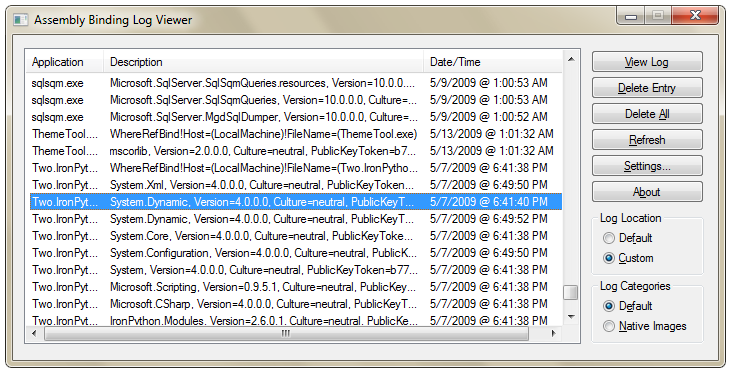 I made a mistake and had some really old DLLs floating around that I shouldn't have had. My symptom was a FileNotFoundException for the file "System.Dynamic.dll." I KNEW it was in the GAC (Global Assembly Cache) and I could SEE it as a reference DLL in my directory. Can't find the file? Dude, it's right there!
Turning on Fusion Logging
You probably have a tool to help on your development system already. Type "Fusion" in the Start Menu. The Assembly Binding Log Viewer, or "Fusion Log Viewer" will tell the CLR to load assembling binding/loading activities to a folder, then let you see them.
Be sure to run it as Administrator if you want to change the Settings, otherwise they'll be grayed out.
Alternatively, just set the Registry keys your self. (I just memorized them, as I set them all the time.) Set HKLM\Software\Microsoft\Fusion\ForceLog registry value to 1 and HKLM\Software\Microsoft\Fusion\LogPath registry value to C:\FusionLogs or some path that exists.
Personally, I leave this on all the time on my dev machines (there's a small speed hit) and just clean the folder out every once in a while.
Solving My Binding Problem
Once I turned on Fusion Logging I could immediately see a failure in my folder:
The operation failed.
Bind result: hr = 0x80070002. The system cannot find the file specified.

Assembly manager loaded from:  C:\Windows\Microsoft.NET\Framework\v4.0.xxxxx\clr.dll
Running under executable  C:\Users\Scott\Desktop\TechEd09\FX4\Demo 5 - DLR\Two.IronPythonInterop\bin\Debug\Two.IronPythonInterop.exe
--- A detailed error log follows.

=== Pre-bind state information ===
LOG: User = HANSELMAN-DEV10\Scott
LOG: DisplayName = System.Dynamic, Version=4.0.0.0, Culture=neutral, PublicKeyToken=b77a5c561934e089
LOG: Appbase = file:///C:/Users/Scott/Desktop/TechEd09/FX4/Demo 5 - DLR/Two.IronPythonInterop/bin/Debug/
LOG: Initial PrivatePath = NULL
LOG: Dynamic Base = NULL
LOG: Cache Base = NULL
LOG: AppName = Two.IronPythonInterop.exe
Calling assembly : IronPython, Version=2.6.0.1, Culture=neutral, PublicKeyToken=31bf3856ad364e35.
===
LOG: This bind starts in default load context.
LOG: No application configuration file found.
LOG: Using host configuration file:
LOG: Using machine configuration file from C:\Windows\Microsoft.NET\Framework\v4.0.xxxxx\config\machine.config.
LOG: Post-policy reference: System.Dynamic, Version=4.0.0.0, Culture=neutral, PublicKeyToken=b77a5c561934e089
LOG: GAC Lookup was unsuccessful.
LOG: Attempting download of new URL file:///C:/Users/Scott/Desktop/TechEd09/FX4/Demo 5 - DLR/Two.IronPythonInterop/bin/Debug/System.Dynamic.DLL.
LOG: Attempting download of new URL file:///C:/Users/Scott/Desktop/TechEd09/FX4/Demo 5 - DLR/Two.IronPythonInterop/bin/Debug/System.Dynamic/System.Dynamic.DLL.
LOG: Attempting download of new URL file:///C:/Users/Scott/Desktop/TechEd09/FX4/Demo 5 - DLR/Two.IronPythonInterop/bin/Debug/System.Dynamic.EXE.
LOG: Attempting download of new URL file:///C:/Users/Scott/Desktop/TechEd09/FX4/Demo 5 - DLR/Two.IronPythonInterop/bin/Debug/System.Dynamic/System.Dynamic.EXE.
LOG: All probing URLs attempted and failed.
You can see that it's looking all over for the file, first in the GAC< then all over the local folders before it gives up. Hm. Why isn't this working? I can see the file sitting right there.
Well, what's the public key token for this signed assembly? I can run "sn -T" on the file:
C:\Program Files (x86)\Reference Assemblies\Microsoft\Framework\.NETFramework\v4.0>
sn -T System.Dynamic.dll

Microsoft (R) .NET Framework Strong Name Utility  Version 4.0.xxxxx.1
Copyright (c) Microsoft Corporation.  All rights reserved.

Public key token is b03f5f7f11d50a3a
Wha? What's b03whatever? That's not b77whatever like the one my app is looking for! Looks like my sample app had reference not only an old version of System.Dynamic, but one with a completely different public key. That's what I get for not cleaning out my obj directories between daily builds.
This could have been just by setting the registry keys and watching the c:\fusionlogs folder, but the Fusion Log Viewer makes the process more user-friendly.
If you're debugging version number mismatches or strong-name mismatches, Fusion will ALWAYS tell you what's really going on. There is no Black Box.
Related Links
- Detailing Failed Assembly Loads with the Assembly Binding Log Viewer ("The Fusion Logger")
- More on Assembly Binding, Strong Naming, the GAC, Publisher Policy and Dynamically Loaded Assemblies
- Gotcha in .NET Framework handling of Versions and Publisher Policies
- Be aware of your DLLs and who's loading them - know about assembly binding redirects
- Richard Grimes' most excellent .NET Fusion Workshop
About Scott
Scott Hanselman is a former professor, former Chief Architect in finance, now speaker, consultant, father, diabetic, and Microsoft employee. He is a failed stand-up comic, a cornrower, and a book author.


About Newsletter

 I really advocate folks reading as much source as they can because you become a better writer by reading as much as writing. That's the whole point of the
 _2.png "Registry Editor (2)")