The Weekly Source Code 24 - Extensibility Edition - PlugIns, Providers, Attributes, AddIns and Modules in .NET
I've been getting more and more interested in how folks extend their applications using plugins and things. In my new ongoing quest to read source code to be a better developer, Dear Reader, I present to you twenty-fourth in a infinite number of posts of "The Weekly Source Code."
There's a lot of ways to "extend" an application or framework. Probably dozens of patterns. You can learn about the Gang of Four Patterns using C# over here.
I was looking and three chunks of code this week that extend things or are extensible. The first was xUnit.NET, the new Unit Testing Framework on the block (until I finally go File|New Project and bang out "HanselTest2000" ;) ) and the second was some source that Miguel Castro gave out at the March 2008 CINNUG meeting called Sexy Extensibility Patterns. Miguel has a Code Generation/Data Mapping tool called CodeBreeze that uses this patterns. It was on DNRTV a while back. The third was the plugin design of Windows Live Writer and the WLW SDK.
This post isn't trying to be an exhaustive list of anything, it's just some cool code that's got me thinking about interesting was to extend stuff. I like these three examples because each has more than one way to extend it.
Extending software means adding functionality that wasn't there to start with. There's MANY ways to do it though. For example, adding a script engine like VBA or PowerShell and hosting script would be one way. Making a public scripting-friendly API is a twist on that theme. Hosting AddIns or Plugins via deriving from base classes, implementing interfaces or sourcing events. using System.AddIn, is another. Using a Dependency Injection Container is a more advanced and powerful way to extend applications.
xUnit.NET
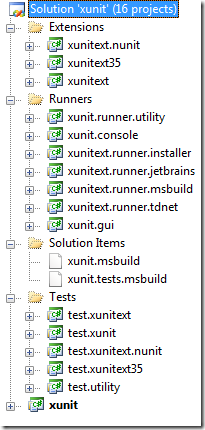 xUnit.NET is a .NET Unit Testing Framework from Brad Wilson and Jim Newkirk (formerly of NUnit fame). Initial reaction to their framework was a resounding "meh" as folks asked "seriously, do we NEED another Unit Testing Framework?" but they soldiered on, and just like the little Mock Framework that could, they're starting to get the respect they deserve. It's got an MSBuild task, Resharper and TestDriven.NET Test Runner support, and most importantly, the framework has some interesting extensibility points.
The xUnit.NET source code is exceedingly tidy. I mean that as a total complement, like when you visit someone's house and you find yourself asking "who is your decorator?" while simultaneously realizing that they are just THAT tidy and organized.
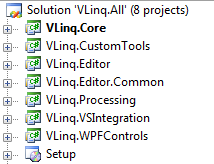
ASIDE: Not enough people use "Solution Folders" in Visual Studio. Seriously, folks, just right-click and "Add | New Solution Folder," start dragging things around and bask in the tidiness.
They've separately any controversial (my word) static extension methods into separate projects, xunitext and xunitext35 that includes .NET 3.5-specific features. So, certainly Extension Methods are a coarse extensibility point for developers "downstream" from your framework.
They use Attributes as MAJOR way to extend their framework. For example, say you want something to happen before and/or after a test.
namespace XunitExt
{
    [AttributeUsage(AttributeTargets.Method, AllowMultiple = false)]
    public class TraceAttribute : BeforeAfterTestAttribute
        public override void Before(MethodInfo methodUnderTest)
        {
            Trace.WriteLine(String.Format("Before : {0}.{1}", methodUnderTest.DeclaringType.FullName, methodUnderTest.Name));
        }

        public override void After(MethodInfo methodUnderTest)
        {
            Trace.WriteLine(String.Format("After : {0}.{1}", methodUnderTest.DeclaringType.FullName, methodUnderTest.Name));
        }
    }
}
You just derive a new attribute from BeforeAfterTestAttribute, and put it on a test. The [Fact] attribute is a standard one. They use it instead of [Test]:
[Fact]
[Trace]
public void CanSearchForSubstrings()
{
    Assert.Contains("wor", "Hello, world!");
}
Now, my code in Before() and After() above will execute for this test.
If you've got your own Test Framework but you want to move towards using xUnit.NET, they've got a [RunWith] attribute, where you can make your own Test Runner and say, for example, "run this test with nUnit." You can use it two ways, either as [RunWith(typeof(MyRunner)] or with a custom attribute like:
public class RunWithNUnitAttribute : RunWithAttribute
{
    public RunWithNUnitAttribute()
        : base(typeof(NUnitCommand)) {}
}
...where nUnitCommand implements a very clean interface called ITestCommand that "describes the ability to executes all the tests in a test class."
public interface ITestClassCommand
{
object ObjectUnderTest { get; }
ITypeInfo TypeUnderTest { get; set; }
int ChooseNextTest(ICollectiontestsLeftToRun);
Exception ClassFinish();
Exception ClassStart();
IEnumerableEnumerateTestCommands(IMethodInfo testMethod);
IEnumerableEnumerateTestMethods();
bool IsTestMethod(IMethodInfo testMethod);
}
I think this is a very elegant interface. The framework "eats its own dogfood" also, which means that the xUnit.NET guys have factored things appropriately (as they should have) such that they are using their own extensibility points. Using your own framework to build your stuff is the only way you'll know if you've got a great framework and it's the best way to find out what's NOT working.
The NUnitCommand implementation then uses the NUnit SDK/API to run test. This allows you to move over to xUnit.NET, if you like, from NUnit or another test framework a little at a time, while running all the tests under the same runner.
Another way to extend your code is through the use of existing well-known interfaces like IComparer<T>, for example. They're a test framework, so they're full of Asserts like Assert.Equal and Assert.Contains. The Assert.InRange has an overload, seen below, than can take an IComparer as an optional parameter.
public void InRange<T>(T actual,
T low,
T high)
{
Assert.InRange(actual, low, high);
}
public void InRange<T>(T actual,
T low,
T high,
IComparercomparer)
{
Assert.InRange(actual, low, high, comparer);
}
This might seem obvious to some, but it's thoughtfully obvious and a clean extensibility point. And thoughtfully obvious is easy to say and hard to do. I'm thinking that Moq and xUnit.NET just may be the new peas and carrots - they go together nicely and each have the similar goals.
Sexy Extensibility Patterns
You know someone likes their job and coding when they describe a pattern as "sexy" and not just "handsome" or "sassy." Miguel includes his slide deck and code in both C# and VB up on the CINNUG website.
Miguel calls out three main extensibility types that he uses (from his presentation):
- Providers - Allow abstraction for data and behavior
- Plugins- Adding new behavior
- Modules - Centralize plug-in functionality and enforce manageable standards
Providers are based on the Strategy Design Pattern and look like this. You'll see stuff like this all throughout ASP.NET 2.0. A controller or context class needs a way (hence "strategy" to do something). Classically an instance of a class that provides the needed strategy is passed in, but nowadays it could come from an IOC framework, or just a config file.
They're often very simple and they're easy to write. Make an interface that provides something, usually data:
namespace Core
{
    public interface IDataProvider
    {
        string GetSource();
        string GetData(string source);
        void LogData(string data);
    }
}
Then use it. This is a simple example, but usually this would be buried in a ProviderFactory that would hide the config and activation, and even hold the new instance:
public void ProcessData()
{
    string s_Provider =  ConfigurationManager.AppSettings["dataProvider"];

    Object o =  Activator.CreateInstance(Type.GetType(s_Provider));

    IDataProvider o_Provider = o as IDataProvider;
    string s_Source = o_Provider.GetSource();

    string s_Data = o_Provider.GetData(s_Source);

    if (s_Data != "")
    {
        o_Provider.LogData(s_Data);
    }
}
Aside: Personally I find the quasi-Hungarian naming in Miguel's source off-putting, but I know him well enough to say that. ;)
So, Providers provide stuff, and Plug-Ins add functionality, like:
public class ArchiveProcessing : IPostLogPlugin
{
    void IPostLogPlugin.PerformProcess(string data)
    {
        // take data and archive it
    }
}
public class ArchiveProcessing : IPostLogPlugin
{
    void IPostLogPlugin.PerformProcess(string data)
    {
        // take data and archive it
    }
}
You might have a bunch of plugins added to your config file and then call them synchronously, in this example, perhaps as a postProcessing step to a provider:
object section =  ConfigurationManager.GetSection("postProcessing");
List<plugininfo> o_Plugins = section as List;
foreach (PluginInfo o_PluginInfo in o_Plugins)
{
    object o = Activator.CreateInstance(Type.GetType(o_PluginInfo.PluginType));
    IPostLogPlugin o_Plugin = o as IPostLogPlugin;
    o_Plugin.PerformProcess(s_Data);
}
Modules, in Miguel's parlance, are like Filters that get involved in a process and various points (like HttpModules) and change functionality. First you define some events:
public delegate void AcmeModuleDelegate<t>(T e);
public class ModuleEvents
{
    public AcmeModuleDelegate<checkdatasourceeventargs> CheckDataSource { get; set; }
    public AcmeModuleDelegate<preprocessdataeventargs> PreProcessData { get; set; }
    public AcmeModuleDelegate<postprocessdataeventargs> PostProcessData { get; set; }
}
You might add a bunch of modules to your application and have them listen in at these three or more "events." Then you need to ask yourself, do these things fire in order and more importantly, can a module cancel the process? To make this happen, modules would have to each consciously respect the cancel boolean and that's not really enforceable.
A Module is passed a ModuleEvents in this example so they can hook up to the shared delegate. This is called a multi-cast delegate because if I call it, EVERYONE gets called:
public interface IAcmeModule
{
    void Initialize(ModuleEvents events);
}

public class ArchiveModule : IAcmeModule
{
    void IAcmeModule.Initialize(ModuleEvents events)
    {
        events.PostProcessData += events_PostProcessData;
    }

    void events_PostProcessData(PostProcessDataEventArgs e)
    {
        // perform archive functionality with processed data
    }
}
You'd call the multicast-delagate like this
CheckDataSourceEventArgs o_EventArgs =  new CheckDataSourceEventArgs(s_Source);
o_FilterEvents.CheckDataSource.Invoke(o_EventArgs);
Or, you could spin through the delegates and invoke them yourself, checking the cancel flag and stopping the whole thing yourself. Miguel's got a nice sample app and PPT with lots more code that illustrates this point well.
Then you can take all these concepts and put them together into a single extensible app with providers, plugins, modules that all work together. I like to keep all my Interfaces separated in another assembly and version them slowly, only when the contract changes.
Windows Live Writer
Windows Live Writer is what I use to post to my blog. I'm typing in it right now. If you're using an admin web page to post to your blog, stop. Go download it now, I'll wait here. Ok, it's got three kinds of extensibility (from MSDN):
- Application API, for launching Writer to create new posts or "Blog This" items for links, snippets, images, and feed items.
- Content Source Plugin API, for extending the capabilities of Writer to insert, edit, and publish new types of content.
- Provider Customization API, for customizing both the capabilities of Writer as well as adding new capabilities to the Writer user interface.
Let's handle the last bullet, first, the Provider Customization API. Extensibility can also mean extending an application without using code at all. Check out how to extend the Windows Live Writer UI using only an XML file for DasBlog. No code was required. Sometimes, just a thoughtful XML file provides the extensibility points you need.
The Content Source Plugin API is a slick thing, letting you add your own "Insert" commands directly to WLW. There's 85 plugins at the time of this writing in the gallery.
This time last year I took Travis's CueCat and make a CueCat Windows Live Writer plugin so I could more quickly post my Monthly Reading List (which tragically, ended up being yearly out of laziness. Note to self: Self, post a monthly reading list.)
Anyway, I wrote an article for Coding4Fun and blogged as well. The Plugin looked like this:
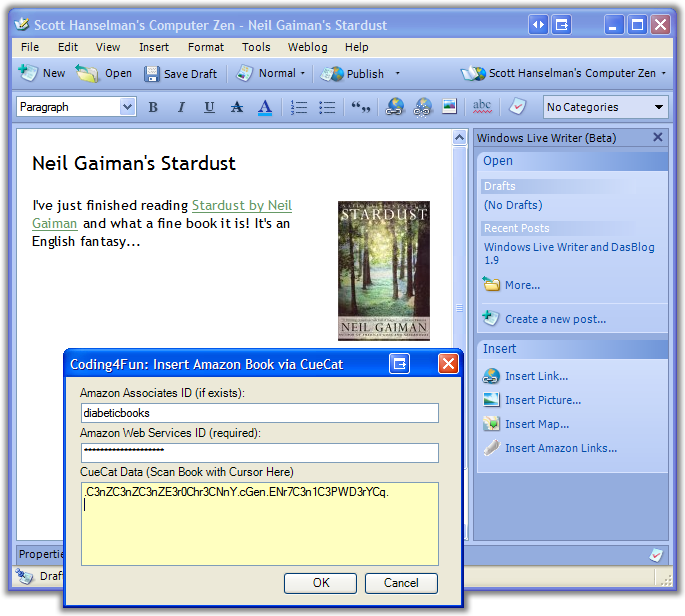
Windows Live Writer has a cool model for Plugins. There's the potential for adding lots of functionality. You're adding a link and picture to the main UI, an undefined number of forms, plus you'll need storage, and you'll want to insert HTML into the main Editor window. This could potentially be a complex plugin model, but Joe Cheng and the others on the team made it, IMHO, very easy.
How does the plugin model for WLW enable all this? The code for a plugin speaks volumes:
using System;
using System.Collections.Generic;
using System.Windows.Forms;
using WindowsLive.Writer.Api;

namespace AmazonLiveWriterPlugin
{
    [WriterPlugin("605EEA63-B74B-4e9d-A290-F5E9E8229FC1", "Amazon Links with CueCat",
        ImagePath = "Images.CueCat.png",
        PublisherUrl = "http://www.hanselman.com",
        Description = "Amazon Links with a CueCat.")]
    [InsertableContentSource("Amazon Links")]
    public class Plugin : ContentSource
    {
        public override System.Windows.Forms.DialogResult CreateContent(System.Windows.Forms.IWin32Window dialogOwner, ref string newContent)
        {
            using(InsertForm form = new InsertForm())
            {
                form.AmazonAssociatesID = this.Options[AMAZONASSOCIATESID];
                form.AmazonWebServicesID = this.Options[AMAZONWEBSERVICESID];
                DialogResult result = form.ShowDialog();
                if (result == DialogResult.OK)
                {
                    this.Options[AMAZONASSOCIATESID] = form.AmazonAssociatesID;
                    this.Options[AMAZONWEBSERVICESID] = form.AmazonWebServicesID;
                    Product p = Decoder.Decode(form.CueCatData);
                    AmazonBook book = AmazonBookPopulator.CreateAmazonProduct(p, form.AmazonWebServicesID);
                    string associatesId = form.AmazonAssociatesID.Trim();
                    string builtAmazonUrl = removed for cleanliness";
                    newContent = string.Format(builtAmazonUrl, book.ID, associatesId, book.Title, book.Author);
                }
                return result;
            }
        }
    }
}
Their plugin model uses a combination of things. There's attributes on the class that give details on where images are (embedded as resources), text, URLs and a GUID for uniqueness. There's a base class that makes a "Hello World" plugin a one-line affair. And there's a clean way to show any WinForm, show it and tell WLW what the result was. The HTML is returned by reference in newContent while the return value was a standard DialogResult. If you need storage for state, they pass in a simple dictionary-like Interface to your plugin when you're initialized. As a plugin, you don't need to sweat storage, or how you appear in the list of plugins, you just focus on your main dialog.
Do you have any cool examples of elegant, cool, convenient, clever extensibility mechanisms?
About Scott
Scott Hanselman is a former professor, former Chief Architect in finance, now speaker, consultant, father, diabetic, and Microsoft employee. He is a failed stand-up comic, a cornrower, and a book author.


About Newsletter





 Monster 4 Outlet Mini Power Strip