Scott Hanselman

Announcing .NET Jupyter Notebooks

November 05, 2019 Comment on this post [14] Posted in DotNetCore | Open Source
Sponsored By

Graphs in Jupyter NotebooksJupyter Notebooks has been the significant player in the interactive development space for many years, and Notebooks have played a vital role in the continued popularity of languages like Python, R, Julia, and Scala. Interactive experiences like this give users with a lightweight tool (I like to say "interactive paper") for learning, iterative development, and data science and data manipulation.

The F# community has enjoyed F# in Juypter Notebooks from years with the pioneering functional work of Rick Minerich, Colin Gravill and many other contributors!

As Try .NET has grown to support more interactive C# and F# experiences across the web with runnable code snippets, and an interactive documentation generator for .NET Core with the dotnet try global tool, we're happy to take that same codebase to the next level, by announcing C# and F# in Jupyter notebooks.

.NET in Jupyter Notebooks

Even better you can start playing with it today, locally or in the cloud!

.NET in Anaconda locally

Install the .NET Kernel

Please note: If you have the dotnet try global tool already installed, you will need to uninstall the older version and get the latest before grabbing the Jupyter kernel-enabled version of the dotnet try global tool.

  • Check to see if Jupyter is installed

    jupyter kernelspec list

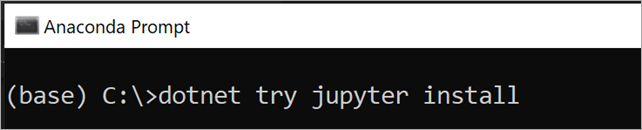
  • Install the .NET kernel!

    dotnet try jupyter install

    dotnet try jupyter install

  • Test installation

    jupyter kernelspec list

    You should see the .net-csharp and .net-fsharp listed.

jupyter kernelspec list
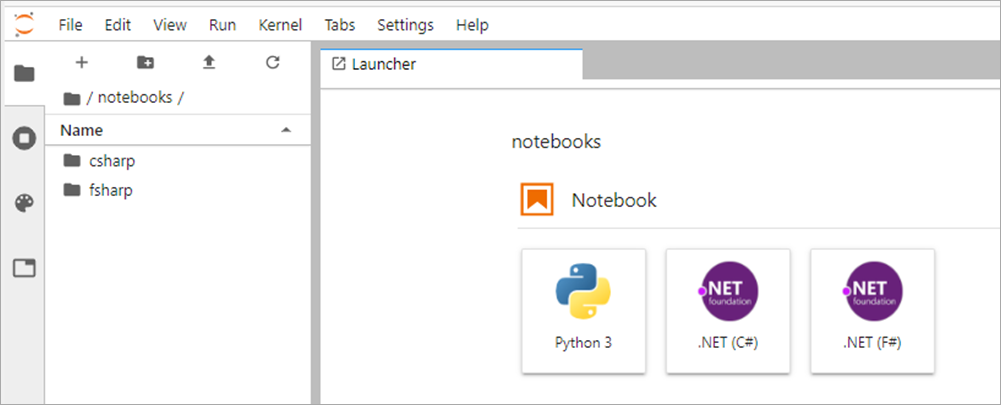
  • To start a new notebook, you can either type jupyter lab Anaconda prompt or launch a notebook using the Anaconda Navigator.

  • Once Jupyter Lab has launched in your preferred browser, you have the option to create a C# or a F# notebook

.NET C# and F# in Jupyter Notebooks
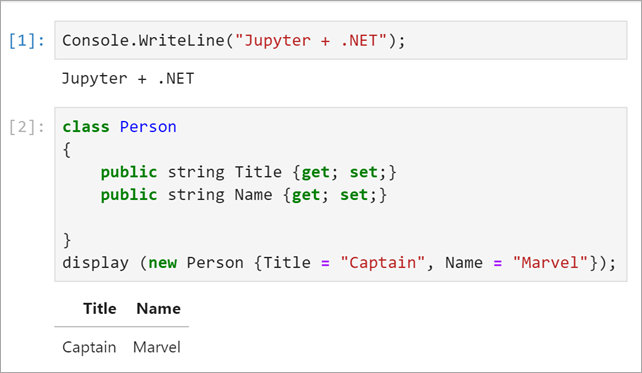
  • Now you can write .NET and and prose side by side, and just hit Shift-Enter to run each cell.

    Example C# code in Jupyter Notebooks

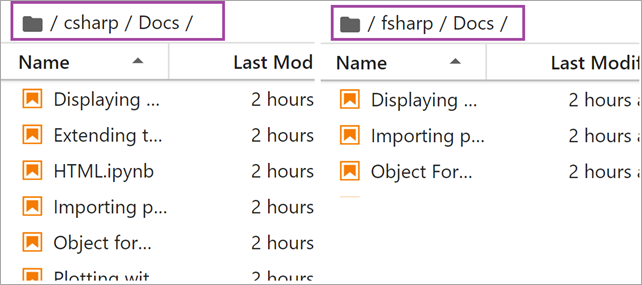
For more information on our APIs via C# and F#, please check out our documentation on the binder side or in the dotnet/try repo in the NotebookExamples folder.

C# and F# samples and docs

Features

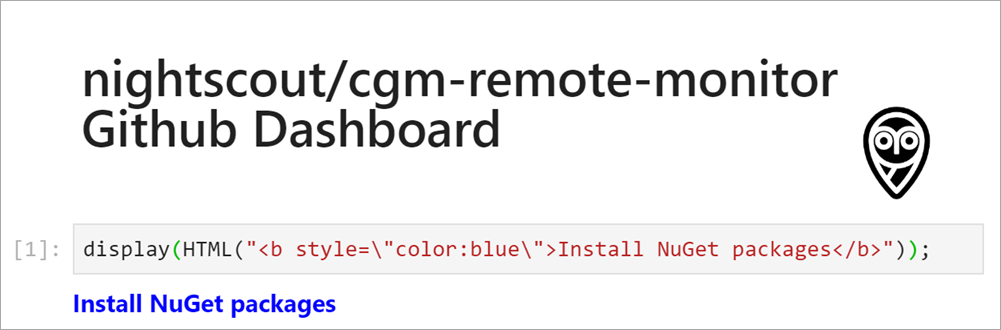
To explore some of the features that .NET notebooks ships with, I put together dashboard for the Nightscout GitHub repo.

HTML output : By default .NET notebooks ship with several helper methods for writing HTML. From basic helpers that enable users to write out a string as HTML or output Javascript to more complex HTML with PocketView. Below I'm using the display() helper method.

Nightscout

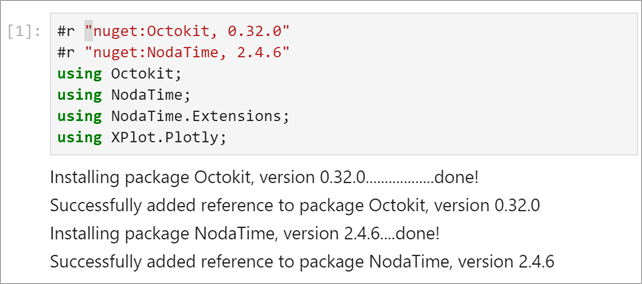
Importing packages : You can load NuGet packages using the following syntax. If you've used Rosyln-powered scripting this #r for a reference syntax will be familiar.

#r "nuget:<package name>,<package version>"

For Example

#r "nuget:Octokit, 0.32.0"
#r "nuget:NodaTime, 2.4.6"
using Octokit;
using NodaTime;
using NodaTime.Extensions;
using XPlot.Plotly;

Do note that when you run a cell like this with a #r reference that you'll want to wait as that NuGet package is installed, as seen below with the ... detailed output.

installing nuget packages in Jupyter Notebooks

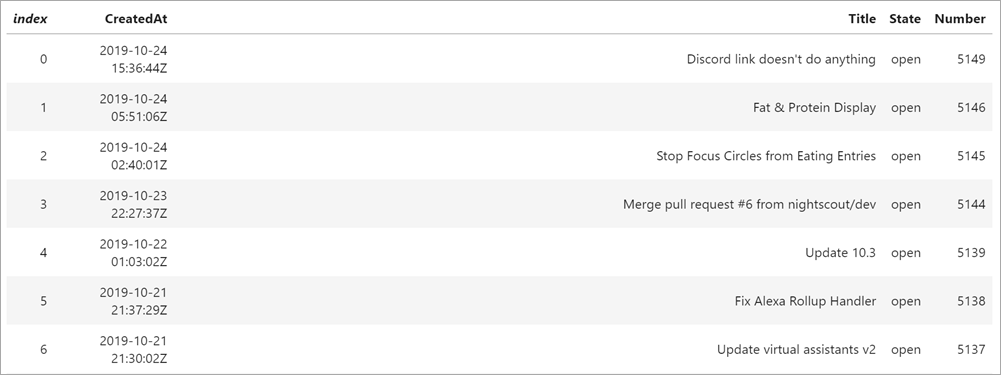
Object formatters : By default, the .NET notebook experience enables users to display useful information about an object in table format.

The code snippet below will display all opened issues in the nightscout/cgm-remote-monitor repo.

display(openSoFar.Select(i => new {i.CreatedAt, i.Title, State = i.State.StringValue,  i.Number}).OrderByDescending(d => d.CreatedAt));

With the object formatter feature, the information will be displayed in a easy to read table format.

Querying the Nightscout repository

Plotting

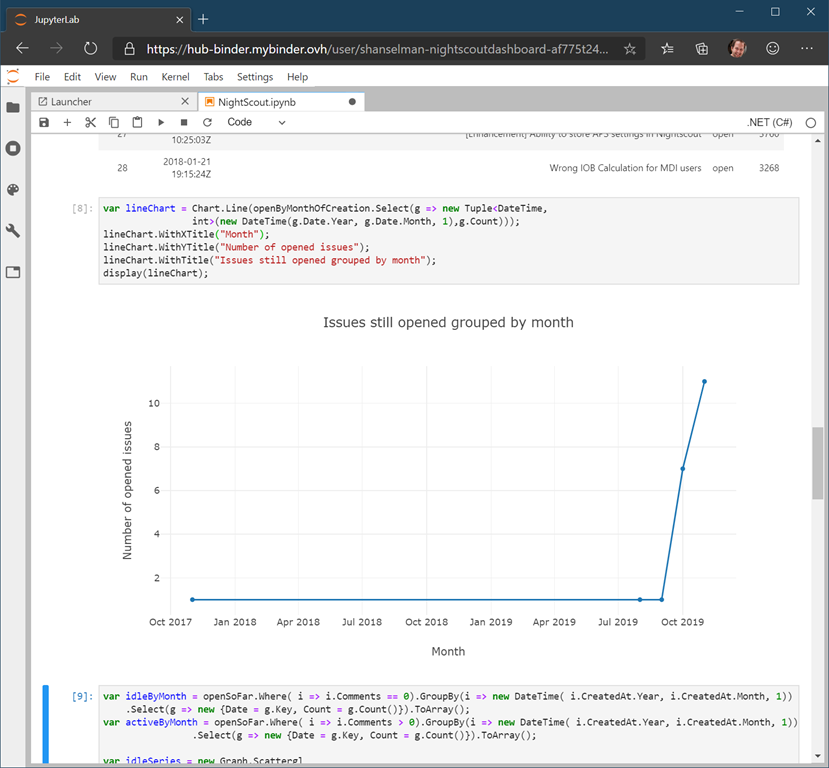
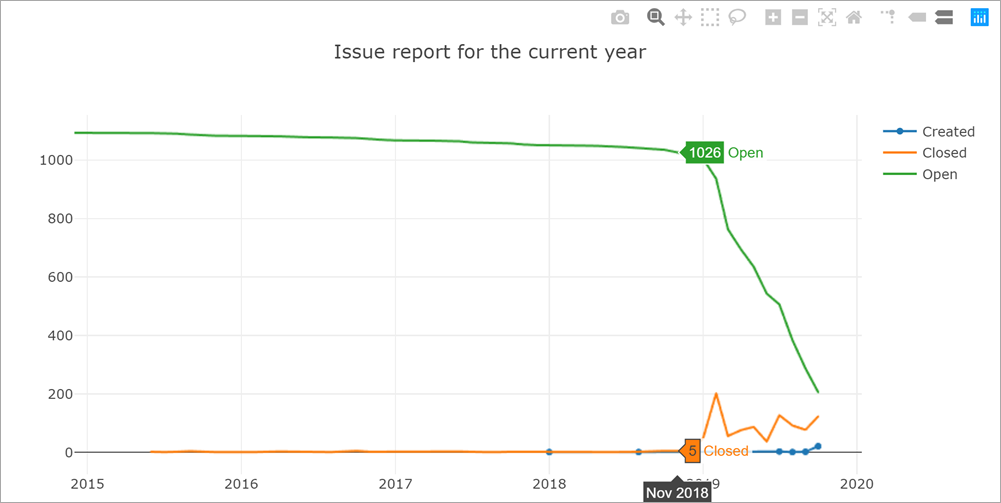
Visualization is powerful storytelling tool and,a key feature of the Jupyter notebook experience. As soon as you import the wonderful XPlot.Plotly F# Visualization Package into your notebooks(using Xplot.Ploty;) you can begin creating rich data visualizations in .NET.

The graphs are interactive too! Hover over the different data points to see the values.

Issue report over the last year

Learn, Create and Share

To learn, create and share .NET notebooks please check out the following resources:

  • Learn: To learn online checkout the dotnet/try binder image for a zero install experience.
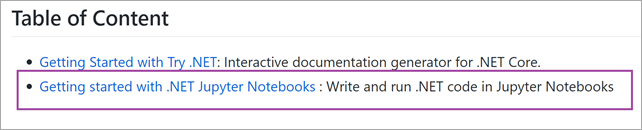
  • Create: To get started on your machine check out the dotnet/try repo. Select the option highlighted option
     68223835-86614680-ffbb-11e9-9161-bcafd6c3133d
  • Share: If you want to share notebooks you have made using the .NET Jupyter kernel, the easiest way is to generate a Binder image that anyone can run on the web. For more information on how to do this please check out the .NET Jupyter documentation.

Checkout the online .NET Jupyter Notebook I created for to explore the NightScout GitHub project using C# and the Octokit APIs.

We hope you enjoy this new .NET Interactive experience and that you're pleasantly surprised by this evolution of the .NET Try interactive kernel.


Sponsor: Octopus Deploy wanted me to let you know that Octopus Server is now free for small teams, without time limits. Give your team a single place to release, deploy and operate your software.

About Scott

Scott Hanselman is a former professor, former Chief Architect in finance, now speaker, consultant, father, diabetic, and Microsoft employee. He is a failed stand-up comic, a cornrower, and a book author.

facebook bluesky subscribe
About   Newsletter
Hosting By
Hosted on Linux using .NET in an Azure App Service

Trying out Visual Studio Online - Using the cloud to manage and compile your code is amazing

October 31, 2019 Comment on this post [8] Posted in VSOnline
Sponsored By

Visual Studio Online was announced in preview, so I wanted to try it out. I already dig the Visual Studio "Remote" technology (it's almost impossibly amazing) so moving the local container or WSL to the Cloud makes a lot of sense. Check out their blog post here.

There's three quick starts.

Sweet. I'll start with with Browser version, which is the easiest one I'm guessing. I head to the login page. I'm using the new Edge browser.

I see this page that says I have no "environments" set up.

VS Online for the Browser

I'll make a plan. I changed mine to fall asleep (suspend) in 5 minutes, but the default is 30. Pricing is here.

Creating a 4 Core, 8 Gig of RAM environment

Now it's making my environment.

Sweet. VS Online

I clicked on it. Then opened a new Terminal, ran "dotnet new web" and I'm basically in a thin VS Code, except in the browser. I've got intellicode, I can install the C# extension.

I'm in VS Code but it's not, it's VS Online in a browser

Since I'm running a .NET app I had to run these commands in a new terminal to generate and trust certs for SSL.

dotnet dev-certs https
dotnet dev-certs https -- trust

Then I hit the Debug menu to build and compile my app IN THE CLOUD and I get "connecting to the forwarded port" as its "localhost" is in the cloud.

Connecting to the forwarded port

Now I've hit a breakpoint! That's bonkers.

Hello World IN THE CLOUD

Now to try it in VS Code rather than online in the browser. I installed the Visual Studio Online extention and clicked on the little Remote Environment thing on the left side after running VS Code.

This is amazing. Look on the left side there. You can see my Raspberry PI as an SSH target. You can see my new VS Online Plan, you can see my Docker Containers because I'm running Docker for Windows, you can see my WSL Targets as I've got multiple local Linuxes.

Since I'm running currently in VS Online (see the HanselmanTestPlan1 in the lower corner in green) I can just hit F5 and it compiles and runs.

It's a client-server app. VS Code is doing some of the work, but the heavy lifting is in the cloud. Same as if I split the work between Windows and WSL locally, in this case VS Code is talking to that 8 gig Linux Environment I made earlier.

VS Code attached to VS Online

When I hit localhost:500x it's forwarded up to the cloud:

Port forwarding

Amazing. Now I can do dev on a little cheapo laptop but have a major server to the work in the cloud. I can then head over to https://online.visualstudio.com/environments and delete it, or I can let it suspend.

Suspending a VS Online Environment

I'm going to continue to explore this and see if I can open my blog and podcast sites in this world. Then I can open and develop on them from anywhere. Or soon from my iPad Pro!

Go give Visual Studio Online a try. It's Preview but it's lovely.


Sponsor: Like C#? We do too! That’s why we've developed a fast, smart, cross-platform .NET IDE which gives you even more coding power. Clever code analysis, rich code completion, instant search and navigation, an advanced debugger... With JetBrains Rider, everything you need is at your fingertips. Code C# at the speed of thought on Linux, Mac, or Windows. Try JetBrains Rider today!

About Scott

Scott Hanselman is a former professor, former Chief Architect in finance, now speaker, consultant, father, diabetic, and Microsoft employee. He is a failed stand-up comic, a cornrower, and a book author.

facebook bluesky subscribe
About   Newsletter
Hosting By
Hosted on Linux using .NET in an Azure App Service

Adafruit's Circuit Playground Express simulated Visual Studio Code's Device Simulator Express

October 29, 2019 Comment on this post [3] Posted in Hardware
Sponsored By

I'm an unabashed Adafruit fan and I often talking about them because I'm always making cool stuff with their hardware and excellent tutorials. You should check out the YouTube video we made when I visited Adafruit Industries in New York with my nephew. They're just a lovely company.

While you're at it, go sign up for the Adabox Subscription and get amazing hardware projects mailed to you in a mystery box regularly!

One of the devices I keep coming back to is the extremely versatile Circuit Playground Express. It's under $25 and does a LOT.

It's got 10 NeoPixels, a motion sensor, temp sensor, light sensor, sound sensor, buttons, a slide, and a speaker. It even can receive and transmit IR for any remote control. It's great for younger kids because you can use alligator clips for the input output pins which means no soldering for easy projects.

You can also mount the Circuit Playground Express onto a Crickit which is the "Creative Robotics & Interactive Construction Kit. It's an add-on lets you #MakeRobotFriend using CircuitPython, MakeCode, or Arduino." The Crickit makes it easy to control motors and adds additional power options to drive them! Great for creating small bots or battlebots as my kids do.

MakeCode

The most significant - and technically impressive, in my opinion - aspect of the Circuit Playground Express is that it doesn't dictate the tech you use! There's 3 great ways to start.

  • Start your journey with Microsoft MakeCode block-based or Javascript programming.
  • Then, you can use the same board to try CircuitPython, with the Python interpreter running right on the Express.
  • As you progress, you can advance to using Arduino IDE, which has full support of all the hardware down to the low level, so you can make powerful projects.

Start by exploring MakeCode for Circuit Playground Express by just visiting https://makecode.adafruit.com/ and running in the browser!

Device Simulator Express for Adafruit Circuit Playground Express

Next, check out the Device Simulator Express extension for Visual Studio Code! This was made over the summer by Christella Cidolit, Fatou Mounezo, Jonathan Wang, Lea Akkari, Luke Slevinsky, Michelle Yao, and Rachel Phinnemore, the interns at the Microsoft Garage Vancouver!

Christella Cidolit, Fatou Mounezo, Jonathan Wang, Lea Akkari, Luke Slevinsky, Michelle Yao, and Rachel Phinnemore

This great extension lets YOU, Dear Reader, code for a Circuit Playground Express without the physical hardware! And when you've got one in your hards, it makes development even easier. That means:

  • Device simulation for those without hardware
  • Code deployment to devices
  • Auto-completion and error flagging
  • Debugging with the simulator

You'll need these things:

Fire up Visual Studio Code with the Device Simulator Express extension installed and then select "Device Simulator Express: New File" in the command palette (CTRL+SHIFT+P to open the palette).

Device Simulator Express

There's a lot of potential here! You've got the simulated device on the right and the Python code on the left. There's step by step debugging in this virtual device. There's a few cool things I can think of to make this extension easier to set up and get started that would be it a killer experience for an intermediate developer who is graduating from MakeCode into a Code editor like VS Code.

It's early days and the interns are back in school but I'm hoping to see this project move forward and get improved. I'll blog more details as I have them!


Sponsor: Like C#? We do too! That’s why we've developed a fast, smart, cross-platform .NET IDE which gives you even more coding power. Clever code analysis, rich code completion, instant search and navigation, an advanced debugger... With JetBrains Rider, everything you need is at your fingertips. Code C# at the speed of thought on Linux, Mac, or Windows. Try JetBrains Rider today!

About Scott

Scott Hanselman is a former professor, former Chief Architect in finance, now speaker, consultant, father, diabetic, and Microsoft employee. He is a failed stand-up comic, a cornrower, and a book author.

facebook bluesky subscribe
About   Newsletter
Hosting By
Hosted on Linux using .NET in an Azure App Service

Be a Technology Tourist

October 24, 2019 Comment on this post [16] Posted in Musings
Sponsored By

Passport Pages by daimoneklund used under CCI was talking to Tara and we were marveling that in in 1997 15% of Americans had Passports. However, even now less than half do. Consider where the US is physically located. It's isolated in a hemisphere with just Canada and Mexico as neighbors. In parts of Europe a 30 minute drive will find three or four languages, while I can't get to Chipotle in 30 minutes where I live.

A friend who got a passport and went overseas at age 40 came back and told me "it was mind-blowing. There's billions of people who will never live here...and don't want to...and that's OK. It was so useful for me to see other people's worlds and learn that."

I could tease my friend for their awakening. I could say a lot of things. But for a moment consider the context of someone geographically isolated learning - being reminded - that someone can and will live their whole life and never need or want to see your world.

Travel of any kind opens eyes.

Now apply this to technology. I'm a Microsoft technologist today but I've done Java and Mainframes at Nike, Pascal and Linux at Intel, and C and C++ in embedded systems as a consultant. It's fortunate that my technology upbringing has been wide-reaching and steeped in diverse and hybrid systems, but that doesn't negate someone else's bubble. But if I'm going to speak on tech then I need to have a wide perspective. I need to visit other (tech) cultures and see how they live.

You may work for Microsoft, Google, or Lil' Debbie Snack Cakes but just like you should consider getting a passport, you should absolutely visit other (tech) cultures. Travel will make you more well-rounded. Embrace the ever-changing wonders of the world and of technology. Go to their meet-ups, visit their virtual conferences, follow people outside your space, try to build their open source software, learn a foreign (programming) language. They may not want or need to visit yours, but you'll be a better and more well-rounded person when you return home if you're chose to be technology tourist.


Sponsor: Like C#? We do too! That’s why we've developed a fast, smart, cross-platform .NET IDE which gives you even more coding power. Clever code analysis, rich code completion, instant search and navigation, an advanced debugger... With JetBrains Rider, everything you need is at your fingertips. Code C# at the speed of thought on Linux, Mac, or Windows. Try JetBrains Rider today!

About Scott

Scott Hanselman is a former professor, former Chief Architect in finance, now speaker, consultant, father, diabetic, and Microsoft employee. He is a failed stand-up comic, a cornrower, and a book author.

facebook bluesky subscribe
About   Newsletter
Hosting By
Hosted on Linux using .NET in an Azure App Service

Create exceptional interactive documentation with Try .NET - The Polly NuGet library did!

October 22, 2019 Comment on this post [13] Posted in DotNetCore | NuGet
Sponsored By

I've blogged at length about the great open source project called "Polly"

and I've blogged about "Try .NET" which is a wonderful .NET Core global tool that lets you make interactive in-browser documentation and create workshops that can be run both online and locally (totally offline!)

If you've got .NET Core installed, you can try it in minutes! Just do this:

dotnet tool install --global dotnet-try
dotnet try demo

Even better, you can just clone a Try .NET enabled repository with markdown files that have a few magic herbs and spices, then run "dotnet try" in that cloned folder.

What does this have to do with Polly, the lovely .NET resilience and transient fault handling library that YOU should be using every day? Well, my friends, check out this lovely bit of work by Bryan J Hogan! He's created some interactive workshop-style demos using Try .NET!

How easy is it to check out? Let's give it a try. I've run dotnet tool install --global dotnet-try already. You may need to run update if you've installed it a while back.

git clone https://github.com/bryanjhogan/trydotnet-polly.git
dotnet try

That's it. What does it do? It'll launch your browser to a local website powered by Try .NET that looks like this!

Interactive local documentation with Try.NET

Sweet! Ah, but Dear Reader, scroll down! Let me try out one of the examples. You'll see a Monaco-based local text editor (the same edit that powers VS Code) and you're able to run - and modify - local code samples IN THE BROWSER!

Checking out Polly exception retries

Here's the code as text to make it more accessible.

RetryPolicy retryPolicy = Policy.Handle<Exception>()
.Retry(3, (exception, retryCount) =>
{
Console.WriteLine($"{exception.GetType()} thrown, retrying {retryCount}.");
});

int result = retryPolicy.Execute(() => errorProneCode.QueryTheDatabase());

Console.WriteLine($"Received a response of {result}.");

And the output appears below the sample, again, in a console within the browser:

System.Exception thrown, retrying 1.
System.InsufficientMemoryException thrown, retrying 2.
Received a response of 0.

You can see that Polly gives you a RetryPolicy that can envelop your code and handle things like transient errors, occasional flaky server responses, or whatever else you want it to do. It can be configured as a policy outside your code, or coded inline fluently like this.

NOTE the URL! See that it's a .MD or Markdown file? Try .NET has a special handler that reads in a regular markdown file and executes it. The result is an HTML representation of your Markdown *and* your sample, now executable!

What's the page/image above look like as Markdown? Like this:

# Polly Retries Part 2

### Retrying When an Exception Occurs
The Polly NuGet package has been added and we are going to use the Retry Policy when querying database.
The policy states that if an exception occurs, it will retry up to three times.

Note how you execute the unreliable code inside the policy. `retryPolicy.Execute(() => errorProneCode.QueryTheDatabase());`


``` cs --region retryIfException --source-file .\src\Program.cs --project .\src\PollyDemo.csproj
```

#### Next: [Retrying Based on a Result &raquo;](./retryIfIncorrectStatus.md) Previous: [Before You Add Polly &laquo;](../lettingItFail.md)

Note the special ``` region. The code isn't inline, but rather it lives in a named region in Program.cs in a project in this same repository, neatly under the /src folder. The region is presented in the sample, but as samples are usually more complex and require additional libraries and such, the region name and project context is passed into your app as Try.NET executes it.

Go check out some Try .NET enabled sample repositories. Just make sure you have the Try .NET global tool installed, then go clone and "dotnet try" any of these!

If you're doing classwork, teaching workshops, making assignments for homework, or even working in a low-bandwidth or remote environment this is great as you can put the repositories on a USB key and once they've run once they'll run offline!

Now, be inspired by (and star on GitHub) Bryan's great work and go make your own interactive .NET documentation!


Sponsor: Like C#? We do too! That’s why we've developed a fast, smart, cross-platform .NET IDE which gives you even more coding power. Clever code analysis, rich code completion, instant search and navigation, an advanced debugger... With JetBrains Rider, everything you need is at your fingertips. Code C# at the speed of thought on Linux, Mac, or Windows. Try JetBrains Rider today!

About Scott

Scott Hanselman is a former professor, former Chief Architect in finance, now speaker, consultant, father, diabetic, and Microsoft employee. He is a failed stand-up comic, a cornrower, and a book author.

facebook bluesky subscribe
About   Newsletter
Hosting By
Hosted on Linux using .NET in an Azure App Service

Disclaimer: The opinions expressed herein are my own personal opinions and do not represent my employer's view in any way.