Scott Hanselman's 2006 Ultimate Developer and Power Users Tool List for Windows
Everyone collects utilities, and most folks have a list of a few that they feel are indispensable. Here's mine. Each has a distinct purpose, and I probably touch each at least a few times a week. For me, util means utilitarian and it means don't clutter my tray. If it saves me time, and seamlessly integrates with my life, it's the bomb. Many/most are free some aren't. Those that aren't free are very likely worth your 30-day trial, and perhaps your money.
Discover more cool tools and programmings tips on my weekly Podcast with Carl Franklin. Hanselminutes (FEED/Archives) - "Guaranteed not to waste your time. Free free to listen in double speed and waste half as much."
Here are most of the contents of my C:/UTILS folder. These are all well loved and used. I wouldn't recommend them if I didn't use them constantly.
This is the Updated for 2006 Version of my Original Tools List and 2005 List, and subsumes all my other lists.
- New Entries to the Ultimate Tools are in Red with dozens of additions and many updated and corrected entries.
NOTE: Please don't reproduce this in its entirety, I'd rather you link to http://www.hanselman.com/tools. I appreciate your enthusiam, but posts like this take a lot of work on my part and I'd appreciate that work staying where it is and linked to, rather than being copy/pasted around the 'net. Also, I do believe in the Permanence of the Permalink, and I will do everything in my power (as I have for the last 3+ years) to avoid Link Rot. If you're reading this and you're not at http://www.hanselman.com/blog, perhaps you'd like to join us at the original URL?)
The Big Ten Life and Work-Changing Utilities
- Notepad2 or Notepad++ (Scite also uses the codebase) - A great text editor. First class CR/LF support, ANSI to Unicode switching, whitespace and line ending graphics and Mouse Wheel Zooming. A must. Here's how to completely replace notepad.exe. Personally I renamed Notepad2.exe to "n.exe" which saves me a few dozen "otepad"s a day. Here's how to have Notepad2 be your View Source Editor. Here's how to add Notepad2 to the Explorer context menu.
- Notepad++ is built on the same fundamental codebase as Notepad2, but is more actively developed than Notepad2. Notepad++ also includes tabbed editing and more language syntax highlighting.
- PowerShell - The full power of .NET, WMI and COM all from a command line. PowerShell has a steep learning curve, much like the tango, but oh, my, when you really start dancing...woof. I also use PowerShell Prompt Here.
- Lutz's Reflector and its AddIns - The tool that changed the world and the way we learn about .NET. Download it, select an interesting method and hit the space bar. Take the time to install the Add-Ins and check out the amazing static analysis you can do with things like the Diff and Graph.
- SlickRun - A free floating dynamic "command prompt" with alias support that continues to amaze. My tips for effective use: read the instructions, edit the slickrun.ini file and bind it to Window-R. Also set ChaseCursor so when you hit Win-R, you'll have a floating transparent command line anywhere your mouse is. I recommend you also use larger fonts! Get to know this little box. It's the bomb.
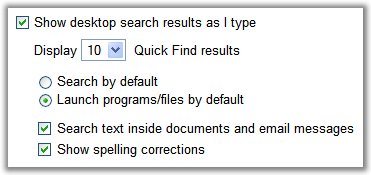
- Google Desktop - Google's Desktop Search has come leaps and bounds in the last year. It's a lightning fast Launcher with its Ctrl-Ctrl feature, a feature rich indexer with many plugins available and it is now a Gadget/Sidebar platform. It's my primary local search tool. It even <cough> integrates with PowerShell nicely, thank you very much thanks to its rich SDK.
- ZoomIt - ZoomIt is so elegant and so fast, it has taken over as my #1 screen magnifier. Do try it, and spend more time with happy audiences and less time dragging a magnified window around.
- WinSnap - One of the finest screenshot utilities I've ever found. Free, clean, fast and tight, WinSnap has as many (or as few) options as you'd like. Also does wonders with rounded corners and transparancy.
- CodeRush and Refactor! (and DxCore) - Apparently my enthusiasm for CodeRush has been noticed by a few. It just keeps getting better. However, the best kept secret about CodeRush isn't all the shiny stuff, it's the free Extensibility Engine called DxCore that brings VS.NET plugins to the masses. Don't miss out on free add-ins like CR_Documentor and ElectricEditing.
- SysInternals - I showed specifically ProcExp and AutoRuns, but anything these guys do is pure gold. ProcExp is a great Taskman replacement and includes the invaluable "Find DLL" feature. It can also highlight any .NET proceses. AutoRuns is an amazing aggregated view of any and all things that run at startup on your box.
- FolderShare - It takes a minute to grok, but FolderShare lets you synchronize folders between systems, between OS's, behind firewalls. Truly change the way you use your machine. Save a file in a folder and it will always been on your other three machines when you need it. Also access files, if you like, from remote locations. And it's free.
Dropped out of the Top 10 for 2006 but still rockin' sweet
- TestDriven.NET and NCoverExplorer (checkout the BETA) - Now in one integrated build! The perfect integration of Unit Testing with Visual Studio.NET. Right click and "Run Test." The output window says "Build" then switches to "Test." The best part, though, is "Test With...Debugger" as a right click that automatically starts up an external process runner, loads and starts your test. Compatible with NUnit, MBUnit and Team System.
- Cropper - A fabulous screen capture applet. I usually pick simple tools that do their job elegantly. Cropper does just that and it's written in .NET.
- Magnifixer - My ZoomIn tool du jour. Be sure that you have SOME kind of ZoomIn tool installed. I like this one because it automatically follows your cursor and your typing and saves settings without asking. It also has a nice eye-dropper for the RGB in you. Learn how to use this tool if you present at all.
- Windows Desktop Search - The betas were rough and tended to lock up, but the free final edition is tight. I can finally bring up a file almost as fast as I can think about it. One important note that sets it apart from Google Desktop Search is that the items appearing in the result window are first-class Explorer Items. Right click on them and you'll not only have all your context menu extensions, but also Open Containing Folder.
- TaskSwitchXP and/or TopDesk - Two better ways to ALT-Tab and Task Switch in Windows. Don't confuse TaskSwitchXP with the old PowerToy. This one is fast and powerful. If you envy the Mac's Expose, then use TopDesk. Personally, I use both and set a cursor hotspot in the lower-right corner to tile my windows. Be sure to have DirectX9 installed.
A Developer's Life
- Application Profiler - A great GotDotNet sample, a tool for visualizing and analyzing allocations on the GC heap. Has a GREAT graphical view
- Adam Nathan's CLRSPY - A diagnostic that looks at .NET 1.1 Customer Debug Probes, in-freaking-valuable.
- Eric J Smith's CodeSmith - Oh, yes, it's much more than just a Strongly Typed Collection Generator. It's a complete code-generation engine with an ASP.NET-like syntax. Very extendable, very powerful, very affordable. And all is right with the world. I've used it to generate THOUSANDS of lines of code. There's a learning curve, but the benefits are immense. It's worth the download just for the Strongly Typed Collection code from Chris Nahr.
- Query Express - Wow, a Query Analyzer look-alike that doesn't suck, doesn't need an install, is wicked fast, is free and is only 100k. Pinch me, I'm dreaming.
- Jeff Key's Snippet Compiler - Sits quietly waiting for you to test a quick snippet of code or algorithm. No need to even start VS.NET!
- Alintex .NET Scripting Host - Allows you to create scripts (like like VBS files, etc) except with .NET. Also a great prototyping tool.
- Omar Shahine's CleanSources - Right click on any folder with code in it and get your bin,obj,debug,release directories blown away.
- Jeff Atwood's CleanSourcesPlus - Jeff extends on Omar's idea and includes configuration options for deleting things like Resharper folders and Source Control bindings.
- Venkman - An amazing JavaScript debugger for FireFox that has seen me through a number of hard times.
- Also try FireBug for great XMLHttpRequest debugging and an arguably better interface!
- Clemen's BuildDay.exe - Great commandline util that you should put in your path. Returns the last digit of the year and the number of the day. Great for batch files that create daily builds, log files, etc.
- PromptSQL - Intellisense for T-SQL in your editor of choice.
- DbQuickLaunch - Launch SQL Database utils on database-specific instances from the tray.
- LogParser - This utility is so good it has its own FAN SITE. That says something. Get to know it, as it's a free command-line tool from Microsoft that lets you run SQL queries against a variety of log files and other system data sources, and get the results out to an array of destinations, from SQL tables to CSV files. I dig it and use it to parse my own logs.
- WatirMaker now WatirRecorder - A basic, but functional way to jump into the world of Watir testing. Open Source, with C# and Ruby versions, soon to be hosted at OpenQA.
- WinMerge - The best open-source Diff Merge Tool that I've found.
- fLogViewer - Great freeware highlighting log viewer for large log files.
- HightLight for Windows - Highlight is a universal sourcecode converter for Linux and Windows, which transforms code to HTML, XHTML, RTF, LaTeX or TeX - files with syntax highlighting. (X)HTML output is formatted by CSS.
- The Subservient Programmer - Send this link to your boss when you've had it with his demands.
- IECookiesView 1.5 from NirSoft - Nice clean interface to snoop contents of the cookies on your box in IE.
- NirSoft Utilities Collection - Nearly everthing NirSoft does is work looking at. My favorites are MyUninstaller, a replacement for Remove Programs, and WhoIsThisDomain.
- Also check out ZipInstaller; it installs utilities that don't provide their own installer! It creates icons, puts them in the folder you want and adds an uninstaller.
- Fiddler - More feature-packed than the elegantly minimalist ieHttpHeaders, Fiddler is THE debugging proxy for checking out HTTP between here and there.
- ieHttpHeaders - Internet Explorer "Explorer Bar" that shows the HTTP Headers as you browse. Invaluable for quickie debugging. More great stuff from Jonas Blunck.
- MSI Utilities - This site lists darn near every MSI related utility.
-
SCCSwitch - Harry Pierson's ruthlessly competent Source Control Provider switcher for VS.NET. Great if you are using Vault, VSS and CVS like me.
COM is Dead
- Reggie - Not a regular expression tool, it's a BETTER RegSvr32.exe from Shawn Van Ness. It provides better error handling and messages. It doesn't suck. Which is more than I can say for RegSvr32.exe.
- COMTrace - Hooks and lets you see COM "traffic" on processes on your system. Intercepts COM calls on any interface. Has saved my ass 3 times.
- APIViewer 2003 - A database and browser of the Win32API, similar to the old win32api.txt file that was distributed with VB6. Includes 6500 function declarations and 55000 constants.
- Microsoft MDAC Component Checker - Utility to diagnose and deal with MDAC compatibility and versioning problems.
- ActiveXplorer v4 - A file manager and analyzer for COM objects...a little higher level than OleView and easier to understand.
- BinType2.exe - Ever want to check a VB6 COM dll to see if it has been appropriately compiled with "Retain in Memory" and "Unattended Execution" set to true for correct execution under MTS?
The Angle Bracket Tax (XML/HTML Stuff)
- VisualXPath - A nice GotDotNet project that runs XPath Queries interactively and displays the results. Also useful for quick coarse timing of query speed.
- XPathMania from DonXML - A guy named DonXML is really serious about his angle brackets. This is an extension to the XML Editor within Visual Studio 2005 that allows you to execute XPath queries against the current document dynamically. Created under the Mvp.Xml umbrella project - also a kickbutt XML extension library.
- Web Services Studio 2.0 - .NET Webservice Studio is a tool to invoke Web Services interactively. The user can provide a WSDL endpoint and it generates the .NET Proxy immediately.
- Mindreef SOAPscope - The original. The glory forever, this is more than an Add-In, it's a complete XML Web Services design studio. It's a bargain and works even better when setup in a workgroup. It keeps a database of all Web Services traffic, but it's more than a sniffer. It also analyzes data for WS-I compliance and allows for record and replay of messages. "It's Tivo for Web Services!"
- XmlSpy - Just buy it.
-
Ken Arway's ComXT - Don't write this of just because of the funky UI. This is 13 different useful XML tools (like a true Xml Diff) in one app.
- PPXML - Command-Line XML Pretty Printer
- Xenu's Link Sleuth - Xenu's Link Sleuth (TM) checks Web sites for broken links. Link verification is done on "normal" links, images, frames, plug-ins, backgrounds, local image maps, style sheets, scripts and java applets. It displays a continuously updated list of URLs which you can sort by different criteria.
- Fesersoft's VS.NET XSLT 1.0 Schema - Enables Intellisense for XSLT 1.0 documents in Visual Studio.NET 2003. There's other good code here to check out also!
Regular Expressions
- Roy Osherove's Regulator - Roy entered the RegEx fray with a bang, and with syntax highlighting and web services integration with regexlib.com. The very definition of slick.
- RegEx Visualizers for VS 2005 - Roy has extended his toolkit to include Debug Visualizers for Regular Expressions, based on his Regulator code base.
- Regulazy - Currently at version 1.01, this tool is a great way for newbies to start using Regular Expressions. Write regular expressions without prior knowlege of the syntax!
"So you've got a problem, and you want to use Regular Expressions to solve it. Now you've got two problems."
- Eric Gunnerson's Regular Expression Workbench - Nice .NET interactive Regular Expression builder.
Expresso is a new free tool for working with regular expressions in .NET. - RegexDesigner.NET from Chris Sells - Simple, elegant, it's what I use most.
- Regular Expression builder inside of SharpDevelop - Which is worth the download just to read the SharpDevelop code!
- Funduc's Search and Replace - Multiple file search and replace on sterioids! You'll love it if you love Grep.
Launchers
- Slickrun - still the sexy favorite, this little floating magic bar keeps me moving fast, launching programs, macros and explorer with its shiny simplicity.
Tell them I sent you. - SmartStartMenu - Shaun Harrington has created this elegant little application that lives in the task bar and automatically indexes the list of items in your Start Menu for quick access with the speed of AutoComplete. It will take system commands, paths to launch explorer, even UNC paths. Launch anything on your system with less than 4 keystrokes. It also adds new context menus to Explorer like CopyPath and Open in DOS box to Explorer.
- Martin Plante, hot off his gig at Xceed has created slimKEYS, a "universal hotkey manager" with a simple .NET plugin architecture. If you've got ideas or thoughts, visit the slimCODE Forums.
Have you ever wanted to bind something to Shift-Ctrl-Alt-Window-Q but didn't know how to grab a global hotkey?
This will launch programs, watch folders, and find files. It has great potential as more and more plugins appear. - Tidy Start Menu - If you still love the Start Menu, but you've installed everything on this list and your menu takes up more room than you have pixels, this program will organize it all.
-
Also try SMOz (Start Menu Organizer)
-
- Colibri - The closest thing so far, IMHO, to Quicksilver on Windows, although this little gem has a slow startup time, it runs fast! It's being actively developed and promises integration with a dozen third party programs. It also formally supports "Portable Mode" for those of you who like to carry your apps around on a USB key.
- Launchy - Another do it all application, this one Open Source and written
entirely in .NET, Launchy binds to Alt-Space by default. This app also has the potential to be Quicksilver like if it start including support for stringing together verb-noun combos. It's pretty as hell and totally skinnable (there's TWO Quicksilver skins included!) - AppRocket -this little bar sits at the top of your screen, popping down an active list of Bookmarks, Programs, Music, Web Queries and more. It's unclear if this tool is being enhanced for future versions as folks have reported not hearing from the company in a while.
- ActiveWords - Arguably the most minimal of these launchers (as it can have no UI at all if you like!), but the most configurable. ActiveWords watches everything you type, in every application, so anything you've just typed could potentially be used by you to launch a program, a macro, send email, or give you Auto-Correct in any application. Check out their screencast/demos and their scripting language. It also is the only launcher (I've seen) with explicit support for the Tablet PC and allows ink to trigger an "Active Word."
- Dave's Quick Search Bar - Written orignally in JavaScript and now written in magic and ensconced in voodoo, this little Toolbar sits in your Windows Task bar (or wherever you choose to drag it) and supports a huge community of macro writers who've enabled it as a Calculator, Web Searcher, People Finder, Currency Converter and literally hundreds of other tasks via simple to write plugins. Very actively developed and on the web for over 5 years (that's like 100 people years). It even has a Search Wizard to create your own web searches by example.
- Google Desktop - Google Desktop has an option that let's you use it as a quick program launcher along with fantastic search abilities by tapping Ctrl-Ctrl.
- Find and Run Robot - Lightweight, small, quiet until you need it. This little application allows for tuneable heuristics to make it work like you think. Demo Screencast here.
- Run++ - The only ClickOnce launcher I've found. Requires .NET 2.0.
Stuff I Just Dig
-
InstallPad - How long until someone creates an InstallPad application list containing the complete contents of this post? I dunno, but it'd be cool. InstallPad takes care of downloading and installing the latests versions of all your favorite apps. What a great way to get from a freshly paved machine to something usable by me. :)
- Foxit Reader for Windows - Fast as hell. This little PDF reader requires no installer and is tiny and fast. Did I mention fast? Good bye, Acrobat.
- Virtual TI-89 [Emulator] - Sometimes CALC.EXE doesn't cut it, and I want a REAL scientific calculator for Windows, so I emulate the one I used in college.
- VisiCalc (vc.exe) - Because I just like having a copy of VisiCalc in my utils folder. I use it occasionally.
-
DiskView - The most powerfull disk usage program I've found, DiskView integrates nicely with Explorer and includes SMART disk health statistics.
-
SequoiaView - A fast Treemap of your disk usage!
- WinDirStat - There's a lot of Disk Visualization Tools out there, but this one just seems to tell me exactly what I need to know and it can be run without installation.
- OverDisk - This one's stuck at version 0.11b but it's still worth a download. It's a pie chart view of your disk space usage.
-
- VLC Media Player - Screw all other media players. When you just want to watch video. Bam.
- WhiteBoard Photo - Has to be seen to be believed. Takes a skewed low-contrast, bad photo of a Whiteboard and automatically corrects it and offers up a clean white sheet of paper with a color corrected and keystoned photo of your whiteboard. Check out the demo. Expensive though.
- FAR File Manager - Norton Commander is back, it is still text mode, it's still lightning speed and it's from the makers of RAR File Archiver. I'll race you. I get FAR, you get Explorer.
- Skype - Internet VOIP Calls with better sound than the POTS phone? Free? Conference calls as well? Sign me up.
- Cygwin - Remind yourself of your roots and give yourself a proper Unix prompt within Windows. However, it's less about the prompt as it is about the wealth of command-line tools you'll gain access to.
- FinePrint - This virtual printer lets you save paper, print booklets, delete pages and graphics, and provides print preview for every application.
- BlogJet - I freaking love this little guy. Works great with DasBlog, supports spellcheck, file upload, makes clean HTML, and includes Music Detection support as well as posting of Audio to your blog.
- Acronis TrueImage - has saved me a half dozen times. Image your whole life. Relatively inexpensive and VERY easy to use.
- Fraps - DirectX video capture! Exactly what you need when you want full screen video of a DirectX or OpenGL application.
- 7-ZIP - The 7z format is fast becoming the compression format that choosey hardcore users choose. You'll typically get between 2% and 10% better compression than ZIP.
- xplorer2 - Norton Commander-like funcitonality for Windows. It's one better than Explorer.
- SyncBack - How can you not like a company named 2BrightSparks? There's a Freeware SE version as well. Golden, with a clean crisp configuration UI, I use this tool internally for scheduled backups and syncs between machines within my family network.
- TimeSnapper - Tivo for your desktop? Kind of. TimeSnapper can't give you files back, but it'll take a screenshot in the backgound at user-configurable intervals and let you answer the burning question - What was I doing all day at work? Free and only 80k. Another brilliant idea blatently stolen off my list of things to do and executed by folks more clever than I. Kudos.
Low-Level Utilities
- The Ultimate Boot CD and the Ultimate Boot CD for Windows - I've downloaded and saved everything from BootDisks.com, including Win95 and Win98 boot disks and a DOS 6.22 disk. The boot CDs are life-savers and should be taken to all family gatherings where the relatives KNOW you're a computer person. They'll expect you to save their machines before the turkey is served.
- DllFiles - You never know when you might need an old-ass dll.
- DVDDecrypter and other utils - When you just need to make an archival backup copy of a DVD.
- DVDWizardPro - Another nice one that writes to MANY formats.
- PSPVideo9 - Meant for the Playstation Portable, this utility is more useful that you think. It creates MP4 squished video you can use anywhere.
- Daemon367, Virtual CD ISO Image Mounter - This is the utility that lets you mount an ISO image as a Drive Letter...nice to keep a library of CDs around on a Firewire drive. Very robust.
- Synergy - Share the same keyboard between two systems...I use this to move the mouse cursor out the right side of my monitor and onto the one that's connected to my Mac.
- FileMon - Displays file system activity in REAL TIME. Just who is that writing to the disk right now?
- YATT by Simon Fell - Yet Another Trace Tool, requires WinPCAP, when you just need to sniff some packets.
- ProxyTrace - Often less trouble than the Microsoft Soap Toolkit's SOAPTrace.
- Who's Locking? - WhosLocking.exe lets you know what application is locking that DLL you're trying to delete! Although, lately I've been using...
- Unlocker - Nicely integrated into Explorer's right-click menu.
- Process Explorer - The ultimate replacement for TaskManager. Includes the amazing Find DLL feature to find out what processes have your DLL in memory.
- Sid2User - CommandLine Util to take a SID and get a Real Name to, for example, get the local name of the "Everyone" user.
- BinText - Gives you more detail that you can handle about text hidden within binaries.
Websites and Bookmarklets (that change the way you work)
- TinyUrl.com - Makes big urls tiny. For when you're emailing a long URL to someone and you KNOW they will freakout it if wraps.
- Visibone HTML/JavaScript Reference - These guys make a great physical paper reference, but they also have a great .HTML file you can download for free that has ASCII charts and Color references. It's a link I keep close by.
- Del.icio.us - A social distributed bookmarks manager. It took me a bit to get into it, but their Bookmarklets that you drag into your Links toolbar won me over. All my bookmarks are here now and I can always find what I need, wherever I am. Very RESTful.
- Genpass - Bookmarklets to make your passwords more powerful. Adapted from Nic Wolff's concept. There's a great screenmovie explaining how this works by Jon Udell.
- Google Portal - It's not Google, it's http://www.google.com/ig and it includes movie times, driving directions, news and weather. My new home page.
- QuirksMode - Over 150 pages of details on CSS and JavaScript. When my brain is overflowing with the HTML of it all, I head here.
- Google Maps + HousingMaps.com - Google Maps is cool, but Paul Rademacher's HousingMaps.com is synergy.
- PortableApps.com - Take all your favorite apps with you on a USB key without installing them! All your settings remain. Be sure to get PStart, the handy Portable Apps Launcher for the Tray.
- More Portable apps at http://portablefreeware.com/
Tools for Bloggers
- Amazoner - RoyO's applet dedicated to making it easier to create Amazon Associate links. This little. How about a Windows Live Writer plugin anyone?
- DasBlog - Easy to install and requires no database, DasBlog runs this blog. Actively developed.
- Subtext - Another ASP.NET blogging engine based on SQLServer. Actively developed.
- BlogJet - I freaking love this little guy. Works great with DasBlog, supports spellcheck, file upload, makes clean HTML, and includes Music Detection support as well as posting of Audio to your blog.
- FeedDemon - My favorite aggregator. Always on the cutting edge and very actively developed. $30.
- RSSBandit - Free, Open Source, and written in .NET. The first aggregator for many.
- FeedValidator - If your RSS/Atom feed doesn't pass FeedValidator's tests, it's crap. Seriously. Crap.
- Windows Live Writer - The ultimate offline Blog Post tool? Not quite, it's beta, but it has an easy SDK. If you don't like it. Change it.
- Windows Live Writer Plugins at WLWPlugins.com - A growing collection of plugins for Windows Live Wiriter including a number of Code Formatters.
Smart People and their Pages for Utils They Wrote
- Chris Sells - Everything from COM Moniker stuff to CSV ADO Samples to the legendary RegExDesigner.NET.
- Fritz Onion and Keith Brown and Aaron Skonnard - The makers of ViewStateDecoder and GenerateMachineKey and XPathExpressionBuilder collect their tools here.
- The aggregated blog of Pluralsight and it's RSS Feed is the best way to sip from the wisdom that is Pluralsight. Their tools list is here.
- Jeff Key - Ah, to have this dude's skillz. The man who brought you SnippetCompiler has a crapload of other stuff at this page including SingleDrive and Ruler and NetPing.
- Travis Illig - A page of software dedicated to saving at least one mouse click. Includes SNInfo, CR_Documentor, and the Fusion Log Settings Changer.
- Phil Haack - Phil leads the SubText team and always has something thoughtful to say.
- Mark Russinovich and Bryce Cogswell - The folks behind SysInternals. Every tool they have ROCKS. Completely. I like Process Explorer, Autoruns, Regmon, and PsTools.
- Lutz Roeder - The maker of Reflector also makes Resourcer and inspired the Reflector Add-In community (complete list).
- Eric Lawrence - The Father of SlickRun also makes a number of tools for IE.
- Jeff Atwood - Jeff's Coding Horror blog consistently doesn't suck. Or do I mean it sucks inconsistently?
- Jonas Blunck - Jonas wrote ieHttpHeaders, my favorite HTTP Sniffer, but also ComTrace and Developer Playground with Kim Gräsman.
- Juval Lowy - Juval has been quietly but consistantly filling the IDesign site with a veritable crapload of utilities. If you're into WCF (Indigo) spend an afternoon (or a weekend) here.
- Nikhil Kothari - Nikhil keeps a not-so-secret stash of goodness up on his site while writing one of the prettiest technical blogs I've seen. He's given the world Script#, a C# to JavaScript compiler, as well as the astonishing Web Development Helper that enables ASP.NET 2.0 to with all the features you wish it had out of the box.
- Check out the rest of my Must Read BlogRoll along with the accompanying Podcast over here...
Alt.Lang
- John Lam's RubyCLR - Digging Ruby but also love the .NET Framework Base Class Library? Why not merge the two like Chocolate and Peanut Butter with RubyCLR?
- Wilco Bauer's IronRuby - An ongoing project to compile Ruby as IL, Wilco's the smartest (and tallest) intern I've ever met.
- Boo - Feels like C# but feels like Python. Boo is an up and coming wrist-friendly .NET language with great support within the SharpDevelop IDE
- Ruby and Watir (Web Application Testing in Ruby) - Ruby's today's Web 2.0 posterchild but Watir changed my functional-testing life. Learn about Watir in 3 min at SecretGeek.
- Seaside Web Framework in Smalltalk - Smalltalk? What's this? Don't judge until you've seen DabbleDB (written in Seaside) in action.
- Instant Rails - No muss, no fuss. A one-stop Ruby on Rails solution with no installer! Great if you're paranoid about changing your system.
Browser Add-Ins
- Urlograph - I don't know how I lived without this util. It adds a button to internet explorer that cleans filthy URLs (Amazon, Google, MSDN, Google Groups, etc) and puts the smallest URL possible in your clipboard. Not to be confused with TinyUrl.com, this util removes the fluff and makes Urls hackable again.
- UrlKicker - If you DO end up with a giant wrapped URL with line breaks, this little tray icon will remove those breaks and launch the browser. Source included.
- GetRight - Downloads, resumes and most importantly, splits up large downloads over HTTP or FTP into as many as 10 concurrent streams. Great with FlashGot for FireFox.
- WebDeveloper for FireFox - If you're the last developer to download FireFox, or you're holding off, WebDeveloper is a solid reason to switch to FireFox NOW. It's amazing and has to be used to be believed. It consolidates at least 2 dozens useful functions for those who sling ASP.NET or HTML. And if you're a CSS person, the realtime CSS editing is pretty hot.
- IEView and ViewInFireFox - These two utils go together. Both are FireFox extensions, but they are yin to the others yang. They add View in Internet Explorer and View in FireFox context menu items to their respective browsers. Great if you develop, but also great if you tend to visit sites that aren't browser agnostic.
- FireFox Extensions - Stunning! Extensions for my browser that won't kill my family! GoogleBar for FireFox, CopyPlainText, DownloadManagerTweak, AdBlock, ChromEdit, FlashGot, and GreaseMonkey.
Things Windows Forgot
- Ultramon - Why this kind of functionality isn't built in, I don't know. But it'll keep the guy at RealTimeSoftware in business! Ultramon is the ultimate utility for Multiple Monitor systems. It's most significant features, IMHO, is the addition of TaskBars that are monitor specific, and the addition of buttons NEXT to Minimize and Maximize to move open windows over to other monitors. Great if you've got 2 monitors, but a MUST if you've got more than 2!
- AutoHotKey - Do you like AutoCorrect in Word? Grab AutoHotKey while you still can! It's cross-application AutoCorrect. Works in any application and corrects the world's most common (English) typing mistakes. Laziness abounds!
- Rainlender - Double-click on the Clock in the Windows Taskbar? Feh. That's so 1995. Try Rainlender instead, it's floaty, transparent and skinable.
- Tail for Windows - There's lots of ways to get this functionality, including the GNU Utils for Windows and BareTail. The point is, it should have been included! A "tail -f" for Windows. Great if you work with programs that write to log files and you want to watch the log as it's being written. Also has keyword highlighting so you can see things get visually flagged as they go by.
- Console - Tabbed and transparent, this Open Source Windows Console Enhancement puts you in control of your controls. I call mine the Hanselshell. I also modded the PROMPT environment variable.
- SlickRun, Windows Search and/or Dave's Search Bar - Pick one, and love it. Why there isn't a floating or docked command-line in Windows I do not know. Probably so my mom wouldn't freak out.
- RoboCopy - When COPY and XCOPY just won't cut it, try the "Robust Copy"
-
Nero 6 and ImageDrive - Nero 6 is a fantastic value and the greatest burning suite out there. It also include ImageDrive that let's you make and mount ISO images.
- BgInfo from SysInternals - If you log into a lot of boxes remotely and always wonder, where the hell is this? This wallpaper tool creates custom wallpapers with all the information you'd need, like IP Address, Box Name, Disk Space, and it's totally configurable.
- ProcessTamer - Beat back those processes demanding 100% CPU. Raise the priority of the process that has focus. ProcessTamer makes it happen. Sure sped up Outlook on my system.
- DonationCoder.com is a treasure trove of donationware. Check out the complete collection.
- AutoRuns - I always am suspicious that someone is running something automatically on my system. AutoRuns (from SysInternals) checks EVERYWHERE that could be running something, the registry, win.ini (remember those?), the Startup Group, etc...
- SharpKeys - Do you want your Right-CTRL key to map to the Windows Key? I do. Why can't I do it with Windows' Control Panel? Because Windows forgot. Thankfully Randy didn't. Remap any key in Windows.
- Marc Merrit's Event Log Monitor (EventReader) - Sits in the tray and pops up a nice XP-style baloon whenever the event log is written to. I hate tray icons but I love balloon tooltip info, so it's a good tradeoff.
- NetMeter - Clean and simple, how much traffic is running over my network?
-
PingPlotter - Graphical plotting of network latency.
- Filter Files with Unknown Extensions for XP - Chris Sell's provides a .REG file that let's explorer's find files with file extensions that are not known. A real irritant with XP, fixed.
- PC De-Crapifier - So you just bought a Dell for $300 and it has a $4000 value worth of Crapware. Get ride of that poo with the De-Crapifier.
- CrapCleaner (CCleaner) - Freeware app that optimizes and cleans your system's registry and temp files. Better than the built-in Windows Disk Cleanup.
- GhostIt - Little tray app that lets you ghost (make transparent) any window by clicking on it.
-
NetPing - Jeff Key's multi-threaded pinger...it continues to include new features, like right-click and launch Remote Desktop. Great for administration of small networks. I use it all the time.
-
Spybot - The first thing I install when I visit a relatives house. Seriously. Step One.
-
Windows OneCare - Don't poo poo it. You can get OneCare on Amazon for $19. It's anti-spyware and anti-virus. Sounds like anti-extended-family-support-calls if you ask me.
-
-
Magical Jelly Bean KeyFinder - Misplace your Windows and Office Product Keys? Find them with this.
-
NetworkDriveInfo - Helps you find free drive space on remote systems.
-
Bulk Rename Utility - A graphical and incredible versatile way to rename large numbers of files using a myriad of patterns. Invaluable.
-
PSTools from SysInternals - All the command-line tools that Windows forgot...kill, loggedon, remote exec, shutdown, getsid, etc.
-
TrueName - Right click a file in Explorer and find out it's TRUENAME (Remember the Truename.exe?) The 8.3 name of My Documents might be C:DOCUME~1SHANSELMMYDOCU~1.
-
RealVNC - When RemoteDesktop is a hassle and PCAnywhere is lame...VNC stands for Virtual Network Computing. It is remote control software which allows you to view and interact with one computer (the "server") using a simple program (the "viewer") on another computer anywhere on the Internet.
-
WHICH - It's which and it's back. Wondering WHICH copy of that .exe is being run first in the path? Run "which calc.exe"
-
Visual Subst - Subst.exe is quite possibly evil, but Visual Subst is a joy.
-
HSTART - Just like START.EXE, but this one hides the console windows!
-
URL Bandit - Monitors the clipboard and saves all URLs that go by in the click-stream. If you copy a 1 meg file to the clipboard, URL Bandit can find, for example, all 200 URLS within it. Yum.
-
Synchronex - A file synchronizer, sure, but not just any file synchronizer, this one supports local, UNC, FTP, SFTP, WebDAV, ZIP and versioning. And only $20. Oy. I use it for backing up my blog on a schedule. An obtuse scripting format, more complex than SyncBack SE, but more detail oriented and powerful. Once you set it and forget it, IJW (It Just Works.) Brilliant.
-
Visual Studio Prompt Here - Right click on a folder and get four different "prompt here" options; cmd.exe, Visual Studio 2003, 2005, and PowerShell.
Outlook AddIns and Life Oganizers
- UrlRun - The Chez Tabor Outlook Add-In version of Chris Sells original UrlRun. Smart enough to take out spaces and > characters on split lines in forwarded email. Only works on Plain Text Messages.
- Sciral Consistancy - A strange little tool with a stranger name, this little jewel helps you get those niggling little "every once in a while but have to get done" tasks done.
- Getting Things Done (GTD) with Outlook
- ClearContext - Artifical Intelligence for your Outlook Inbox.
- Speedfiler - A replacement for Move To Folder in Outlook; file your messages as fast as your can press Enter.
- Taglocity - A learning system, Taglocity tags, filters, searchs, and teaches itself about your mail.
- Windows Live Local for Outlook - Map your appointment and meeting locations directly from within Outlook. Get driving directions, print detailed maps, find optimized trip routes, and estimate travel times. Receive reminders based on the estimated travel time. Even find the nearest Quiznos!
- PocketMod - Has nothing to do with Outlook, but everthing to do with getting organized. This tiny book is created by some creative folding and your printer. Design it and print it yourself for free.
Ultimate Registry Tweaks
- Add 'Cleanup Drives' to the My Computer Right-Click Menu: DriveCleanup.reg (.2 KB)
- Add 'Notepad2' to ALL Right-Click Menus [Steve Clark]
(note: I renamed Notepad2 to n.exe to save all those 'otepads'): notepad2_shell_integration.reg (.38 KB) - Add 'Event Viewer' to the My Computer Right-Click Menu: eventviewer.reg (.19 KB)
- Fix the Windows Search and treat all unknown extensions as text (.txt) files [Chris Sells]: SearchUnknownExtensionsForXP.reg (.31 KB)
- Update/Change the CleanMgr.exe (Drive Cleanup) to include better options, and remove the unused and slow Compress Old Files [Shawn A. Van Ness] (warning: this deletes four registry keys): VolumeCaches.reg (.2 KB)
- Adds System Restore, Services, LogOff, Reboot, Shutdown, Device Manager, Control Panel and Add/Remove Programs to My Computer Right-Click Menu: MajorControl.reg (3.42 KB)
- Cause Cmd.exe to ALWAYS run 'vsvars32.bat' no matter what [Travis Illig] vsnetcmd.reg (.14 KB)
- Remapping a Windows Key on an IBM Thinkpad - I have a ThinkPad, and it has no Windows Key. Now it does and I can Window-Key my way to victory.
Windows Explorer Integration (and other Integraty things)
- LinkShellEx - This tool subsumes the tool below with the same functionality and more! Manage all your junctions and hard links with clean Explorer Integration.
- Junction Icon Overlay - If you're digging Junctions (NTFS Reparse Points/Symbolic Links) like I am, then you're lamenting the fact that Windows Explorer is CLUELESS about them. Well, no longer, thanks to Travis and his Junction Overlay for Explorer.
- ExecParm - Like Right Click|RunAs...it's even better with ExecParm adding the ability to execute with parameters. Everything else at this site is awesome also, including ClipName.
- ASP.NET Development Helper - Nikhil, a dev lead on ASP.NET 2.0, created this wonderfully elegant developer helper that plugs into IE and gives you lots of insight into what's happening in ASP.NET while you develop. Want a FireFox version? Sure.
- PowerMenu - Great little hook that adds item to the System Menu that let you change the Transparency or Priority of the current window.
- CommandBar for Explorer - This tool extends explorer with functionality of a command prompt. Implemented as a band object completely in C#. Demonstrates COM Interop and P/Invoke, windows hooking and API interception. Finally you can run all these .Net SDK tools and ‘Hello World!’ programs without leaving explorer shell. Definitely turns heads if you use it in a presentation.
- UrlRun plugin for Outlook - From Tim Tabor based on Chris Sells' UrlRun. Lets you right-click on messed-up and wrapped URLs in Outlook and launch the browser without manually fixing the URL. Chris Sells says "It's pure sex."
- Unlocker - Nicely integrated into Explorer's right-click menu.
- SummerProperties - a Shell Extension that adds a Tab to File Properties that calculates the file's checksum.
- PrivBar - This util is great if you're trying to avoid running as Administrator. It adds a bar to Explorer that uses text and color to let you know what Privilege level you're running at.
- Plaxo - I love the way Plaxo integrates with Outlook, tells me about upcoming Birthdays and has kept my whole Address Book up to date.
- BrowseToSender - This little Outlook Add-In takes you to the website of the sender of the currently viewed email.
- PureText - Ever wish Ctrl-V didn't suck? And when I say "suck" I mean, wouldn't you rather spend less of your live in Edit|Paste Special? PureText pastes plain text, purely, plainly. Free and glorious. Thanks Steve Miller.
- BCWipe - Check out all the fine software from Jetico, but don't forget to pick up BCWipe and don't just delete your files, wipe them off the face of the earth. Very clean integration with Explorer.
Continuous Integration
- NUnit or ZaneBug - Microsoft Visual Studio Team System is shiny, but there's ways to do Continuous Integration and super charge your developers today. NUnit is the name everyone knows, but ZaneBug is a better GUI for NUnit than NUnitGui. It adds multiple assembly tests, requires no recompiles, adds performance counters, repeating tests, as well as charts and graphs.
- TestDriven.NET - see above in the Big Ten.
- NAnt - It all starts here. Get your build working from the command line, not from DevEnv. It is makefiles with angle brackets and it's a good way to start improving your processes. Supports .NET 1.0 through 2.0 as well as Mono!
- NDepend - This amazing app does dependancy analysis on your .NET application and presents the findings as a TreeMap.
- devMetrics - devMetrics is a free tool for measuring various attributes of your C# code so that you can accurately assess your product for quality and maintainability. I use it to measure cyclomatic complexity and abuse people during code reviews. A great way to add static analysis to your automated builds!
- LibCheck - Highly recommended. This is the tool that Microsoft uses to compare builds of public APIs. We use it at Corillian to generate reports showing what public methods and properties have changed between builds. (Note, be sure to read this gotcha when you start messing around.)
- Simian - Similiarity Analyzer finds duplication (copy-pastes!) within your code! Great way to jump start refactoring at your company.
- CruiseControl.NET - This is a great Automated Continuous Integration Server using .NET, from ThoughtWorks. Includes a tray icon for your developers to receive updated build information as well as a flexible plugin model you can use to extend CCNet to meet your needs.
- Clemen's BuildDay.exe - Great commandline util that you should put in your path. Returns the last digit of the year and the number of the day. Great for batch files that create daily builds, log files, etc.
- NCover - Code Coverage for .NET with NAnt Integration by Grant Drake. Clover is also nice, but costs.
- Also check out NCoverExplorer (or the beta) or the integrated pack at TestDriven.NET.
TabletPC Indispensibles
-
ArtRage - It's free, and it's amazing. If you remember being blown away the first time you used Kai's Power Tools, you'll feel the same way with ArtRage. In the You can create some AMAZING art with an organic quality I've just never seen on a PC. If you do one thing this weekend, install it and use the "Load Tracing Paper" Feature.
-
Paint.NET - This is a must have tool Tablet PC or not, but since the 2.0 version added Ink support, you'll find it very comfortable for making annotations to screenshots. Now on version 2.7, it keeps getting better.
-
MaxiVista - Use your Tablet PC as a virtual second or third monitor! I use my M205 as a third monitor that keeps Outlook open. Now MaxiVista Version 2 is a software Virtual Keyboard and Mouse! When I don't want to use the Tablet as an extension of my main computer, I want to use my main computer's keyboard and mouse as an extension of my Tablet!
- Wallpaper Gyro - The Toshiba M205 has a Gyroscope installed so no matter how you hold it, when you press the hardware "orient" button on the edge of the screen the system will switch to the correct orientation. Wallpaper Gyro will not only automatically change your wallpaper when the orientation changes, but it allows you to have different wallpaper for each orientation!
-
InkPlayer - Easily create Macromedia Flash playbacks of animated ink stokes!
-
MathPractice and Fraction Practice - Great for the young people in your life. A series of Tablet PC-enabled FlashCards that let kids practice Math with Ink!
-
MuseBook Concert - Not completely Tablet-specific, but create and use an electronic music score and sheet music on your Tablet PC. Different from MusicPad.
-
-
Get Omar's OneNote From Outlook PowerToy or Microsoft's to improve Outlook/OneNote integration
-
Get Microsoft's OneNote From IE PowerToy to move content from IE to OneNote
-
Decide if you want to Blog directly from OneNote or not.
-
-
X-Think Calculator or MathJournal - Fantastic support for ink along side equations, these are worth download the trials just to see. If not, at least be prepared by downloading the free viewer.
-
Alias SketchBook Pro - It costs, but it has a very different style and goal (IMHO) than ArtRage, and the output is different in philosophy. ArtRage is largely about paint, and Alias is about pencils and sketching.
-
Tablet PC PowerToys - Get any and all of these, but I use:
-
Physics Illustrator - This one helped me out when I went back to finish my degree and was stuck in Physics 203.
-
New York Times Crossword Puzzle - This one is the bomb-diggity. Even the wife digs it. The only complaint is it's not re-sizable, but the Zoom to 640x480 feature of the Toshiba Tablet fixes that. The Crossword app lets you download today's Crossword for solving off line. Fantastic for the bus or train ride to work.
-
Pool for Tablet - This is worth at least $20, but it's FREE. A wonderful game of Pool with all the graphics and physics to make you smile, and it's all TabletPC enabled. Be sure to try playing over a wireless network with a friend.
-
Snipping Tool - A new tool that some folks haven't seen yet, this lets you "cut out" portions of the screen for annotation. It's the Pen's take on the traditional screen shot tool.
-
Web Search Power Tool - This is the one I wrote lo these many years ago in 17 minutes , and got $2500 for my troubles. Even more useful when combined with Google Desktop Search.
-
Music Composition - Free and it lets you write Sheet Music with your Tablet PC
-
Energy Blue Theme - An Media Center-inspired theme for the Tablet PC
-
Make your own Handwriting Font - A winner of the Tablet PC applet content, you can make your own TrueType Font out of your Handwriting. Amazing.
-
Microsoft Experience Pack for TabletPC - A collection of some of the PowerToys all packed up, including a TabletPC specific Windows Theme.
-
-
TabletPC Enhancements for Outlook - Outlook isn't exactly TabletPC-friendly. An Outlook-Addin, you can create Appointments and Tasks in Outlook using Ink.
-
MindManager for the TabletPC - If you use Mind Mapping software, it's even more intuitive and comfortable when the application has seamless Tablet PC support.
ASP.NET Must Haves
- Web Application Project for VS2005 - Probably the first thing you should install after installing VS2005, this add on returns the Web Project development model that was removed in the original release. Makes it WAY easier to port code over from VS2003.
- Atlas - Microsoft's AJAX implementation for VS2005.
- Peter Blum's Validation And More - Not an add-in but rather a complete re-imagining of the ASP.NET Validation Framework. There's a learning curve, but it will change the way you write pages. Also check out his Visual Security Security and Peter'sDatePackage. His documentation is legendary.
- Andy's MetaBuilders - Talk about good karma. When you put this much goodness and free ASP.NET controls into the world, you must get a lot of great parking spots. Check out the dozens of ASP.NET Controls here.
- Web Development Helper - Enables ASP.NET 2.0 debugging with all the features you wish it had out of the box, but built into a Browser Toolbar.
- Fritz Onion's ViewStateDecoder - Simple util that gives you more insight into what's hidden inside of ASP.NET's ViewState (hidden form field)
- ELMAH (Error Logging Modules and Handlers) - An HttpModule and Handler that will capture and log all Yellow Screen of Death messages your ASP.NET site experiences. And it will even give you an RSS Feed of the errors! Great for anyone who wants to instrument a site without recompiling.
- Blinq - Slightly bleeding edge, Blinq is "a tool for generating ASP.NET websites for displaying, creating, and manipulating data based on database schema." Very Rails.
Visual Studio.NET Add-Ins
- CodeRush - Of course. It's the bomb, enough said. Also check out Resharper (C# only).
- CodeRush Plugins - There's a rich plugin model for CodeRush's DxCore underpinings. Check out Jay's list of CodeRush Plugins/Addins.
- CR_Documentor is pure gold. Remember that DxCore (the plugin engine for CodeRush) is FREE. You can run these plugins without CodeRush proper.
- CodeRush Plugins - There's a rich plugin model for CodeRush's DxCore underpinings. Check out Jay's list of CodeRush Plugins/Addins.
- Peter Blum's ADME - ASP.NET Design Mode Extender (“ADME”) helps custom controls to provide a better design mode interface. This supports his Validation Controls, which rock, but also controls that you might write that need richer Design Mode Support.
- CodeSmith Explorer - Generate CodeSmith code and templates directly from VS.NET
- CopySourceAsHtml - Better than a Macro, this Add-In puts syntax-highlighed HTML on your clipboard. Now it supports "Embedded Styles" for use in BlogJet and other tools.
- GhostDoc - Here's an Add-In I'd overlooked previously, now in its 1.2 version. GhostDoc attempts to generate C# documentation that can be gleaned from the name and type of methods and properties. Roland Weigelt has big plans for version 1.30 that will include customizable text and rules. One to watch, and while it sometimes guesses wrong, it's a completely unique Add-In worth your download.
- DPack - A packaged collection of Visual Studio 2003 and 2005 tools. Kind of a CodeRush/Reshaper-lite, but possibly just what the doctor ordered.
- devMetrics - devMetrics is a free tool for measuring various attributes of your C# code so that you can accurately assess your product for quality and maintainability. I use it to measure cyclomatic complexity and abuse people during code reviews.
- CodeKeep - Manage and share codesnippets from within VS.NET.
- SmartPaster - An oldie, but a goodie, this add in allows "Paste As" support in VS.NET.
- XML Visualizer - This gorgeous VS2005 Visualizer is from Howard van Rooijen.
- Mindreef SOAPscope - The original. The glory forever, this is more than an Add-In, it's a complete XML Web Services design studio. It's a bargain and works even better when setup in a workgroup. It keeps a database of all Web Services traffic, but it's more than a sniffer. It also analyzes data for WS-I compliance and allows for record and replay of messages. "It's Tivo for Web Services!"
- Cache Visualizer - What's in the ASP.NET cache? Find out with this VS2005 Visualizer.
- NUnit Addin, now TestDriven.NET - If you're serious about TDD, stop fooling with NUnitGui and Attach Process and start using TestDriven.NET. It's a simple as Right-Click -> Test With -> Debugger.
- pinvoke.net - Adam Nathan continues to innovate with an add-in that lets you "Insert PInvoke Signature" from the VS.NET Editor by communiating with a server-side repository with best-practice signatures to make calling unmanaged code a breeze. Also, be sure to visit the PInvoke.NET Wiki.
- Reflector as an AddIn - A joint effort, run Lutz's unbelievable decompiler/explorer with Jamie's Add-In support. (There's a number of other slick, but alpha-quality addins at that link as well, including FxCop as an AddIn.)
- Regions AddIn - Finally, something useful from CodeProject, this add-in helps organize your code with a simple Right-Click -> Add To New Region and Right-Click -> Add To Existing Region. You'll wonder how you lived without it!
- SmartAssembly - Code pruning, obuscations, and automatic exception reporting. A great way to take your .NET application to the next level.
- Unleash it! - The great ASP.NET deployment tool with the unfortunate name. Formerly known as WebDeploy, this Add-In lets you deploy your ASP.NET application using whatever it takes. Now with plugin support!
- AnkhSVN - Integrated support for the Subversion Source Control System with Visual Studio 2003 and 2005.
- WS Contract-First - Christian Weyer leads the pack with custom Web Service code generation, and generation of WSDL itself from Message-based XSD. How's that for SOA and contract-first development?
- VSCmdShell - Open a Command Prompt within a Visual Studio.NET 2003 Docked Toolbox Window!
- CommentReflower - Really detail-oriented? This tool reformats your code comments to your specifications.
- OnlineSearch - Search the Internet and Google directly from VS.NET!
Contents Copyright © 2003-2006 by Scott Hanselman - Reproduction prohibited without written permission. Hyperlinks welcome.
About Scott
Scott Hanselman is a former professor, former Chief Architect in finance, now speaker, consultant, father, diabetic, and Microsoft employee. He is a failed stand-up comic, a cornrower, and a book author.


About Newsletter

 My
My 


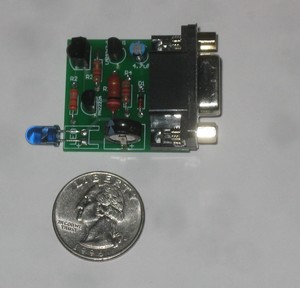 This is obscure, but then, what do I end up blogging about that isn't obscure? I wish I knew why this stuff keeps happening to me.
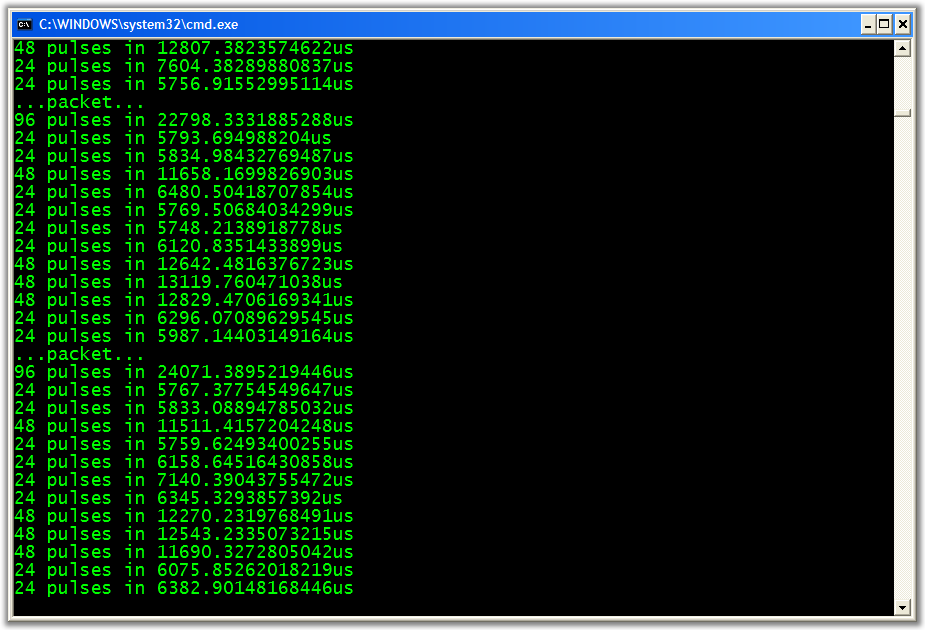
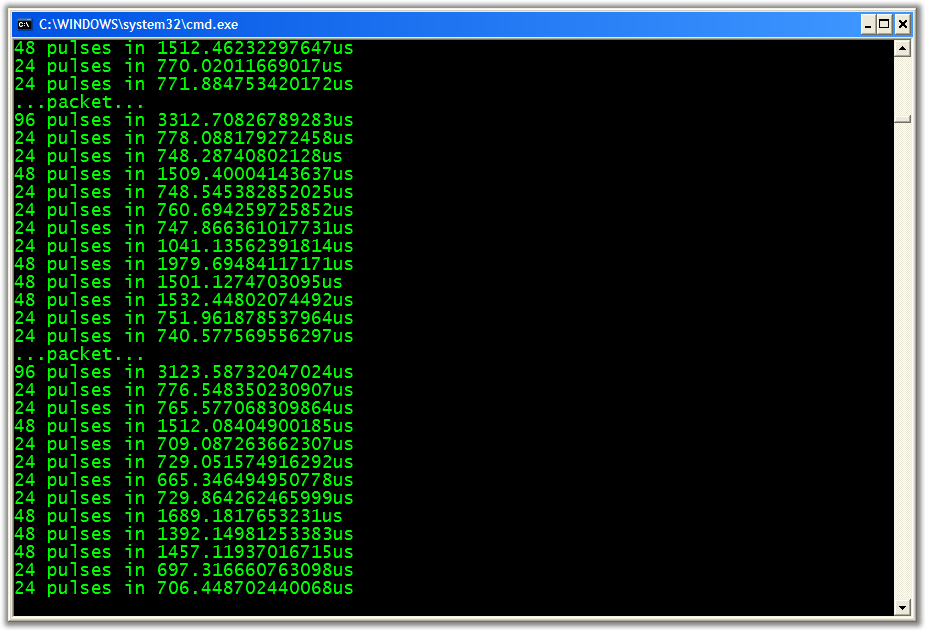
 INTERESTING NOTE: Remember, you can't see IR (it's Infrared, not in our visible spectrum) but you can see it if you point it at a Webcam, which is what I've been doing to debug.