My niece just started her MBA at a local university and that uni is a G Suite/Google/Gmail user. Her professors share their class calendars (vs inviting the students to events) so everything is a "Shared with You" shared calendar. That means the events aren't on your primary Google Calendar, they are read-only shares to you.
My niece uses an iPhone and wanted to calendars to sync with her iPhone calendar she already uses. Google help and everyone else says "install Google Calendar." Sure, that works and she can see the calendars in that other apps, but again, it's totally not integrated with her life and existing Calendar App on iPhone, Mac, and iPad.
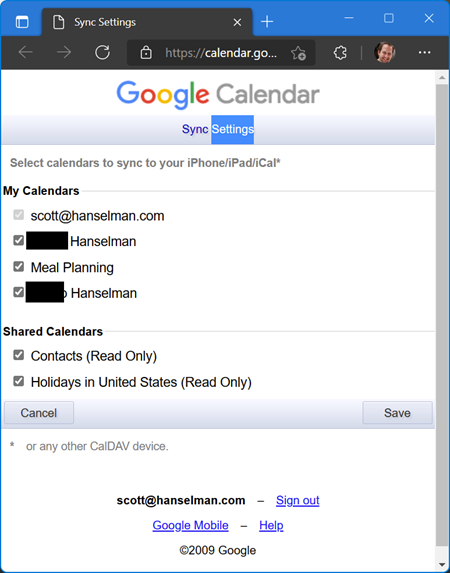
Turns out there is a 12 year old page deep in Google Calendar at https://www.google.com/calendar/syncselect that you can visit to "reshare" those shared calendars to external users like iOS. Love that Copyright 2009 action and the ongoing dedication to improvement in Google Suite and Calendar for the real features that people need /s.
Make sure you are signed into the right Google Account before you click that link. At this point, return to your iPhone/iPad Calendar app and tap Calendars at the bottom. Check the ones you want to see, and press done. Wait a few minutes and your Google Shared Calendars will start to sync to your iOS Calendar!
Hope this helps.
Sponsor: YugabyteDB is a distributed SQL database designed for resilience and scale. It is 100% open source, PostgreSQL-compatible, enterprise-grade, and runs across all clouds. Sign up and get a free t-shirt.
About Scott
Scott Hanselman is a former professor, former Chief Architect in finance, now speaker, consultant, father, diabetic, and Microsoft employee. He is a failed stand-up comic, a cornrower, and a book author.
Hill climbing is an algorithmic technique when you have a problem (a hill) and then you improve and improve (climb) until you have reached some maximum acceptable solution (reach the top).
Sébastien, the OP of the bug, says there's a "Hysteresis effect" on the threadpool. "Hysteresis is the dependence of the state of a system on its history." Something weird is happening now because something happened before...but what was it?
Sawtooth up and down graphs aren't THAT interesting...but look at the x-axis. This isn't showing minute by minute or even millisecond by millisecond ups and downs like you may have seen before. This x-axis uses months as its unit of measure. Read that again and drink it in.
Things are cool in February until they are bad for weeks and then cool in March and it moves along a cycle. Not strictly the cycle of the moon but close.
He's seeing the number of cores being used changing from month to month when using PortableThreadPool
We have noticed a periodic pattern on the threadpool hill-climbing logic, which uses either n-cores or n-cores + 20 with an hysteresis effect that switches every 3-4 weeks.
Did you know (I know because I'm old) that Windows 95, for a time, was unable to run longer than 49.7 days of runtime? If you ran it that long it would eventually crash! That's because there's 86M ms in a day, i.e. 1000 * 60 * 60 * 24 = 86,400,000 and 32 bits is 4,294,967,296 so 4,294,967,296 / 86,400,000 = 49.7102696 days!
Kevin in the Github issues notes this as well:
The whole period of square wave sounds an awful lot like it is around 49.7 days. That is how long it takes GetTickCount() to wrap around. On POSIX platforms the platform abstraction layer implements this, and the value returned for that is based not on uptime but on wall clock time, which matches with all machines changing on the same day.
This 49.7 days number is well known as it's how long it take before GetTickCount() overflows/wraps. Kevin goes on to actually give the changeover dates which correspond to the graph!
Thu Jan 14 2021
Sun Feb 07 2021
Thu Mar 04 2021
Mon Mar 29 2021
Fri Apr 23 2021
He then finds the code in PortableThreadPool.cs that explains the issue:
private bool ShouldAdjustMaxWorkersActive(int currentTimeMs) { // We need to subtract by prior time because Environment.TickCount can wrap around, making a comparison of absolute times unreliable. int priorTime = Volatile.Read(ref _separated.priorCompletedWorkRequestsTime); int requiredInterval = _separated.nextCompletedWorkRequestsTime - priorTime; int elapsedInterval = currentTimeMs - priorTime; if (elapsedInterval >= requiredInterval) { ...
He says, and this is all Kevin:
currentTimeMs is Environment.TickCount, which in this case happens to be negative.
The if clause controls if the hill climbing is even run.
_separated.priorCompletedWorkRequestsTime and _separated.nextCompletedWorkRequestsTime start out as zero on process start, and only get updated if the hill climbing code is run.
Therefore, requiredInterval = 0 - 0 and elapsedInterval = negativeNumber - 0. This causes the if statement to become if (negativeNumber - 0 >= 0 - 0) which returns false, so the hill climbing code is not run, and therefore the variables never get updated, and remain zero. The native version of the thread pool code does all math with unsigned numbers which would avoid such a bug, and it's equivalent part is not even quite the same math in the first place.
The easy fix here is probably to use unsigned arithmetic, but alternatively having the two fields get initialized to Environment.TickCount probably also work
Back to me. Fabulous. The fix is to cast the results to unsigned ints via (uint).
Before:
int requiredInterval = _separated.nextCompletedWorkRequestsTime - priorTime; int elapsedInterval = currentTimeMs - priorTime;
What an interesting and insidious bug! Bugs based on a time calculations can often show themselves later when view through a longer lens and scope of time...sometimes WAY longer than you'd expect.
Sponsor: YugabyteDB is a distributed SQL database designed for resilience and scale. It is 100% open source, PostgreSQL-compatible, enterprise-grade, and runs across all clouds. Sign up and get a free t-shirt.
About Scott
Scott Hanselman is a former professor, former Chief Architect in finance, now speaker, consultant, father, diabetic, and Microsoft employee. He is a failed stand-up comic, a cornrower, and a book author.
".NET 6 introduces implicit namespace support for C# projects. To reduce the amount of using directives boilerplate in .NET C# project templates, namespaces are implicitly included by utilizing the global using feature introduced in C# 10."
NOTE: Did you know that Visual Basic has had this very feature forever?
Remember that C# as a language is itself versioned and in .NET 6 we'll have support for C# 10 features like global usings, which are super cool.
Since we don't want to break existing stuff, there's some things to consider. First, for new projects this is on by default but for existing projects this will be off by default. This offers the best of both worlds.
When you create a new .NET 6 project it will enable this new property:
<ImplicitUsings>enable</ImplicitUsings>
Read more about this breaking change here. This build property builds upon (utilizes) the C# global using feature feature which means any .cs in your project can have a line like:
global using global::SomeNamespace;
The SDK uses a target to autogenerate a .cs file called ImplicitNamespaceImports.cs that will be in your obj folder, but you can - if you desire - have full control and add or remove namespaces to taste.
This gives advanced users who understand target file a huge amount control while still allowing newbies to reap the benefits. Other way to think about it is - if you care, you can control it all. If you don't, it'll just make things easier and cleaner.
Let's look at some code to point out that it's pretty cool. Oleg gives a great example doing some basic threading where there's three lines of code (cool) and three more lines of usings to bring in the namespace support for the actual work (less cool).
using System; using System.Collections.Generic; using System.Threading.Tasks;
Console.WriteLine("Hello World"); await Task.Delay(1000); List<int> _ = new ();
With implicating usings (implicitly bringing in default namespaces) .NET apps with C# 10 can do more out of the box. It's faster to get started because the 90% of the stuff you do all the time is already available and ready to be used!
Maybe this example is too simple? What If you were using a simple Web Worker app? Check out Wade's example.
This is a lot of boilerplate if you just want a web app. If I'm using the Microsoft.Net.Sdk.Worker SDK in my project file, or just Microsoft.NET.Sdk.Web, I don't have think about or include any of these - they are there implicitly!
You may initially love implicit usings, as I do, or you may find it to be too "magical." I would remind you that most innovations feel magical, especially if they aren't in your face. The Garbage Collector is taken for granted by the majority of .NET developers, while I found it magical when I had spent the previous 10 years managing my own memory down to the byte.
Hope you enjoy this new feature as we get closer to .NET 6's release.
Sponsor: The No. 1 reason developers choose Couchbase? You can use your existing SQL++ skills to easily query and access JSON. That’s more power and flexibility with less training. Learn more.
About Scott
Scott Hanselman is a former professor, former Chief Architect in finance, now speaker, consultant, father, diabetic, and Microsoft employee. He is a failed stand-up comic, a cornrower, and a book author.
I got a tweet from Stevö John who said he found my existing light theme for my blog to be jarring as he lives in Dark Mode. I had never really thought about it before, but once he said it, it was obvious. Not only should I support dark mode, but I should detect the user's preference and switch seamlessly. I should also support changing modes if the browser or OS changes as well. Stevö was kind enough to send some sample CSS and a few links so I started to explore the topic.
There's a few things here to consider when using prefers-color-scheme and detecting dark mode:
Using the existing theme as much as possible.
I don't want to have a style.css and a style-dark.css if I can avoid it. Otherwise it'd be a maintenance nightmare.
Make it work on all my sites
I have three logical sites that look like two to you, Dear Reader. I have hanselman.com, hanselman.com/blog, and hanselminutes.com. They do share some CSS rules but they are written in different sub-flavors of ASP.NET
Consider 3rd party widgets
I use a syntax highlighter (very very old) for my blog, and I use a podcast HTML5 player from Simplecast for my podcast. I'd hate to dark mode it all and then have a big old LIGHT MODE podcast player scaring people away. As such, I need the context to flow all the way through.
Consider the initial state of the page as well as the stage changing.
Sure, I could just have the page look good when you load it and if you change modes (dark to light and back) in the middle of viewing my page, it should also change, right? And also consider all the requirements above.
You can set your Chrome/Edge browser to use System Settings, Light, or Dark. Search for Theme in Settings.
All this, and I can only do it on my lunch hour because this blog isn't my actual day job. Let's go!
The prefers-color-scheme CSS Media Query
I love CSS @media queries and have used them for many years to support mobile and tablet devices. Today they are a staple of responsive design. Turns out you can just use a @media query to see if the user prefers dark mode.
@media (prefers-color-scheme: dark) {
Sweet. Anything inside here (the C in CSS stands for Cascading, remember) will override what comes before. Here's a few starter rules I changed. I was just changing stuff in the F12 tools inspector, and then collecting them back into my main CSS page. You can also use variables if you are an organized CSS person with a design system.
These are just a few, but you get the idea. Note the .line-tan example also where I say 'just put it back to it's initial value.' That's often a lot easier than coming up with "the opposite" value, which in this case would have meant generating some PNGs.
Sweet. This change to my main css works for the http://hanselman.com main site. Let's do the blog now, which includes the 3rd party syntax highlighter. I use the same basic rules from my main site but then also had to (sorry CSS folks) be aggressive and overly !important with this very old syntax highlighter, like this:
Your mileage may vary but it all depends on the tools. I wasn't able to get this working without the !important which I'm told is frowned upon. My apologies.
Detecting Dark Mode preferences with JavaScript
The third party control I use for my podcast is a like a lot of controls, it's an iFrame. As such, it takes some parameters as URL querystring parameters.
If I add "dark=true" to the querystring, I'll get a different player skin. This is just one example, but it's common that 3rd party integrations will either want a queryString or a variable or custom CSS. You'll want to work with your vendors to make sure they not only care about dark mode (thanks Simplecast!) and that they have a way to easily enable it like this.
But this introduce some interesting issues. I need to detect the preference with JavaScript and make sure the right player gets loaded.
I'd also like to notice if the theme changes (light to dark or back) and dynamically change my CSS (that part happens automatically by the browser) and this player (that's gotta be done manually, because dark mode was invoked via a URL querystring segment.)
Here's my code. Again, not a JavaScript expert but this felt natural to me. If it's not super idiomatic or it just sucks, email me and I'll do an update. I do check for window.matchMedia to at least not freak out if an older browser shows up.
if (window.matchMedia) { var match = window.matchMedia('(prefers-color-scheme: dark)') toggleDarkMode(match.matches);
match.addEventListener('change', e => { toggleDarkMode(match.matches); })
function toggleDarkMode(state) { let simpleCastPlayer = new URL(document.querySelector("#simpleCastPlayeriFrame").src); simpleCastPlayer.searchParams.set("dark", state); document.querySelector("#simpleCastPlayeriFrame").src = simpleCastPlayer.href; } }
toggleDarkMode is a method so I can use it for the initial state and the 'change' state. It uses the URL object because parsing strings is so 2000-and-late. I set the searchParams rather than .append because I know it's always set. I set it.
As I write this I supposed I could have stored the document.querySelector() like I did the matchMedia, but I just saw it now. Darn. Still, it works! So I #shipit.
All in all, a fun lunch hour. Thanks Stevö for the nudge!
Now YOU, Dear Reader can go update YOUR sites for both Light Mode and Dark Mode.
Sponsor: The No. 1 reason developers choose Couchbase? You can use your existing SQL++ skills to easily query and access JSON. That’s more power and flexibility with less training. Learn more.
About Scott
Scott Hanselman is a former professor, former Chief Architect in finance, now speaker, consultant, father, diabetic, and Microsoft employee. He is a failed stand-up comic, a cornrower, and a book author.
But it's super fun and very easy! Once tests are easy to write, WRITE A LOT OF THEM.
Here's a simple Unit Test of a Web API:
[Fact] public async Task GetTodos() { await using var application = new TodoApplication();
var client = application.CreateClient(); var todos = await client.GetFromJsonAsync<List<Todo>>("/todos");
Assert.Empty(todos); }
Look how nice that is. Client and Server (Application) are right there, and the HTTP GET is just a function call (as this is a Unit Test, not an integration test that covers end-to-end full stack).
Here's the TodoApplication application factory that creates a Host with a mocked out in memory version of a SQLite database.
class TodoApplication : WebApplicationFactory<Todo> { protected override IHost CreateHost(IHostBuilder builder) { var root = new InMemoryDatabaseRoot();
builder.ConfigureServices(services => { services.AddScoped(sp => { // Replace SQLite with the in memory provider for tests return new DbContextOptionsBuilder<TodoDbContext>() .UseInMemoryDatabase("Tests", root) .UseApplicationServiceProvider(sp) .Options; }); });
return base.CreateHost(builder); } }
Nice and clean. You're talking directly to the API, testing just the Unit of Work. No need for HTTP, you're just calling a clean method on the existing API, directly.
That's a simple example, just getting Todos. How would we test making one (POSTing to our Todo application as a Minimal .NET 6 API?)
[Fact] public async Task PostTodos() { await using var application = new TodoApplication();
var client = application.CreateClient(); var response = await client.PostAsJsonAsync("/todos", new Todo { Title = "I want to do this thing tomorrow" });
var todos = await client.GetFromJsonAsync<List<Todo>>("/todos");
Assert.Single(todos); Assert.Equal("I want to do this thing tomorrow", todos[0].Title); Assert.False(todos[0].IsComplete); }
You could abstract the setup away if you wanted to and start with an Server/App and Client ready to go, but it's just two lines.
Here we are asserting that it returned an HTTP 200 - even though the HTTP networking stack isn't involved we are still able to test intent. Then we confirm that we created a Todo and could successfully retrieve it from the (in-memory) database.
Pretty slick!
Sponsor: YugabyteDB is a distributed SQL database designed for resilience and scale. It is 100% open source, PostgreSQL-compatible, enterprise-grade, and runs across all clouds. Sign up and get a free t-shirt.
About Scott
Scott Hanselman is a former professor, former Chief Architect in finance, now speaker, consultant, father, diabetic, and Microsoft employee. He is a failed stand-up comic, a cornrower, and a book author.