The Video Card
 Well, I've been an NVidia fan for years, and I really thought I'd go for the new NVidia 6800 Ultra. They've got fantastically stable drivers, dual monitor support, and dual DVI support. However, it's US$600 and I've got a wife - she'd never go for it. :) So, the other option, as was wisely discussed in the comments of my previous post on the subject, is an ATI Radeon 256Meg 9800 Pro. It's roughly US$299 (half the price) and arguably comparable results for my needs. Sure, it won't do 100fps but who needs to?
I wanted Dual-DVI but I'm not willing to pay for it. There are a few options, but the ATI 9800 Pro is a good compromise. ONE of it's outputs is DVI, the other is Analog. So, I run the Dell FP2001 off the DVI at 1600x1200x32 and the Viewsonic VA800 off analog at 1280x1024x32. It's a very good compromise. Add in the Tablet PC with Maxivista running at 1400x1080 and that's ~4.7million pixels working for me.
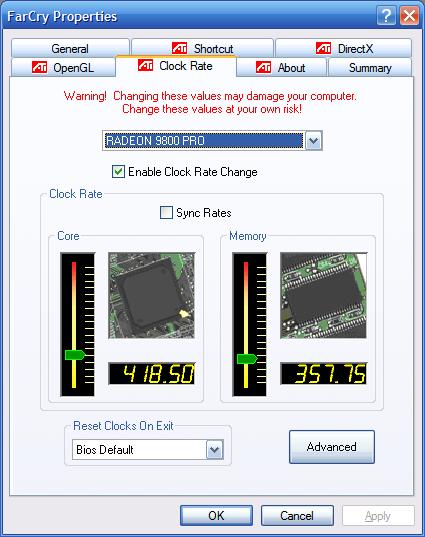
The other reason is that there's an active an happy overclocking community around this card. The drivers and the card are stable and I've been able to get +11% FPS in most games by overclocking it from 378Mhz(core)/337Mhz(mem) to ~418Mhz/357Mhz. I can take it higher, but a few artifacts creep in.
Ordinarily I'm not big on overclocking, but in my research I discovered RadLinker, an amazing and free utility for ATI Radeon-based cards.
From his site:
RadLinker is new tweaker/linker for ATI Radeon based graphics cards. RadLinker features:
Absolutely no programs running in the background
Does not bloat the registry
Per game/program settings
Control over process priority
Per game/program clock rate settings
As many unique game profiles as your computer can hold
Custom profiles for all your games
RadLinker allows you to create a "RadLink", a special kind of shell link (a.k.a. shortcut) to your games/programs that allows you to change it's individual settings. A RadLink will look and act just like a normal shortcut except it's property settings can be custom tailored for your video settings.
RadLinker adds a tab to your Display Properties, but also lets you make custom shortcuts for each game. In these shortcuts you can specify not only all the details like AntiAliasing, Texture Quality, etc, but the overclocking settings for your Video Card just for that game! What a fantastic idea. It works great, and I've been running FarCry and Dungeon Siege at 1600x1200x32 with 4x Anti-Aliasing on and getting 25-30fps! The difference is NIGHT AND DAY from my NVidia FX5200. The only problem I've had is with BattleField 1942, apparently there's a problem with the video on Radeons, and I've been unable to get past the menu.
The Processor
 I've also had some trouble with my little P4-3Ghz overheating when rendering DVD Video, squishing TV-Video into WMV or playing games for long periods.
After toying with the idea over water cooling, I talked to Richard Campbell (an expert on the subject) and decided that was over-kill. So, I picked up a Zalman CNPS7000A-Cu and installed it. It was breeze, literally and figuratively. My average temp is around 42°C and it doesn't get to more than 55-58°C when it's REALLY working. The case and harddrive are usually around 37°C.
It also included a Fanmate so I run the Zalman at <2000RPM with the two case fans around 2200RPM. Currently the loudest thing in the room is the 400W Power Supply fan. Over all, it's doing OK, and I'm very pleased with the quieter and cooler operation, as well as the stellar 3D and Dual Monitor Support.
This fan also included a free component called "Cooling After" that runs the fans in your computer for a some number of minutes (I set mine to three minutes) after it's turned off. This is to avoid the sudden spike in temperature that happens after a hot machines shuts off and the fans stop. It blinks the power-light to let you know it's still cooling down your system. A nice little piece of insurance. Kind of like when your car's engine fan continues even after you turn it off.
The Tools/Software
I'm using the following programs to manage all this:
MBM5 Motherboard Monitor. Tells you the temperature of the CPU, the other temp monitors on your MB, the RPM of the Fans, and other neat stuff. The first and the best.
(Sadly Alex Van Kaam, the author, has decided to stop development on MBM as of today, July 6th, 2004. It's a shame, but 7.5 years on one program is a long time. Good luck to him!) DTEMP Hard Drive Temperature Meter - Great little tray icon that not only tells you the temperature of your hard drive (assuming it's a newer one with this ability) but it also monitors the S.M.A.R.T. details and MTBF metrics.
SpeedFan. Programmatically control the speed of your system's fan(s). This is great if you'd like to get the quietest system possible, while still running the fans at a decent speed.
Thanks again to everyone who helped me with all this, and for the ATI 9800 Pro suggestion - also running an LCD with DVI versus Analog really is noticeable, especially when the native resolution of the LCD Is 1600x1200.
Hosting By

 This is always a lovely error to get: