How to Post Code To Your Blog and other Religious Arguments
If you've got a programming blog, chances are you'll want to post some code snippets. Posting code sounds easy but it's surprisingly tricky if you consider all the ways that people will be reading your blog. There's a number of ways. Here's a few and their pros and cons.
Copy Paste from your IDE (like Visual Studio, for example)
If I copy paste directly from VS into my editor of choice, Windows Live Writer, I'll get a <pre> section.
using System;

namespace WindowsGame1
{
#if WINDOWS || XBOX
    static class Program
    {
        /// <summary>
        /// The main entry point for the application.
        /// </summary>
        static void Main(string[] args)
        {
            using (Game1 game = new Game1())
            {
                game.Run();
            }
        }
    }
#endif
}
Pros:
- It's just text.
- Looks the same everywhere.
- Code is in a pre and you can apply css rules to pre's if you like.
Cons:
- It's just text.
- Looks the same everywhere.
I can also go to the Visual Studio Gallery and get the Copy As HTML Extension from inside the "Productivity Power Tools." When someone names something "Productivity Power Tools" but doesn't include it out of the box that means they are "things that aren't totally tested and that would blow your mind if we did include them in the box so just get them and be happy but we are sorry we didn't ship them straight away."
Once this extension is plugged in, when I Ctrl-C some text, VS adds not just plain text to the clipboard but also rich HTML and what-not.
using System;

namespace WindowsGame1
{
#if WINDOWS || XBOX
    static class Program
    {
        /// <summary>
        /// The main entry point for the application.
        /// </summary>
        static void Main(string[] args)
        {
            using (Game1 game = new Game1())
            {
                game.Run();
            }
        }
    }
#endif
}
This looks lovely, but it includes a pile of <spans> and now my code is a bunch of marked up HTML, rather than a block of code.
Pros:
- Looks the same everywhere, RSS or on your site. Consistent.
- Will always look like this, no need to change anything.
Cons:
- Inline styles and colors. Ick.
- Span-itis.
- Stores the formatting in your blog system directly (in the DB, etc)
- Will always look like this, you can't change anything.
Using PreCode and SyntaxHighlighter
PreCode is Anthony Bouch's Windows Live Writer plugin. SyntaxHighlighter is Alex Gorbatchev's JavaScript (that's client-side) syntax highlighter. SyntaxHighlighter highlights your code locally using <pre> blogs that are marked for specific languages. You include "brushes" for just the langugaes you care about. This is the combination that I currently use.
SyntaxHighlighter is definitely the client-side highlighter of choice, but there are others you might also check out including:
- Chili Highlighter - Hosted on Google Code
- Google Code Prettify - This is the code highlighter that Google themselves use on Google Code. It doesn't require you to specify the language. It works on most C-style languages, works iffy on Ruby, PHP and VB, and needs extensions for LISP and F# and others.
NOTE: Make sure whatever one you pick that you're cool with the OSS license for your library of choice.
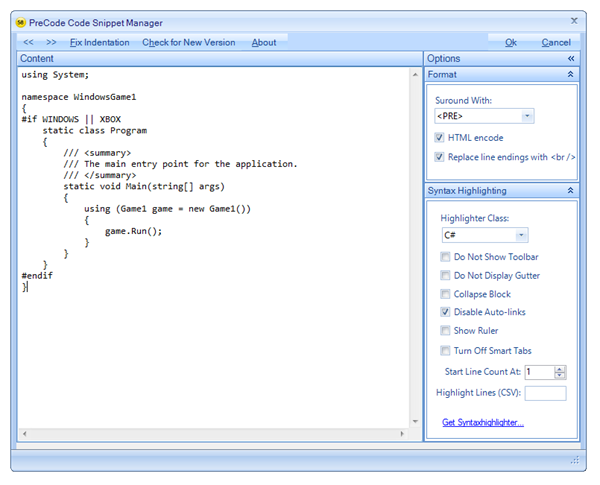
From within Live Writer you click "Insert PreCode Snippet" and paste your snippet in. It has a number of nice options. I use HTML encode and "replace line endings with <br/> which is required for use in DasBlog for historical reasons. It also has a number of SyntaxHighlighter specific options for doing line-highlights or turning the toolbar on and off.
This creates output like this. Here's the trick, though. If you are reading this post via RSS, you're seeing just plain text. You need to visit this post on my site directly in order to see pretty fonts and colors because the JavaScript isn't firing in your RSS Reader.
It's created a <pre> that looks like this <pre class="brush: csharp; auto-links: false;"> and the JavaScript comes around later and processes it in the browser.
using System;

namespace WindowsGame1
{
#if WINDOWS || XBOX
    static class Program
    {
        /// <summary>
        /// The main entry point for the application.
        /// </summary>
        static void Main(string[] args)
        {
            using (Game1 game = new Game1())
            {
                game.Run();
            }
        }
    }
#endif
}
Pros:
- Having code stored in a pre means there's no formatting stored in your blog system.
- Looks great in any browser with JavaScript
- You can choose themes and change the look and feel of your code whatever
- You also get nice printing support, toolbars, line highlighting, etc.
Cons:
- RSS readers effectively lose out and see just text.
- NOTE: There really is no "good" solution for RSS viewers unless your blog engine's RSS Feed Generator does the processing on the server-side for code blocks and sends <span>itis when the feed is requested.
- Once you've inserted code in WLW with PreCode, you can't easily edit the code. I usually edit it outside and paste again.
Using Code Formatter Plugin for Windows by Steve Dunn
Another Windows Live Writer plugin is Steve Dunn's Code Formatter. It has a few features that differ from PreCode, and a few quirks (as of the current version). It supports not just Syntax Highlighter style <pre>'s for code but also <span>itis inline styles using ActiPro's SyntaxHighlighter.
 1 using System;
 2
 3 namespace WindowsGame1
 4 {
 5 #if WINDOWS || XBOX
 6     static class Program
 7     {
 8         /// <summary>
 9         /// The main entry point for the application.
10         /// </summary>
11         static void Main(string[] args)
12         {
13             using (Game1 game = new Game1())
14             {
15                 game.Run();
16             }
17         }
18     }
19 #endif
20 }
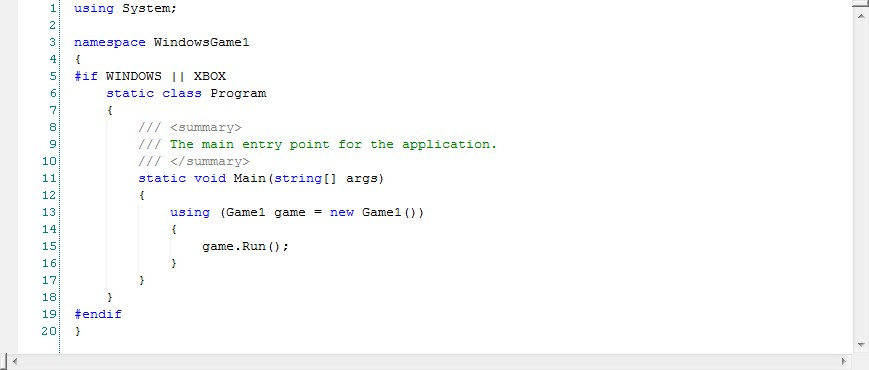
You can also insert code as images, which people do, so I mention it here, but I think is rude to blind folks, and not useful as GoogleBing can't see it. Don't do this. You're a bad person.
Pros:
- Supports WLW's "Smart Content Editing" so you can edit your code after you insert it.
- When using ActiPro
- Looks the same everywhere, RSS or on your site.
- Will always look like this, no need to change anything.
- When using SyntaxHighlighter
- Looks great when users visit your site
- Supports images (if you're into that kind of thing and you are Satan)
Cons:
- When using ActiPro
- Intense Span-itis and embedded colors.
- Inline styles and colors. Ick.
- Stores the formatting in your blog system directly (in the DB, etc)
- RSS readers effectively lose out and see just text.
- The plugin inserts unneeded (IMHO) inline styles like width and height.
- Supports images (if you're NOT into that kind of thing or you're blind.)
Hosting your Code elsewhere like GitHub
GitHub is a social code hosting and sharing site, and Gist is a part of their site where you can easily share code without logging in. You can create private or public Gists, or you can create your own GitHub login and keep the source you host on your blog in one place.
You can share your code by using embedded JavaScript like this: <script src="http://gist.github.com/516380.js?file=Hanselman%20Sample%201"></script>. You don't get too much control over the look and feel of it, but it "just works."
using System;
namespace WindowsGame1{#if WINDOWS || XBOX    static class Program    {        /// <summary>        /// The main entry point for the application.        /// </summary>        static void Main(string[] args)        {            using (Game1 game = new Game1())            {                game.Run();            }        }    }#endif}
Pros:
- You can store all your code in an external service, just like you might store all your pictures at Flickr.
- All your code is in once place.
- Dead simple.
Cons:
- You're no longer storing your code with your blog posts. You're storing a JavaScript link.
- You need Javascript running within your RSS reader for the code to show up. Most won't do this for security reasons. Otherwise, you'll see nothing.
- You can't control it. It's alive!
Conclusion
As with all religious arguments, I don't care who you choose to go with, just that you pick one and be excited about it, and that you know the pros and cons. You can certainly switch back and forth if you like, but I personally believe there's something to be said for consistency, so pick something you can live with for a few years, or your life on earth. ;)
Currently, I'm using PreCode with SyntaxHighlighter until a better solution comes along. Did I miss any good options?
About Scott
Scott Hanselman is a former professor, former Chief Architect in finance, now speaker, consultant, father, diabetic, and Microsoft employee. He is a failed stand-up comic, a cornrower, and a book author.


About Newsletter

 https://www.google.com/accounts/o8/id?id=AItOawnjXD6zQzzVeXu3D7eh3VMw1R969Zky7Tw
As for the no image thing, THANK YOU! I hate this. Someone should poke at ScottGu to read this post. /sigh
Useful post, thanks!


Like you, I'm in favor of avoiding span-itis and like SyntaxHighlighter for that reason. But you wind up depending on its particular set of regexes. When I fed it this:
public static Object DictObjToObj(Dictionary<string, object> dict_obj, Type type)
it produced this (text only, no effort to reproduce colors here):
public static Object DictObjToObj(Dictionary<string, object=""> dict_obj, Type type)
Given that we are (I hope) in the Age of Services, here's a scenario I'd like to see. Every language is intimately known by a compiler and/or IDE. Instances of those compilers/environments would reside in the cloud, as services that would take in raw source and return structurally-annotated source. One or more companion services would then colorize the structurally-annotated source. That transformation could be done client-side, a la SyntaxHighlighter, but also server-side, as I'd need to do because I won't be able to source JavaScript into the site I'll be posting to.
With this arrangement you could also compose pipelines of transformations. So, for example, where-defined and where-used annotations, relative to some line-number-addressable data store, might be injected into a pipeline.
There are sites that do colorizing interactively, e.g. http://tohtml.com/, http://www.quickhighlighter.com/. But I'm not finding anything that's a service in the sense I mean here.


@Scott - that's an older screen shot of PreCode. Are you not using the latest WPF version? (Props to Alex who did all the really hard work in Syntaxhighlighter)

I love this line.
I love this line.
Trying again, without OpenID this time.

"One important thing to watch out for is opening triangular bracket <. It must be replaced with an HTML equivalent of < in all cases." (http://code.google.com/p/syntaxhighlighter/wiki/Usage)
There's still a question about where/how to do the transformation. I like the idea of decoupling the production of structural annotation, which is what SyntaxHighlighter creates, so it can be deployed independently of the browser in environments that allow user-supplied CSS but not user-supplied JavaScript. But that may not be practical.
So while I do primarily use Syntax Highighter because it makes things look pretty, For any full source code files that may need to be maintained Gists are definitely the way to go!
Keep up the great work!


Stu

Has the same span-itis and inline style issues, but it's got lexers for a LOT of languages..
Erik


Have you tried C\opysourceAsHtml Visual Studio plug-in?
http://copysourceashtml.codeplex.com/
This is basically similar to the VS copy-paste style but with the extra context-coloring added (for classes, etc..), captures also your custom colors and background, etc...
Sometimes the context does matter in coloring. For example, how to tell if some word is an identifier or a class name or so (different coloring...).
Also (probably not you), you may have special fonts/colors setup and want to show the code the same way it looks in your editor.


Ironically, this is the only one that DIDN'T show up at all on my Android phone email reader (I get the blog posts as emails). There literally was no code at all.

Did I miss something when reading the article?
JasonHS - Yes, good point. You need JS running inline on your phone (and/or RSS reader) to get GitHub snippets to work.

OpenID isn't working for some reason (names Terry)
The one pain point was source code and with PreCode you've just solved that for me.
Thank you for this post.
Ralph


The "Code Formatter Plugin for Windows by Steve Dunn" is bad with this regard as the line numbers (come on, we no longer code in old school Basic!) are copied with the code.
The "Span-itis" as con is strange, as JavaScript will just generate similar code (or, in the case of "SyntaxHighlighter", code-itis), so at the end, it is as verbose (hard to avoid, anyway).
The "Inline styles and colors" can be avoided with smarter generators (SciTE exports to HTML by generating a CSS section and using short name classes for the spans).
The argument against frozen formatting is interesting, but frankly, you don't change formatting that often, do you?
I am not fan of JavaScript formatting. The RSS argument is a good one (HTML in e-mail client is a similar one), and too often I see sites taking time to convert the code boxes on the fly, because of a slow computer, busy CPU, heavy page, etc.
So, my personal choice is to paste pre-formatted code, but I appreciate your survey of the available solutions.

I tried PreCode and Synatxhighlighter plugins for Window Live Writer but none of them worked well.
I found this called Code Snippet for WLW and it seems to be prettey decent. There might be some issues but so far it has served my purpose.
http://lvildosola.blogspot.com/2009/03/code-snippet-plugin-for-windows-live.html
http://wlwplugincollection.codeplex.com/wikipage?title=Code%20Snippet&referringTitle=Home

Comments are closed.