Microsummaries - Über Simple Syndication
I'm still not quite sure why Microsummaries are useful...seems like USS (Über Simple Syndication - my term) to me. I've been meaning to add this to my blog since I heard about it a few months ago, but then MikeG added microsummaries to his site and I figured if a Luddite like Mike would support this emerging format, then I would too. :)
Basically this is how it works:
- Add a <link> tag inside the <head> of your document like this.
- <link rel="microsummary" type="application/x.microsummary+xml" href="http://www.hanselman.com/blog/Microsummary.ashx" />
- In your Microsummary endpoint, return some text/plain with the text you want to show up in the live bookmark.
- In FireFox Beta 2, either bookmark this site, or drag a link to this site to your toolbar:
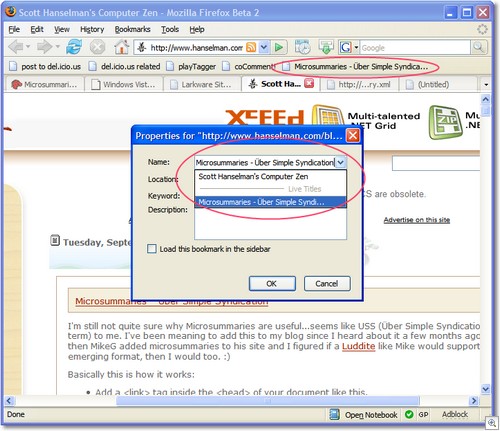
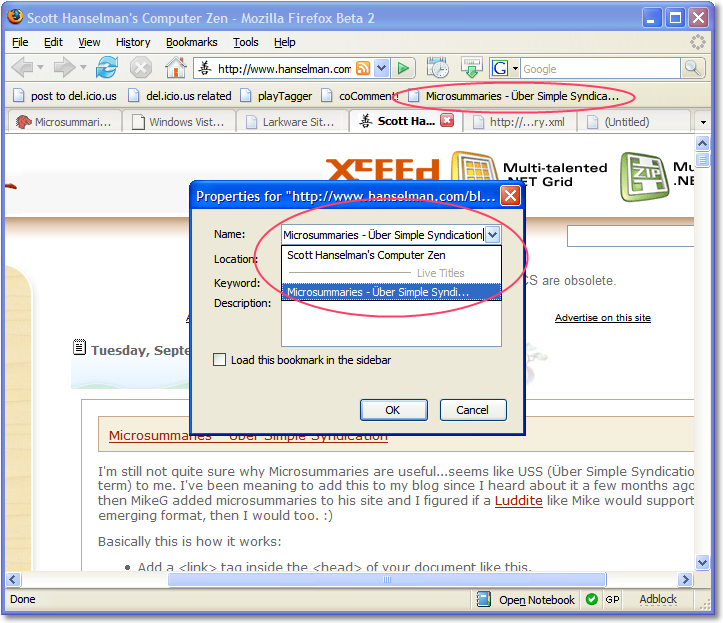
- If you've created the link in your toolbar, right click and select Properties and pick the Microsummary (or "Live Title"). If you've created the link via Add Bookmark, you should already be at this dialog.
- Once the Microsummary has been selected, it will show up as the title of your bookmark or toolbar button.
This is easy to do to any ASP.NET site. Add an very basic HttpHandler with code like this:
using System;
using System.Web;
namespace Foo.Web.Services
{
public class MicrosummaryHandler : IHttpHandler
{
public MicrosummaryHandler() {}
public bool IsReusable{get{return true;}}
public void ProcessRequest( HttpContext context )
{
context.Response.Write("Yay Microsummaries...get your summaries here. Get them anywhere.");
}
}
}
And add it to your web.config, of course:
<httpHandlers>
<add verb="*" path="microsummary.ashx"
type="Foo.Web.Services.MicrosummaryHandler,
Foo.Web.Services" />
</httpHandlers>
You can also use Microsummary Generators that are basically formalized screenscraping of existing (x)HTML. You make an XSLT that yanks what you want and turns that into plain text suitable for a toolbar button.
Direct (free) support for this has been checked into DasBlog and will be in the daily builds if we ever get this g*dforsaken thing to ship. :)
About Scott
Scott Hanselman is a former professor, former Chief Architect in finance, now speaker, consultant, father, diabetic, and Microsoft employee. He is a failed stand-up comic, a cornrower, and a book author.


About Newsletter

Comments are closed.